
非官方中文翻译
本页译自 MNE-Python 官方文档:
查看英文原文 ↗。
文档版权归 MNE Developers 所有(BSD-3-Clause)。
说明
转到末尾下载完整示例代码。
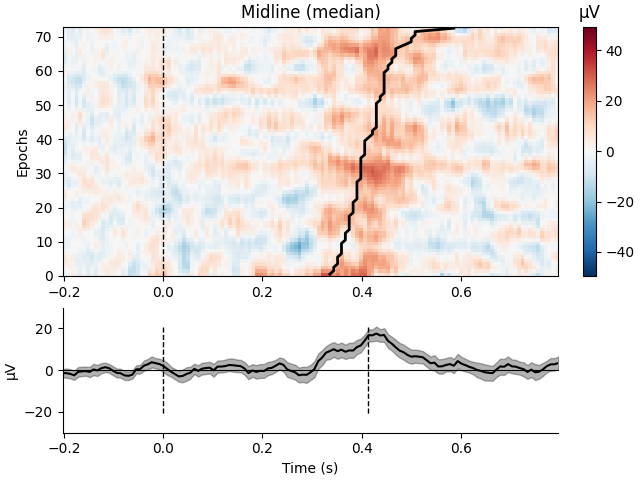
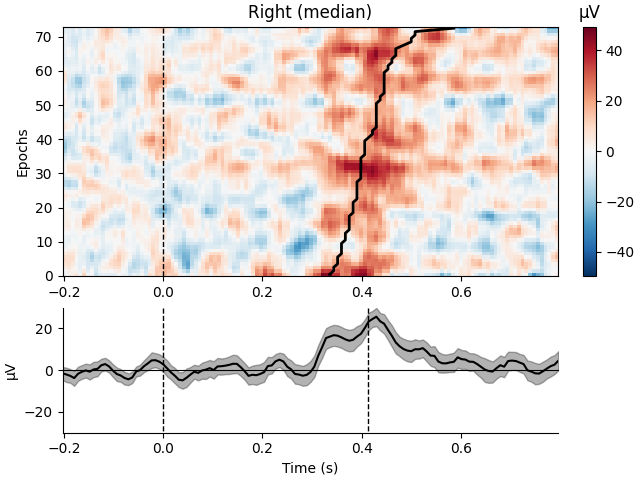
按 ROI 分组并按反应时排序绘制单试次活动#
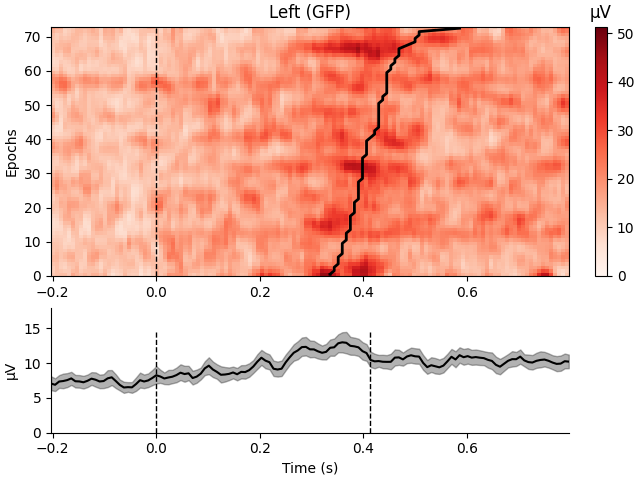
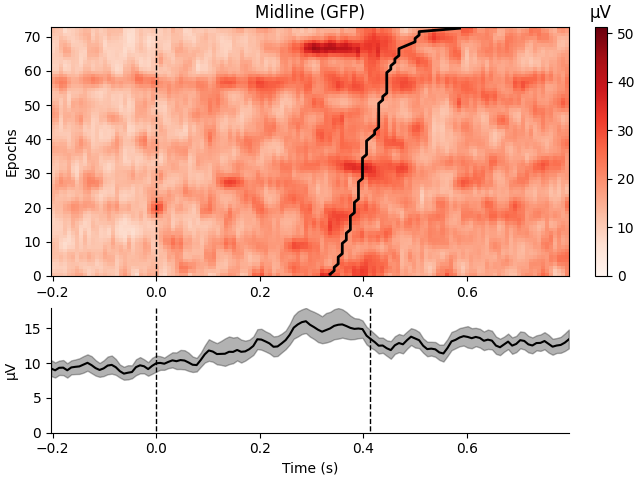
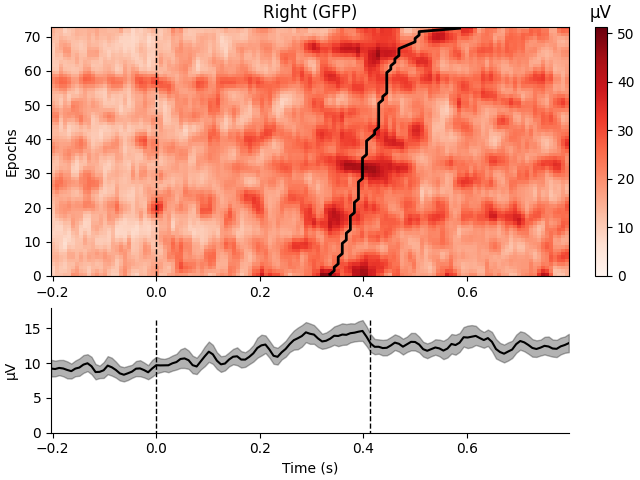
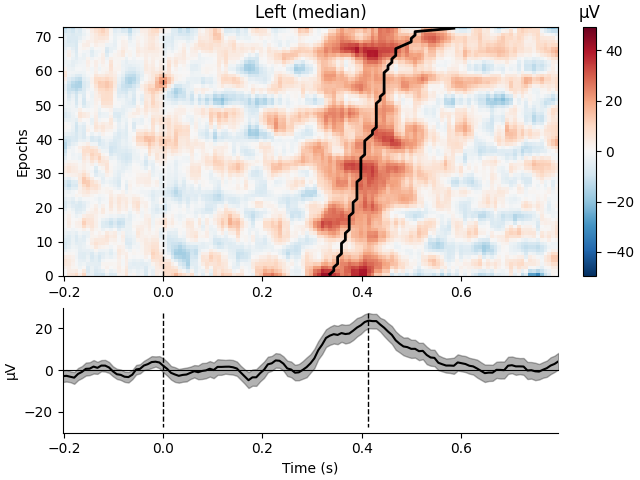
这将生成通常称为事件相关电位/场(ERP/ERF)图像的结果。
读入 EEGLAB 示例文件(包含对简单视觉刺激按键反应的实验)并计算反应时。感兴趣区域按通道类型确定(按 10/20 通道记法,偶数通道为右侧、奇数为左侧、“z”为中央)。计算每个通道组内的中位数与全局场功率,并按反应时排序绘制试次。
# Authors: Jona Sassenhagen <jona.sassenhagen@gmail.com>
#
# License: BSD-3-Clause
# Copyright the MNE-Python contributors.
import mne
from mne.channels import make_1020_channel_selections
from mne.event import define_target_events

print(__doc__)
加载 EEGLAB 示例数据(一个小型 EEG 数据集)
data_path = mne.datasets.testing.data_path()
fname = data_path / "EEGLAB" / "test_raw.set"

event_id = {"rt": 1, "square": 2}  # must be specified for str events
raw = mne.io.read_raw_eeglab(fname)

mapping = {
    "EEG 000": "Fpz",
    "EEG 001": "EOG1",
    "EEG 002": "F3",
    "EEG 003": "Fz",
    "EEG 004": "F4",
    "EEG 005": "EOG2",
    "EEG 006": "FC5",
    "EEG 007": "FC1",
    "EEG 008": "FC2",
    "EEG 009": "FC6",
    "EEG 010": "T7",
    "EEG 011": "C3",
    "EEG 012": "C4",
    "EEG 013": "Cz",
    "EEG 014": "T8",
    "EEG 015": "CP5",
    "EEG 016": "CP1",
    "EEG 017": "CP2",
    "EEG 018": "CP6",
    "EEG 019": "P7",
    "EEG 020": "P3",
    "EEG 021": "Pz",
    "EEG 022": "P4",
    "EEG 023": "P8",
    "EEG 024": "PO7",
    "EEG 025": "PO3",
    "EEG 026": "POz",
    "EEG 027": "PO4",
    "EEG 028": "PO8",
    "EEG 029": "O1",
    "EEG 030": "Oz",
    "EEG 031": "O2",
}
raw.rename_channels(mapping)
raw.set_channel_types({"EOG1": "eog", "EOG2": "eog"})
raw.set_montage("spherical_1005")

events = mne.events_from_annotations(raw, event_id)[0]
Reading /home/circleci/mne_data/MNE-testing-data/EEGLAB/test_raw.fdt
Used Annotations descriptions: ['rt', 'square']
创建 Epochs
# define target events:
# 1. find response times: distance between "square" and "rt" events
# 2. extract A. "square" events B. followed by a button press within 700 msec
tmax = 0.7
sfreq = raw.info["sfreq"]
reference_id, target_id = 2, 1
new_events, rts = define_target_events(
    events, reference_id, target_id, sfreq, tmin=0.0, tmax=tmax, new_id=2
)

epochs = mne.Epochs(raw, events=new_events, tmax=tmax + 0.1, event_id={"square": 2})
Not setting metadata
73 matching events found
Setting baseline interval to [-0.203125, 0.0] s
Applying baseline correction (mode: mean)
0 projection items activated
使用全局场功率绘图
# Parameters for plotting
order = rts.argsort()  # sorting from fast to slow trials

selections = make_1020_channel_selections(epochs.info, midline="12z")

# The actual plots (GFP)
epochs.plot_image(
    group_by=selections,
    order=order,
    sigma=1.5,
    overlay_times=rts / 1000.0,
    combine="gfp",
    ts_args=dict(vlines=[0, rts.mean() / 1000.0]),
)
Loading data for 73 events and 129 original time points ...
0 bad epochs dropped
Not setting metadata
73 matching events found
No baseline correction applied
0 projection items activated
Not setting metadata
73 matching events found
No baseline correction applied
0 projection items activated
Not setting metadata
73 matching events found
No baseline correction applied
0 projection items activated
combining channels using GFP (eeg channels)
combining channels using GFP (eeg channels)
combining channels using GFP (eeg channels)
使用中位数绘图
epochs.plot_image(
    group_by=selections,
    order=order,
    sigma=1.5,
    overlay_times=rts / 1000.0,
    combine="median",
    ts_args=dict(vlines=[0, rts.mean() / 1000.0]),
)
Loading data for 73 events and 129 original time points ...
Not setting metadata
73 matching events found
No baseline correction applied
0 projection items activated
Not setting metadata
73 matching events found
No baseline correction applied
0 projection items activated
Not setting metadata
73 matching events found
No baseline correction applied
0 projection items activated
combining channels using "median"
combining channels using "median"
combining channels using "median"
脚本总运行时间:(0 分 3.281 秒)