
说明
转到末尾下载完整示例代码。
单试次功率的质量单变量双因素重复测量 ANOVA#
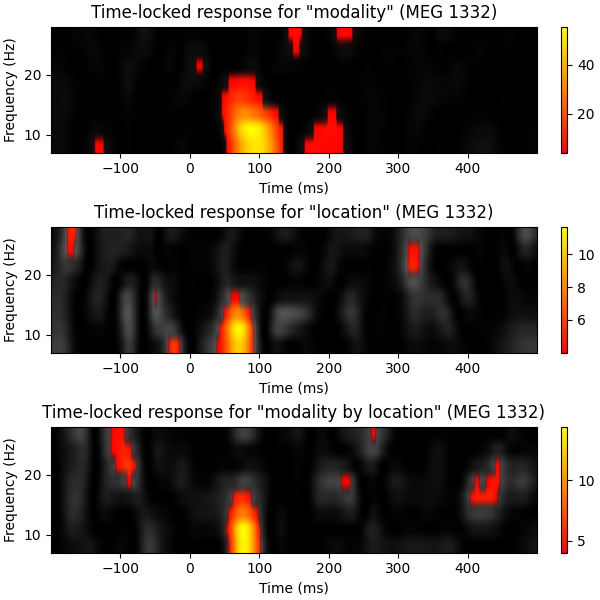
本脚本展示如何进行质量单变量(mass-univariate)重复测量 ANOVA。由于待拟合的模型假定两个完全交叉的因素,我们将研究感知通道(听觉 vs 视觉)与刺激呈现位置(左 vs 右)之间的相互作用。这里我们把单试次当作重复(被试),同时遍历时间切片和频段来拟合质量单变量模型。为简化起见,我们把分析限制在一个已知具有强诱发响应的单一通道上。随后,我们通过生成相应的质量单变量效应图来可视化各个效应。最后,我们以 ANOVA 作为聚类函数执行置换聚类检验,以处理多重比较问题。最终结果将与使用错误发现率(False Discovery Rate, FDR)校正的多重比较结果进行比较。
# Authors: Denis Engemann <denis.engemann@gmail.com>
#          Eric Larson <larson.eric.d@gmail.com>
#          Alexandre Gramfort <alexandre.gramfort@inria.fr>
#          Alex Rockhill <aprockhill@mailbox.org>
#
# License: BSD-3-Clause
# Copyright the MNE-Python contributors.
import matplotlib.pyplot as plt
import numpy as np

import mne
from mne.datasets import sample
from mne.stats import f_mway_rm, f_threshold_mway_rm, fdr_correction

print(__doc__)
设置参数#
data_path = sample.data_path()
meg_path = data_path / "MEG" / "sample"
raw_fname = meg_path / "sample_audvis_raw.fif"
event_fname = meg_path / "sample_audvis_raw-eve.fif"
tmin, tmax = -0.2, 0.5

# Setup for reading the raw data
raw = mne.io.read_raw_fif(raw_fname)
events = mne.read_events(event_fname)

include = []
raw.info["bads"] += ["MEG 2443"]  # bads

# picks MEG gradiometers
picks = mne.pick_types(
    raw.info,
    meg="grad",
    eeg=False,
    eog=True,
    stim=False,
    include=include,
    exclude="bads",
)

ch_name = "MEG 1332"

# Load conditions
reject = dict(grad=4000e-13, eog=150e-6)
event_id = dict(aud_l=1, aud_r=2, vis_l=3, vis_r=4)
epochs = mne.Epochs(
    raw,
    events,
    event_id,
    tmin,
    tmax,
    picks=picks,
    baseline=(None, 0),
    preload=True,
    reject=reject,
)
epochs.pick([ch_name])  # restrict example to one channel
Opening raw data file /home/circleci/mne_data/MNE-sample-data/MEG/sample/sample_audvis_raw.fif...
    Read a total of 3 projection items:
        PCA-v1 (1 x 10²)  idle
        PCA-v2 (1 x 10²)  idle
        PCA-v3 (1 x 10²)  idle
    Range : 25800 ... 192599 =     42.956 ...   320.670 secs
Ready.
Not setting metadata
289 matching events found
Setting baseline interval to [-0.19979521315838786, 0.0] s
Applying baseline correction (mode: mean)
0 projection items activated
Loading data for 289 events and 421 original time points ...
    Rejecting  epoch based on EOG : ['EOG 061']
    Rejecting  epoch based on EOG : ['EOG 061']
    Rejecting  epoch based on EOG : ['EOG 061']
    Rejecting  epoch based on EOG : ['EOG 061']
    Rejecting  epoch based on EOG : ['EOG 061']
    Rejecting  epoch based on EOG : ['EOG 061']
    Rejecting  epoch based on EOG : ['EOG 061']
    Rejecting  epoch based on EOG : ['EOG 061']
    Rejecting  epoch based on EOG : ['EOG 061']
    Rejecting  epoch based on EOG : ['EOG 061']
    Rejecting  epoch based on EOG : ['EOG 061']
    Rejecting  epoch based on EOG : ['EOG 061']
    Rejecting  epoch based on EOG : ['EOG 061']
    Rejecting  epoch based on EOG : ['EOG 061']
    Rejecting  epoch based on EOG : ['EOG 061']
    Rejecting  epoch based on EOG : ['EOG 061']
    Rejecting  epoch based on EOG : ['EOG 061']
    Rejecting  epoch based on EOG : ['EOG 061']
    Rejecting  epoch based on EOG : ['EOG 061']
    Rejecting  epoch based on EOG : ['EOG 061']
    Rejecting  epoch based on EOG : ['EOG 061']
    Rejecting  epoch based on EOG : ['EOG 061']
    Rejecting  epoch based on EOG : ['EOG 061']
    Rejecting  epoch based on EOG : ['EOG 061']
    Rejecting  epoch based on EOG : ['EOG 061']
    Rejecting  epoch based on EOG : ['EOG 061']
    Rejecting  epoch based on EOG : ['EOG 061']
    Rejecting  epoch based on EOG : ['EOG 061']
    Rejecting  epoch based on EOG : ['EOG 061']
    Rejecting  epoch based on EOG : ['EOG 061']
    Rejecting  epoch based on EOG : ['EOG 061']
    Rejecting  epoch based on EOG : ['EOG 061']
    Rejecting  epoch based on EOG : ['EOG 061']
    Rejecting  epoch based on EOG : ['EOG 061']
    Rejecting  epoch based on EOG : ['EOG 061']
    Rejecting  epoch based on EOG : ['EOG 061']
    Rejecting  epoch based on EOG : ['EOG 061']
    Rejecting  epoch based on EOG : ['EOG 061']
    Rejecting  epoch based on EOG : ['EOG 061']
    Rejecting  epoch based on EOG : ['EOG 061']
    Rejecting  epoch based on EOG : ['EOG 061']
    Rejecting  epoch based on EOG : ['EOG 061']
    Rejecting  epoch based on EOG : ['EOG 061']
    Rejecting  epoch based on EOG : ['EOG 061']
    Rejecting  epoch based on EOG : ['EOG 061']
    Rejecting  epoch based on EOG : ['EOG 061']
    Rejecting  epoch based on EOG : ['EOG 061']
    Rejecting  epoch based on EOG : ['EOG 061']
    Rejecting  epoch based on EOG : ['EOG 061']
    Rejecting  epoch based on EOG : ['EOG 061']
    Rejecting  epoch based on EOG : ['EOG 061']
    Rejecting  epoch based on EOG : ['EOG 061']
    Rejecting  epoch based on EOG : ['EOG 061']
53 bad epochs dropped
我们必须确保所有条件的试次数相同,因为 ANOVA 要求数据矩阵完全平衡,对不平衡的数据并不宽容(会增加 I 类错误的风险)。
epochs.equalize_event_counts(event_id)

# Factor to down-sample the temporal dimension of the TFR computed by
# tfr_morlet.
decim = 2
freqs = np.arange(7, 30, 3)  # define frequencies of interest
n_cycles = freqs / freqs[0]
zero_mean = False  # don't correct morlet wavelet to be of mean zero
# To have a true wavelet zero_mean should be True but here for illustration
# purposes it helps to spot the evoked response.
Dropped 12 epochs: 50, 92, 128, 147, 152, 154, 155, 186, 196, 198, 206, 207
为所有条件创建 TFR 表示#
epochs_power = list()
for condition in [epochs[k] for k in event_id]:
    this_tfr = condition.compute_tfr(
        "morlet",
        freqs,
        n_cycles=n_cycles,
        decim=decim,
        average=False,
        zero_mean=zero_mean,
        return_itc=False,
    )
    this_tfr.apply_baseline(mode="ratio", baseline=(None, 0))
    this_power = this_tfr.data[:, 0, :, :]  # we only have one channel.
    epochs_power.append(this_power)
Applying baseline correction (mode: ratio)
Applying baseline correction (mode: ratio)
Applying baseline correction (mode: ratio)
Applying baseline correction (mode: ratio)
建立重复测量 ANOVA#
我们需要告诉 ANOVA 如何按因素解释数据矩阵。这通过 factor_levels 参数完成,它是一个列表,给出每个因素的因素水平数。
n_conditions = len(epochs.event_id)
n_replications = epochs.events.shape[0] // n_conditions

factor_levels = [2, 2]  # number of levels in each factor
effects = "A*B"  # this is the default signature for computing all effects
# Other possible options are 'A' or 'B' for the corresponding main effects
# or 'A:B' for the interaction effect only (this notation is borrowed from the
# R formula language)
n_freqs = len(freqs)
times = 1e3 * epochs.times[::decim]
n_times = len(times)
现在我们来组装数据矩阵并交换轴,使试次重复位于第一维、条件位于第二维。
data = np.swapaxes(np.asarray(epochs_power), 1, 0)

# so we have replications × conditions × observations
# where the time-frequency observations are freqs × times:
print(data.shape)
(56, 4, 8, 211)
上面用于组装数据矩阵的迭代方案可确保前两个维度按预期组织(其中 A = 感知通道,B = 位置):
| 试次 | A1B1 |
A1B2 |
A2B1 |
B2B2 |
|---|---|---|---|---|
1 |
1.34 |
2.53 |
0.97 |
1.74 |
… |
… |
… |
… |
… |
56 |
2.45 |
7.90 |
3.09 |
4.76 |
现在可以运行重复测量 ANOVA 了。
注意:由于我们把试次当作被试,尽管采用的是“诱发”(induced)思路,该检验仍只考虑锁时响应。若要在组水平分析诱发功率,则需要使用平均后的 TRF。
fvals, pvals = f_mway_rm(data, factor_levels, effects=effects)

effect_labels = ["modality", "location", "modality by location"]

fig, axes = plt.subplots(3, 1, figsize=(6, 6), layout="constrained")

# let's visualize our effects by computing f-images
for effect, sig, effect_label, ax in zip(fvals, pvals, effect_labels, axes):
    # show naive F-values in gray
    ax.imshow(
        effect,
        cmap="gray",
        aspect="auto",
        origin="lower",
        extent=[times[0], times[-1], freqs[0], freqs[-1]],
    )
    # create mask for significant time-frequency locations
    effect[sig >= 0.05] = np.nan
    c = ax.imshow(
        effect,
        cmap="autumn",
        aspect="auto",
        origin="lower",
        extent=[times[0], times[-1], freqs[0], freqs[-1]],
    )
    fig.colorbar(c, ax=ax)
    ax.set_xlabel("Time (ms)")
    ax.set_ylabel("Frequency (Hz)")
    ax.set_title(f'Time-locked response for "{effect_label}" ({ch_name})')
使用 FDR 与置换聚类检验处理多重比较#
首先,我们需要稍作修改 ANOVA 函数,使其适用于聚类流程,同时还想设置一些默认值。我们先覆盖 effects,把分析限定在交互效应上
effects = "A:B"
stat_fun 必须能够处理数量可变的输入参数。在聚类函数内部,每个条件都会以展平数组的形式传入,这是聚类流程所要求的。然而 ANOVA 期望的输入数组维度为:被试 × 条件 × 观测值(可选)。下面的函数接收列表输入,交换第一维和第二维,最后调用 ANOVA 函数。
def stat_fun(*args):
    return f_mway_rm(
        np.swapaxes(args, 1, 0),
        factor_levels=factor_levels,
        effects=effects,
        return_pvals=False,
    )[0]


# The ANOVA returns a tuple f-values and p-values, we will pick the former.
pthresh = 0.001  # set threshold rather high to save some time
f_thresh = f_threshold_mway_rm(n_replications, factor_levels, effects, pthresh)
tail = 1  # f-test, so tail > 0
n_permutations = 256  # Save some time (the test won't be too sensitive ...)
F_obs, clusters, cluster_p_values, h0 = mne.stats.permutation_cluster_test(
    epochs_power,
    stat_fun=stat_fun,
    threshold=f_thresh,
    tail=tail,
    n_jobs=None,
    n_permutations=n_permutations,
    buffer_size=None,
    out_type="mask",
    rng=101,
)
stat_fun(H1): min=6.658469887778116e-07 max=14.419588379647625
Running initial clustering …
Found 1 cluster

  0%|          | Permuting : 0/255 [00:00<?,       ?it/s]
  2%|▏         | Permuting : 5/255 [00:00<00:01,  148.50it/s]
  4%|▍         | Permuting : 10/255 [00:00<00:01,  148.66it/s]
  6%|▋         | Permuting : 16/255 [00:00<00:01,  159.28it/s]
  8%|▊         | Permuting : 21/255 [00:00<00:01,  156.62it/s]
 11%|█         | Permuting : 27/255 [00:00<00:01,  161.59it/s]
 13%|█▎        | Permuting : 32/255 [00:00<00:01,  159.23it/s]
 15%|█▍        | Permuting : 38/255 [00:00<00:01,  162.48it/s]
 17%|█▋        | Permuting : 43/255 [00:00<00:01,  160.47it/s]
 19%|█▉        | Permuting : 49/255 [00:00<00:01,  162.94it/s]
 21%|██        | Permuting : 54/255 [00:00<00:01,  161.20it/s]
 23%|██▎       | Permuting : 59/255 [00:00<00:01,  159.77it/s]
 25%|██▌       | Permuting : 65/255 [00:00<00:01,  161.82it/s]
 27%|██▋       | Permuting : 70/255 [00:00<00:01,  160.49it/s]
 30%|██▉       | Permuting : 76/255 [00:00<00:01,  162.29it/s]
 32%|███▏      | Permuting : 82/255 [00:00<00:01,  163.86it/s]
 34%|███▍      | Permuting : 87/255 [00:00<00:01,  162.56it/s]
 36%|███▋      | Permuting : 93/255 [00:00<00:00,  163.90it/s]
 39%|███▉      | Permuting : 99/255 [00:00<00:00,  165.14it/s]
 41%|████      | Permuting : 104/255 [00:00<00:00,  163.86it/s]
 43%|████▎     | Permuting : 110/255 [00:00<00:00,  165.05it/s]
 45%|████▌     | Permuting : 115/255 [00:00<00:00,  163.83it/s]
 47%|████▋     | Permuting : 121/255 [00:00<00:00,  164.96it/s]
 50%|████▉     | Permuting : 127/255 [00:00<00:00,  165.99it/s]
 52%|█████▏    | Permuting : 132/255 [00:00<00:00,  164.82it/s]
 54%|█████▍    | Permuting : 138/255 [00:00<00:00,  165.81it/s]
 56%|█████▌    | Permuting : 143/255 [00:00<00:00,  164.69it/s]
 58%|█████▊    | Permuting : 148/255 [00:00<00:00,  163.63it/s]
 60%|██████    | Permuting : 154/255 [00:00<00:00,  164.52it/s]
 62%|██████▏   | Permuting : 159/255 [00:00<00:00,  163.49it/s]
 64%|██████▍   | Permuting : 164/255 [00:01<00:00,  162.56it/s]
 66%|██████▋   | Permuting : 169/255 [00:01<00:00,  161.69it/s]
 68%|██████▊   | Permuting : 174/255 [00:01<00:00,  160.87it/s]
 70%|███████   | Permuting : 179/255 [00:01<00:00,  160.13it/s]
 72%|███████▏  | Permuting : 184/255 [00:01<00:00,  159.44it/s]
 74%|███████▍  | Permuting : 189/255 [00:01<00:00,  158.79it/s]
 76%|███████▌  | Permuting : 194/255 [00:01<00:00,  158.20it/s]
 78%|███████▊  | Permuting : 199/255 [00:01<00:00,  157.64it/s]
 80%|████████  | Permuting : 204/255 [00:01<00:00,  157.11it/s]
 82%|████████▏ | Permuting : 209/255 [00:01<00:00,  156.62it/s]
 84%|████████▍ | Permuting : 214/255 [00:01<00:00,  156.16it/s]
 86%|████████▌ | Permuting : 219/255 [00:01<00:00,  155.74it/s]
 88%|████████▊ | Permuting : 224/255 [00:01<00:00,  155.35it/s]
 90%|████████▉ | Permuting : 229/255 [00:01<00:00,  154.96it/s]
 92%|█████████▏| Permuting : 234/255 [00:01<00:00,  154.61it/s]
 94%|█████████▎| Permuting : 239/255 [00:01<00:00,  154.27it/s]
 96%|█████████▌| Permuting : 244/255 [00:01<00:00,  153.96it/s]
 98%|█████████▊| Permuting : 250/255 [00:01<00:00,  155.29it/s]
100%|██████████| Permuting : 255/255 [00:01<00:00,  154.99it/s]
100%|██████████| Permuting : 255/255 [00:01<00:00,  158.17it/s]
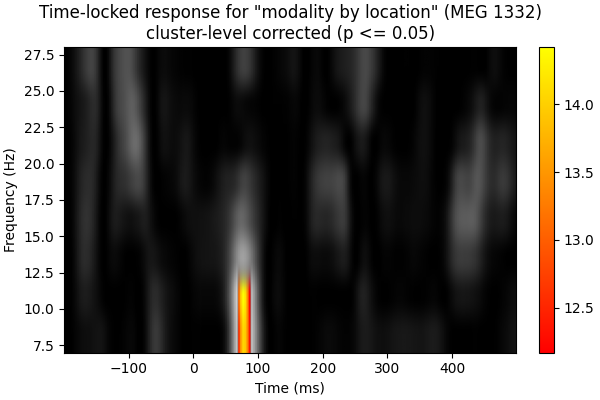
创建仅包含显著聚类的新统计图像:
good_clusters = np.where(cluster_p_values < 0.05)[0]
F_obs_plot = np.full_like(F_obs, np.nan)
for ii in good_clusters:
    F_obs_plot[clusters[ii]] = F_obs[clusters[ii]]

fig, ax = plt.subplots(figsize=(6, 4), layout="constrained")
for f_image, cmap in zip([F_obs, F_obs_plot], ["gray", "autumn"]):
    c = ax.imshow(
        f_image,
        cmap=cmap,
        aspect="auto",
        origin="lower",
        extent=[times[0], times[-1], freqs[0], freqs[-1]],
    )

fig.colorbar(c, ax=ax)
ax.set_xlabel("Time (ms)")
ax.set_ylabel("Frequency (Hz)")
ax.set_title(
    f'Time-locked response for "modality by location" ({ch_name})\n'
    "cluster-level corrected (p <= 0.05)"
)
现在使用 FDR:
mask, _ = fdr_correction(pvals[2])
F_obs_plot2 = F_obs.copy()
F_obs_plot2[~mask.reshape(F_obs_plot.shape)] = np.nan

fig, ax = plt.subplots(figsize=(6, 4), layout="constrained")
for f_image, cmap in zip([F_obs, F_obs_plot2], ["gray", "autumn"]):
    c = ax.imshow(
        f_image,
        cmap=cmap,
        aspect="auto",
        origin="lower",
        extent=[times[0], times[-1], freqs[0], freqs[-1]],
    )

fig.colorbar(c, ax=ax)
ax.set_xlabel("Time (ms)")
ax.set_ylabel("Frequency (Hz)")
ax.set_title(
    f'Time-locked response for "modality by location" ({ch_name})\n'
    "FDR corrected (p <= 0.05)"
)
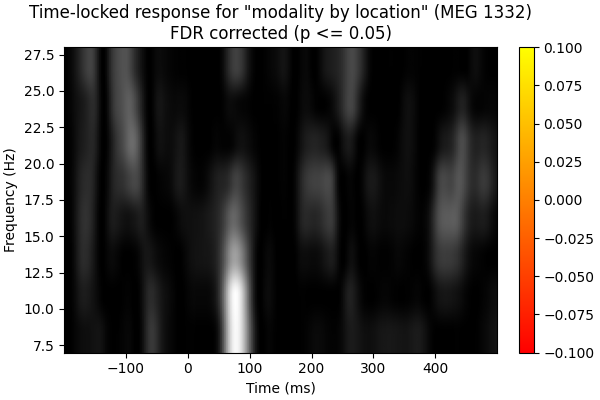
聚类水平校正和 FDR 校正都有助于消除我们在朴素 f 图像中看到的潜在假阳性。聚类置换校正偏向于具有连续高功率或低功率区域的时频点,考虑到本数据高度相关的特性,这很可能是合适的。这也最可能解释为何聚类置换校正保留了一个聚类,而使用 FDR 校正时没有任何时频点显著。
脚本总运行时间:(0 分钟 3.630 秒)