
说明
转到末尾下载完整示例代码。
让图表更符合出版要求#
在本示例中,我们展示几个用例,说明如何对 MNE 生成的图形进行自定义,使其更符合出版要求。
# Authors: Eric Larson <larson.eric.d@gmail.com>
#          Daniel McCloy <dan.mccloy@gmail.com>
#          Stefan Appelhoff <stefan.appelhoff@mailbox.org>
#
# License: BSD-3-Clause
# Copyright the MNE-Python contributors.
导入#
我们导入本示例所需的全部内容:
import matplotlib.pyplot as plt
import numpy as np
from mpl_toolkits.axes_grid1 import ImageGrid, inset_locator, make_axes_locatable

import mne
带脑激活图的诱发响应图#
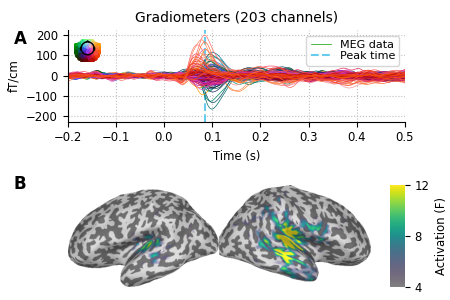
假设我们想要一幅图:上方是诱发响应图,下方是脑激活图,且脑部子图比诱发响应图略大。我们先加载一些示例数据。
data_path = mne.datasets.sample.data_path()
subjects_dir = data_path / "subjects"
fname_stc = data_path / "MEG" / "sample" / "sample_audvis-meg-eeg-lh.stc"
fname_evoked = data_path / "MEG" / "sample" / "sample_audvis-ave.fif"

evoked = mne.read_evokeds(fname_evoked, "Left Auditory")
evoked.pick(picks="grad", exclude="bads").apply_baseline((None, 0.0))
max_t = evoked.get_peak()[1]

stc = mne.read_source_estimate(fname_stc)
Reading /home/circleci/mne_data/MNE-sample-data/MEG/sample/sample_audvis-ave.fif ...
    Read a total of 4 projection items:
        PCA-v1 (1 x 10²) active
        PCA-v2 (1 x 10²) active
        PCA-v3 (1 x 10²) active
        Average EEG reference (1 x 60) active
    Found the data of interest:
        t =    -199.80 ...     499.49 ms (Left Auditory)
        0 CTF compensation matrices available
        nave = 55 - aspect type = 100
Projections have already been applied. Setting proj attribute to True.
No baseline correction applied
Applying baseline correction (mode: mean)
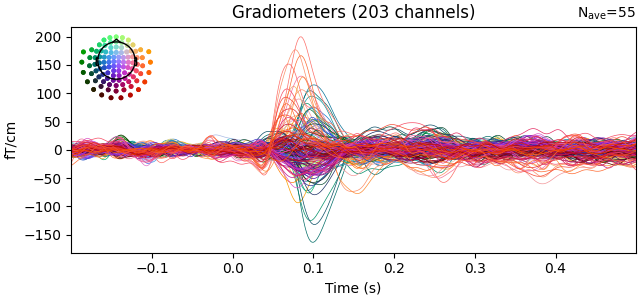
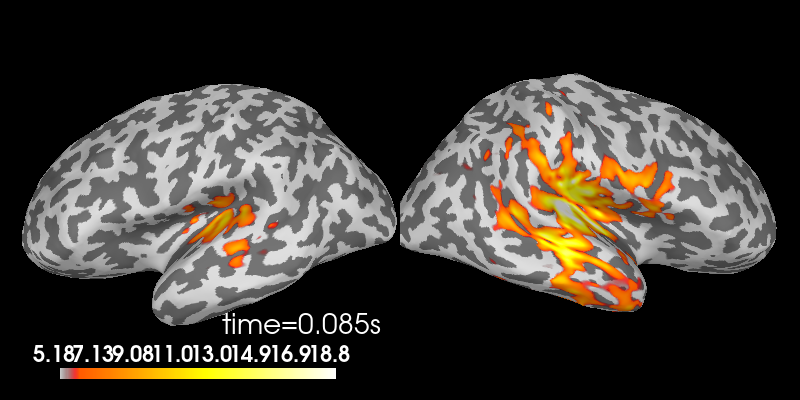
在交互式绘图过程中,我们可能会看到这样的图:
evoked.plot()

stc.plot(
    views="lat",
    hemi="split",
    size=(800, 400),
    subject="sample",
    subjects_dir=subjects_dir,
    initial_time=max_t,
    time_viewer=False,
    show_traces=False,
)
Using control points [ 5.17909658 6.18448887 18.83197989]
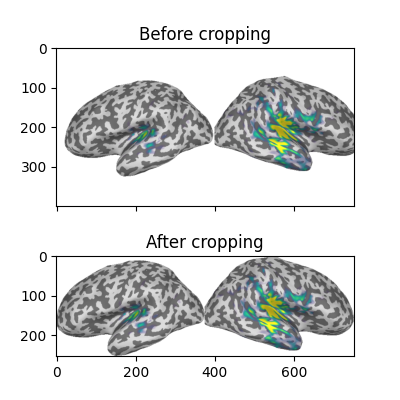
为了制作符合出版要求的图,我们首先在白色背景上重新绘制脑图,截取屏幕截图,然后裁掉白色边距。顺便,我们更改颜色映射、设置自定义的颜色映射范围,并移除默认的颜色条(以便之后添加一个更小的竖直颜色条):
colormap = "viridis"
clim = dict(kind="value", lims=[4, 8, 12])

# Plot the STC, get the brain image, crop it:
brain = stc.plot(
    views="lat",
    hemi="split",
    size=(800, 400),
    subject="sample",
    subjects_dir=subjects_dir,
    initial_time=max_t,
    background="w",
    colorbar=False,
    clim=clim,
    colormap=colormap,
    time_viewer=False,
    show_traces=False,
)
screenshot = brain.screenshot()
brain.close()
现在我们裁掉白色边距以及左右半球之间的白色间隙。截图的维度为 (h, w, 3),最后一个轴是每个像素的 R、G、B 值,以 0 到 255 之间的整数编码。(255, 255, 255) 表示白色像素,因此我们将检测所有与该值不同的像素:
nonwhite_pix = (screenshot != 255).any(-1)
nonwhite_row = nonwhite_pix.any(1)
nonwhite_col = nonwhite_pix.any(0)
cropped_screenshot = screenshot[nonwhite_row][:, nonwhite_col]

# before/after results
fig = plt.figure(figsize=(4, 4))
axes = ImageGrid(fig, 111, nrows_ncols=(2, 1), axes_pad=0.5)
for ax, image, title in zip(
    axes, [screenshot, cropped_screenshot], ["Before", "After"]
):
    ax.imshow(image)
    ax.set_title(f"{title} cropping")
许多图形设置可以在图形创建后进行修改,但也有很多可以提前通过更新 rcParams 字典来设置。当你的脚本生成多幅图且希望它们风格统一时,这尤其有用:
# Tweak the figure style
plt.rcParams.update(
    {
        "ytick.labelsize": "small",
        "xtick.labelsize": "small",
        "axes.labelsize": "small",
        "axes.titlesize": "medium",
        "grid.color": "0.75",
        "grid.linestyle": ":",
    }
)
现在我们创建自定义图形。完成这一步有很多方法。这里我们将一步创建图形和子图坐标轴,并使用 GridSpec 关键字指定整体图形尺寸、子图的数量与布局,以及每行子图高度的比例。其他方法(使用 subplot2grid() 或手动添加每个坐标轴)已以注释形式给出,供参考。
# figsize unit is inches
fig, axes = plt.subplots(
    nrows=2, ncols=1, figsize=(4.5, 3.0), gridspec_kw=dict(height_ratios=[3, 4])
)

# alternate way #1: using subplot2grid
# fig = plt.figure(figsize=(4.5, 3.))
# axes = [plt.subplot2grid((7, 1), (0, 0), rowspan=3),
#         plt.subplot2grid((7, 1), (3, 0), rowspan=4)]

# alternate way #2: using figure-relative coordinates
# fig = plt.figure(figsize=(4.5, 3.))
# axes = [fig.add_axes([0.125, 0.58, 0.775, 0.3]),  # left, bot., width, height
#         fig.add_axes([0.125, 0.11, 0.775, 0.4])]

# we'll put the evoked plot in the upper axes, and the brain below
evoked_idx = 0
brain_idx = 1

# plot the evoked in the desired subplot, and add a line at peak activation
evoked.plot(axes=axes[evoked_idx])
peak_line = axes[evoked_idx].axvline(max_t, color="#66CCEE", ls="--")
# custom legend
axes[evoked_idx].legend(
    [axes[evoked_idx].lines[0], peak_line],
    ["MEG data", "Peak time"],
    frameon=True,
    columnspacing=0.1,
    labelspacing=0.1,
    fontsize=8,
    fancybox=True,
    handlelength=1.8,
)
# remove the "N_ave" annotation
for text in list(axes[evoked_idx].texts):
    text.remove()
# Remove spines and add grid
axes[evoked_idx].grid(True)
axes[evoked_idx].set_axisbelow(True)
for key in ("top", "right"):
    axes[evoked_idx].spines[key].set(visible=False)
# Tweak the ticks and limits
axes[evoked_idx].set(
    yticks=np.arange(-200, 201, 100), xticks=np.arange(-0.2, 0.51, 0.1)
)
axes[evoked_idx].set(ylim=[-225, 225], xlim=[-0.2, 0.5])

# now add the brain to the lower axes
axes[brain_idx].imshow(cropped_screenshot)
axes[brain_idx].axis("off")
# add a vertical colorbar with the same properties as the 3D one
divider = make_axes_locatable(axes[brain_idx])
cax = divider.append_axes("right", size="5%", pad=0.2)
cbar = mne.viz.plot_brain_colorbar(cax, clim, colormap, label="Activation (F)")

# tweak margins and spacing
fig.subplots_adjust(left=0.15, right=0.9, bottom=0.01, top=0.9, wspace=0.1, hspace=0.5)

# add subplot labels
for ax, label in zip(axes, "AB"):
    ax.text(
        0.03,
        ax.get_position().ymax,
        label,
        transform=fig.transFigure,
        fontsize=12,
        fontweight="bold",
        va="top",
        ha="left",
    )
带电极布置内嵌图的自定义时间进程曲线#
假设我们想要一幅图,其中包含从若干传感器提取的平均时间进程曲线,并且希望在图中嵌入一个较小的面板,显示头部轮廓并清晰标出这些传感器的位置。如果你熟悉 MNE,就会知道这正是 mne.viz.plot_compare_evokeds() 所实现的功能,示例输出见文末的 HF-SEF 数据集。
在示例的这一部分,我们将展示如何在你自己的图形中实现这一效果,而无需使用 mne.viz.plot_compare_evokeds()!
我们先加载一些示例数据。
data_path = mne.datasets.sample.data_path()
fname_raw = data_path / "MEG" / "sample" / "sample_audvis_raw.fif"
raw = mne.io.read_raw_fif(fname_raw)

# For the sake of the example, we focus on EEG data
raw.pick(picks="eeg")
Opening raw data file /home/circleci/mne_data/MNE-sample-data/MEG/sample/sample_audvis_raw.fif...
    Read a total of 3 projection items:
        PCA-v1 (1 x 10²)  idle
        PCA-v2 (1 x 10²)  idle
        PCA-v3 (1 x 10²)  idle
    Range : 25800 ... 192599 =     42.956 ...   320.670 secs
Ready.
我们来画一幅图。
# channels to plot:
to_plot = [f"EEG {i:03}" for i in range(1, 5)]

# get the data for plotting in a short time interval from 10 to 20 seconds
start = int(raw.info["sfreq"] * 10)
stop = int(raw.info["sfreq"] * 20)
data, times = raw.get_data(picks=to_plot, start=start, stop=stop, return_times=True)

# Scale the data from the MNE internal unit V to µV
data *= 1e6
# Take the mean of the channels
mean = np.mean(data, axis=0)
# make a figure
fig, ax = plt.subplots(figsize=(4.5, 3))
# plot some EEG data
ax.plot(times, mean)
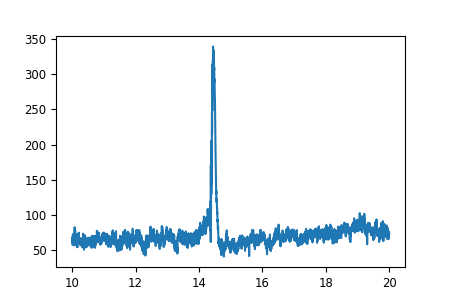
到目前为止一切顺利。现在我们在图中添加一个较小的图,以准确显示我们使用了哪些传感器来生成时间进程曲线。为此,我们使用一个“inset_axes”,将其绘制到已有的坐标轴中。带有传感器位置的头部轮廓可以使用作为数据来源的 Raw 对象来绘制。具体来说,该对象已经包含所有传感器位置,我们可以使用 plot_sensors 方法将它们绘制出来。
# recreate the figure (only necessary for our documentation server)
fig, ax = plt.subplots(figsize=(4.5, 3))
ax.plot(times, mean)
axins = inset_locator.inset_axes(ax, width="30%", height="30%", loc=2)

# pick() edits the raw object in place, so we'll make a copy here
# so that our raw object stays intact for potential later analysis
raw.copy().pick(to_plot).plot_sensors(title="", axes=axins)
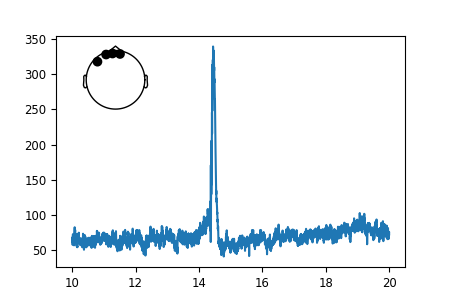
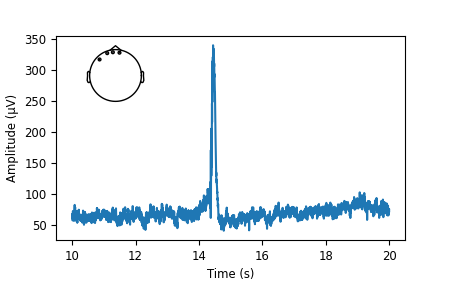
看起来不错。但传感器圆点对我们来说太大了。幸运的是,所有 MNE-Python 图形底层都使用 Matplotlib,我们可以自定义其中的每一个细节。要把传感器圆点变小,我们需要先获得它们的句柄,然后对其应用 *.set_* 方法。
# If we inspect our axes we find the objects contained in our plot:
print(axins.get_children())
[Text(0, 0, ''), <matplotlib.lines.Line2D object at 0x7654b7d87380>, <matplotlib.lines.Line2D object at 0x7654b7d874d0>, <matplotlib.lines.Line2D object at 0x7654b7d87620>, <matplotlib.lines.Line2D object at 0x7654b7d87770>, <matplotlib.collections.PathCollection object at 0x7654b7c36d50>, <matplotlib.spines.Spine object at 0x7654b7c34550>, <matplotlib.spines.Spine object at 0x7654b7c34690>, <matplotlib.spines.Spine object at 0x7654b7c347d0>, <matplotlib.spines.Spine object at 0x7654b7c34910>, <matplotlib.axis.XAxis object at 0x7654b7c34a50>, <matplotlib.axis.YAxis object at 0x7654b7c34e10>, Text(0.5, 1.0, ''), Text(0.0, 1.0, ''), Text(1.0, 1.0, ''), <matplotlib.patches.Rectangle object at 0x7654b7c35d10>]
对象确实很多,但我们知道要修改的是传感器圆点,而它们极有可能是“PathCollection”对象。那么让我们看看坐标轴中有多少个“collections”。
print(axins.collections)
<Axes.ArtistList of 1 collections>
只有一个!这些一定就是我们寻找的传感器圆点。我们终于找到了需要的东西。有时这需要一些尝试。
sensor_dots = axins.collections[0]

# Recreate the figure once more; shrink the sensor dots; add axis labels
fig, ax = plt.subplots(figsize=(4.5, 3))
ax.plot(times, mean)
axins = inset_locator.inset_axes(ax, width="30%", height="30%", loc=2)
raw.copy().pick(to_plot).plot_sensors(title="", axes=axins)
sensor_dots = axins.collections[0]
sensor_dots.set_sizes([1])
# add axis labels, and adjust bottom figure margin to make room for them
ax.set(xlabel="Time (s)", ylabel="Amplitude (µV)")
fig.subplots_adjust(bottom=0.2)
脚本总运行时间:(0 分钟 3.605 秒)