
说明
转到末尾下载完整示例代码。
使用 LCMV 波束形成器进行源重建#
本教程概述波束形成器方法,并展示如何使用 LCMV 波束形成器重建源活动。
# Authors: Britta Westner <britta.wstnr@gmail.com>
#          Eric Larson <larson.eric.d@gmail.com>
#
# License: BSD-3-Clause
# Copyright the MNE-Python contributors.

import matplotlib.pyplot as plt

import mne
from mne.beamformer import apply_lcmv, make_lcmv
from mne.datasets import fetch_fsaverage, sample
波束形成器简介#
波束形成器是一种空间滤波器:它遍历预先定义的源点网格,独立估计每个源点上的活动,从而重建源活动。对每个已定义的源位置都会构造一组权重,用来描述各个传感器对该源的贡献。
波束形成器常因其聚焦的重建结果以及重建较深源的能力而被使用。它们还可以抑制外部噪声源。本教程采用的波束形成方法是线性约束最小方差(LCMV)波束形成器 [ 1 ],它作用于时间序列。
对频率分辨的数据,可以使用动态相干源成像(DICS)波束形成方法 [ 2 ] 进行重建。下面将会看到,空间滤波器由两个要素计算得到:正向模型解与数据的协方差矩阵。
数据处理#
本教程将使用示例数据集,并在左耳听觉刺激的试次上重建源活动。
data_path = sample.data_path()
subjects_dir = data_path / "subjects"
meg_path = data_path / "MEG" / "sample"
raw_fname = meg_path / "sample_audvis_filt-0-40_raw.fif"

# Read the raw data
raw = mne.io.read_raw_fif(raw_fname)
raw.info["bads"] = ["MEG 2443"]  # bad MEG channel

# Set up epoching
event_id = 1  # those are the trials with left-ear auditory stimuli
tmin, tmax = -0.2, 0.5
events = mne.find_events(raw)

# pick relevant channels
raw.pick(["meg", "eog"])  # pick channels of interest

# Create epochs
proj = False  # already applied
epochs = mne.Epochs(
    raw,
    events,
    event_id,
    tmin,
    tmax,
    baseline=(None, 0),
    preload=True,
    proj=proj,
    reject=dict(grad=4000e-13, mag=4e-12, eog=150e-6),
)

# for speed purposes, cut to a window of interest
evoked = epochs.average().crop(0.05, 0.15)

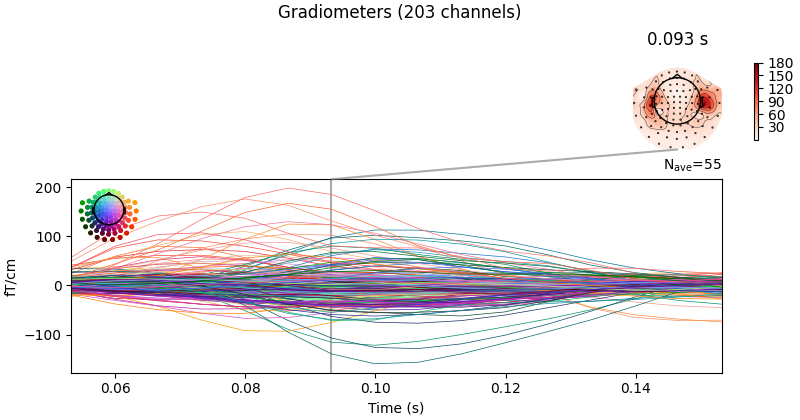
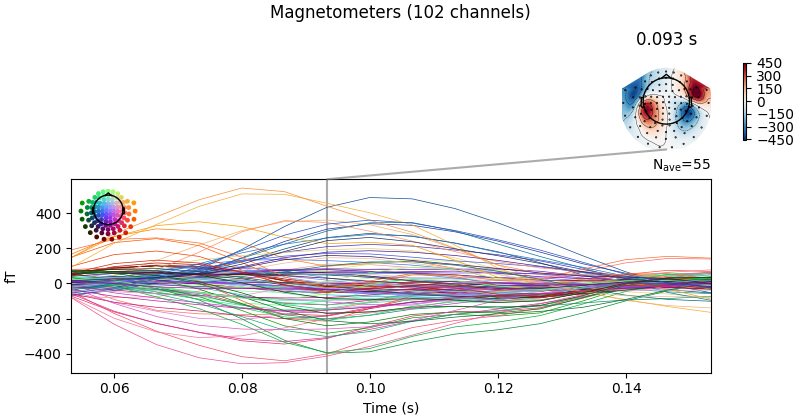
# Visualize averaged sensor space data
evoked.plot_joint()

del raw  # save memory
Opening raw data file /home/circleci/mne_data/MNE-sample-data/MEG/sample/sample_audvis_filt-0-40_raw.fif...
    Read a total of 4 projection items:
        PCA-v1 (1 x 10²)  idle
        PCA-v2 (1 x 10²)  idle
        PCA-v3 (1 x 10²)  idle
        Average EEG reference (1 x 60)  idle
    Range : 6450 ... 48149 =     42.956 ...   320.665 secs
Ready.
Finding events on: STI 014
319 events found on stim channel STI 014
Event IDs: [ 1  2  3  4  5 32]
Not setting metadata
72 matching events found
Setting baseline interval to [-0.19979521315838786, 0.0] s
Applying baseline correction (mode: mean)
Created an SSP operator (subspace dimension = 3)
Loading data for 72 events and 106 original time points ...
    Rejecting  epoch based on EOG : ['EOG 061']
    Rejecting  epoch based on EOG : ['EOG 061']
    Rejecting  epoch based on EOG : ['EOG 061']
    Rejecting  epoch based on EOG : ['EOG 061']
    Rejecting  epoch based on EOG : ['EOG 061']
    Rejecting  epoch based on MAG : ['MEG 1711']
    Rejecting  epoch based on EOG : ['EOG 061']
    Rejecting  epoch based on EOG : ['EOG 061']
    Rejecting  epoch based on EOG : ['EOG 061']
    Rejecting  epoch based on EOG : ['EOG 061']
    Rejecting  epoch based on EOG : ['EOG 061']
    Rejecting  epoch based on EOG : ['EOG 061']
    Rejecting  epoch based on EOG : ['EOG 061']
    Rejecting  epoch based on EOG : ['EOG 061']
    Rejecting  epoch based on EOG : ['EOG 061']
    Rejecting  epoch based on EOG : ['EOG 061']
    Rejecting  epoch based on EOG : ['EOG 061']
17 bad epochs dropped
Created an SSP operator (subspace dimension = 3)
3 projection items activated
SSP projectors applied...
计算协方差矩阵#
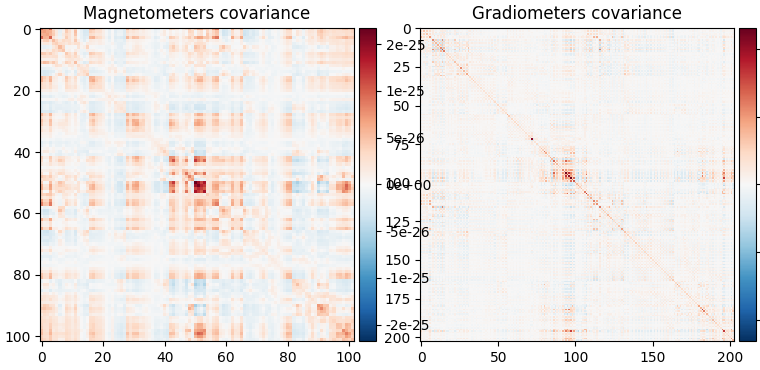
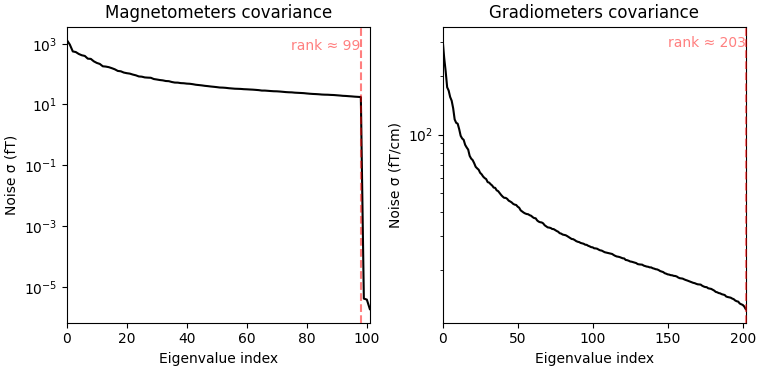
空间滤波器利用数据协方差来估计滤波器权重。在计算空间滤波器时需要对数据协方差矩阵求逆,因此先绘制协方差矩阵及其特征值、判断求逆是否可行,是很有价值的做法。另外,由于我们想把不同通道类型(磁强计和梯度计)结合起来,就需要考虑这些通道类型在幅值尺度上的差异。为此,我们会向波束形成器提供一个噪声协方差矩阵,用于白化。数据协方差矩阵应在一个包含感兴趣脑信号的时间窗上估计,并包含足够多的采样以保证估计稳定。经验法则是使用的采样数要多于数据集中的通道数;关于波束形成器协方差估计的更详细建议,请参阅 [ 3 ] [ 4 ]。这里我们使用的时间窗包含刺激后约 100 ms 的预期听觉响应,并适当延长该时段,以兼顾较少的试次数(72)和较低的 150 Hz 采样率。
data_cov = mne.compute_covariance(epochs, tmin=0.01, tmax=0.25, method="empirical")
noise_cov = mne.compute_covariance(epochs, tmin=tmin, tmax=0, method="empirical")
data_cov.plot(epochs.info)
del epochs
    Created an SSP operator (subspace dimension = 3)
    Setting small MEG eigenvalues to zero (without PCA)
Reducing data rank from 305 -> 302
Estimating covariance using EMPIRICAL
Done.
Number of samples used : 2035
[done]
    Created an SSP operator (subspace dimension = 3)
    Setting small MEG eigenvalues to zero (without PCA)
Reducing data rank from 305 -> 302
Estimating covariance using EMPIRICAL
Done.
Number of samples used : 1705
[done]
Computing rank from covariance with rank=None
    Using tolerance 4e-14 (2.2e-16 eps * 102 dim * 1.8  max singular value)
    Estimated rank (mag): 99
    MAG: rank 99 computed from 102 data channels with 0 projectors
Computing rank from covariance with rank=None
    Using tolerance 4.3e-13 (2.2e-16 eps * 203 dim * 9.4  max singular value)
    Estimated rank (grad): 203
    GRAD: rank 203 computed from 203 data channels with 0 projectors
观察协方差矩阵图可以看到,我们的数据略微秩亏,因为秩不等于通道数。因此,我们选择在波束形成器计算中对协方差矩阵求逆之前先进行正则化。可以通过在使用 make_lcmv() 计算空间滤波器时设置参数 reg=0.05 来实现,这相当于在协方差矩阵的对角线上加载传感器功率的 5%。处理秩亏协方差矩阵的其他方法在 [ 4 ] 中讨论。
正向模型#
正向模型是计算空间滤波器的另一个重要要素。这里我们将从磁盘加载正向模型;有关如何创建正向模型的更多信息,可参阅教程 头模型与正向计算。请注意,波束形成器通常在体积源空间中计算,因为只估计皮层表面激活可能会对数据产生错误表示。
# Read forward model

fwd_fname = meg_path / "sample_audvis-meg-vol-7-fwd.fif"
forward = mne.read_forward_solution(fwd_fname)
Reading forward solution from /home/circleci/mne_data/MNE-sample-data/MEG/sample/sample_audvis-meg-vol-7-fwd.fif...
    Reading a source space...
    [done]
    1 source spaces read
    Desired named matrix (kind = 3523 (FIFF_MNE_FORWARD_SOLUTION_GRAD)) not available
    Read MEG forward solution (3757 sources, 306 channels, free orientations)
    Source spaces transformed to the forward solution coordinate frame
处理深度偏倚#
正向模型解本身偏向于浅表源。在分析单一条件时,最好以某种方式减轻深度偏倚。有几种做法:
mne.beamformer.make_lcmv()有一个depth参数,可在计算空间滤波器之前对正向模型进行归一化。详情请参阅该函数的文档字符串。单位噪声增益波束形成器通过归一化空间滤波器的权重来处理深度偏倚。设置
weight_norm='unit-noise-gain'即可选用这种方式。在计算神经活动指数(Neural activity index)时,深度偏倚通过同时归一化权重和估计噪声来处理(见 [ 1 ])。设置
weight_norm='nai'即可选用这种方式。
请注意,在比较不同条件时,深度偏倚会相互抵消,因此可以把这两个参数都设为 None。
计算空间滤波器#
现在可以计算空间滤波器了。我们将使用单位噪声增益波束形成器来处理深度偏倚,同时优化源的方向,使输出功率最大。这可以通过设置 pick_ori='max-power' 实现。这样每个源(即体素)得到一个源估计,称为标量波束形成器。
filters = make_lcmv(
    evoked.info,
    forward,
    data_cov,
    reg=0.05,
    noise_cov=noise_cov,
    pick_ori="max-power",
    weight_norm="unit-noise-gain",
    rank=None,
)

# You can save the filter for later use with:
# filters.save('filters-lcmv.h5')
Computing rank from covariance with rank=None
    Using tolerance 7.1e-13 (2.2e-16 eps * 305 dim * 10  max singular value)
    Estimated rank (mag + grad): 302
    MEG: rank 302 computed from 305 data channels with 3 projectors
Computing rank from covariance with rank=None
    Using tolerance 2.9e-13 (2.2e-16 eps * 305 dim * 4.3  max singular value)
    Estimated rank (mag + grad): 302
    MEG: rank 302 computed from 305 data channels with 3 projectors
Making LCMV beamformer with rank {'meg': 302}
Computing inverse operator with 305 channels.
    305 out of 306 channels remain after picking
Selected 305 channels
Whitening the forward solution.
    Created an SSP operator (subspace dimension = 3)
Computing rank from covariance with rank={'meg': 302}
    Setting small MEG eigenvalues to zero (without PCA)
Creating the source covariance matrix
Adjusting source covariance matrix.
Computing beamformer filters for 3757 sources
Filter computation complete
也可以计算矢量波束形成器,它为每个体素返回三个估计,分别对应源的三个方向分量。设置 pick_ori='vector' 即可实现,并会得到体积矢量源估计。注意这里把 weight_norm 参数改为 'unit-noise-gain-invariant',这只对矢量单位噪声增益波束形成器才需要。更深入的细节请参阅 [ 4 ]。下面我们再用矢量波束形成器方法计算另一组滤波器:
Computing rank from covariance with rank=None
    Using tolerance 7.1e-13 (2.2e-16 eps * 305 dim * 10  max singular value)
    Estimated rank (mag + grad): 302
    MEG: rank 302 computed from 305 data channels with 3 projectors
Computing rank from covariance with rank=None
    Using tolerance 2.9e-13 (2.2e-16 eps * 305 dim * 4.3  max singular value)
    Estimated rank (mag + grad): 302
    MEG: rank 302 computed from 305 data channels with 3 projectors
Making LCMV beamformer with rank {'meg': 302}
Computing inverse operator with 305 channels.
    305 out of 306 channels remain after picking
Selected 305 channels
Whitening the forward solution.
    Created an SSP operator (subspace dimension = 3)
Computing rank from covariance with rank={'meg': 302}
    Setting small MEG eigenvalues to zero (without PCA)
Creating the source covariance matrix
Adjusting source covariance matrix.
Computing beamformer filters for 3757 sources
Filter computation complete
应用空间滤波器#
空间滤波器可应用于不同的数据类型:raw、epochs、evoked 数据,或数据协方差矩阵(用于获得静态功率图像)。把空间滤波器应用于 Evoked 数据的函数是 apply_lcmv(),也是我们这里要用的。其他函数有 apply_lcmv_raw()、apply_lcmv_epochs() 和 apply_lcmv_cov()。
stc = apply_lcmv(evoked, filters)
stc_vec = apply_lcmv(evoked, filters_vec)
del filters, filters_vec
可视化重建的源活动#
我们可以用不同方式可视化源估计,例如体渲染、叠加到 MRI 上,或叠加到玻璃脑上。
标量波束形成器的图显示,刺激后约 100 ms 右侧颞叶存在脑活动。考虑到实验中是对左耳进行听觉刺激,这一结果是符合预期的。
lims = [0.3, 0.45, 0.6]
kwargs = dict(
    src=src,
    subject="sample",
    subjects_dir=subjects_dir,
    initial_time=0.087,
    verbose=True,
)
在 MRI 切片上(orthoview;2D)#
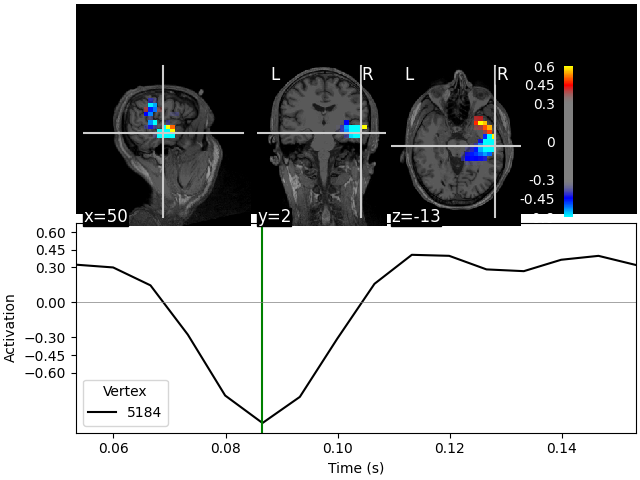
Fixing initial time: 0.087 s
Showing: t = 0.087 s, (50.7, 2.0, -13.3) mm, [18, 12, 9] vox, 5184 vertex
在 MNI 玻璃脑上(orthoview;2D)#
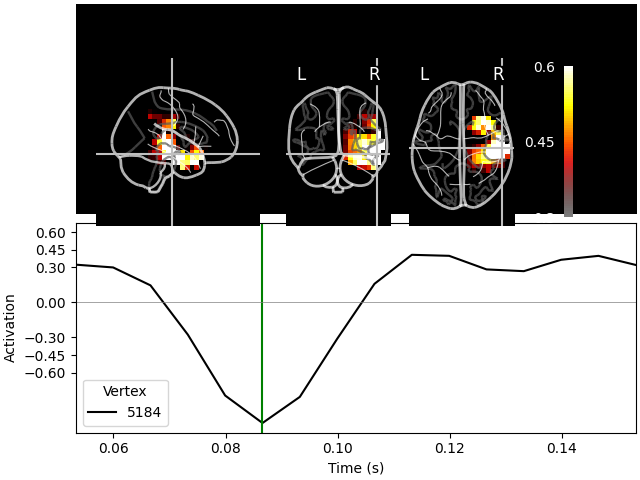
Transforming subject RAS (non-zero origin) -> MNI Talairach
    1.022485 -0.008449 -0.036217       5.60 mm
    0.071071 0.914866 0.406098     -19.82 mm
    0.008756 -0.433700 1.028119      -1.55 mm
    0.000000 0.000000 0.000000       1.00

Fixing initial time: 0.087 s
Showing: t = 0.087 s, (57.9, -19.7, -15.6) mm, [18, 12, 9] vox, 5184 vertex
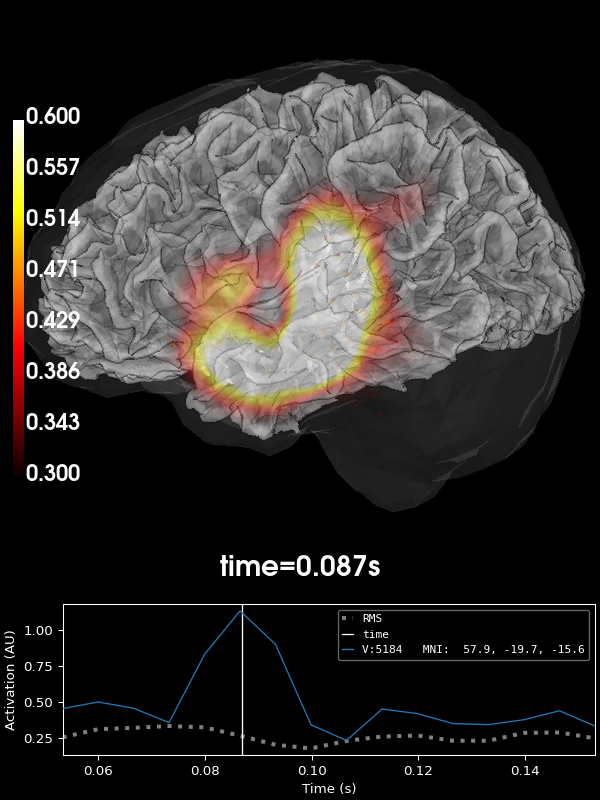
带矢量的体渲染(3D)#
这些图也可以通过 plot_3d() 以体渲染方式显示。我们来尝试可视化矢量波束形成器的情形。这里每个体素会得到三条源时间过程(分别对应偶极矩的 x、y、z 三个分量),它们在可视化中显示为小矢量(在 2D 绘图中只能显示幅值):
brain = stc_vec.plot_3d(
    clim=dict(kind="value", lims=lims),
    hemi="both",
    size=(600, 600),
    views=["lateral"],
    # Could do this for a 3-panel figure:
    # view_layout='horizontal', views=['coronal', 'sagittal', 'axial'],
    brain_kwargs=dict(silhouette=True),
    **kwargs,
)
brain.show_view("lateral", hemi="rh")
    Triangle neighbors and vertex normals...
Loading geometry from /home/circleci/mne_data/MNE-sample-data/subjects/sample/surf/lh.sphere...
Setting up the triangulation for the decimated surface...
    Triangle neighbors and vertex normals...
Loading geometry from /home/circleci/mne_data/MNE-sample-data/subjects/sample/surf/rh.sphere...
Setting up the triangulation for the decimated surface...
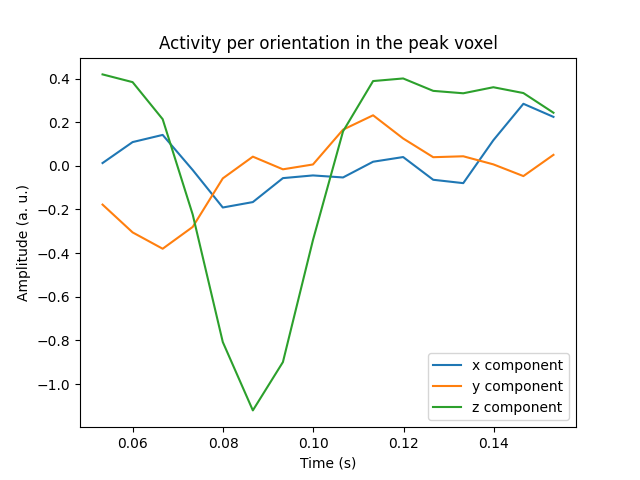
可视化最大体素全部三个分量的活动#
我们也可以可视化峰值体素中的全部三个分量。为此,我们先找到峰值体素,再绘制该体素的时间过程。
peak_vox, _ = stc_vec.get_peak(tmin=0.08, tmax=0.1, vert_as_index=True)

ori_labels = ["x", "y", "z"]
fig, ax = plt.subplots(1)
for ori, label in zip(stc_vec.data[peak_vox, :, :], ori_labels):
    ax.plot(stc_vec.times, ori, label=f"{label} component")
ax.legend(loc="lower right")
ax.set(
    title="Activity per orientation in the peak voxel",
    xlabel="Time (s)",
    ylabel="Amplitude (a. u.)",
)
mne.viz.utils.plt_show()
del stc_vec
将输出形变到 fsaverage#
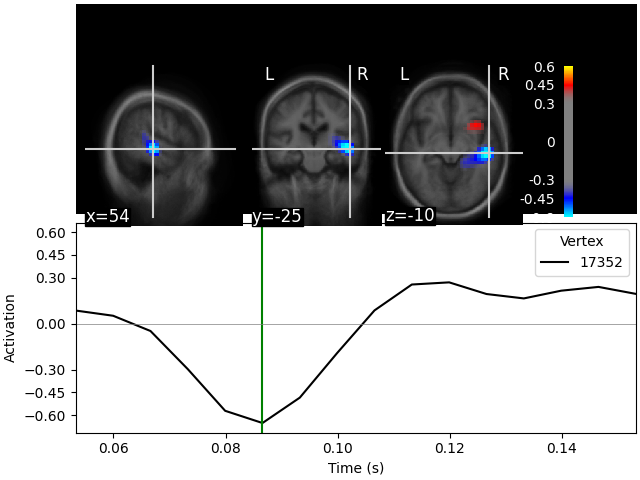
我们还可以使用体积形变把数据变换到 fsaverage 空间。例如,在比较不同受试者的活动时就需要这样做。这里我们使用标量波束形成器的示例。我们把一个 mne.SourceMorph 作为 src 参数传给 mne.VolSourceEstimate.plot。为减少应用形变时的计算量,我们先对 stc 进行裁剪:
fetch_fsaverage(subjects_dir)  # ensure fsaverage src exists
fname_fs_src = subjects_dir / "fsaverage" / "bem" / "fsaverage-vol-5-src.fif"

src_fs = mne.read_source_spaces(fname_fs_src)
morph = mne.compute_source_morph(
    src,
    subject_from="sample",
    src_to=src_fs,
    subjects_dir=subjects_dir,
    niter_sdr=[5, 5, 2],
    niter_affine=[5, 5, 2],
    zooms=7,  # just for speed
    verbose=True,
)
stc_fs = morph.apply(stc)
del stc

kwargs = dict(
    src=src_fs,
    subjects_dir=subjects_dir,
    initial_time=0.085,
    clim=dict(kind="value", pos_lims=lims),
    verbose=True,
)
stc_fs.plot(mode="stat_map", **kwargs)
0 files missing from root.txt in /home/circleci/mne_data/MNE-sample-data/subjects
0 files missing from bem.txt in /home/circleci/mne_data/MNE-sample-data/subjects/fsaverage
    Reading a source space...
    [done]
    1 source spaces read
Volume source space(s) present...
    Loading /home/circleci/mne_data/MNE-sample-data/subjects/sample/mri/brain.mgz as "from" volume
    Loading /home/circleci/mne_data/MNE-sample-data/subjects/fsaverage/mri/brain.mgz as "to" volume
Computing registration...
Reslicing to zooms=(7.0, 7.0, 7.0) for translation ...
Optimizing translation:
[2026-09-27 04:28:59][dipy] INFO: ➞ Running center_of_mass step from affine registration...
[2026-09-27 04:28:59][dipy] INFO: ➞ Running translation step from affine registration...
    Translation:   22.7 mm
    R²:            92.1%
Optimizing rigid:
[2026-09-27 04:28:59][dipy] INFO: ➞ Running rigid step from affine registration...
    Translation:   22.7 mm
    Rotation:      19.7°
    R²:            96.3%
Optimizing affine:
[2026-09-27 04:28:59][dipy] INFO: ➞ Running affine step from affine registration...
    R²:            96.6%
Optimizing sdr:
[2026-09-27 04:28:59][dipy] INFO: Creating scale space from the moving image. Levels: 3. Sigma factor: 0.200000.
[2026-09-27 04:28:59][dipy] INFO: Creating scale space from the static image. Levels: 3. Sigma factor: 0.200000.
[2026-09-27 04:28:59][dipy] INFO: Optimizing level 2
[2026-09-27 04:28:59][dipy] INFO: Optimizing level 1
[2026-09-27 04:28:59][dipy] INFO: Optimizing level 0
    R²:            98.3%
[done]

  0%|          | Time : 0/16 [00:00<?,       ?it/s]
  6%|▋         | Time : 1/16 [00:00<00:01,   13.19it/s]
 12%|█▎        | Time : 2/16 [00:00<00:00,   17.72it/s]
 19%|█▉        | Time : 3/16 [00:00<00:00,   20.95it/s]
 25%|██▌       | Time : 4/16 [00:00<00:00,   21.70it/s]
 31%|███▏      | Time : 5/16 [00:00<00:00,   19.93it/s]
 38%|███▊      | Time : 6/16 [00:00<00:00,   19.81it/s]
 44%|████▍     | Time : 7/16 [00:00<00:00,   20.26it/s]
 50%|█████     | Time : 8/16 [00:00<00:00,   20.98it/s]
 56%|█████▋    | Time : 9/16 [00:00<00:00,   21.71it/s]
 62%|██████▎   | Time : 10/16 [00:00<00:00,   22.23it/s]
 69%|██████▉   | Time : 11/16 [00:00<00:00,   22.80it/s]
 75%|███████▌  | Time : 12/16 [00:00<00:00,   23.28it/s]
 81%|████████▏ | Time : 13/16 [00:00<00:00,   23.70it/s]
 88%|████████▊ | Time : 14/16 [00:00<00:00,   23.85it/s]
 94%|█████████▍| Time : 15/16 [00:00<00:00,   23.62it/s]
100%|██████████| Time : 16/16 [00:00<00:00,   23.69it/s]
100%|██████████| Time : 16/16 [00:00<00:00,   23.13it/s]
Fixing initial time: 0.085 s
Showing: t = 0.087 s, (55.0, -25.0, -10.0) mm, [27, 18, 13] vox, 17352 vertex
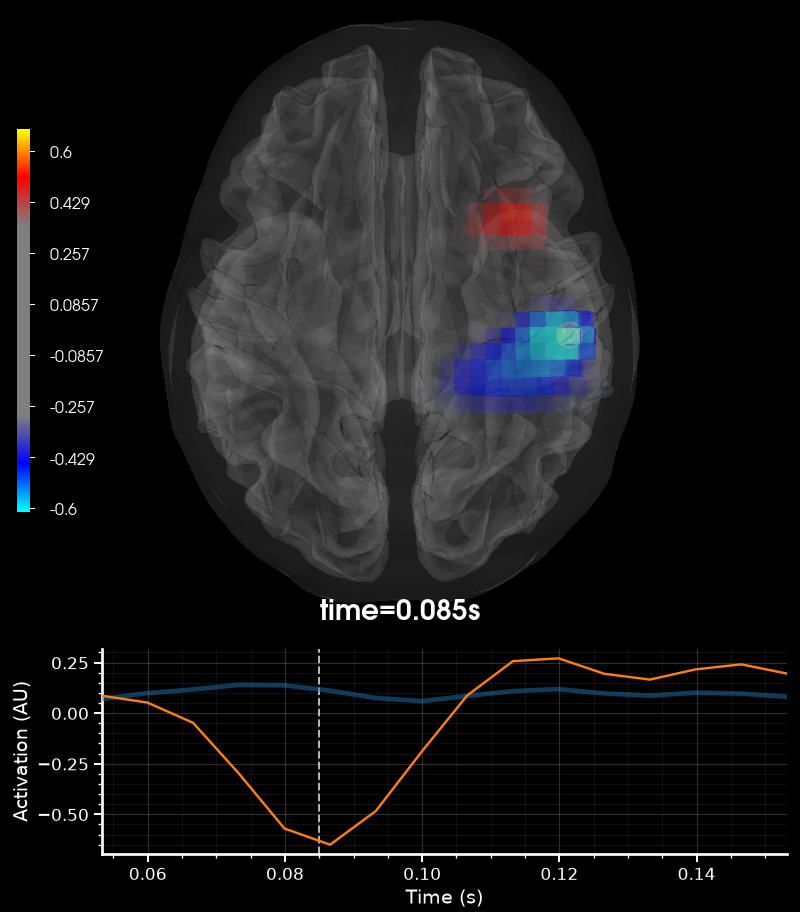
我们也可以在交互式 3D 模式下绘制:
stc_fs.plot_3d(
    brain_kwargs=dict(silhouette=True),
    volume_options=dict(alpha=0.5, interpolation="nearest"),
    **kwargs,
)
    Warning: zero size triangles: [3 4]
    Triangle neighbors and vertex normals...
Loading geometry from /home/circleci/mne_data/MNE-sample-data/subjects/fsaverage/surf/lh.sphere...
Setting up the triangulation for the decimated surface...
    Warning: zero size triangles: [3 4]
    Triangle neighbors and vertex normals...
Loading geometry from /home/circleci/mne_data/MNE-sample-data/subjects/fsaverage/surf/rh.sphere...
Setting up the triangulation for the decimated surface...
参考文献#
脚本总运行时间:(0 分钟 34.288 秒)