
非官方中文翻译
本页译自 MNE-Python 官方文档:
查看英文原文 ↗。
文档版权归 MNE Developers 所有(BSD-3-Clause)。
说明
转到末尾下载完整示例代码。
可视化 EEG 数据的统计显著性阈值#
MNE-Python 提供了一系列用于统计假设检验及结果可视化的工具。这里我们展示探索性与验证性检验的几种方案,例如针对性 t 检验、基于聚类的置换方法(此处使用无阈值聚类增强,Threshold-Free Cluster Enhancement),以及如何可视化结果。
所用数据来自 [1];我们对比长词与短词。TFCE 的说明见 [2]。
# Authors: The MNE-Python contributors.
# License: BSD-3-Clause
# Copyright the MNE-Python contributors.
import matplotlib.pyplot as plt
from scipy.stats import ttest_ind

import mne
from mne.channels import find_ch_adjacency, make_1020_channel_selections
from mne.stats import spatio_temporal_cluster_test

# Load the data
path = mne.datasets.kiloword.data_path() / "kword_metadata-epo.fif"
epochs = mne.read_epochs(path)
# These data are quite smooth, so to speed up processing we'll (unsafely!) just
# decimate them
epochs.decimate(4, verbose="error")
name = "NumberOfLetters"

# Split up the data by the median length in letters via the attached metadata
median_value = str(epochs.metadata[name].median())
long_words = epochs[name + " > " + median_value]
short_words = epochs[name + " < " + median_value]
Reading /home/circleci/mne_data/MNE-kiloword-data/kword_metadata-epo.fif ...
Isotrak not found
    Found the data of interest:
        t =    -100.00 ...     920.00 ms
        0 CTF compensation matrices available
Adding metadata with 8 columns
960 matching events found
No baseline correction applied
0 projection items activated
如果我们想检验空间和时间上的某个特定点,将数据转换为 Pandas DataFrame 格式会比较方便。此时,mne.Epochs 对象有一个便捷的 mne.Epochs.to_data_frame() 方法,可返回 DataFrame。随后可以针对特定的时间窗和传感器查询该 DataFrame,并将提取的数据提交给标准统计检验。这里我们对长词与短词之间的差异进行 t 检验。
time_windows = ((0.2, 0.25), (0.35, 0.45))
elecs = ["Fz", "Cz", "Pz"]
index = ["condition", "epoch", "time"]

# display the EEG data in Pandas format (first 5 rows)
print(epochs.to_data_frame(index=index)[elecs].head())

report = "{elec}, time: {tmin}-{tmax} s; t({df})={t_val:.3f}, p={p:.3f}"
print("\nTargeted statistical test results:")
for tmin, tmax in time_windows:
    long_df = long_words.copy().crop(tmin, tmax).to_data_frame(index=index)
    short_df = short_words.copy().crop(tmin, tmax).to_data_frame(index=index)
    for elec in elecs:
        # extract data
        A = long_df[elec].groupby("condition").mean()
        B = short_df[elec].groupby("condition").mean()

        # conduct t test
        t, p = ttest_ind(A, B)

        # display results
        format_dict = dict(
            elec=elec, tmin=tmin, tmax=tmax, df=len(epochs.events) - 2, t_val=t, p=p
        )
        print(report.format(**format_dict))
channel                       Fz        Cz        Pz
condition epoch time
film      0     -0.096  0.453939  0.232879  0.222424
                -0.080  0.518939  0.214091 -0.371515
                -0.064  0.811667  0.793636  0.250152
                -0.048  0.039697  0.188636  0.318030
                -0.032 -1.163030 -1.018939 -0.425152

Targeted statistical test results:
Fz, time: 0.2-0.25 s; t(958)=-0.661, p=0.509
Cz, time: 0.2-0.25 s; t(958)=-2.682, p=0.007
Pz, time: 0.2-0.25 s; t(958)=-3.238, p=0.001
Fz, time: 0.35-0.45 s; t(958)=5.304, p=0.000
Cz, time: 0.35-0.45 s; t(958)=5.684, p=0.000
Pz, time: 0.35-0.45 s; t(958)=6.508, p=0.000
在没有具体假设的情况下,我们也可以在所有传感器和时间点上进行探索性的大规模单变量(mass-univariate)分析。这需要进行多重检验校正。MNE 为此提供了多种方法,其中基于聚类的置换方法能够利用数据的时空相关结构来提升统计功效。这里我们使用 TFCE。
# Calculate adjacency matrix between sensors from their locations
adjacency, _ = find_ch_adjacency(epochs.info, "eeg")

# Extract data: transpose because the cluster test requires channels to be last
# In this case, inference is done over items. In the same manner, we could
# also conduct the test over, e.g., subjects.
X = [
    long_words.get_data(copy=False).transpose(0, 2, 1),
    short_words.get_data(copy=False).transpose(0, 2, 1),
]
tfce = dict(start=0.4, step=0.4)  # ideally start and step would be smaller

# Calculate statistical thresholds
t_obs, clusters, cluster_pv, h0 = spatio_temporal_cluster_test(
    X, tfce, adjacency=adjacency, n_permutations=100, rng=113
)  # a more standard number would be 1000+
significant_points = cluster_pv.reshape(t_obs.shape).T < 0.05
print(str(significant_points.sum()) + " points selected by TFCE ...")
Could not find a adjacency matrix for the data. Computing adjacency based on Delaunay triangulations.
-- number of adjacent vertices : 29
stat_fun(H1): min=7.176438127884552e-07 max=80.91729757691468
Running initial clustering …
Using 202 thresholds from 0.40 to 80.80 for TFCE computation (h_power=2.00, e_power=0.50)
Found 1856 clusters

  0%|          | Permuting : 0/99 [00:00<?,       ?it/s]
  5%|▌         | Permuting : 5/99 [00:00<00:00,  146.89it/s]
 10%|█         | Permuting : 10/99 [00:00<00:00,  147.91it/s]
 15%|█▌        | Permuting : 15/99 [00:00<00:00,  148.25it/s]
 20%|██        | Permuting : 20/99 [00:00<00:00,  148.14it/s]
 25%|██▌       | Permuting : 25/99 [00:00<00:00,  148.29it/s]
 30%|███       | Permuting : 30/99 [00:00<00:00,  148.42it/s]
 35%|███▌      | Permuting : 35/99 [00:00<00:00,  148.32it/s]
 40%|████      | Permuting : 40/99 [00:00<00:00,  148.42it/s]
 46%|████▋     | Permuting : 46/99 [00:00<00:00,  150.76it/s]
 49%|████▉     | Permuting : 49/99 [00:00<00:00,  143.19it/s]
 56%|█████▌    | Permuting : 55/99 [00:00<00:00,  147.27it/s]
 61%|██████    | Permuting : 60/99 [00:00<00:00,  147.42it/s]
 66%|██████▌   | Permuting : 65/99 [00:00<00:00,  147.58it/s]
 71%|███████   | Permuting : 70/99 [00:00<00:00,  147.71it/s]
 77%|███████▋  | Permuting : 76/99 [00:00<00:00,  150.57it/s]
 81%|████████  | Permuting : 80/99 [00:00<00:00,  147.78it/s]
 86%|████████▌ | Permuting : 85/99 [00:00<00:00,  147.88it/s]
 91%|█████████ | Permuting : 90/99 [00:00<00:00,  147.97it/s]
 96%|█████████▌| Permuting : 95/99 [00:00<00:00,  148.02it/s]
100%|██████████| Permuting : 99/99 [00:00<00:00,  149.54it/s]
100%|██████████| Permuting : 99/99 [00:00<00:00,  148.92it/s]
326 points selected by TFCE ...
这些大规模单变量分析的结果可以通过将 mne.Evoked 对象绘制为图像(借助 mne.Evoked.plot_image)并遮罩显著点来可视化。这里我们按感兴趣区(Regions of Interest)对通道分组,以便在头皮上定位效应。
# We need an evoked object to plot the image to be masked
evoked = mne.combine_evoked(
    [long_words.average(), short_words.average()], weights=[1, -1]
)  # calculate difference wave
time_unit = dict(time_unit="s")
evoked.plot_joint(
    title="Long vs. short words", ts_args=time_unit, topomap_args=time_unit
)  # show difference wave

# Create ROIs by checking channel labels
selections = make_1020_channel_selections(evoked.info, midline="12z")

# Visualize the results
fig, axes = plt.subplots(nrows=3, figsize=(8, 8))
axes = {sel: ax for sel, ax in zip(selections, axes.ravel())}
evoked.plot_image(
    axes=axes,
    group_by=selections,
    colorbar=False,
    show=False,
    mask=significant_points,
    show_names="all",
    titles=None,
    **time_unit,
)
plt.colorbar(axes["Left"].images[-1], ax=list(axes.values()), shrink=0.3, label="µV")

plt.show()
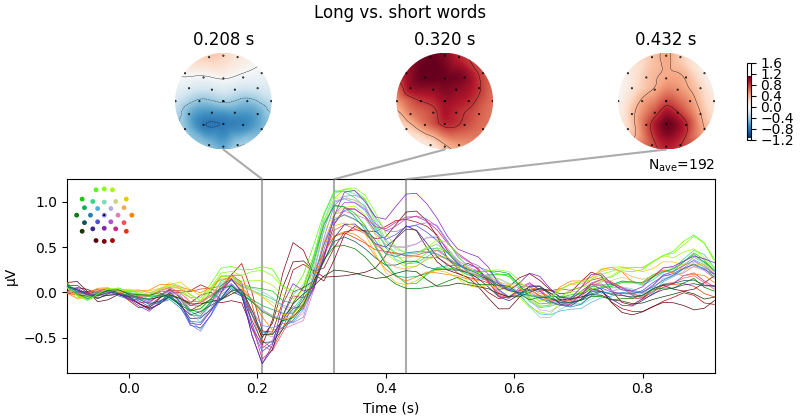
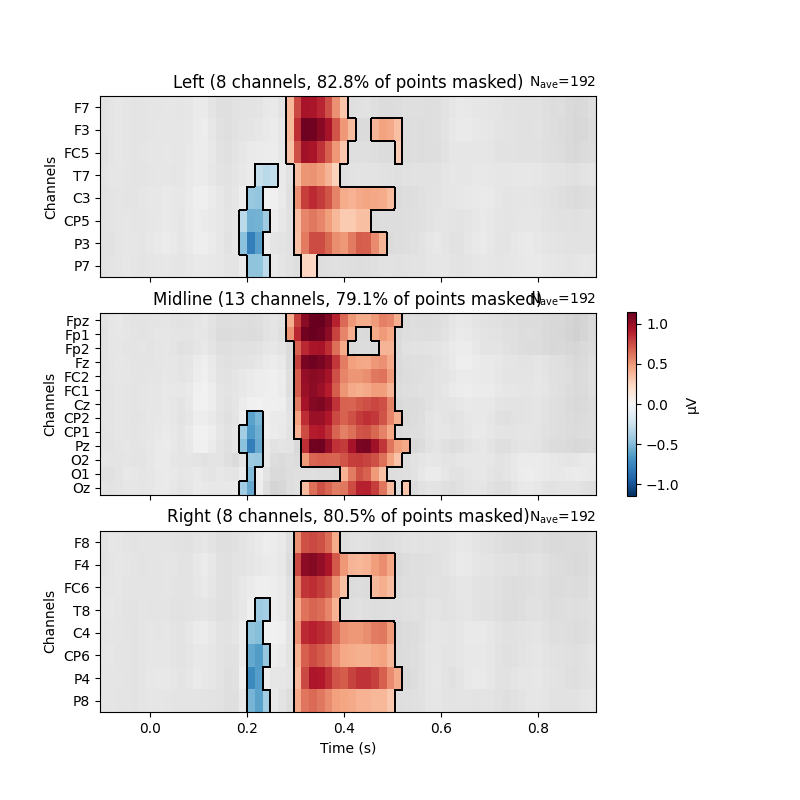
No projector specified for this dataset. Please consider the method self.add_proj.
参考文献#
脚本总运行时间:(0 分钟 2.197 秒)