
说明
转到末尾下载完整示例代码。
绘制诱发数据的地形图#
加载诱发数据,并针对选定时间点用多种附加选项绘制地形图。
# Authors: Christian Brodbeck <christianbrodbeck@nyu.edu>
#          Tal Linzen <linzen@nyu.edu>
#          Denis A. Engeman <denis.engemann@gmail.com>
#          Mikołaj Magnuski <mmagnuski@swps.edu.pl>
#          Eric Larson <larson.eric.d@gmail.com>
#          Alex Rockhill <aprockhill@mailbox.org>
#
# License: BSD-3-Clause
# Copyright the MNE-Python contributors.
import matplotlib.pyplot as plt
import numpy as np

import mne

print(__doc__)

path = mne.datasets.sample.data_path()
fname = path / "MEG" / "sample" / "sample_audvis-ave.fif"

# load evoked corresponding to a specific condition
# from the fif file and subtract baseline
condition = "Left Auditory"
evoked = mne.read_evokeds(fname, condition=condition, baseline=(None, 0))
Reading /home/circleci/mne_data/MNE-sample-data/MEG/sample/sample_audvis-ave.fif ...
    Read a total of 4 projection items:
        PCA-v1 (1 x 10²) active
        PCA-v2 (1 x 10²) active
        PCA-v3 (1 x 10²) active
        Average EEG reference (1 x 60) active
    Found the data of interest:
        t =    -199.80 ...     499.49 ms (Left Auditory)
        0 CTF compensation matrices available
        nave = 55 - aspect type = 100
Projections have already been applied. Setting proj attribute to True.
Applying baseline correction (mode: mean)
plot_topomap() 基本选项#
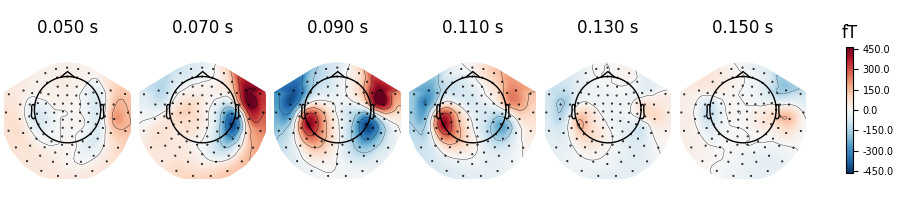
使用 mne.Evoked.plot_topomap() 绘制诱发地形图。第一个参数 times 用于指定显示地形图的时间点(单位为秒!)。我们选择 50 到 150 ms、步长 20 ms 的时间点并绘制磁强计数据:
times = np.arange(0.05, 0.151, 0.02)
evoked.plot_topomap(times, ch_type="mag")
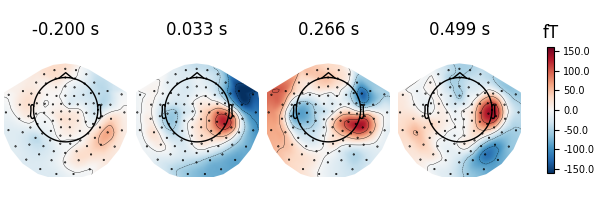
若 times 设为 None,最多显示 10 个等间隔地形图:
evoked.plot_topomap(ch_type="mag")
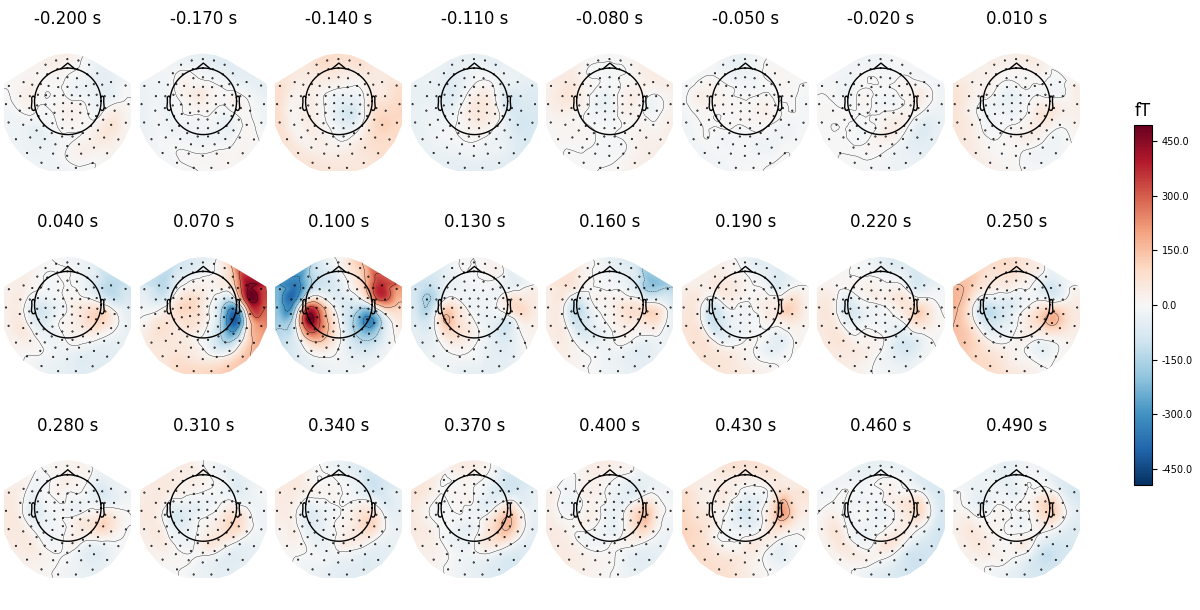
可用 nrows 与 ncols 参数创建包含更多时间点的多行图。
all_times = np.arange(-0.2, 0.5, 0.03)
evoked.plot_topomap(all_times, ch_type="mag", ncols=8, nrows="auto")
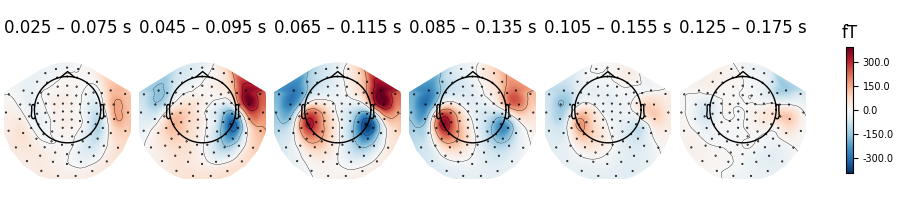
除了显示特定时间点的地形图,还可以计算以这些时间点为中心的 50 ms 时间窗平均,以降低地形图中的噪声:
evoked.plot_topomap(times, ch_type="mag", average=0.05)
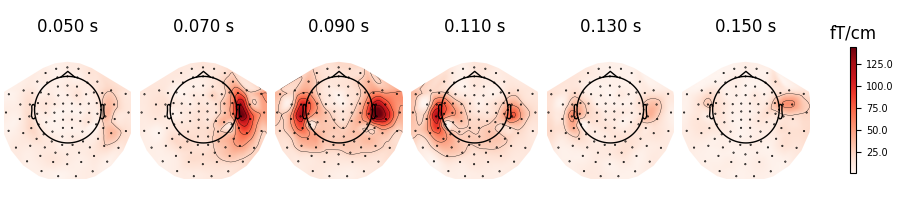
也可以绘制梯度计数据(对每对梯度计绘制 RMS):
evoked.plot_topomap(times, ch_type="grad")
plot_topomap() 其他选项#
还可以使用多种 mne.viz.plot_topomap() 参数控制地形图的绘制方式,例如:
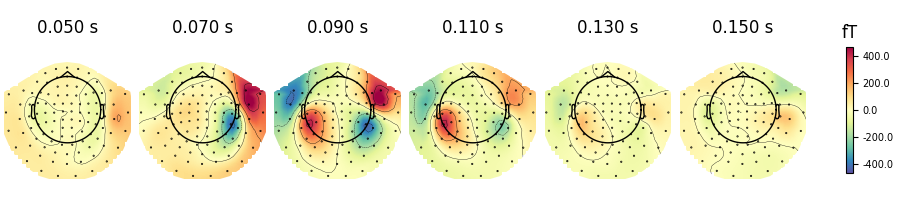
cmap——指定色图res——控制地形图分辨率(分辨率越低绘制越快)contours——定义绘制多少条等高线
evoked.plot_topomap(times, ch_type="mag", cmap="Spectral_r", res=32, contours=4)
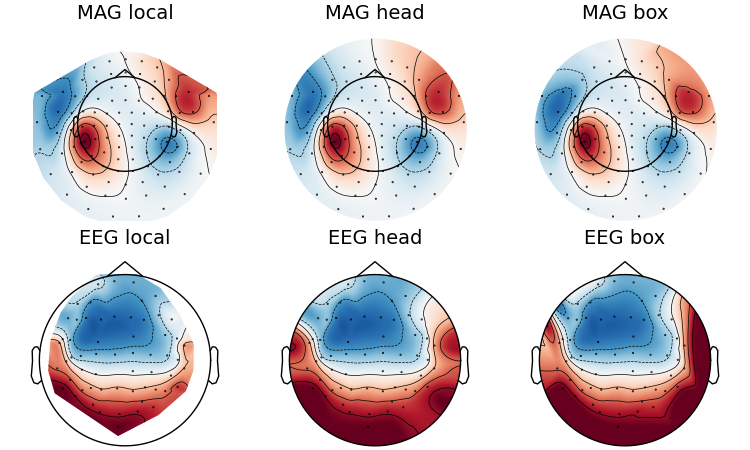
观察单个地形图头部圆形的边缘,可以看到外推的效果。共有三种外推模式:
extrapolate='local'仅外推到靠近传感器的点。extrapolate='head'外推到头部圆形。extrapolate='box'外推到一个超出头部圆形的大方框。
默认值 extrapolate='auto' 对 MEG 传感器使用 'local',其他情况使用 'head'。下面展示各选项:
extrapolations = ["local", "head", "box"]
fig, axes = plt.subplots(figsize=(7.5, 4.5), nrows=2, ncols=3, layout="constrained")

# Here we look at EEG channels, and use a custom head sphere to get all the
# sensors to be well within the drawn head surface
for axes_row, ch_type in zip(axes, ("mag", "eeg")):
    for ax, extr in zip(axes_row, extrapolations):
        evoked.plot_topomap(
            0.1,
            ch_type=ch_type,
            size=2,
            extrapolate=extr,
            axes=ax,
            show=False,
            colorbar=False,
            sphere=(0.0, 0.0, 0.0, 0.09),
        )
        ax.set_title(f"{ch_type.upper()} {extr}", fontsize=14)
更高级的用法#
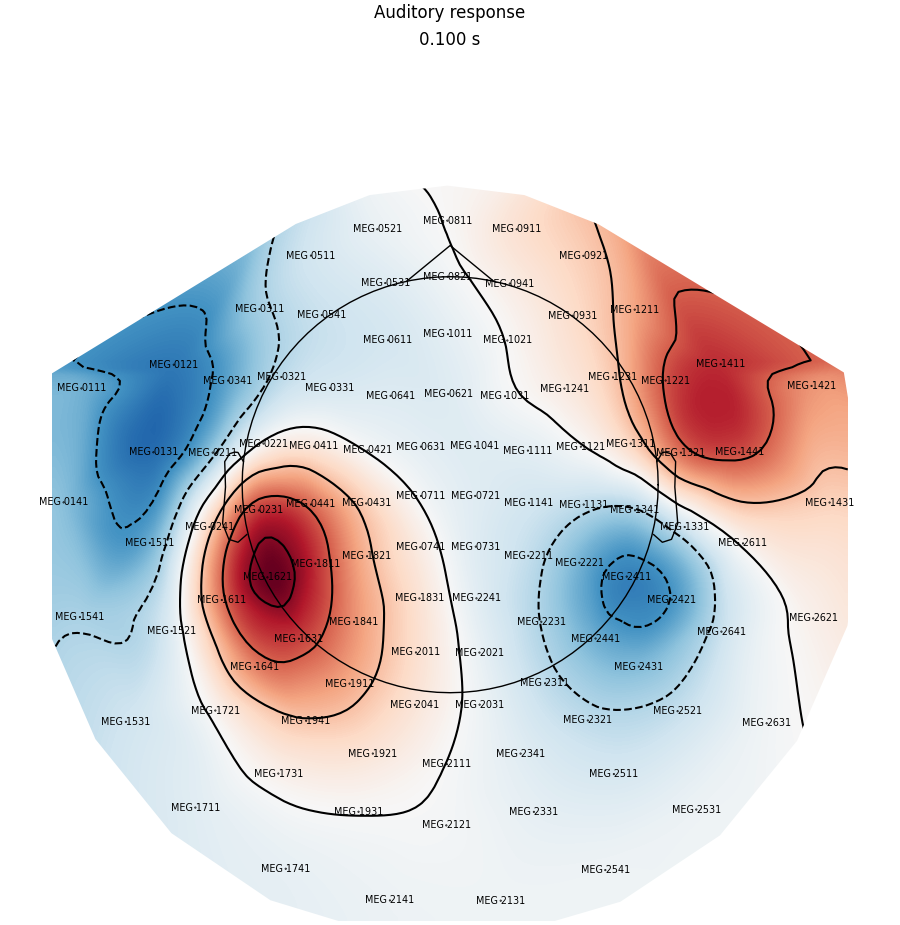
现在绘制刺激后 100 ms 单一时间点的磁强计地形图,添加通道标签与标题,并调整边距:
fig = evoked.plot_topomap(
    0.1, ch_type="mag", show_names=True, colorbar=False, size=6, res=128
)
fig.suptitle("Auditory response")
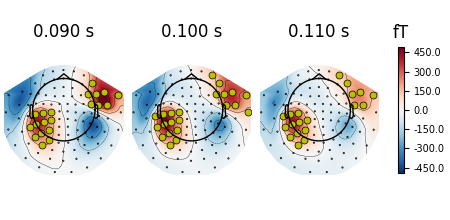
还可以通过添加掩码高亮特定通道,例如标记给定时点上超过阈值的通道:
# Define a threshold and create the mask
mask = evoked.data > 1e-13

# Select times and plot
times = (0.09, 0.1, 0.11)
mask_params = dict(markersize=10, markerfacecolor="y")
evoked.plot_topomap(times, ch_type="mag", mask=mask, mask_params=mask_params)
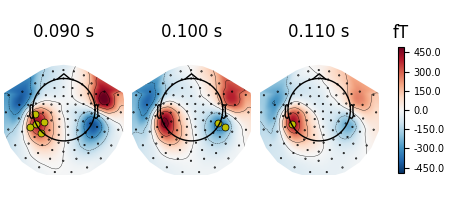
或手动选择在不同时间点要高亮的通道:
times = (0.09, 0.1, 0.11)
_times = ((np.abs(evoked.times - t)).argmin() for t in times)
significant_channels = [
    ("MEG 0231", "MEG 1611", "MEG 1621", "MEG 1631", "MEG 1811"),
    ("MEG 2411", "MEG 2421"),
    ("MEG 1621"),
]
_channels = [np.isin(evoked.ch_names, ch) for ch in significant_channels]

mask = np.zeros(evoked.data.shape, dtype="bool")
for _chs, _time in zip(_channels, _times):
    mask[_chs, _time] = True

evoked.plot_topomap(times, ch_type="mag", mask=mask, mask_params=mask_params)
插值地形图#
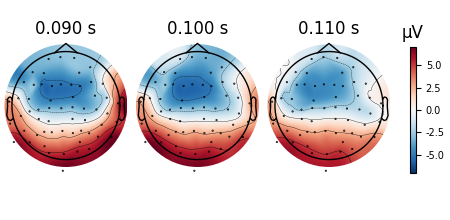
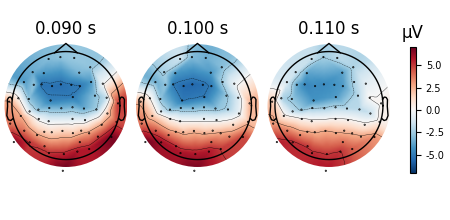
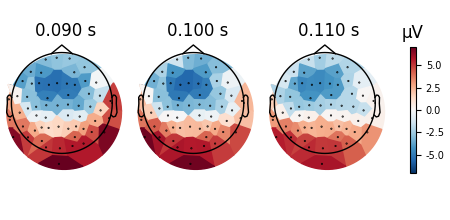
也可以查看插值的效果。有时我们拥有各通道的数据(例如每个电极的阻抗),但不希望对其插值;或者只想不做插值地查看数据以做基本检查。可用 image_interp='nearest' 禁止任何插值,或用 image_interp='linear' 以线性插值替代默认的三次插值。
默认的三次插值最平滑,很适合论文插图。
evoked.plot_topomap(times, ch_type="eeg", image_interp="cubic")
线性插值在某些情况下可能更有帮助。
evoked.plot_topomap(times, ch_type="eeg", image_interp="linear")
最近邻(Voronoi,无插值)插值特别适合调试,可看到赋给地形图的原始数值。
evoked.plot_topomap(times, ch_type="eeg", image_interp="nearest", contours=0)
制作地形图动画#
除了静态图像,还可以把磁强计数据绘制为动画;该动画仅在 matplotlib 交互模式下正常播放。
脚本总运行时间:(0 分 9.726 秒)