
注意
转到末尾下载完整示例代码。
全传感器数据的时空置换 F 检验#
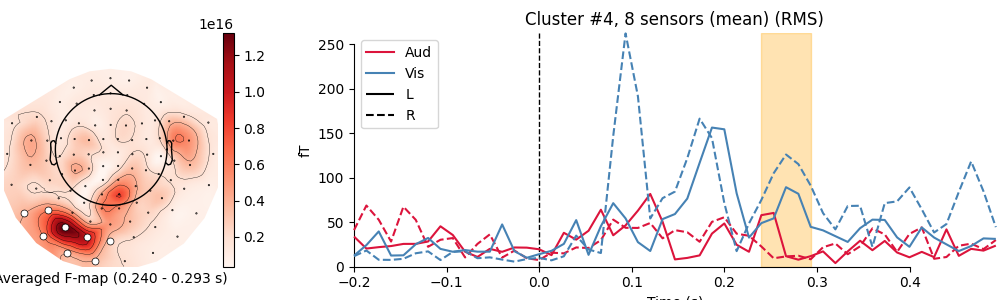
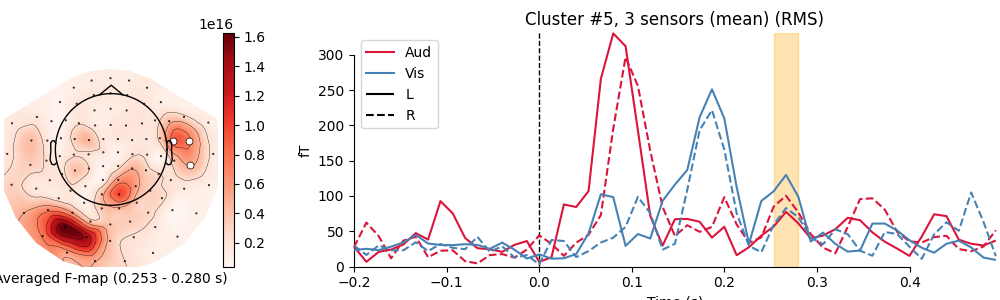
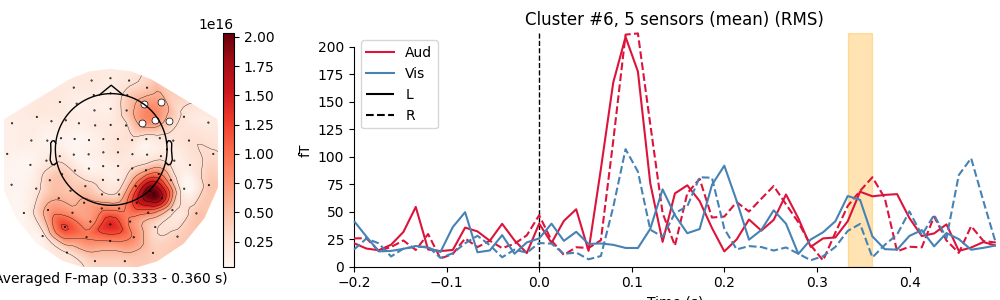
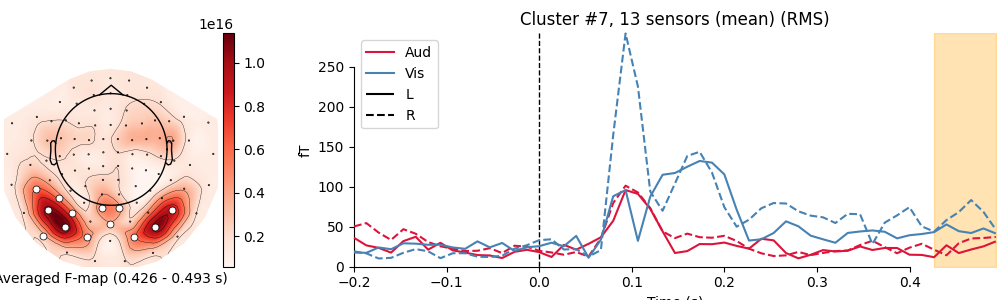
本教程使用置换聚类检验,检验至少一个条件下的诱发响应是否存在差异。将使用 FieldTrip 邻接模板确定传感器之间的邻接关系,作为聚类的空间先验。随后使用自定义 matplotlib 代码对时空簇进行可视化。
在这里,观测单位是来自特定研究被试的 epoch。不过,当观测单位是若干名研究被试、且每名被试贡献自己的平均数据(即其 epoch 的平均)时,同样的逻辑也适用。这种情况会被视为“第二层”(2nd level)分析。
关于“显著”簇可能如何解释的注意事项,请参阅 FieldTrip 教程。
有关 MNE-Python 中基于聚类的置换检验的更多信息,另请参阅:单试次功率的非参数单样本聚类统计。
# Authors: Denis Engemann <denis.engemann@gmail.com>
#          Jona Sassenhagen <jona.sassenhagen@gmail.com>
#          Alex Rockhill <aprockhill@mailbox.org>
#          Stefan Appelhoff <stefan.appelhoff@mailbox.org>
#
# License: BSD-3-Clause
# Copyright the MNE-Python contributors.
import matplotlib.pyplot as plt
import numpy as np
import scipy.stats
from mpl_toolkits.axes_grid1 import make_axes_locatable

import mne
from mne.channels import find_ch_adjacency
from mne.datasets import sample
from mne.stats import combine_adjacency, spatio_temporal_cluster_test
from mne.viz import plot_compare_evokeds
设置参数#
data_path = sample.data_path()
meg_path = data_path / "MEG" / "sample"
raw_fname = meg_path / "sample_audvis_filt-0-40_raw.fif"
event_fname = meg_path / "sample_audvis_filt-0-40_raw-eve.fif"
event_id = {"Aud/L": 1, "Aud/R": 2, "Vis/L": 3, "Vis/R": 4}
tmin = -0.2
tmax = 0.5

# Setup for reading the raw data
raw = mne.io.read_raw_fif(raw_fname, preload=True)
raw.filter(1, 25)
events = mne.read_events(event_fname)
Opening raw data file /home/circleci/mne_data/MNE-sample-data/MEG/sample/sample_audvis_filt-0-40_raw.fif...
    Read a total of 4 projection items:
        PCA-v1 (1 x 10²)  idle
        PCA-v2 (1 x 10²)  idle
        PCA-v3 (1 x 10²)  idle
        Average EEG reference (1 x 60)  idle
    Range : 6450 ... 48149 =     42.956 ...   320.665 secs
Ready.
Reading 0 ... 41699  =      0.000 ...   277.709 secs...
Filtering raw data in 1 contiguous segment
Setting up band-pass filter from 1 - 25 Hz

FIR filter parameters
---------------------
Designing a one-pass, zero-phase, non-causal bandpass filter:
- Windowed time-domain design (firwin) method
- Hamming window with 0.0194 passband ripple and 53 dB stopband attenuation
- Lower passband edge: 1.00
- Lower transition bandwidth: 1.00 Hz (-6 dB cutoff frequency: 0.50 Hz)
- Upper passband edge: 25.00 Hz
- Upper transition bandwidth: 6.25 Hz (-6 dB cutoff frequency: 28.12 Hz)
- Filter length: 497 samples (3.310 s)
读取感兴趣通道的 epoch 数据#
picks = mne.pick_types(raw.info, meg="mag", eog=True)

reject = dict(mag=4e-12, eog=150e-6)
epochs = mne.Epochs(
    raw,
    events,
    event_id,
    tmin,
    tmax,
    picks=picks,
    decim=2,  # just for speed!
    baseline=None,
    reject=reject,
    preload=True,
)

epochs.drop_channels(["EOG 061"])
epochs.equalize_event_counts(event_id)

# Obtain the data as a 3D matrix and transpose it such that
# the dimensions are as expected for the cluster permutation test:
# n_epochs × n_times × n_channels
X = [epochs[event_name].get_data(copy=False) for event_name in event_id]
X = [np.transpose(x, (0, 2, 1)) for x in X]
Not setting metadata
288 matching events found
No baseline correction applied
Created an SSP operator (subspace dimension = 3)
3 projection items activated
Using data from preloaded Raw for 288 events and 106 original time points (prior to decimation) ...
    Rejecting  epoch based on EOG : ['EOG 061']
    Rejecting  epoch based on EOG : ['EOG 061']
    Rejecting  epoch based on EOG : ['EOG 061']
    Rejecting  epoch based on EOG : ['EOG 061']
    Rejecting  epoch based on EOG : ['EOG 061']
    Rejecting  epoch based on EOG : ['EOG 061']
    Rejecting  epoch based on EOG : ['EOG 061']
    Rejecting  epoch based on EOG : ['EOG 061']
    Rejecting  epoch based on EOG : ['EOG 061']
    Rejecting  epoch based on EOG : ['EOG 061']
    Rejecting  epoch based on EOG : ['EOG 061']
    Rejecting  epoch based on EOG : ['EOG 061']
    Rejecting  epoch based on EOG : ['EOG 061']
    Rejecting  epoch based on EOG : ['EOG 061']
    Rejecting  epoch based on EOG : ['EOG 061']
    Rejecting  epoch based on MAG : ['MEG 1711']
    Rejecting  epoch based on EOG : ['EOG 061']
    Rejecting  epoch based on EOG : ['EOG 061']
    Rejecting  epoch based on EOG : ['EOG 061']
    Rejecting  epoch based on EOG : ['EOG 061']
    Rejecting  epoch based on EOG : ['EOG 061']
    Rejecting  epoch based on MAG : ['MEG 1711']
    Rejecting  epoch based on EOG : ['EOG 061']
    Rejecting  epoch based on EOG : ['EOG 061']
    Rejecting  epoch based on EOG : ['EOG 061']
    Rejecting  epoch based on EOG : ['EOG 061']
    Rejecting  epoch based on EOG : ['EOG 061']
    Rejecting  epoch based on EOG : ['EOG 061']
    Rejecting  epoch based on EOG : ['EOG 061']
    Rejecting  epoch based on EOG : ['EOG 061']
    Rejecting  epoch based on EOG : ['EOG 061']
    Rejecting  epoch based on EOG : ['EOG 061']
    Rejecting  epoch based on EOG : ['EOG 061']
    Rejecting  epoch based on EOG : ['EOG 061']
    Rejecting  epoch based on EOG : ['EOG 061']
    Rejecting  epoch based on EOG : ['EOG 061']
    Rejecting  epoch based on EOG : ['EOG 061']
    Rejecting  epoch based on EOG : ['EOG 061']
    Rejecting  epoch based on EOG : ['EOG 061']
    Rejecting  epoch based on EOG : ['EOG 061']
    Rejecting  epoch based on EOG : ['EOG 061']
    Rejecting  epoch based on EOG : ['EOG 061']
    Rejecting  epoch based on EOG : ['EOG 061']
    Rejecting  epoch based on EOG : ['EOG 061']
    Rejecting  epoch based on EOG : ['EOG 061']
    Rejecting  epoch based on EOG : ['EOG 061']
    Rejecting  epoch based on EOG : ['EOG 061']
    Rejecting  epoch based on EOG : ['EOG 061']
48 bad epochs dropped
Dropped 16 epochs: 50, 51, 84, 93, 95, 96, 129, 146, 149, 154, 158, 195, 201, 203, 211, 212
查找 FieldTrip 邻接定义以设置传感器邻接关系#
adjacency, ch_names = find_ch_adjacency(epochs.info, ch_type="mag")

print(type(adjacency))  # it's a sparse matrix!

mne.viz.plot_ch_adjacency(epochs.info, adjacency, ch_names)
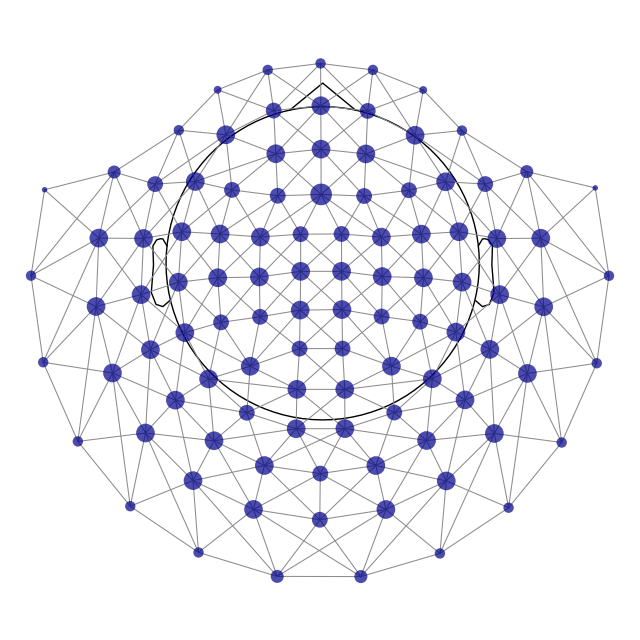
Reading adjacency matrix for neuromag306mag.
<class 'scipy.sparse._csr.csr_array'>
计算置换统计量#
它是如何工作的?我们使用聚类将相似的特征“绑定”在一起。这里的特征是不同时刻在传感器阵列上测得的磁场。这样可以缓解多重比较问题。为了计算实际的检验统计量,我们首先对每个簇内的所有 F 值求和,从而为每个簇得到一个统计量。然后,我们在样本之间打乱条件标签并重新计算簇和检验统计量,由此从数据中生成一个分布。我们通过计算观察到如此大小的簇的概率,来检验给定簇的显著性 [ 1 ] [ 2 ]。
# We are running an F test, so we look at the upper tail
# see also: https://stats.stackexchange.com/a/73993
tail = 1

# We want to set a critical test statistic (here: F), to determine when
# clusters are being formed. Using Scipy's percent point function of the F
# distribution, we can conveniently select a threshold that corresponds to
# some alpha level that we arbitrarily pick.
alpha_cluster_forming = 0.001

# For an F test we need the degrees of freedom for the numerator
# (number of conditions - 1) and the denominator (number of observations
# - number of conditions):
n_conditions = len(event_id)
n_observations = len(X[0])
dfn = n_conditions - 1
dfd = n_observations - n_conditions

# Note: we calculate 1 - alpha_cluster_forming to get the critical value
# on the right tail
f_thresh = scipy.stats.f.ppf(1 - alpha_cluster_forming, dfn=dfn, dfd=dfd)

# run the cluster based permutation analysis
cluster_stats = spatio_temporal_cluster_test(
    X,
    n_permutations=1000,
    threshold=f_thresh,
    tail=tail,
    n_jobs=None,
    buffer_size=None,
    adjacency=adjacency,
    rng=149,
)
F_obs, clusters, p_values, _ = cluster_stats
stat_fun(H1): min=0.003378737471819137 max=207.77535362731714
Running initial clustering …
Found 22 clusters

  0%|          | Permuting : 0/999 [00:00<?,       ?it/s]
  3%|▎         | Permuting : 25/999 [00:00<00:01,  741.74it/s]
  5%|▌         | Permuting : 50/999 [00:00<00:01,  742.65it/s]
  8%|▊         | Permuting : 76/999 [00:00<00:01,  753.12it/s]
 10%|█         | Permuting : 100/999 [00:00<00:01,  742.49it/s]
 12%|█▏        | Permuting : 124/999 [00:00<00:01,  736.14it/s]
 15%|█▍        | Permuting : 147/999 [00:00<00:01,  726.39it/s]
 17%|█▋        | Permuting : 171/999 [00:00<00:01,  724.18it/s]
 20%|█▉        | Permuting : 195/999 [00:00<00:01,  721.66it/s]
 22%|██▏       | Permuting : 219/999 [00:00<00:01,  720.61it/s]
 24%|██▍       | Permuting : 243/999 [00:00<00:01,  719.70it/s]
 27%|██▋       | Permuting : 268/999 [00:00<00:01,  722.46it/s]
 29%|██▉       | Permuting : 293/999 [00:00<00:00,  724.74it/s]
 32%|███▏      | Permuting : 317/999 [00:00<00:00,  723.64it/s]
 34%|███▍      | Permuting : 341/999 [00:00<00:00,  722.73it/s]
 37%|███▋      | Permuting : 365/999 [00:00<00:00,  721.94it/s]
 39%|███▉      | Permuting : 390/999 [00:00<00:00,  723.86it/s]
 42%|████▏     | Permuting : 415/999 [00:00<00:00,  725.50it/s]
 44%|████▍     | Permuting : 439/999 [00:00<00:00,  724.55it/s]
 46%|████▋     | Permuting : 463/999 [00:00<00:00,  723.66it/s]
 49%|████▊     | Permuting : 487/999 [00:00<00:00,  722.84it/s]
 51%|█████     | Permuting : 510/999 [00:00<00:00,  719.91it/s]
 54%|█████▎    | Permuting : 535/999 [00:00<00:00,  721.63it/s]
 56%|█████▋    | Permuting : 562/999 [00:00<00:00,  727.17it/s]
 59%|█████▉    | Permuting : 590/999 [00:00<00:00,  734.45it/s]
 62%|██████▏   | Permuting : 615/999 [00:00<00:00,  735.15it/s]
 64%|██████▍   | Permuting : 643/999 [00:00<00:00,  741.77it/s]
 68%|██████▊   | Permuting : 675/999 [00:00<00:00,  755.86it/s]
 70%|███████   | Permuting : 704/999 [00:00<00:00,  762.96it/s]
 74%|███████▎  | Permuting : 735/999 [00:00<00:00,  773.35it/s]
 77%|███████▋  | Permuting : 765/999 [00:01<00:00,  781.05it/s]
 80%|███████▉  | Permuting : 795/999 [00:01<00:00,  788.04it/s]
 83%|████████▎ | Permuting : 825/999 [00:01<00:00,  794.47it/s]
 86%|████████▌ | Permuting : 855/999 [00:01<00:00,  800.49it/s]
 89%|████████▊ | Permuting : 885/999 [00:01<00:00,  806.01it/s]
 92%|█████████▏| Permuting : 915/999 [00:01<00:00,  811.28it/s]
 94%|█████████▍| Permuting : 944/999 [00:01<00:00,  814.41it/s]
 97%|█████████▋| Permuting : 973/999 [00:01<00:00,  817.36it/s]
100%|██████████| Permuting : 999/999 [00:01<00:00,  820.36it/s]
100%|██████████| Permuting : 999/999 [00:01<00:00,  784.00it/s]
注意
请注意,我们只为传感器指定了邻接关系!然而,由于使用了 mne.stats.spatio_temporal_cluster_test(),时间点的邻接关系会被自动考虑在内。也就是说,在时间点 N,时间点 N - 1 和 N + 1 被视为相邻(这也称为“格点邻接”,lattice adjacency)。这之所以可行,是因为我们对每个观测的二维数据(时间 × 通道)进行了分析……对于每个观测的三维数据(例如时间 × 频率 × 通道),则需要使用 mne.stats.combine_adjacency(),如下文所示。
另请注意,这些函数同样适用于源估计。区别仅在于数据来源、数据规模以及邻接关系的定义。它既可用于单试次,也可用于被试组。
可视化簇#
# We subselect clusters that we consider significant at an arbitrarily
# picked alpha level: "p_accept".
# NOTE: remember the caveats with respect to "significant" clusters that
# we mentioned in the introduction of this tutorial!
p_accept = 0.01
good_cluster_inds = np.where(p_values < p_accept)[0]

# configure variables for visualization
colors = {"Aud": "crimson", "Vis": "steelblue"}
linestyles = {"L": "-", "R": "--"}

# organize data for plotting
evokeds = {cond: epochs[cond].average() for cond in event_id}

# loop over clusters
for i_clu, clu_idx in enumerate(good_cluster_inds):
    # unpack cluster information, get unique indices
    time_inds, space_inds = np.squeeze(clusters[clu_idx])
    ch_inds = np.unique(space_inds)
    time_inds = np.unique(time_inds)

    # get topography for F stat
    f_map = F_obs[time_inds, ...].mean(axis=0)

    # get signals at the sensors contributing to the cluster
    sig_times = epochs.times[time_inds]

    # create spatial mask
    mask = np.zeros((f_map.shape[0], 1), dtype=bool)
    mask[ch_inds, :] = True

    # initialize figure
    fig, ax_topo = plt.subplots(1, 1, figsize=(10, 3), layout="constrained")

    # plot average test statistic and mark significant sensors
    f_evoked = mne.EvokedArray(f_map[:, np.newaxis], epochs.info, tmin=0)
    f_evoked.plot_topomap(
        times=0,
        mask=mask,
        axes=ax_topo,
        cmap="Reds",
        vlim=(np.min, np.max),
        show=False,
        colorbar=False,
        mask_params=dict(markersize=10),
    )
    image = ax_topo.images[0]

    # remove the title that would otherwise say "0.000 s"
    ax_topo.set_title("")

    # create additional axes (for ERF and colorbar)
    divider = make_axes_locatable(ax_topo)

    # add axes for colorbar
    ax_colorbar = divider.append_axes("right", size="5%", pad=0.05)
    plt.colorbar(image, cax=ax_colorbar)
    ax_topo.set_xlabel(
        "Averaged F-map ({:0.3f} - {:0.3f} s)".format(*sig_times[[0, -1]])
    )

    # add new axis for time courses and plot time courses
    ax_signals = divider.append_axes("right", size="300%", pad=1.2)
    title = f"Cluster #{i_clu + 1}, {len(ch_inds)} sensor"
    if len(ch_inds) > 1:
        title += "s (mean)"
    plot_compare_evokeds(
        evokeds,
        title=title,
        picks=ch_inds,
        axes=ax_signals,
        colors=colors,
        linestyles=linestyles,
        show=False,
        split_legend=True,
        truncate_yaxis="auto",
    )

    # plot temporal cluster extent
    ymin, ymax = ax_signals.get_ylim()
    ax_signals.fill_betweenx(
        (ymin, ymax), sig_times[0], sig_times[-1], color="orange", alpha=0.3
    )

plt.show()
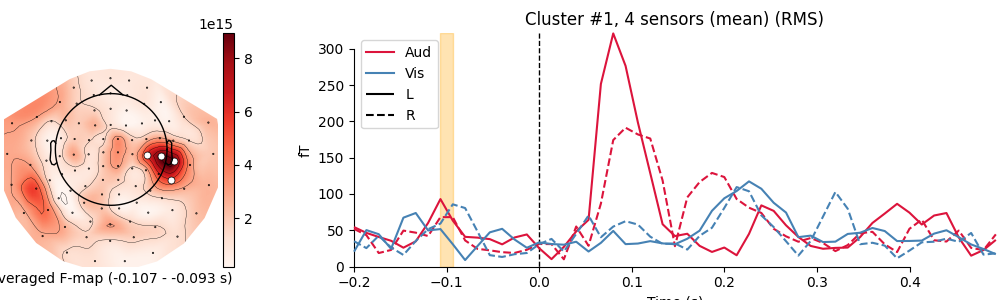
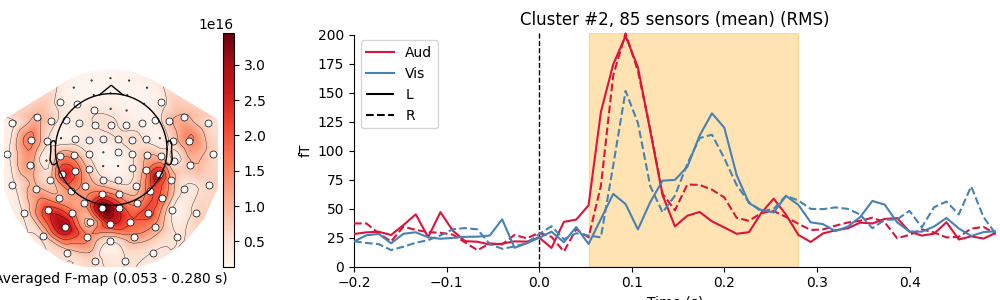
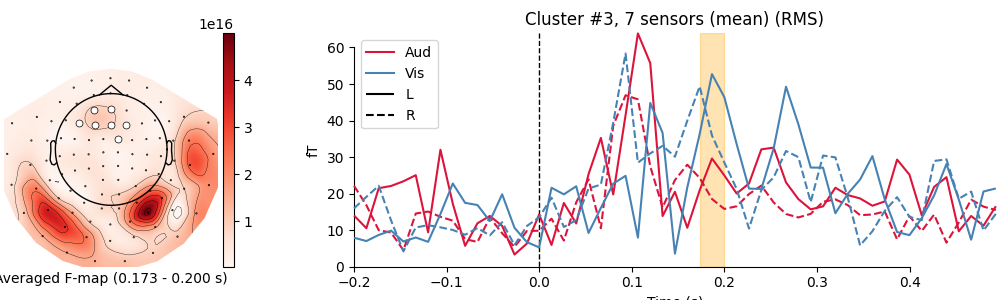
combining channels using RMS (mag channels)
combining channels using RMS (mag channels)
combining channels using RMS (mag channels)
combining channels using RMS (mag channels)
combining channels using RMS (mag channels)
combining channels using RMS (mag channels)
combining channels using RMS (mag channels)
combining channels using RMS (mag channels)
combining channels using RMS (mag channels)
combining channels using RMS (mag channels)
combining channels using RMS (mag channels)
combining channels using RMS (mag channels)
combining channels using RMS (mag channels)
combining channels using RMS (mag channels)
combining channels using RMS (mag channels)
combining channels using RMS (mag channels)
combining channels using RMS (mag channels)
combining channels using RMS (mag channels)
combining channels using RMS (mag channels)
combining channels using RMS (mag channels)
combining channels using RMS (mag channels)
combining channels using RMS (mag channels)
combining channels using RMS (mag channels)
combining channels using RMS (mag channels)
combining channels using RMS (mag channels)
combining channels using RMS (mag channels)
combining channels using RMS (mag channels)
combining channels using RMS (mag channels)
时频数据的置换统计量#
下面我们对数据的时频分解做同样的分析(教程见 传感器层面的频率与时频分析,时频方法比较见 Time-frequency on simulated data (Multitaper vs. Morlet vs. Stockwell vs. Hilbert)),以展示如何在更高维数据上进行聚类置换检验。
decim = 4
freqs = np.arange(7, 30, 3)  # define frequencies of interest
n_cycles = freqs / freqs[0]

epochs_power = list()
for condition in [epochs[k] for k in ("Aud/L", "Vis/L")]:
    this_tfr = condition.compute_tfr(
        method="morlet",
        freqs=freqs,
        n_cycles=n_cycles,
        decim=decim,
        average=False,
        return_itc=False,
    )
    this_tfr.apply_baseline(mode="ratio", baseline=(None, 0))
    epochs_power.append(this_tfr.data)

# transpose again to (epochs, frequencies, times, channels)
X = [np.transpose(x, (0, 2, 3, 1)) for x in epochs_power]
Applying baseline correction (mode: ratio)
Applying baseline correction (mode: ratio)
回想上文关于邻接矩阵的说明:对于此处这样的三维数据,必须使用 mne.stats.combine_adjacency() 扩展基于传感器的邻接关系,以便同时纳入时频平面。
这里,整数输入会被转换为格点,并与传感器邻接矩阵组合,使得时间相近、频率相近且传感器位置相邻的数据被聚到同一个簇中。
# our data at each observation is of shape frequencies × times × channels
tfr_adjacency = combine_adjacency(len(freqs), len(this_tfr.times), adjacency)
现在可以运行聚类置换检验了,但首先需要设置阈值。本示例在时间上进行了抽取,且使用的频率较少,因此需要将阈值提高到默认值以上,才能得到有区分度的簇(即避免算法只找到一个巨大的簇)。若希望以更有原则的方式设置该参数,可以使用无阈值聚类增强(threshold-free cluster enhancement)。相关讨论见 统计推断。
# This time we don't calculate a threshold based on the F distribution.
# We might as well select an arbitrary threshold for cluster forming
tfr_threshold = 15.0

# run cluster based permutation analysis
cluster_stats = spatio_temporal_cluster_test(
    X,
    n_permutations=1000,
    threshold=tfr_threshold,
    tail=1,
    n_jobs=None,
    buffer_size=None,
    adjacency=tfr_adjacency,
    rng=151,
)
stat_fun(H1): min=6.752417666025858e-07 max=38.40836555950503
Running initial clustering …
Found 3 clusters

  0%|          | Permuting : 0/999 [00:00<?,       ?it/s]
  3%|▎         | Permuting : 31/999 [00:00<00:01,  917.40it/s]
  6%|▌         | Permuting : 62/999 [00:00<00:01,  919.37it/s]
 10%|▉         | Permuting : 95/999 [00:00<00:00,  941.02it/s]
 13%|█▎        | Permuting : 125/999 [00:00<00:00,  927.99it/s]
 16%|█▌        | Permuting : 156/999 [00:00<00:00,  926.73it/s]
 19%|█▊        | Permuting : 186/999 [00:00<00:00,  920.27it/s]
 22%|██▏       | Permuting : 218/999 [00:00<00:00,  925.51it/s]
 25%|██▌       | Permuting : 251/999 [00:00<00:00,  933.94it/s]
 28%|██▊       | Permuting : 283/999 [00:00<00:00,  936.38it/s]
 32%|███▏      | Permuting : 316/999 [00:00<00:00,  942.05it/s]
 35%|███▍      | Permuting : 347/999 [00:00<00:00,  939.74it/s]
 38%|███▊      | Permuting : 378/999 [00:00<00:00,  937.77it/s]
 41%|████      | Permuting : 410/999 [00:00<00:00,  939.24it/s]
 44%|████▍     | Permuting : 441/999 [00:00<00:00,  937.56it/s]
 47%|████▋     | Permuting : 472/999 [00:00<00:00,  935.93it/s]
 50%|█████     | Permuting : 501/999 [00:00<00:00,  929.42it/s]
 53%|█████▎    | Permuting : 532/999 [00:00<00:00,  928.79it/s]
 56%|█████▋    | Permuting : 563/999 [00:00<00:00,  928.31it/s]
 59%|█████▉    | Permuting : 594/999 [00:00<00:00,  927.82it/s]
 63%|██████▎   | Permuting : 625/999 [00:00<00:00,  927.35it/s]
 66%|██████▌   | Permuting : 657/999 [00:00<00:00,  929.16it/s]
 69%|██████▉   | Permuting : 689/999 [00:00<00:00,  930.85it/s]
 72%|███████▏  | Permuting : 721/999 [00:00<00:00,  932.36it/s]
 75%|███████▌  | Permuting : 752/999 [00:00<00:00,  931.11it/s]
 78%|███████▊  | Permuting : 784/999 [00:00<00:00,  932.57it/s]
 82%|████████▏ | Permuting : 815/999 [00:00<00:00,  931.86it/s]
 85%|████████▍ | Permuting : 847/999 [00:00<00:00,  933.21it/s]
 88%|████████▊ | Permuting : 879/999 [00:00<00:00,  934.45it/s]
 91%|█████████ | Permuting : 911/999 [00:00<00:00,  935.60it/s]
 94%|█████████▍| Permuting : 942/999 [00:01<00:00,  934.77it/s]
 97%|█████████▋| Permuting : 972/999 [00:01<00:00,  932.13it/s]
100%|██████████| Permuting : 999/999 [00:01<00:00,  932.99it/s]
100%|██████████| Permuting : 999/999 [00:01<00:00,  932.52it/s]
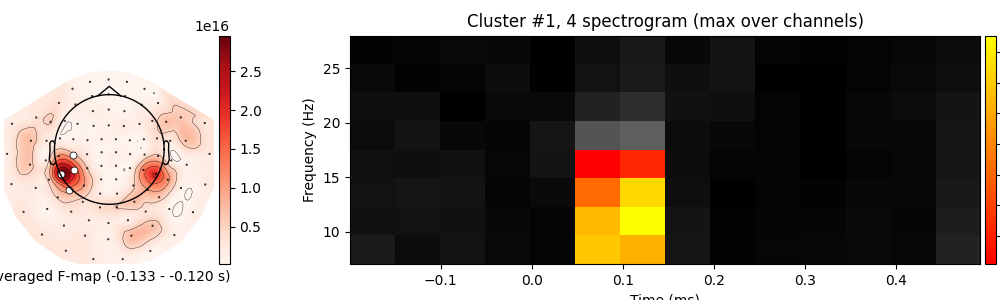
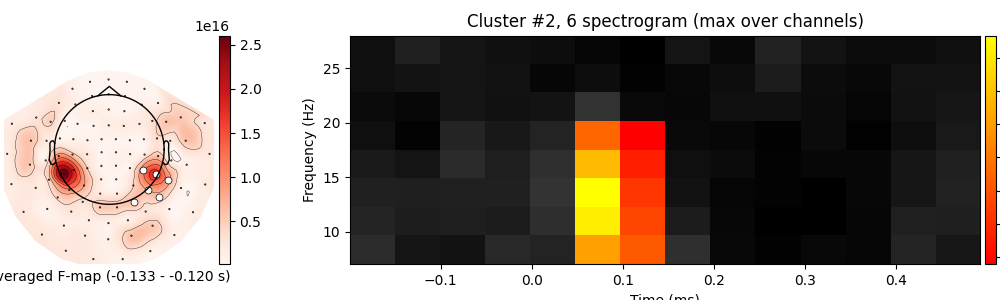
最后,我们可以绘制结果。在时频-传感器空间中可视化簇并不容易;绘制时频频谱图和绘制地形图分别展示时频空间与传感器空间,但两者难以结合。我们将把簇内传感器以白色标出的地形图与频谱图并排绘制,以提供结果的可视化。不过,这是一种维度受限的视角。每个传感器都有其自身显著的时频点,但为了显示单张频谱图,簇内任一传感器显著的所有时频点都会被标为显著。这是高维数据可视化固有的困难,在解释结果时应加以考虑。
F_obs, clusters, p_values, _ = cluster_stats
good_cluster_inds = np.where(p_values < p_accept)[0]

for i_clu, clu_idx in enumerate(good_cluster_inds):
    # unpack cluster information, get unique indices
    freq_inds, time_inds, space_inds = clusters[clu_idx]
    ch_inds = np.unique(space_inds)
    time_inds = np.unique(time_inds)
    freq_inds = np.unique(freq_inds)

    # get topography for F stat
    f_map = F_obs[freq_inds].mean(axis=0)
    f_map = f_map[time_inds].mean(axis=0)

    # get signals at the sensors contributing to the cluster
    sig_times = epochs.times[time_inds]

    # initialize figure
    fig, ax_topo = plt.subplots(1, 1, figsize=(10, 3), layout="constrained")

    # create spatial mask
    mask = np.zeros((f_map.shape[0], 1), dtype=bool)
    mask[ch_inds, :] = True

    # plot average test statistic and mark significant sensors
    f_evoked = mne.EvokedArray(f_map[:, np.newaxis], epochs.info, tmin=0)
    f_evoked.plot_topomap(
        times=0,
        mask=mask,
        axes=ax_topo,
        cmap="Reds",
        vlim=(np.min, np.max),
        show=False,
        colorbar=False,
        mask_params=dict(markersize=10),
    )
    image = ax_topo.images[0]

    # create additional axes (for ERF and colorbar)
    divider = make_axes_locatable(ax_topo)

    # add axes for colorbar
    ax_colorbar = divider.append_axes("right", size="5%", pad=0.05)
    plt.colorbar(image, cax=ax_colorbar)
    ax_topo.set_xlabel(
        "Averaged F-map ({:0.3f} - {:0.3f} s)".format(*sig_times[[0, -1]])
    )

    # remove the title that would otherwise say "0.000 s"
    ax_topo.set_title("")

    # add new axis for spectrogram
    ax_spec = divider.append_axes("right", size="300%", pad=1.2)
    title = f"Cluster #{i_clu + 1}, {len(ch_inds)} spectrogram"
    if len(ch_inds) > 1:
        title += " (max over channels)"
    F_obs_plot = F_obs[..., ch_inds].max(axis=-1)
    F_obs_plot_sig = np.zeros(F_obs_plot.shape) * np.nan
    F_obs_plot_sig[tuple(np.meshgrid(freq_inds, time_inds))] = F_obs_plot[
        tuple(np.meshgrid(freq_inds, time_inds))
    ]

    for f_image, cmap in zip([F_obs_plot, F_obs_plot_sig], ["gray", "autumn"]):
        c = ax_spec.imshow(
            f_image,
            cmap=cmap,
            aspect="auto",
            origin="lower",
            extent=[epochs.times[0], epochs.times[-1], freqs[0], freqs[-1]],
        )
    ax_spec.set_xlabel("Time (ms)")
    ax_spec.set_ylabel("Frequency (Hz)")
    ax_spec.set_title(title)

    # add another colorbar
    ax_colorbar2 = divider.append_axes("right", size="5%", pad=0.05)
    plt.colorbar(c, cax=ax_colorbar2)
    ax_colorbar2.set_ylabel("F-stat")

    # clean up viz
plt.show()
练习#
参考文献#
脚本总运行时间:(0 分钟 6.836 秒)