
注意
转到末尾下载完整示例代码。
使用时空聚类对源数据进行重复测量 ANOVA#
本示例说明如何将聚类函数用于标准 t 检验之外的、任意自定义的对比。在此,我们要检验一组受试者(这里使用一名受试者的数据模拟)中,诱发电位在刺激通道(视觉 vs 听觉)上的差异是否依赖于刺激位置(左 vs 右)。为此,我们使用重复测量 ANOVA 计算交互效应。多重比较问题则通过跨空间和时间的聚类水平置换检验来解决。
# Authors: Alexandre Gramfort <alexandre.gramfort@inria.fr>
#          Eric Larson <larson.eric.d@gmail.com>
#          Denis Engemannn <denis.engemann@gmail.com>
#
# License: BSD-3-Clause
# Copyright the MNE-Python contributors.
import matplotlib.pyplot as plt
import numpy as np

import mne
from mne.datasets import sample
from mne.minimum_norm import apply_inverse, read_inverse_operator
from mne.stats import (
    f_mway_rm,
    f_threshold_mway_rm,
    spatio_temporal_cluster_test,
    summarize_clusters_stc,
)

print(__doc__)
设置参数#
data_path = sample.data_path()
meg_path = data_path / "MEG" / "sample"
raw_fname = meg_path / "sample_audvis_filt-0-40_raw.fif"
event_fname = meg_path / "sample_audvis_filt-0-40_raw-eve.fif"
subjects_dir = data_path / "subjects"
src_fname = subjects_dir / "fsaverage" / "bem" / "fsaverage-ico-5-src.fif"

tmin = -0.2
tmax = 0.3  # Use a lower tmax to reduce multiple comparisons

#   Setup for reading the raw data
raw = mne.io.read_raw_fif(raw_fname)
events = mne.read_events(event_fname)
Opening raw data file /home/circleci/mne_data/MNE-sample-data/MEG/sample/sample_audvis_filt-0-40_raw.fif...
    Read a total of 4 projection items:
        PCA-v1 (1 x 10²)  idle
        PCA-v2 (1 x 10²)  idle
        PCA-v3 (1 x 10²)  idle
        Average EEG reference (1 x 60)  idle
    Range : 6450 ... 48149 =     42.956 ...   320.665 secs
Ready.
读取所有通道的分段数据并剔除一个坏道#
raw.info["bads"] += ["MEG 2443"]
picks = mne.pick_types(raw.info, meg=True, eog=True, exclude="bads")
# we'll load all four conditions that make up the 'two ways' of our ANOVA

event_id = dict(l_aud=1, r_aud=2, l_vis=3, r_vis=4)
reject = dict(grad=1000e-13, mag=4000e-15, eog=150e-6)
epochs = mne.Epochs(
    raw,
    events,
    event_id,
    tmin,
    tmax,
    picks=picks,
    baseline=(None, 0),
    reject=reject,
    preload=True,
)

#    Equalize trial counts to eliminate bias (which would otherwise be
#    introduced by the abs() performed below)
epochs.equalize_event_counts(event_id)
Not setting metadata
288 matching events found
Setting baseline interval to [-0.19979521315838786, 0.0] s
Applying baseline correction (mode: mean)
Created an SSP operator (subspace dimension = 3)
3 projection items activated
Loading data for 288 events and 76 original time points ...
    Rejecting  epoch based on EOG : ['EOG 061']
    Rejecting  epoch based on EOG : ['EOG 061']
    Rejecting  epoch based on EOG : ['EOG 061']
    Rejecting  epoch based on EOG : ['EOG 061']
    Rejecting  epoch based on EOG : ['EOG 061']
    Rejecting  epoch based on EOG : ['EOG 061']
    Rejecting  epoch based on EOG : ['EOG 061']
    Rejecting  epoch based on EOG : ['EOG 061']
    Rejecting  epoch based on EOG : ['EOG 061']
    Rejecting  epoch based on EOG : ['EOG 061']
    Rejecting  epoch based on EOG : ['EOG 061']
    Rejecting  epoch based on MAG : ['MEG 1711']
    Rejecting  epoch based on EOG : ['EOG 061']
    Rejecting  epoch based on EOG : ['EOG 061']
    Rejecting  epoch based on EOG : ['EOG 061']
    Rejecting  epoch based on EOG : ['EOG 061']
    Rejecting  epoch based on EOG : ['EOG 061']
    Rejecting  epoch based on EOG : ['EOG 061']
    Rejecting  epoch based on EOG : ['EOG 061']
    Rejecting  epoch based on EOG : ['EOG 061']
    Rejecting  epoch based on EOG : ['EOG 061']
    Rejecting  epoch based on EOG : ['EOG 061']
    Rejecting  epoch based on EOG : ['EOG 061']
    Rejecting  epoch based on EOG : ['EOG 061']
    Rejecting  epoch based on EOG : ['EOG 061']
    Rejecting  epoch based on EOG : ['EOG 061']
    Rejecting  epoch based on EOG : ['EOG 061']
    Rejecting  epoch based on GRAD : ['MEG 1333', 'MEG 1342']
    Rejecting  epoch based on EOG : ['EOG 061']
    Rejecting  epoch based on EOG : ['EOG 061']
    Rejecting  epoch based on EOG : ['EOG 061']
    Rejecting  epoch based on EOG : ['EOG 061']
    Rejecting  epoch based on EOG : ['EOG 061']
33 bad epochs dropped
Dropped 15 epochs: 0, 13, 14, 32, 33, 35, 52, 151, 166, 168, 198, 199, 200, 201, 222
变换到源空间#
fname_inv = meg_path / "sample_audvis-meg-oct-6-meg-inv.fif"
snr = 3.0
lambda2 = 1.0 / snr**2
method = "dSPM"  # use dSPM method (could also be MNE, sLORETA, or eLORETA)
inverse_operator = read_inverse_operator(fname_inv)

# we'll only use one hemisphere to speed up this example
# instead of a second vertex array we'll pass an empty array
sample_vertices = [inverse_operator["src"][0]["vertno"], np.array([], int)]

#    Let's average and compute inverse, then resample to speed things up
conditions = []
for cond in ["l_aud", "r_aud", "l_vis", "r_vis"]:  # order is important
    evoked = epochs[cond].average()
    evoked.resample(30).crop(0.0, None)
    condition = apply_inverse(evoked, inverse_operator, lambda2, method)
    #    Let's only deal with t > 0, cropping to reduce multiple comparisons
    condition.crop(0, None)
    conditions.append(condition)

tmin = conditions[0].tmin
tstep = conditions[0].tstep * 1000  # convert to milliseconds
Reading inverse operator decomposition from /home/circleci/mne_data/MNE-sample-data/MEG/sample/sample_audvis-meg-oct-6-meg-inv.fif...
    Reading inverse operator info...
    [done]
    Reading inverse operator decomposition...
    [done]
    305 x 305 full covariance (kind = 1) found.
    Read a total of 4 projection items:
        PCA-v1 (1 x 10²) active
        PCA-v2 (1 x 10²) active
        PCA-v3 (1 x 10²) active
        Average EEG reference (1 x 60) active
    Noise covariance matrix read.
    22494 x 22494 diagonal covariance (kind = 2) found.
    Source covariance matrix read.
    22494 x 22494 diagonal covariance (kind = 6) found.
    Orientation priors read.
    22494 x 22494 diagonal covariance (kind = 5) found.
    Depth priors read.
    Did not find the desired covariance matrix (kind = 3)
    Reading a source space...
    Computing patch statistics...
    Patch information added...
    Distance information added...
    [done]
    Reading a source space...
    Computing patch statistics...
    Patch information added...
    Distance information added...
    [done]
    2 source spaces read
    Read a total of 4 projection items:
        PCA-v1 (1 x 10²) active
        PCA-v2 (1 x 10²) active
        PCA-v3 (1 x 10²) active
        Average EEG reference (1 x 60) active
    Source spaces transformed to the inverse solution coordinate frame
Preparing the inverse operator for use...
    Scaled noise and source covariance from nave = 1 to nave = 60
    Created the regularized inverter
    Created an SSP operator (subspace dimension = 3)
    Created the whitener using a noise covariance matrix with rank 302 (3 small eigenvalues omitted)
    Computing noise-normalization factors (dSPM)...
[done]
Applying inverse operator to "l_aud"...
    Picked 305 channels from the data
    Computing inverse...
    Eigenleads need to be weighted ...
    Computing residual...
    Explained  74.9% variance
    Combining the current components...
    dSPM...
[done]
Preparing the inverse operator for use...
    Scaled noise and source covariance from nave = 1 to nave = 60
    Created the regularized inverter
    Created an SSP operator (subspace dimension = 3)
    Created the whitener using a noise covariance matrix with rank 302 (3 small eigenvalues omitted)
    Computing noise-normalization factors (dSPM)...
[done]
Applying inverse operator to "r_aud"...
    Picked 305 channels from the data
    Computing inverse...
    Eigenleads need to be weighted ...
    Computing residual...
    Explained  71.6% variance
    Combining the current components...
    dSPM...
[done]
Preparing the inverse operator for use...
    Scaled noise and source covariance from nave = 1 to nave = 60
    Created the regularized inverter
    Created an SSP operator (subspace dimension = 3)
    Created the whitener using a noise covariance matrix with rank 302 (3 small eigenvalues omitted)
    Computing noise-normalization factors (dSPM)...
[done]
Applying inverse operator to "l_vis"...
    Picked 305 channels from the data
    Computing inverse...
    Eigenleads need to be weighted ...
    Computing residual...
    Explained  74.5% variance
    Combining the current components...
    dSPM...
[done]
Preparing the inverse operator for use...
    Scaled noise and source covariance from nave = 1 to nave = 60
    Created the regularized inverter
    Created an SSP operator (subspace dimension = 3)
    Created the whitener using a noise covariance matrix with rank 302 (3 small eigenvalues omitted)
    Computing noise-normalization factors (dSPM)...
[done]
Applying inverse operator to "r_vis"...
    Picked 305 channels from the data
    Computing inverse...
    Eigenleads need to be weighted ...
    Computing residual...
    Explained  78.9% variance
    Combining the current components...
    dSPM...
[done]
变换到共同皮层空间#
通常情况下,你会读取多个受试者的估计结果,并将它们 morph 到相同的皮层空间(例如 fsaverage)。为便于示例,这里我们让每个“受试者”都具有相同的响应(只是在源空间中带有噪声),以此进行模拟。
本教程中我们只考虑左半球。
n_vertices_sample, n_times = conditions[0].lh_data.shape
n_subjects = 6
print(f"Simulating data for {n_subjects} subjects.")

#    Let's make sure our results replicate, so set the seed.
rng = np.random.default_rng(0)
X = rng.normal(scale=10, size=(n_vertices_sample, n_times, n_subjects, 4))
for ii, condition in enumerate(conditions):
    X[:, :, :, ii] += condition.lh_data[:, :, np.newaxis]
Simulating data for 6 subjects.
对数据进行空间平滑是个好主意;为了可视化,我们把这些结果 morph 到 fsaverage,这是一个 grade 5 的 ICO 源空间,每个半球的顶点编号为 0:10242。通常需要分别对每个受试者的数据进行 morph,但这里所有估计结果都位于“sample”上,因此可以用一个 morph 矩阵完成全部工作。
# Read the source space we are morphing to (just left hemisphere)
src = mne.read_source_spaces(src_fname)
fsave_vertices = [src[0]["vertno"], []]
morph_mat = mne.compute_source_morph(
    src=inverse_operator["src"],
    subject_to="fsaverage",
    spacing=fsave_vertices,
    subjects_dir=subjects_dir,
    smooth=20,
).morph_mat
morph_mat = morph_mat[:, :n_vertices_sample]  # just left hemi from src
n_vertices_fsave = morph_mat.shape[0]

#    We have to change the shape for the dot() to work properly
X = X.reshape(n_vertices_sample, n_times * n_subjects * 4)
print("Morphing data.")
X = morph_mat.dot(X)  # morph_mat is a sparse matrix
X = X.reshape(n_vertices_fsave, n_times, n_subjects, 4)
    Reading a source space...
    [done]
    Reading a source space...
    [done]
    2 source spaces read
surface source space present ...
Computing morph matrix...
    Left-hemisphere map read.
    Right-hemisphere map read.
    20 smooth iterations done.
    20 smooth iterations done.
[done]
[done]
Morphing data.
现在需要为 ANOVA 统计量准备组水平矩阵。为使聚类函数与 ANOVA 函数正确配合,X 必须是由多维数组组成的列表(每个条件一个),其形状为:样本(受试者)× 时间 × 空间。
首先对维度进行置换,然后把数组拆分为按条件组成的列表,并使用 numpy.squeeze 丢弃拆分后产生的空维度。
X = np.transpose(X, [2, 1, 0, 3])  #
X = [np.squeeze(x) for x in np.split(X, 4, axis=-1)]
为任意对比准备函数#
由于我们的 ANOVA 函数是一个多用途工具,需要做几处修改才能与聚类函数集成,包括重塑数据、设置默认参数以及处理返回值。为此,我们编写一个简单的包装函数。
我们需要告诉 ANOVA 如何按因素解释数据矩阵。这通过 factor_levels 参数完成,它是一个列表,给出每个因素的因素水平数。
factor_levels = [2, 2]
最后,我们通过传入 'A:B' 来选择交互效应(这一记法借自 R 公式语言)。顺带说明,在这个特定示例中不能使用 A*B 记法,因为它会同时返回主效应和交互效应。原因是聚类函数要求 stat_fun 返回一维数组。若要同时获得两者的聚类,必须编写循环。
effects = "A:B"
# Tell the ANOVA not to compute p-values which we don't need for clustering
return_pvals = False

# a few more convenient bindings
n_times = X[0].shape[1]
n_conditions = 4
stat_fun 必须能够处理数量可变的输入参数。
在聚类函数内部,每个条件都会以展平数组的形式传入,这是聚类流程所要求的。然而 ANOVA 期望的输入数组维度为:受试者 × 条件 × 观测值(可选)。
下面的函数接收列表输入,交换第一维和第二维,最后调用 ANOVA。
注意
有关此 ANOVA 函数的更多细节,请参阅相应的时频教程。
def stat_fun(*args):
    # get f-values only.
    return f_mway_rm(
        np.swapaxes(args, 1, 0),
        factor_levels=factor_levels,
        effects=effects,
        return_pvals=return_pvals,
    )[0]
计算聚类统计量#
为了使用针对时空聚类优化的算法,我们只需传入空间邻接矩阵(而不是时空邻接矩阵)。
# as we only have one hemisphere we need only need half the adjacency
print("Computing adjacency.")
adjacency = mne.spatial_src_adjacency(src[:1])

# Now let's actually do the clustering. Please relax, on a small
# notebook and one single thread only this will take a couple of minutes ...
pthresh = 0.005
f_thresh = f_threshold_mway_rm(n_subjects, factor_levels, effects, pthresh)

# To speed things up a bit we will ...
n_permutations = 50  # ... run way fewer permutations (reduces sensitivity)

print("Clustering.")
F_obs, clusters, cluster_p_values, H0 = clu = spatio_temporal_cluster_test(
    X,
    adjacency=adjacency,
    n_jobs=None,
    threshold=f_thresh,
    stat_fun=stat_fun,
    n_permutations=n_permutations,
    buffer_size=None,
    rng=173,
)
# Now select the clusters that are sig. at p < 0.05 (note that this value
# is multiple-comparisons corrected).
good_cluster_inds = np.where(cluster_p_values < 0.05)[0]
Computing adjacency.
-- number of adjacent vertices : 10242
Clustering.
stat_fun(H1): min=1.3107722309937826e-10 max=466.3907388680545
Running initial clustering …
Found 467 clusters

  0%|          | Permuting : 0/49 [00:00<?,       ?it/s]
  2%|▏         | Permuting : 1/49 [00:00<00:03,   14.87it/s]
  4%|▍         | Permuting : 2/49 [00:00<00:02,   19.89it/s]
  6%|▌         | Permuting : 3/49 [00:00<00:02,   21.75it/s]
  8%|▊         | Permuting : 4/49 [00:00<00:02,   19.36it/s]
 10%|█         | Permuting : 5/49 [00:00<00:02,   20.98it/s]
 12%|█▏        | Permuting : 6/49 [00:00<00:01,   22.22it/s]
 14%|█▍        | Permuting : 7/49 [00:00<00:01,   23.19it/s]
 16%|█▋        | Permuting : 8/49 [00:00<00:01,   21.42it/s]
 18%|█▊        | Permuting : 9/49 [00:00<00:01,   20.14it/s]
 20%|██        | Permuting : 10/49 [00:00<00:01,   20.98it/s]
 22%|██▏       | Permuting : 11/49 [00:00<00:01,   21.73it/s]
 24%|██▍       | Permuting : 12/49 [00:00<00:01,   22.25it/s]
 27%|██▋       | Permuting : 13/49 [00:00<00:01,   21.18it/s]
 29%|██▊       | Permuting : 14/49 [00:00<00:01,   21.79it/s]
 31%|███       | Permuting : 15/49 [00:00<00:01,   20.89it/s]
 33%|███▎      | Permuting : 16/49 [00:00<00:01,   21.46it/s]
 35%|███▍      | Permuting : 17/49 [00:00<00:01,   21.98it/s]
 37%|███▋      | Permuting : 18/49 [00:00<00:01,   22.47it/s]
 39%|███▉      | Permuting : 19/49 [00:00<00:01,   21.59it/s]
 41%|████      | Permuting : 20/49 [00:00<00:01,   22.06it/s]
 43%|████▎     | Permuting : 21/49 [00:00<00:01,   22.50it/s]
 45%|████▍     | Permuting : 22/49 [00:00<00:01,   22.92it/s]
 47%|████▋     | Permuting : 23/49 [00:01<00:01,   22.07it/s]
 49%|████▉     | Permuting : 24/49 [00:01<00:01,   22.48it/s]
 51%|█████     | Permuting : 25/49 [00:01<00:01,   22.87it/s]
 53%|█████▎    | Permuting : 26/49 [00:01<00:00,   23.24it/s]
 55%|█████▌    | Permuting : 27/49 [00:01<00:00,   23.57it/s]
 57%|█████▋    | Permuting : 28/49 [00:01<00:00,   22.71it/s]
 59%|█████▉    | Permuting : 29/49 [00:01<00:00,   23.07it/s]
 61%|██████    | Permuting : 30/49 [00:01<00:00,   23.37it/s]
 63%|██████▎   | Permuting : 31/49 [00:01<00:00,   23.69it/s]
 65%|██████▌   | Permuting : 32/49 [00:01<00:00,   24.00it/s]
 67%|██████▋   | Permuting : 33/49 [00:01<00:00,   23.13it/s]
 69%|██████▉   | Permuting : 34/49 [00:01<00:00,   23.45it/s]
 71%|███████▏  | Permuting : 35/49 [00:01<00:00,   23.75it/s]
 73%|███████▎  | Permuting : 36/49 [00:01<00:00,   24.04it/s]
 76%|███████▌  | Permuting : 37/49 [00:01<00:00,   23.21it/s]
 78%|███████▊  | Permuting : 38/49 [00:01<00:00,   23.51it/s]
 80%|███████▉  | Permuting : 39/49 [00:01<00:00,   23.80it/s]
 82%|████████▏ | Permuting : 40/49 [00:01<00:00,   24.07it/s]
 84%|████████▎ | Permuting : 41/49 [00:01<00:00,   24.34it/s]
 86%|████████▌ | Permuting : 42/49 [00:01<00:00,   23.50it/s]
 88%|████████▊ | Permuting : 43/49 [00:01<00:00,   23.78it/s]
 90%|████████▉ | Permuting : 44/49 [00:01<00:00,   24.05it/s]
 92%|█████████▏| Permuting : 45/49 [00:01<00:00,   24.31it/s]
 94%|█████████▍| Permuting : 46/49 [00:01<00:00,   24.56it/s]
 96%|█████████▌| Permuting : 47/49 [00:02<00:00,   23.72it/s]
 98%|█████████▊| Permuting : 48/49 [00:02<00:00,   23.98it/s]
100%|██████████| Permuting : 49/49 [00:02<00:00,   24.65it/s]
100%|██████████| Permuting : 49/49 [00:02<00:00,   23.57it/s]
可视化聚类#
print("Visualizing clusters.")

#    Now let's build a convenient representation of each cluster, where each
#    cluster becomes a "time point" in the SourceEstimate
stc_all_cluster_vis = summarize_clusters_stc(
    clu, tstep=tstep, vertices=fsave_vertices, subject="fsaverage"
)

#    Let's actually plot the first "time point" in the SourceEstimate, which
#    shows all the clusters, weighted by duration

subjects_dir = data_path / "subjects"
# The brighter the color, the stronger the interaction between
# stimulus modality and stimulus location

brain = stc_all_cluster_vis.plot(
    subjects_dir=subjects_dir,
    views="lat",
    time_label="temporal extent (ms)",
    clim=dict(kind="value", lims=[0, 1, 40]),
)
brain.save_image("cluster-lh.png")
brain.show_view("medial")
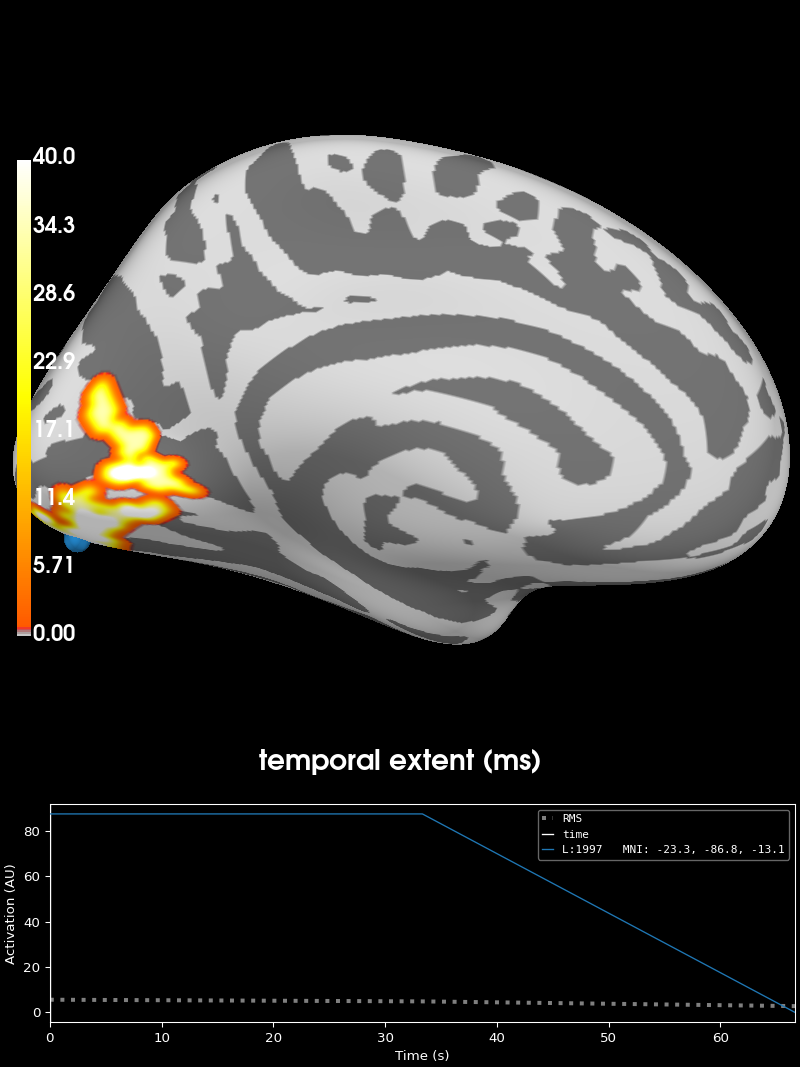
Visualizing clusters.
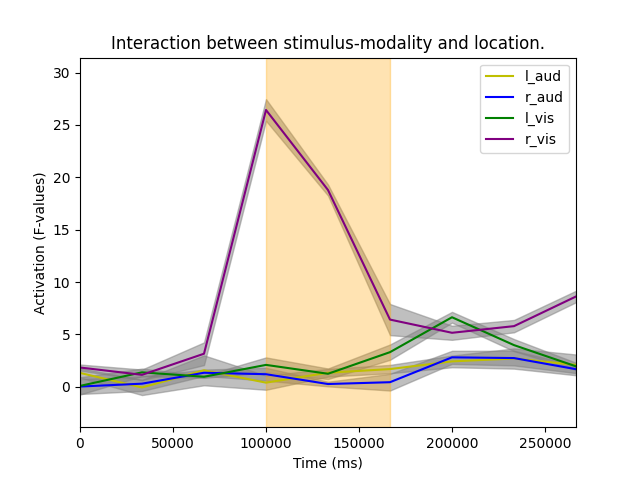
最后,我们通过重建时间过程来考察交互效应:
inds_t, inds_v = [
    (clusters[cluster_ind]) for ii, cluster_ind in enumerate(good_cluster_inds)
][0]  # first cluster

times = np.arange(X[0].shape[1]) * tstep * 1e3

plt.figure()
colors = ["y", "b", "g", "purple"]
event_ids = ["l_aud", "r_aud", "l_vis", "r_vis"]

for ii, (condition, color, eve_id) in enumerate(zip(X, colors, event_ids)):
    # extract time course at cluster vertices
    condition = condition[:, :, inds_v]
    # normally we would normalize values across subjects but
    # here we use data from the same subject so we're good to just
    # create average time series across subjects and vertices.
    mean_tc = condition.mean(axis=2).mean(axis=0)
    std_tc = condition.std(axis=2).std(axis=0)
    plt.plot(times, mean_tc.T, color=color, label=eve_id)
    plt.fill_between(
        times, mean_tc + std_tc, mean_tc - std_tc, color="gray", alpha=0.5, label=""
    )

ymin, ymax = mean_tc.min() - 5, mean_tc.max() + 5
plt.xlabel("Time (ms)")
plt.ylabel("Activation (F-values)")
plt.xlim(times[[0, -1]])
plt.ylim(ymin, ymax)
plt.fill_betweenx(
    (ymin, ymax), times[inds_t[0]], times[inds_t[-1]], color="orange", alpha=0.3
)
plt.legend()
plt.title("Interaction between stimulus-modality and location.")
plt.show()
脚本总运行时间:(0 分钟 7.197 秒)