
注意
转到末尾下载完整示例代码。
修复 BEM 与头部表面#
有时在创建 BEM 模型时,由于可能出现各种问题(例如表面之间相互相交),需要对表面进行手动校正。这里我们将展示如何通过把表面导出到三维建模软件 Blender、编辑后再重新导入来完成校正。我们还会给出一个使用 pymeshfix 修复拓扑问题的简单示例。
本教程的大部分内容基于 Ezequiel Mikulan 的 ezemikulan/blender_freesurfer。
# Authors: Marijn van Vliet <w.m.vanvliet@gmail.com>
#          Ezequiel Mikulan <e.mikulan@gmail.com>
#          Manorama Kadwani <manorama.kadwani@gmail.com>
#
# License: BSD-3-Clause
# Copyright the MNE-Python contributors.
import os
import shutil

import mne

data_path = mne.datasets.sample.data_path()
subjects_dir = data_path / "subjects"
bem_dir = subjects_dir / "sample" / "bem" / "flash"
surf_dir = subjects_dir / "sample" / "surf"
将表面导出到 Blender#
本教程使用 MNE-Sample 数据集,其表面本身没有缺陷。为演示如何修复有问题的表面,我们将手动把内颅骨表面的一个顶点移到外颅骨网格之外。
随后我们将这些表面转换为 .obj 文件,并在 FreeSurfer 受试者文件夹内新建名为 conv 的文件夹来存放它们。
# Put the converted surfaces in a separate 'conv' folder
conv_dir = subjects_dir / "sample" / "conv"
os.makedirs(conv_dir, exist_ok=True)

# Load the inner skull surface and create a problem
# The metadata is empty in this example. In real study, we want to write the
# original metadata to the fixed surface file. Set read_metadata=True to do so.
coords, faces = mne.read_surface(bem_dir / "inner_skull.surf")
coords[0] *= 1.1  # Move the first vertex outside the skull

# Write the inner skull surface as an .obj file that can be imported by
# Blender.
mne.write_surface(conv_dir / "inner_skull.obj", coords, faces, overwrite=True)

# Also convert the outer skull surface.
coords, faces = mne.read_surface(bem_dir / "outer_skull.surf")
mne.write_surface(conv_dir / "outer_skull.obj", coords, faces, overwrite=True)
在 Blender 中编辑#
关于如何在 Blender 中导入、编辑和导出表面,请观看下面的视频教程(分步说明也见下文):
现在可以打开 Blender 并导入表面。依次选择 File > Import > Wavefront (.obj)。进入 conv 文件夹,选择要导入的文件。请务必勾选 Keep Vert Order 选项。也可以勾选 Y Forward 选项,以便按正确的坐标轴方向(RAS)加载:
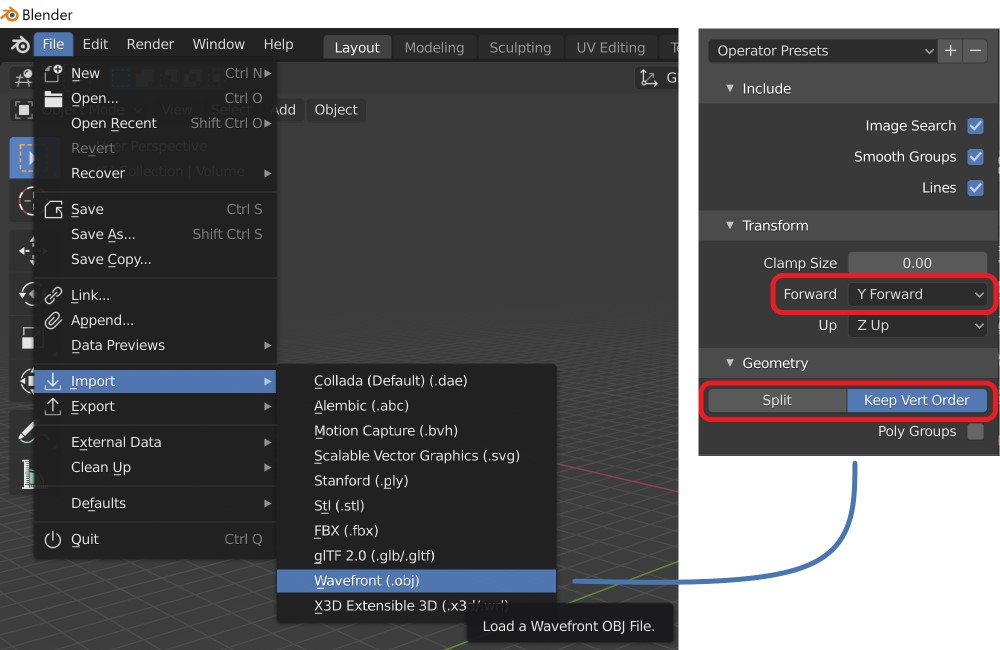
为方便起见,可以点击 Operator Presets 旁边的 + 按钮保存这些设置。
对所有需要导入的表面(例如 inner_skull 和 outer_skull)重复上述操作。
现在可以按自己的需要任意编辑表面。要学习 Blender 的使用方法,请参阅 Beginner Blender Tutorial Series。其中第 2 部分会讲解修复表面所需的基本编辑工具。
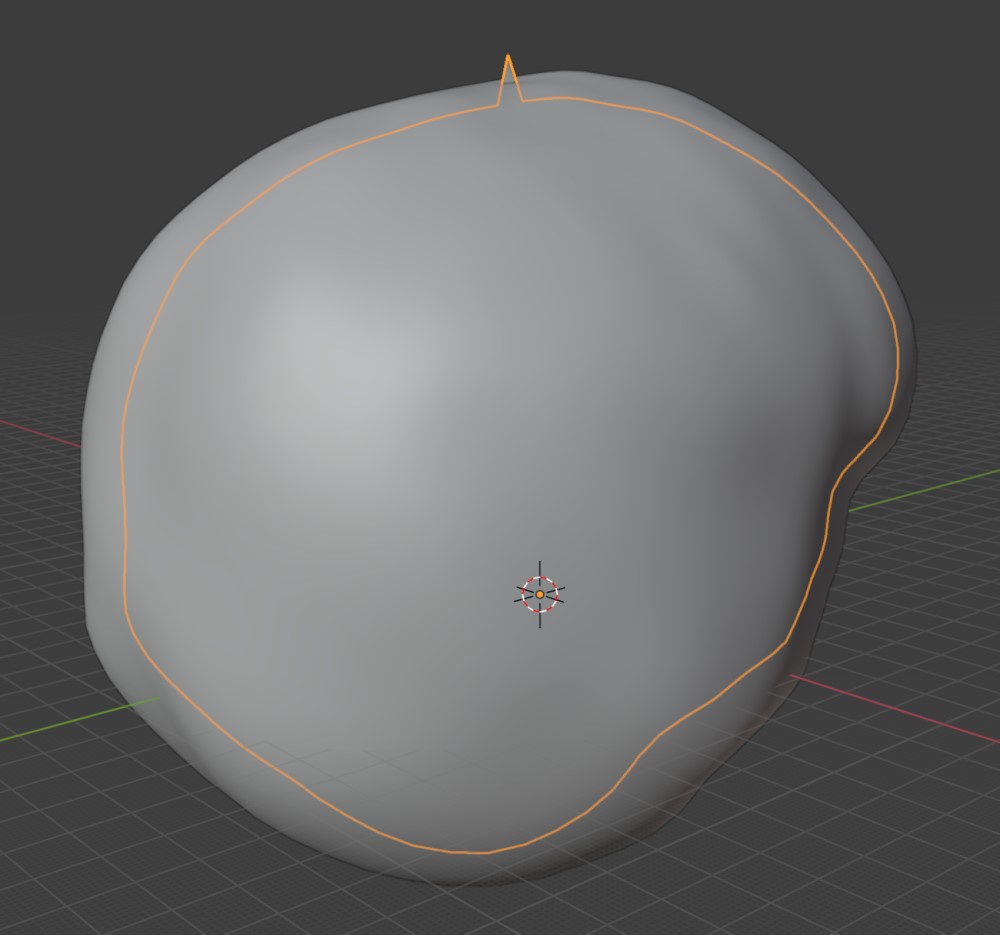
在 MNE-Python 中使用修复后的表面#
在 Blender 中,选中某个表面后依次选择 File > Export > Wavefront (.obj),即可将其导出为 .obj 文件。此时需要再次勾选 Y Forward 选项,并勾选 Keep Vertex Order 复选框。
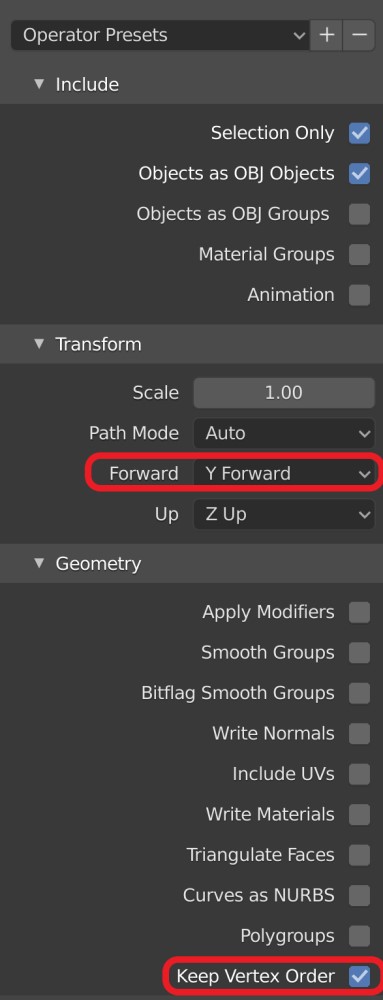
每个表面都需要导出为单独的文件。建议将它们保存在 conv 文件夹中,并让文件名以 _fixed.obj 结尾,不过这并不是必须的。
为了使本教程脚本能够从头到尾完整运行,我们在这里用 Python 代码模拟你在 Blender 中手动完成的编辑:
coords, faces = mne.read_surface(conv_dir / "inner_skull.obj")
coords[0] /= 1.1  # Move the first vertex back inside the skull
mne.write_surface(conv_dir / "inner_skull_fixed.obj", coords, faces, overwrite=True)
回到 Python 后,可以读取修复后的 .obj 文件,并将其保存为 FreeSurfer .surf 文件。为了让 mne.make_bem_model() 函数能够找到这些文件,需要以原始文件名将它们保存到 surf 文件夹中,例如 bem/inner_skull.surf。务必先备份原始表面,以防操作失误!
# Read the fixed surface
coords, faces = mne.read_surface(conv_dir / "inner_skull_fixed.obj")

# Backup the original surface
shutil.copy(bem_dir / "inner_skull.surf", bem_dir / "inner_skull_orig.surf")

# Overwrite the original surface with the fixed version
# In real study you should provide the correct metadata using ``volume_info=``
# This could be accomplished for example with:
#
# _, _, vol_info = mne.read_surface(bem_dir / 'inner_skull.surf',
#                                   read_metadata=True)
# mne.write_surface(bem_dir / 'inner_skull.surf', coords, faces,
#                   volume_info=vol_info, overwrite=True)
编辑头部表面#
有时头部表面存在缺陷,需要手动编辑。我们使用 mne.write_head_bem() 将修复后的表面转换为 .fif 文件。
低分辨率头部#
对于 EEG 正向建模,可能需要手动编辑 outer_skin.surf。在这种情况下,请记得根据编辑后的表面文件保存修复版的 -head.fif,以用于配准(coregistration)。
# Load the fixed surface
coords, faces = mne.read_surface(bem_dir / "outer_skin.surf")

# Make sure we are in the correct directory
head_dir = bem_dir.parent

# Remember to backup the original head file in advance!
# Overwrite the original head file
#
# mne.write_head_bem(head_dir / 'sample-head.fif', coords, faces,
#                    overwrite=True)
高分辨率头部#
我们使用 mne.read_bem_surfaces() 读取头部表面文件。编辑完成后,再用 mne.write_head_bem() 输出头部文件。这里为加快速度使用 -head.fif。
# If ``-head-dense.fif`` does not exist, you need to run
# ``mne make_scalp_surfaces`` first.
# [0] because a list of surfaces is returned
surf = mne.read_bem_surfaces(head_dir / "sample-head.fif")[0]

# For consistency only
coords = surf["rr"]
faces = surf["tris"]

# Write the head as an .obj file for editing
mne.write_surface(conv_dir / "sample-head.obj", coords, faces, overwrite=True)

# Usually here you would go and edit your meshes.
#
# Here we just use the same surface as if it were fixed
# Read in the .obj file
coords, faces = mne.read_surface(conv_dir / "sample-head.obj")

# Remember to backup the original head file in advance!
# Overwrite the original head file
#
# mne.write_head_bem(head_dir / 'sample-head.fif', coords, faces,
#                    overwrite=True)
    1 BEM surfaces found
    Reading a surface...
[done]
    1 BEM surfaces read
注意
另请参阅通过平滑清理质量较差的高密度头部表面,了解一种可能的高分辨率头部替代修复方案:使用 FreeSurfer 平滑而不是 Blender。
Blender 编辑技巧#
一个特别有用的操作是 Shrinkwrap(收缩包裹)功能,它可以将一个表面限制在另一个表面内部(例如将颅骨限制在头皮表面内部)。使用方法如下:
- ① 选择表面
- 选择造成问题的那个表面。
- ② 选择顶点
- 在 Edit Mode(编辑模式)下,按 C 使用圆形选择工具,选中位于外部的顶点。
- ③-⑤ 对顶点分组
- 在 Object Data Properties(物体数据属性)选项卡中,点击 + 按钮添加一个 Vertex Group(顶点组),然后点击 Assign 将当前选中的顶点分配给该组。
- ⑥-⑧ Shrinkwrap
- 在 Modifiers(修改器)选项卡中点击 Add Modifier 添加 Shrinkwrap 修改器,将模式设为 Inside,以外层表面作为 Target,并将之前创建的组设为 Vertex Group。随后可用 Offset 参数调整距离。
注意
如果没有效果,可能是内颅骨表面的法线方向反了。要修复该问题,请选中内颅骨的所有顶点或面,然后在工具栏中选择 Mesh > Normals > Flip。
- ⑨ 应用
- 在 Object Mode(物体模式)下,点击 Shrinkwrap 修改器上的下拉箭头,然后点击 Apply。
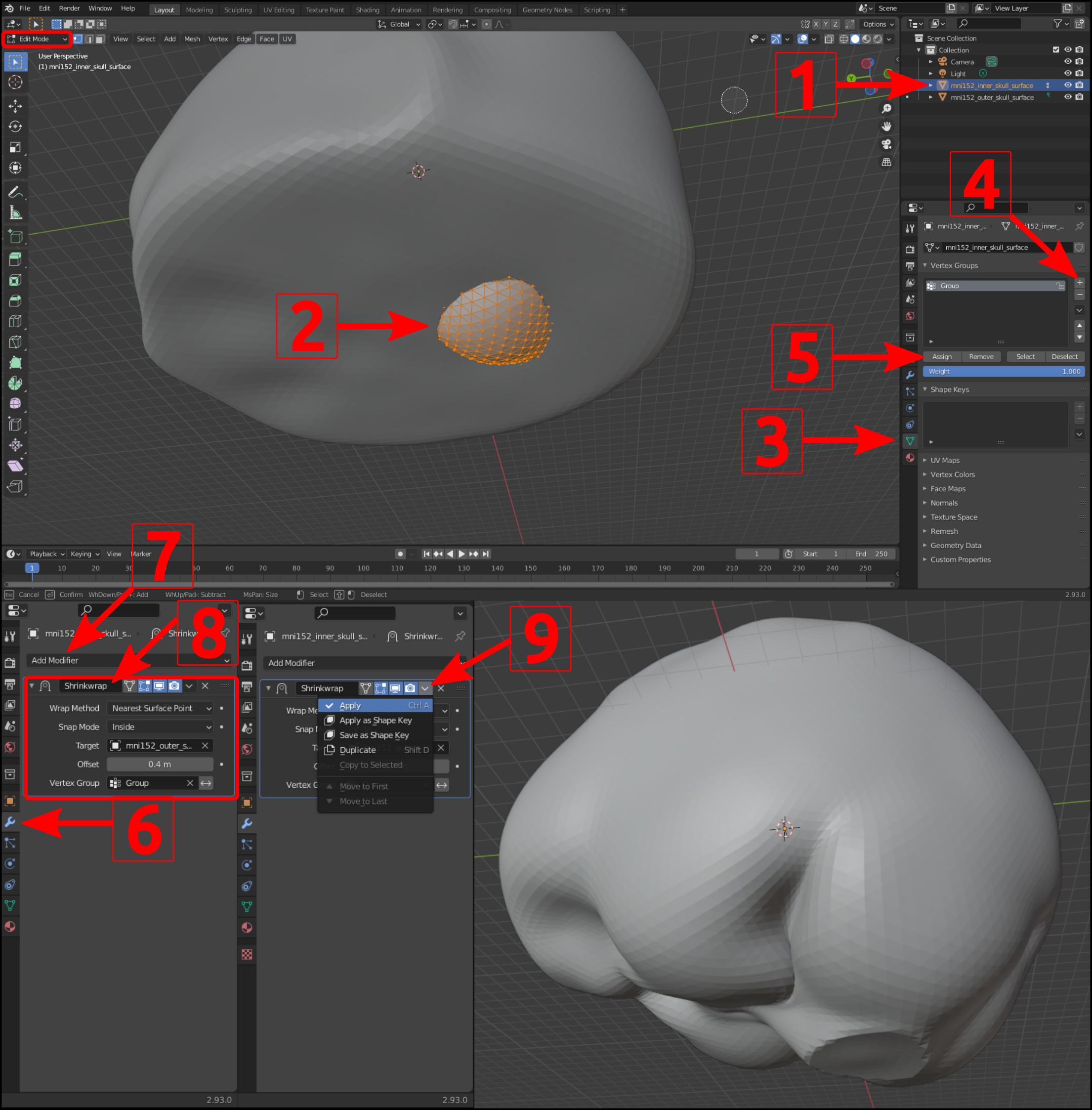
就是这样!现在可以继续你的分析流程了(例如运行 mne.make_bem_model())。
如果仍然报错怎么办?#
Blender 操作#
在 Blender 中编辑 BEM 表面/网格时,务必使用不会改变顶点数量或顺序、也不会改变三角面几何形状的工具。例如,应避免使用挤出(extrusion)工具,因为它会复制被挤出的顶点。
通过平滑清理质量较差的高密度头部表面#
如果使用 mne make_scalp_surfaces 得到的头部表面较为粗糙,可以考虑预先在受试者的 mri 目录中,用 FreeSurfer 以高斯核平滑 T1,命令类似下面这样:
$ mri_convert --fwhm 3 T1.mgz T1_smoothed_3.mgz
其中 --fwhm 参数决定平滑程度(单位为 mm)。然后删除 SUBJECTS_DIR/SUBJECT/surf/lh.seghead,并附加参数 --mri="T1_smoothed_3.mgz" --overwrite 重新运行 mne make_scalp_surfaces,应该就能得到更干净平滑的表面。
拓扑错误#
MNE-Python 要求网格满足一定的拓扑检查,以确保后续处理(如 BEM 求解和电极投影)能够正常工作。
下面列举了在 MNE-Python 中处理网格时可能遇到的一些错误示例,以及这些错误的可能原因。
- 无法降采样至请求的 ico 等级
- 该错误由顶点数过少或过多引起。完整错误信息大致如下:
RuntimeError: Cannot decimate to requested ico grade 4. The provided BEM surface has 20516 triangles, which cannot be isomorphic with a subdivided icosahedron. Consider manually decimating the surface to a suitable density and then use ico=None in make_bem_model.
- 表面 inner skull 存在拓扑缺陷
- 该错误可能在通过移除顶点来匹配原始三角面数量时出现。完整错误信息如下:
RuntimeError: Surface inner skull has topological defects: 12 / 20484 vertices have fewer than three neighboring triangles [733, 1014, 2068, 7732, 8435, 8489, 10181, 11120, 11121, 11122, 11304, 11788]
- 表面 inner skull 不完整
- 该错误(与上一个错误类似)反映表面拓扑存在问题(即预期的顶点/边/面模式被打乱)。
RuntimeError: Surface inner skull is not complete (sum of solid angles yielded 0.999668, should be 1.)
- 三角面顺序错误
- 该错误反映表面在内存中的表示方式(顶点/面定义的顺序)与 MNE-Python 的预期不一致。完整错误信息为:
RuntimeError: The source surface has a matching number of triangles but ordering is wrong
在 Blender 中处理拓扑问题#
遇到上述任何错误时,通常最简单的做法是从未编辑的 BEM 表面重新开始,并确保只移动顶点和面,而不添加或删除任何顶点和面。例如,选中一圈顶点,然后按 G 将其拖动到目标位置。在 Blender 中对一组选中顶点进行平滑(右键单击并选择 “Smooth Vertices”)也可能有帮助。
使用 pymeshfix 处理拓扑问题#
pymeshfix 是一个采用 GPL 许可证的 Python 模块,旨在生成满足上述拓扑检查的水密(封闭无孔)网格。例如,如果你的 'SUBJECTS_DIR/SUBJECT/surf/lh.seghead' 存在拓扑问题,而通过平滑清理质量较差的高密度头部表面不起作用,可以尝试直接修复网格。使用 conda 或 pip 安装 pymeshfix 后,在 'SUBJECTS_DIR/SUBJECT/surf' 目录下可以尝试:
>>> import pymeshfix
>>> rr, tris = mne.read_surface('lh.seghead')
>>> rr, tris = pymeshfix.clean_from_arrays(rr, tris)
>>> mne.write_surface('lh.seghead', rr, tris)
在某些情况下,这可以修复拓扑,使后续调用 mne make_scalp_surfaces 时无需使用 --force 参数即可成功。
脚本总运行时间:(0 分钟 2.224 秒)