
非官方中文翻译
本页译自 MNE-Python 官方文档:
查看英文原文 ↗。
文档版权归 MNE Developers 所有(BSD-3-Clause)。
说明
转到末尾下载完整示例代码。
去除肌肉 ICA 成分#
大幅运动会在大范围通道上产生广泛的高频活动,通常无法恢复,因此必须像 标注肌肉伪迹 中那样剔除该分段。比大幅运动更常见的是姿势维持时产生的肌肉伪迹,这类伪迹更适合用 ICA 去除,否则可能一个分段都不剩!注意这类肌肉伪迹在 EEG 中比在 MEG 中明显得多。
# Authors: Alex Rockhill <aprockhill@mailbox.org>
#
# License: BSD-3-Clause
# Copyright the MNE-Python contributors.
import mne

data_path = mne.datasets.sample.data_path()
raw_fname = data_path / "MEG" / "sample" / "sample_audvis_raw.fif"
raw = mne.io.read_raw_fif(raw_fname)
raw.crop(tmin=100, tmax=130)  # take 30 seconds for speed

# pick only EEG channels, muscle artifact is basically not picked up by MEG
# if you have a simultaneous recording, you may want to do ICA on MEG and EEG
# separately
raw.pick(picks="eeg", exclude="bads")

# ICA works best with a highpass filter applied
raw.load_data()
raw.filter(l_freq=1.0, h_freq=None)
Opening raw data file /home/circleci/mne_data/MNE-sample-data/MEG/sample/sample_audvis_raw.fif...
    Read a total of 3 projection items:
        PCA-v1 (1 x 10²)  idle
        PCA-v2 (1 x 10²)  idle
        PCA-v3 (1 x 10²)  idle
    Range : 25800 ... 192599 =     42.956 ...   320.670 secs
Ready.
Reading 0 ... 18019  =      0.000 ...    30.001 secs...
Filtering raw data in 1 contiguous segment
Setting up high-pass filter at 1 Hz

FIR filter parameters
---------------------
Designing a one-pass, zero-phase, non-causal highpass filter:
- Windowed time-domain design (firwin) method
- Hamming window with 0.0194 passband ripple and 53 dB stopband attenuation
- Lower passband edge: 1.00
- Lower transition bandwidth: 1.00 Hz (-6 dB cutoff frequency: 0.50 Hz)
- Filter length: 1983 samples (3.302 s)
运行 ICA
ica = mne.preprocessing.ICA(n_components=15, method="picard", max_iter="auto", rng=97)
ica.fit(raw)
Fitting ICA to data using 59 channels (please be patient, this may take a while)
Selecting by number: 15 components
Fitting ICA took 0.2s.
使用 ICA 去除含姿势性肌肉伪迹的成分
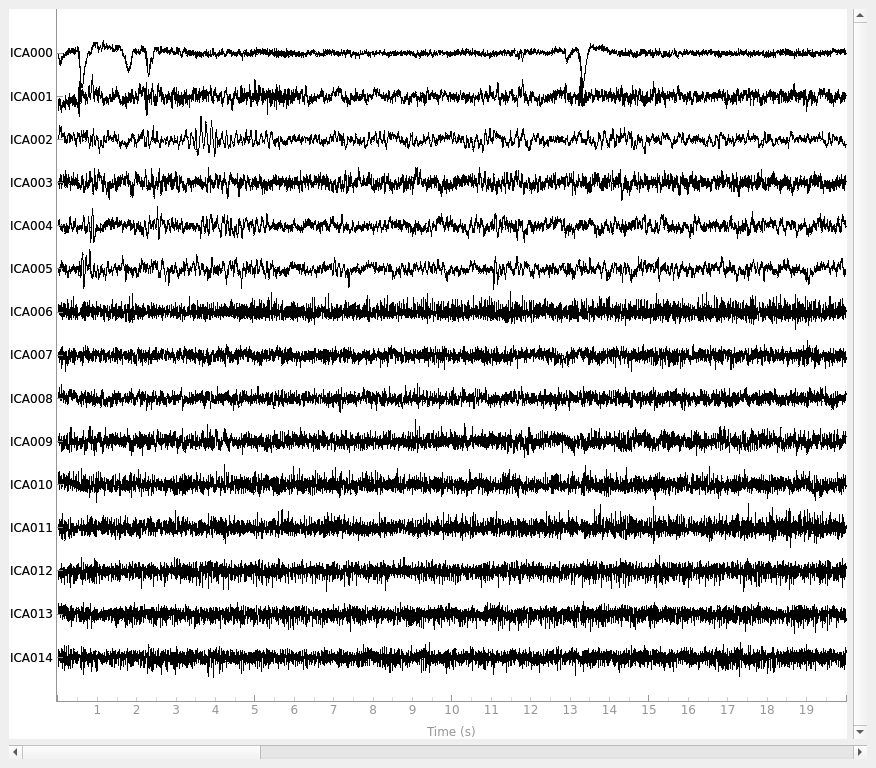
ica.plot_sources(raw)
Creating RawArray with float64 data, n_channels=15, n_times=18020
    Range : 85861 ... 103880 =    142.955 ...   172.956 secs
Ready.
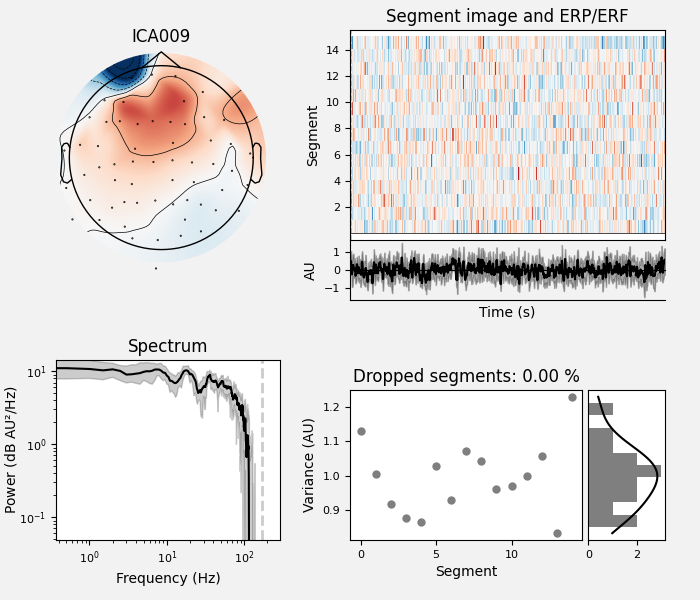
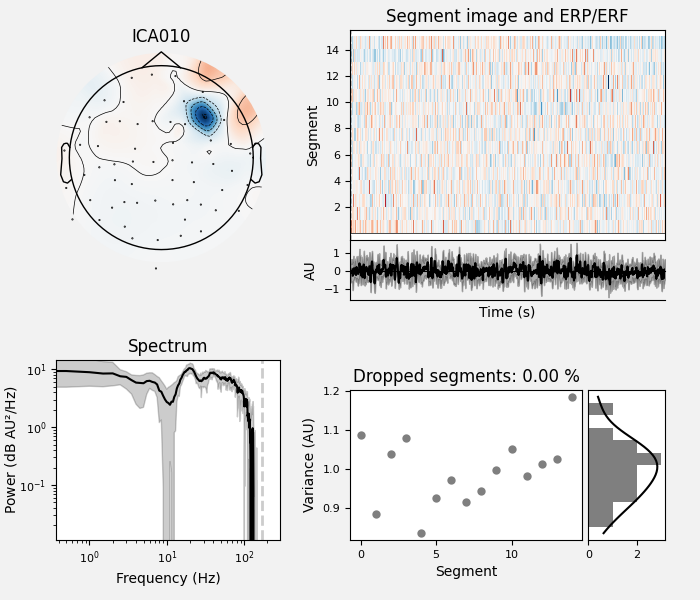
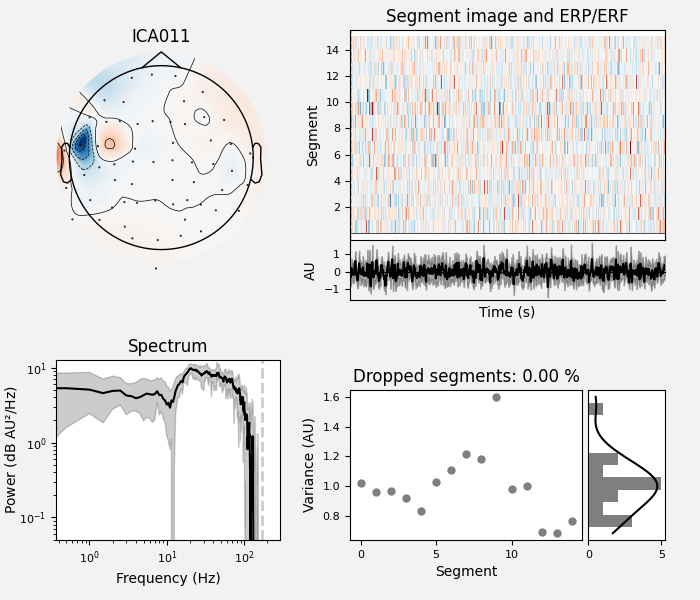
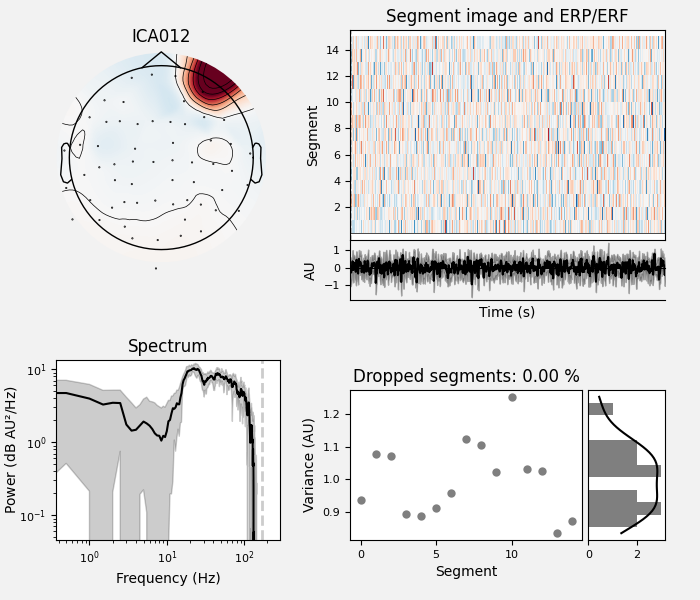
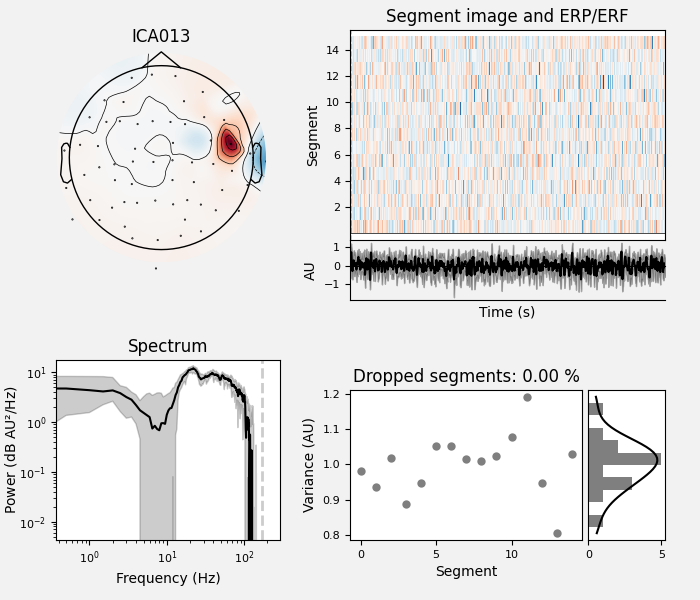
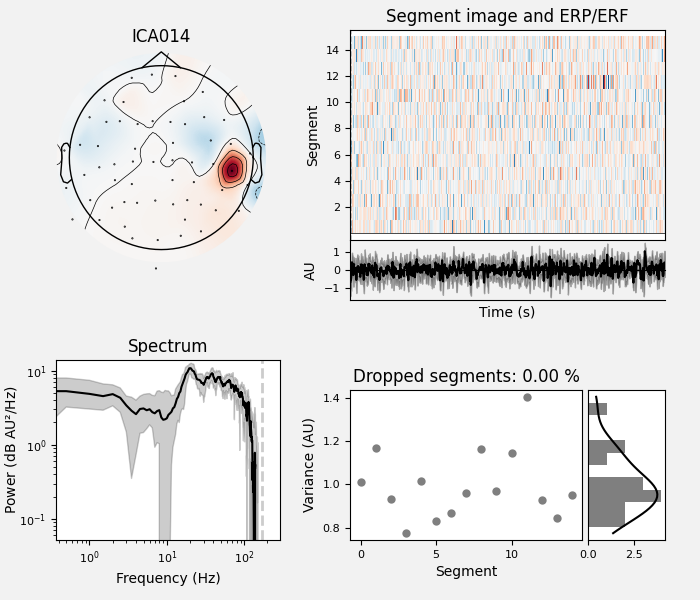
通过观察,我们按 [1] 手动挑出肌肉伪迹成分。判据如下:
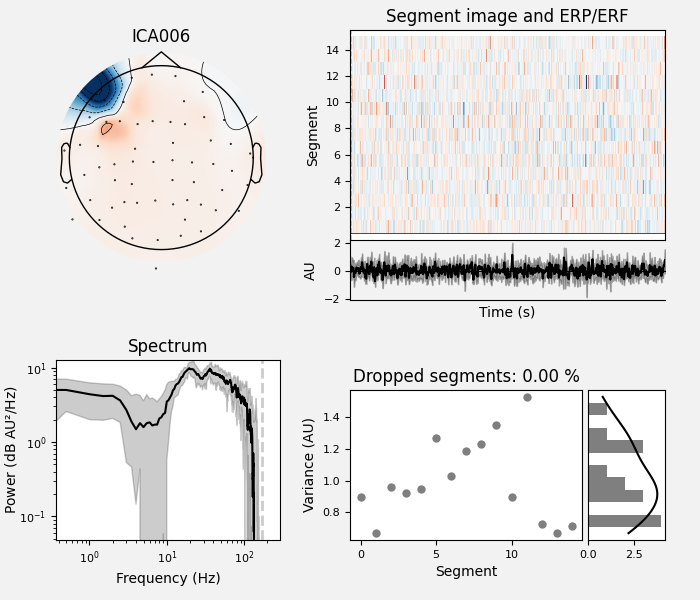
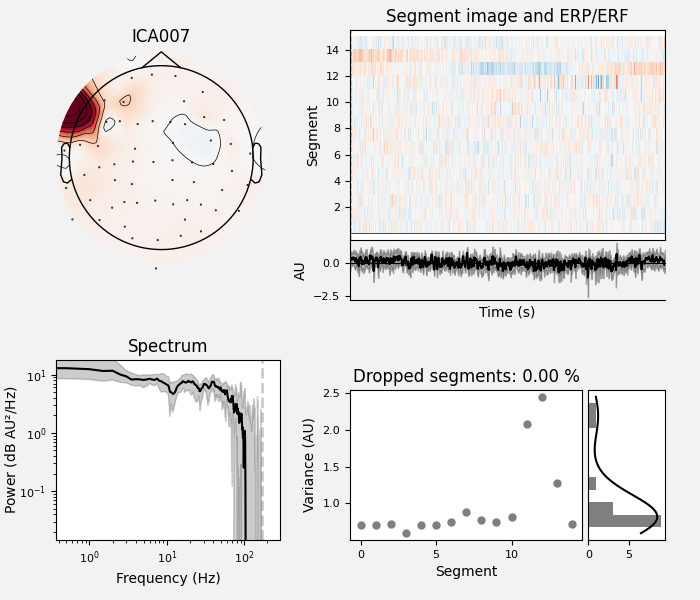
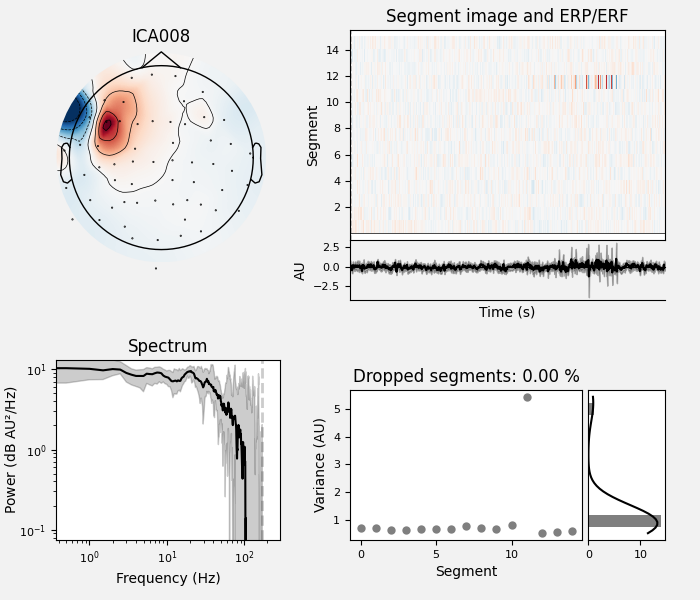
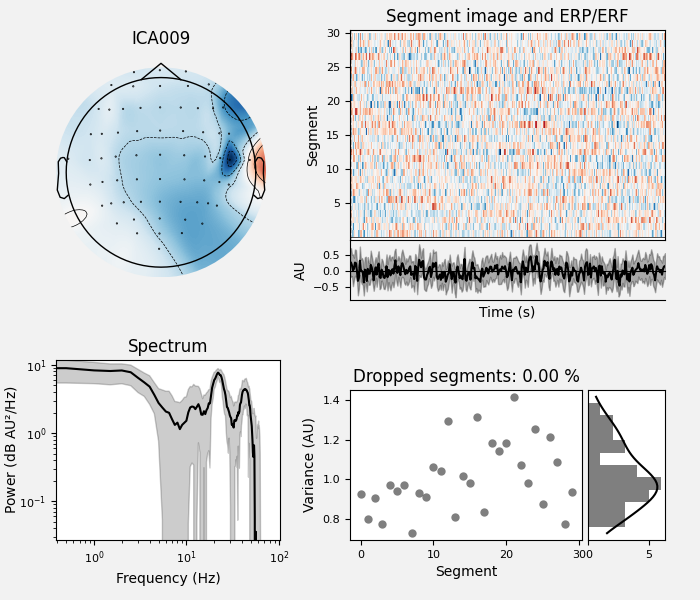
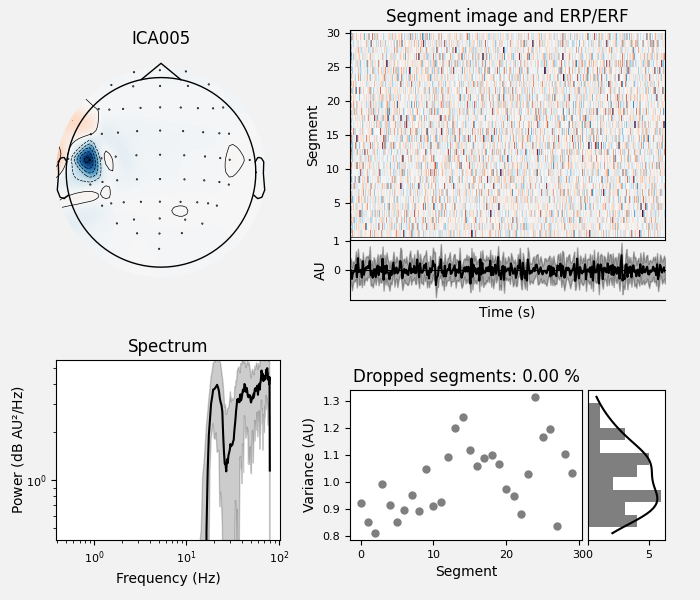
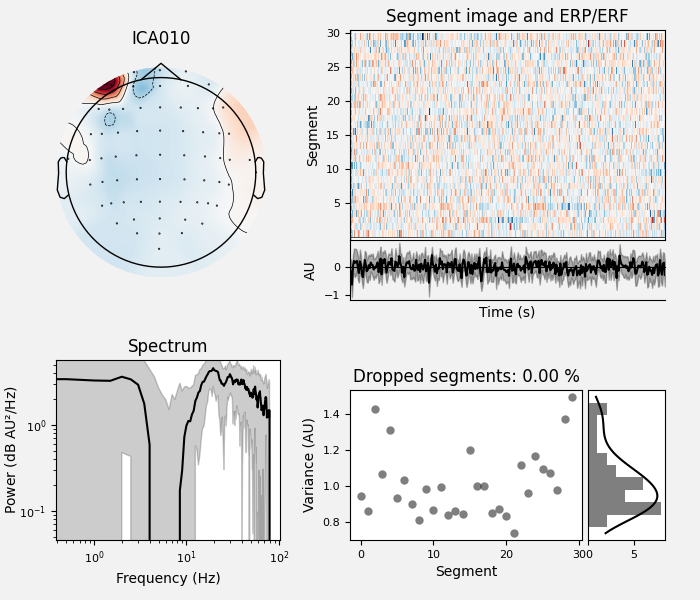
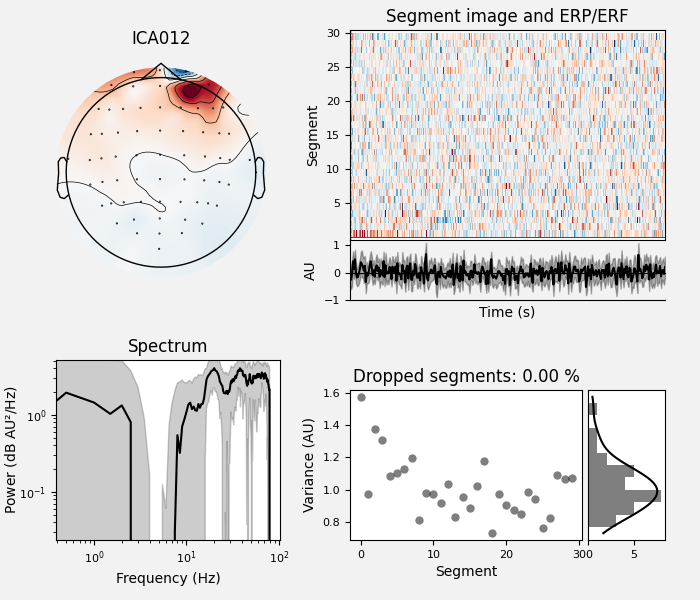
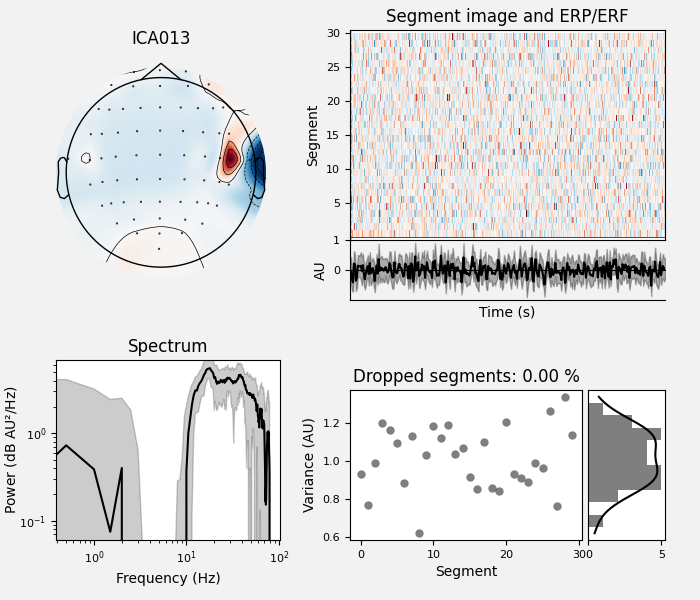
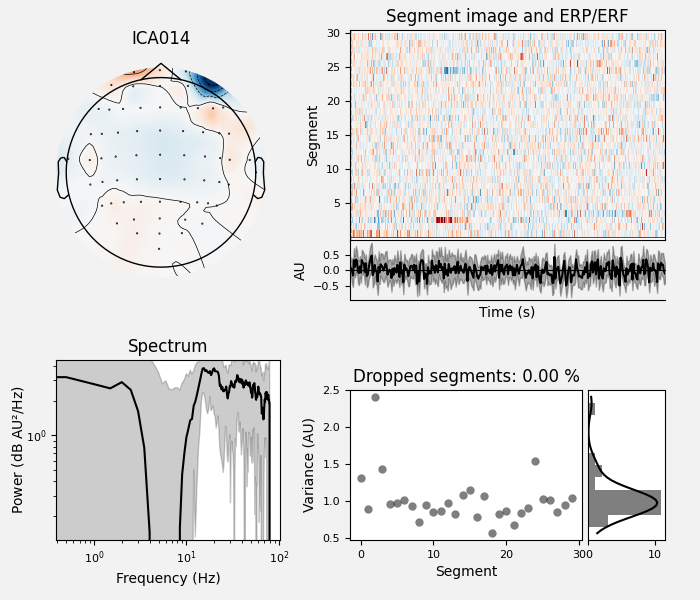
7 到 75 Hz 之间对数—对数功率谱呈正斜率(这里不是对数—对数坐标,因此看起来是平的)
焦点位于外周,或呈偶极/多极焦点(地形图中的蓝、红团块远离肌肉最多的顶点)
单一焦点(空间平滑度低;与前面更可能是神经来源、遍布地形图的成分相比,该地形图只有一个焦点)
另一个值得注意的特征是,mne.preprocessing.ICA.plot_sources() 中的时间过程看起来像 EMG:每个运动单位放电时可见尖峰,因此时间过程显得毛糙,有时出现常呈规律间隔的大尖峰。
ICA 成分 13 是肌肉伪迹的教科书式例子。该成分地形图的焦点正位于耳旁的颞肌上;功率谱在约 10 Hz 处有极小值、约 25 Hz 处有极大值,在对数—对数单位下总体呈正斜率,这是肌肉伪迹非常典型的模式。
muscle_idx = [6, 7, 8, 9, 10, 11, 12, 13, 14]
ica.plot_properties(raw, picks=muscle_idx, log_scale=True)

# first, remove blinks and heartbeat to compare
blink_idx = [0]
heartbeat_idx = [5]
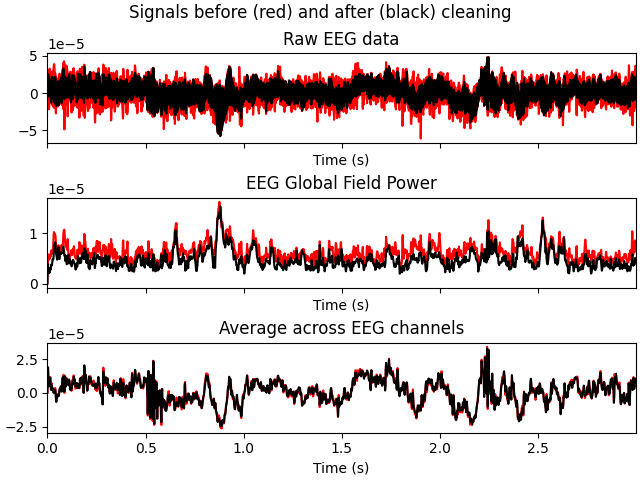
ica.apply(raw, exclude=blink_idx + heartbeat_idx)
ica.plot_overlay(raw, exclude=muscle_idx)
    Using multitaper spectrum estimation with 7 DPSS windows
Not setting metadata
15 matching events found
No baseline correction applied
0 projection items activated
Not setting metadata
15 matching events found
No baseline correction applied
0 projection items activated
Not setting metadata
15 matching events found
No baseline correction applied
0 projection items activated
Not setting metadata
15 matching events found
No baseline correction applied
0 projection items activated
Not setting metadata
15 matching events found
No baseline correction applied
0 projection items activated
Not setting metadata
15 matching events found
No baseline correction applied
0 projection items activated
Not setting metadata
15 matching events found
No baseline correction applied
0 projection items activated
Not setting metadata
15 matching events found
No baseline correction applied
0 projection items activated
Not setting metadata
15 matching events found
No baseline correction applied
0 projection items activated
Applying ICA to Raw instance
    Transforming to ICA space (15 components)
    Zeroing out 2 ICA components
    Projecting back using 59 PCA components
Applying ICA to Raw instance
    Transforming to ICA space (15 components)
    Zeroing out 9 ICA components
    Projecting back using 59 PCA components
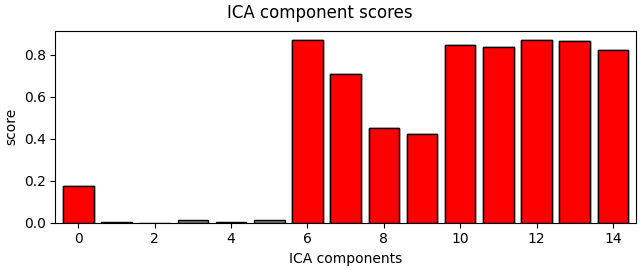
最后尝试自动算法寻找肌肉成分,并确认它找到的成分与我们手动挑选的一致。
muscle_idx_auto, scores = ica.find_bads_muscle(raw)
ica.plot_scores(scores, exclude=muscle_idx_auto)
print(
    f"Manually found muscle artifact ICA components:      {muscle_idx}\n"
    f"Automatically found muscle artifact ICA components: {muscle_idx_auto}"
)
Effective window size : 3.410 (s)
Manually found muscle artifact ICA components:      [6, 7, 8, 9, 10, 11, 12, 13, 14]
Automatically found muscle artifact ICA components: [0, 6, 7, 8, 9, 10, 11, 12, 13, 14]
现在在 EEGBCI 数据集上复现该过程#
for sub in (1, 2):
    raw = mne.io.read_raw_edf(
        mne.datasets.eegbci.load_data(subjects=sub, runs=(1,))[0], preload=True
    )
    mne.datasets.eegbci.standardize(raw)  # set channel names
    montage = mne.channels.make_standard_montage("spherical_1005")
    raw.set_montage(montage)
    raw.filter(l_freq=1.0, h_freq=None)

    # Run ICA
    ica = mne.preprocessing.ICA(
        n_components=15, method="picard", max_iter="auto", rng=97
    )
    ica.fit(raw)
    ica.plot_sources(raw)
    muscle_idx_auto, scores = ica.find_bads_muscle(raw)
    ica.plot_properties(raw, picks=muscle_idx_auto, log_scale=True)
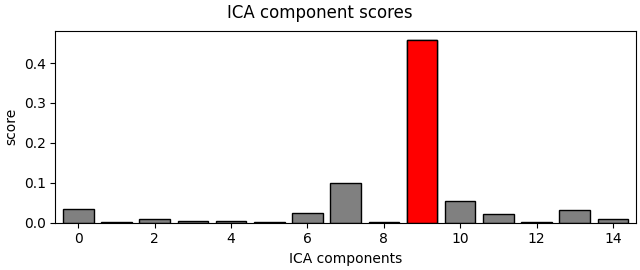
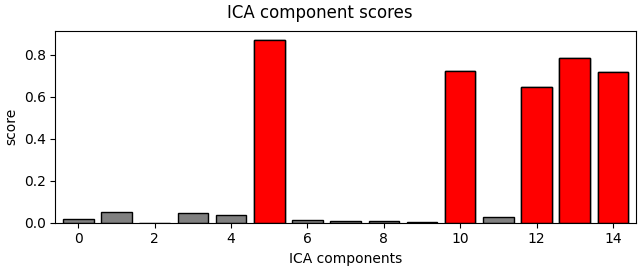
    ica.plot_scores(scores, exclude=muscle_idx_auto)

    print(
        f"Manually found muscle artifact ICA components:      {muscle_idx}\n"
        "Automatically found muscle artifact ICA components: "
        f"{muscle_idx_auto}"
    )
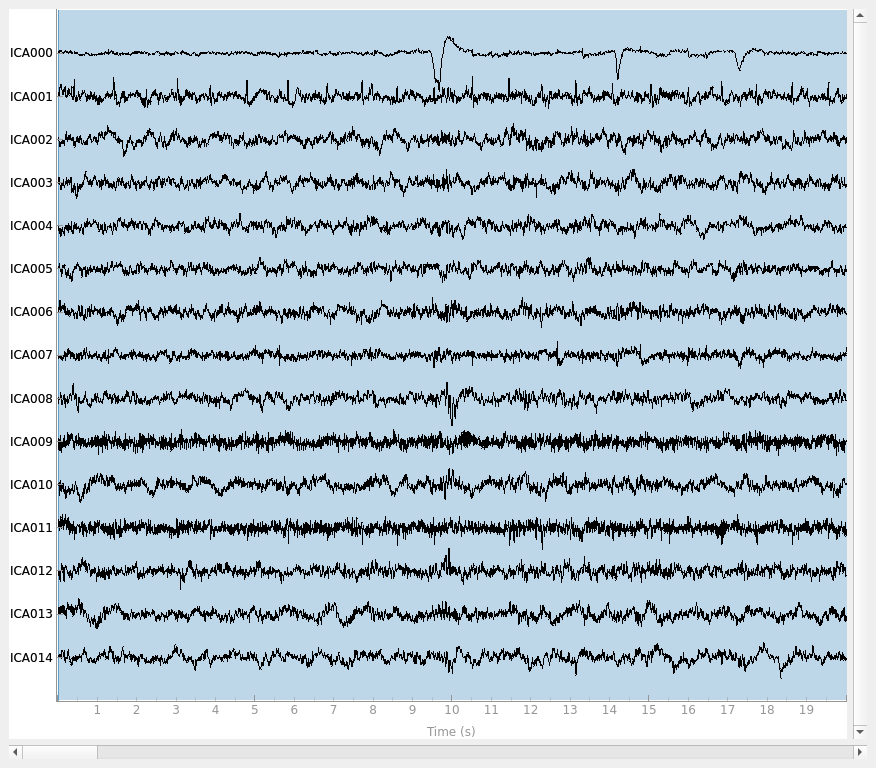
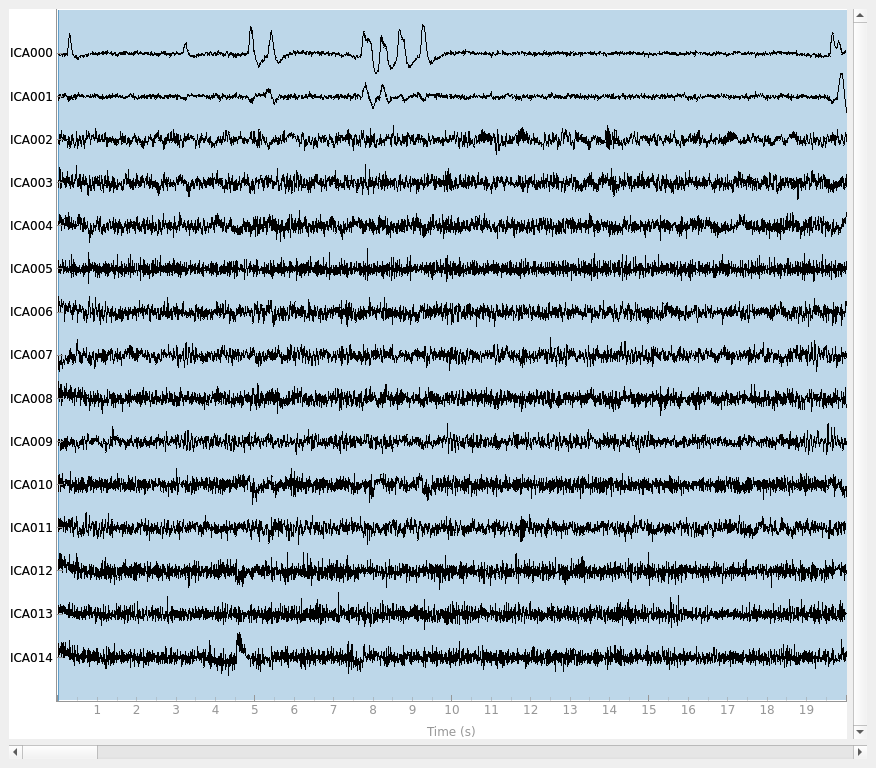
Extracting EDF parameters from /home/circleci/mne_data/MNE-eegbci-data/files/eegmmidb/1.0.0/S001/S001R01.edf...
Setting channel info structure...
Creating raw.info structure...
Reading 0 ... 9759  =      0.000 ...    60.994 secs...
Filtering raw data in 1 contiguous segment
Setting up high-pass filter at 1 Hz

FIR filter parameters
---------------------
Designing a one-pass, zero-phase, non-causal highpass filter:
- Windowed time-domain design (firwin) method
- Hamming window with 0.0194 passband ripple and 53 dB stopband attenuation
- Lower passband edge: 1.00
- Lower transition bandwidth: 1.00 Hz (-6 dB cutoff frequency: 0.50 Hz)
- Filter length: 529 samples (3.306 s)

Fitting ICA to data using 64 channels (please be patient, this may take a while)
Selecting by number: 15 components
Fitting ICA took 0.1s.
Creating RawArray with float64 data, n_channels=15, n_times=9760
    Range : 0 ... 9759 =      0.000 ...    60.994 secs
Ready.
Effective window size : 12.800 (s)
    Using multitaper spectrum estimation with 7 DPSS windows
Not setting metadata
30 matching events found
No baseline correction applied
0 projection items activated
Manually found muscle artifact ICA components:      [6, 7, 8, 9, 10, 11, 12, 13, 14]
Automatically found muscle artifact ICA components: [9]
Extracting EDF parameters from /home/circleci/mne_data/MNE-eegbci-data/files/eegmmidb/1.0.0/S002/S002R01.edf...
Setting channel info structure...
Creating raw.info structure...
Reading 0 ... 9759  =      0.000 ...    60.994 secs...
Filtering raw data in 1 contiguous segment
Setting up high-pass filter at 1 Hz

FIR filter parameters
---------------------
Designing a one-pass, zero-phase, non-causal highpass filter:
- Windowed time-domain design (firwin) method
- Hamming window with 0.0194 passband ripple and 53 dB stopband attenuation
- Lower passband edge: 1.00
- Lower transition bandwidth: 1.00 Hz (-6 dB cutoff frequency: 0.50 Hz)
- Filter length: 529 samples (3.306 s)

Fitting ICA to data using 64 channels (please be patient, this may take a while)
Selecting by number: 15 components
Fitting ICA took 0.1s.
Creating RawArray with float64 data, n_channels=15, n_times=9760
    Range : 0 ... 9759 =      0.000 ...    60.994 secs
Ready.
Effective window size : 12.800 (s)
    Using multitaper spectrum estimation with 7 DPSS windows
Not setting metadata
30 matching events found
No baseline correction applied
0 projection items activated
Not setting metadata
30 matching events found
No baseline correction applied
0 projection items activated
Not setting metadata
30 matching events found
No baseline correction applied
0 projection items activated
Not setting metadata
30 matching events found
No baseline correction applied
0 projection items activated
Not setting metadata
30 matching events found
No baseline correction applied
0 projection items activated
Manually found muscle artifact ICA components:      [6, 7, 8, 9, 10, 11, 12, 13, 14]
Automatically found muscle artifact ICA components: [5, 10, 12, 13, 14]
参考文献#
脚本总运行时间:(0 分 9.621 秒)