
说明
转到末尾下载完整示例代码。
将连续数据切分为等间隔 Epoch#
本教程展示如何将连续数据切分为一组在时间上等间隔的 epochs。这些 epochs 并非基于实验事件创建,而是把连续数据“分块”为连续的 epochs(它们在时间上可能重叠、相邻或彼此分离)。我们还将简要演示如何在连接性分析中使用这些 epochs。
首先,我们导入必要的模块并读取一份示例原始数据集。该数据集包含与事件相关的脑活动,即与听觉刺激起始同步的活动。不过,我们不会围绕每个刺激的起始对数据分段来创建 epochs,而是创建 30 秒长的 epochs,以便对信号进行非事件相关分析。
# Authors: The MNE-Python contributors.
# License: BSD-3-Clause
# Copyright the MNE-Python contributors.
import matplotlib.pyplot as plt
import numpy as np
from mne_connectivity import envelope_correlation

import mne
from mne.preprocessing import compute_proj_ecg

sample_data_folder = mne.datasets.sample.data_path()
sample_data_raw_file = sample_data_folder / "MEG" / "sample" / "sample_audvis_raw.fif"
raw = mne.io.read_raw_fif(sample_data_raw_file)
Opening raw data file /home/circleci/mne_data/MNE-sample-data/MEG/sample/sample_audvis_raw.fif...
    Read a total of 3 projection items:
        PCA-v1 (1 x 10²)  idle
        PCA-v2 (1 x 10²)  idle
        PCA-v3 (1 x 10²)  idle
    Range : 25800 ... 192599 =     42.956 ...   320.670 secs
Ready.
在本教程中,我们会裁剪并重采样原始数据,使其大小适合我们的 Web 服务器处理,忽略 EEG 通道,并去除心跳伪迹,以免仅因该伪迹而得到虚假的相关性。
raw.crop(tmax=150).resample(100).pick("meg")
ecg_proj, _ = compute_proj_ecg(raw, ch_name="MEG 0511")  # No ECG chan
raw.add_proj(ecg_proj)
raw.apply_proj()
Finding events on: STI 014
221 events found on stim channel STI 014
Event IDs: [ 1  2  3  4  5 32]
Finding events on: STI 014
221 events found on stim channel STI 014
Event IDs: [ 1  2  3  4  5 32]
Including 3 SSP projectors from raw file
Running ECG SSP computation
Using channel MEG 0511 to identify heart beats.
Setting up band-pass filter from 5 - 35 Hz

FIR filter parameters
---------------------
Designing a two-pass forward and reverse, zero-phase, non-causal bandpass filter:
- Windowed frequency-domain design (firwin2) method
- Hann window
- Lower passband edge: 5.00
- Lower transition bandwidth: 0.50 Hz (-12 dB cutoff frequency: 4.75 Hz)
- Upper passband edge: 35.00 Hz
- Upper transition bandwidth: 0.50 Hz (-12 dB cutoff frequency: 35.25 Hz)
- Filter length: 1000 samples (10.000 s)

Number of ECG events detected : 165 (average pulse 66.0 / min.)
Computing projector
Filtering a subset of channels. The highpass and lowpass values in the measurement info will not be updated.
Filtering raw data in 1 contiguous segment
Setting up band-pass filter from 1 - 35 Hz

FIR filter parameters
---------------------
Designing a two-pass forward and reverse, zero-phase, non-causal bandpass filter:
- Windowed frequency-domain design (firwin2) method
- Hamming window
- Lower passband edge: 1.00
- Lower transition bandwidth: 0.50 Hz (-12 dB cutoff frequency: 0.75 Hz)
- Upper passband edge: 35.00 Hz
- Upper transition bandwidth: 0.50 Hz (-12 dB cutoff frequency: 35.25 Hz)
- Filter length: 1000 samples (10.000 s)

Not setting metadata
165 matching events found
No baseline correction applied
Created an SSP operator (subspace dimension = 3)
3 projection items activated
Using data from preloaded Raw for 165 events and 61 original time points ...
    Rejecting  epoch based on MAG : ['MEG 1711']
    Rejecting  epoch based on MAG : ['MEG 1711']
    Rejecting  epoch based on MAG : ['MEG 1411', 'MEG 1421']
3 bad epochs dropped
Adding projection: planar--0.200-0.400-PCA-01 (exp var=75.9%)
Adding projection: planar--0.200-0.400-PCA-02 (exp var=15.5%)
Adding projection: axial--0.200-0.400-PCA-01 (exp var=93.7%)
Adding projection: axial--0.200-0.400-PCA-02 (exp var=2.8%)
No channels 'eeg' found. Skipping.
Done.
7 projection items deactivated
Created an SSP operator (subspace dimension = 7)
7 projection items activated
SSP projectors applied...
要创建固定长度 epochs,我们只需调用相应函数并提供合适的参数,用以指明所需的 epoch 时长(秒)、是否预加载数据、是否拒绝与标记为 bad 的原始数据段重叠的 epochs、是否包含投影器,以及最后是否输出详细信息。这里我们选择较长的 epoch 时长(30 秒)。为节省内存,我们将 preload 设为 False。
epochs = mne.make_fixed_length_epochs(raw, duration=30, preload=False)
Not setting metadata
5 matching events found
No baseline correction applied
Created an SSP operator (subspace dimension = 7)
7 projection items activated
固定长度 Epochs 的特点#
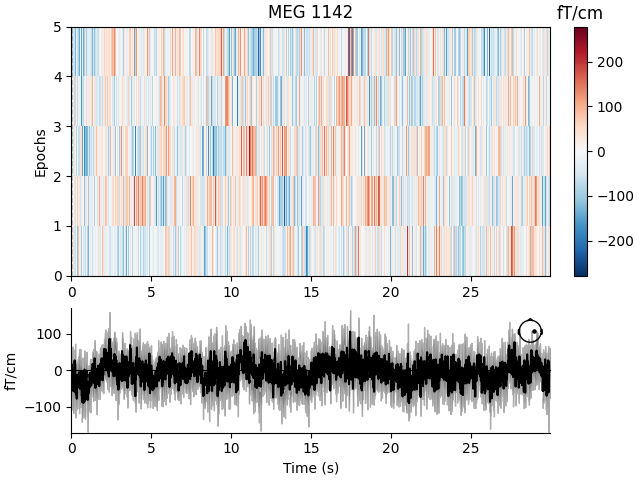
固定长度 epochs 通常不适合事件相关分析。从我们固定长度 epochs 的图像映射(image map)中可以看出这一点。当对 epochs 进行平均时(如绘图底部所示),事件相关活动起始时刻之间的错位会导致噪声。
event_related_plot = epochs.plot_image(picks=["MEG 1142"])
Using data from preloaded Raw for 5 events and 3000 original time points ...
0 bad epochs dropped
Not setting metadata
5 matching events found
No baseline correction applied
0 projection items activated
有关为事件相关分析创建 epochs 的信息,请参阅“Epochs 数据结构:不连续数据”。
固定长度 Epochs 的应用示例:连接性分析#
固定长度 epochs 适用于多种分析,包括频率或时频分析、连接性分析或分类分析。这里我们简要说明它们在传感器空间连接性分析中的用途。
我们的 epochs 对象中的数据形状为 (n_epochs, n_sensors, n_times),因此它适合作为使用 MNE-Python 的包络相关函数在传感器空间计算基于功率的连接性的基础。固定长度 epochs 的较长时长(30 秒)有助于我们在分段后必须进行滤波时减少边缘伪迹并获得更好的频率分辨率。
让我们考察 alpha 频段。我们采用滤波参数的默认值(有关滤波的更多信息,请参阅“滤波与重采样”)。
epochs.load_data().filter(l_freq=8, h_freq=12)
alpha_data = epochs.get_data(copy=False)
Using data from preloaded Raw for 5 events and 3000 original time points ...
Setting up band-pass filter from 8 - 12 Hz

FIR filter parameters
---------------------
Designing a one-pass, zero-phase, non-causal bandpass filter:
- Windowed time-domain design (firwin) method
- Hamming window with 0.0194 passband ripple and 53 dB stopband attenuation
- Lower passband edge: 8.00
- Lower transition bandwidth: 2.00 Hz (-6 dB cutoff frequency: 7.00 Hz)
- Upper passband edge: 12.00 Hz
- Upper transition bandwidth: 3.00 Hz (-6 dB cutoff frequency: 13.50 Hz)
- Filter length: 165 samples (1.650 s)
如有需要,可以获得每个 epoch 各自的独立相关矩阵。对于包络相关,如果使用 mne_connectivity.EpochConnectivity.get_data(),这便是默认返回结果:
corr_matrix = envelope_correlation(alpha_data).get_data()
print(corr_matrix.shape)
(5, 306, 306, 1)
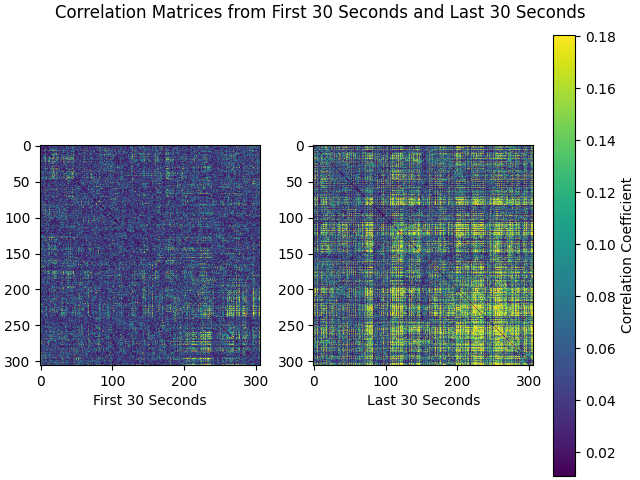
现在我们可以绘制相关矩阵。我们将比较记录中第一个和最后一个 30 秒的 epoch:
first_30 = corr_matrix[0]
last_30 = corr_matrix[-1]
corr_matrices = [first_30, last_30]
color_lims = np.percentile(np.array(corr_matrices), [5, 95])
titles = ["First 30 Seconds", "Last 30 Seconds"]

fig, axes = plt.subplots(nrows=1, ncols=2, layout="constrained")
fig.suptitle("Correlation Matrices from First 30 Seconds and Last 30 Seconds")
for ci, corr_matrix in enumerate(corr_matrices):
    ax = axes[ci]
    mpbl = ax.imshow(corr_matrix, clim=color_lims)
    ax.set_xlabel(titles[ci])
cbar = fig.colorbar(ax.images[0], label="Correlation Coefficient")
脚本总运行时间:(0 分 9.794 秒)