
注意
转到末尾下载完整示例代码。
MNE 如何使用 FreeSurfer 输出#
本教程介绍 MNE-Python 如何处理 MRI 坐标框架,以及 MNE-Python 如何与 FreeSurfer 集成,以处理 MRI 数据和一般的源空间数据。
照例,我们先导入必要的软件包;本教程中包括用于加载 MRI 图像的 nibabel(MNE-Python 在底层也使用 nibabel)。我们还会使用一个特殊的 Matplotlib 函数为文字添加轮廓,使文字在 MRI 图像上清晰可读。
# Authors: The MNE-Python contributors.
# License: BSD-3-Clause
# Copyright the MNE-Python contributors.
import matplotlib.patheffects as path_effects
import matplotlib.pyplot as plt
import nibabel
import numpy as np

import mne
from mne.io.constants import FIFF
from mne.transforms import apply_trans
MRI 坐标系#
我们先来看 sample 受试者的 MRI。按照 FreeSurfer 的标准约定,我们查看 T1.mgz,它是在运行 FreeSurfer 命令 recon-all 时由原始 MRI sample/mri/orig/001.mgz 生成的。这里我们用 nibabel 加载 T1 图像,并调用所得对象的 orthoview() 方法来查看。
data_path = mne.datasets.sample.data_path()
subjects_dir = data_path / "subjects"
subject = "sample"
t1_fname = subjects_dir / subject / "mri" / "T1.mgz"
t1 = nibabel.load(t1_fname)
t1.orthoview()
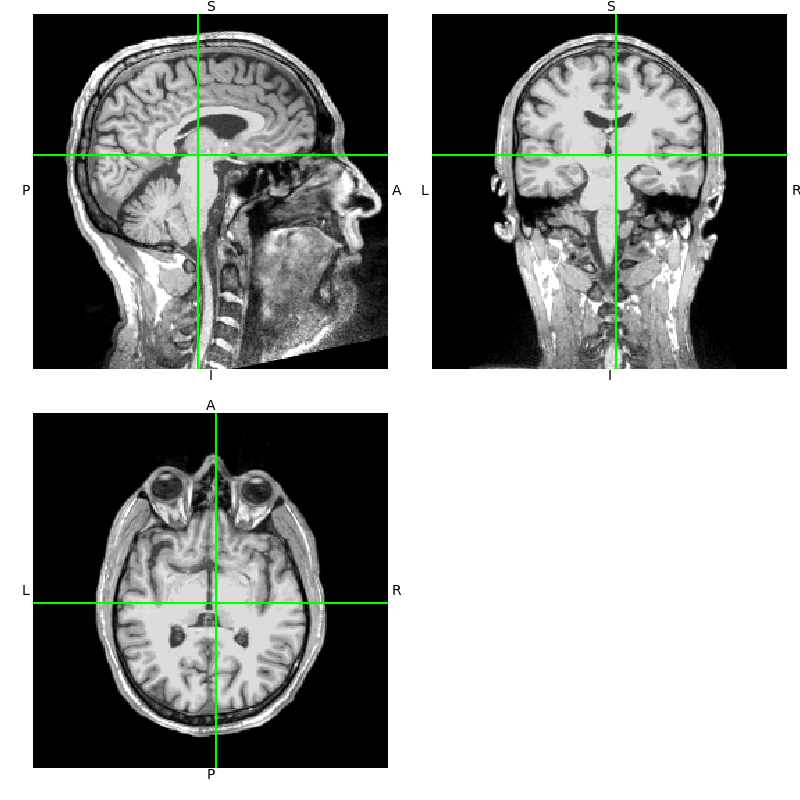
注意,orthoview() 图中的坐标轴标注为 L-R、S-I 和 P-A。它们反映了 MRI 成像中广泛使用的标准 RAS(right-anterior-superior,右-前-上)坐标系。如果你不熟悉 RAS 坐标,可参阅优秀的 nibabel 教程 Coordinate systems and affines。
nibabel 已在底层处理了一些坐标框架变换,因此我们手动做一遍,以便理解其中的过程。首先将数据取为三维数组,并注意它已经是标准尺寸:
data = np.asarray(t1.dataobj)
print(data.shape)
(256, 256, 256)
这些数据是体素强度值。此处为 0-255 范围内的无符号整数,但一般而言也可以是浮点值。给定索引三元组 (i, j, k) 处的值 data[i, j, k] 对应空间中某个真实世界的物理位置 (x, y, z)。要得到它的物理位置,首先必须选定要使用的坐标框架。
例如,我们可以选择地理坐标系:原点位于地心,Z 轴穿过北极,X 轴穿过本初子午线(零度经线),Y 轴与二者正交,共同构成右手坐标系。对于在 MRI 采集期间为分析定义体素的物理位置来说,这并不是很有用的选择,但你仍然可以求出将 (i, j, k) 与该坐标框架联系起来的变换。
相反,每台扫描仪都会定义一个更实用的原生坐标系,供采集时使用,通常与扫描仪本身和/或受试者在其中的物理朝向有关。采集过程中,体素索引 (i, j, k) 与扫描仪原生坐标框架中的物理位置 (x, y, z) 之间的关系会保存在图像的仿射变换中。
我们可以用 nibabel 查看这一变换,同时要记住它内部以毫米为单位处理所有内容,而 MNE 中始终使用国际单位制(米)。
这样,对体素坐标应用仿射变换,我们就能取任意体素或数据切片,并知道它在扫描仪原生物理空间 (x, y, z) 中的位置(单位 mm)。
[[-1.00000000e+00  1.15484021e-07 -1.91852465e-07  1.22726395e+02]
 [ 8.56816911e-08  1.57160827e-08  1.00000000e+00 -1.18960930e+02]
 [ 1.49011647e-08 -1.00000000e+00  6.40284092e-09  1.00712036e+02]
 [ 0.00000000e+00  0.00000000e+00  0.00000000e+00  1.00000000e+00]]
Our voxel has real-world coordinates 0.726, -16.961, -18.288 (mm)
如果你有扫描仪原生 RAS 空间中的一点 (x, y, z),想要得到对应的体素编号,可以使用仿射矩阵的逆来求得。这涉及舍入,因此稍不留意就可能偏差一个体素:
ras_coords_mm = np.array([1, -17, -18])
inv_affine = np.linalg.inv(t1.affine)
i_, j_, k_ = np.round(apply_trans(inv_affine, ras_coords_mm)).astype(int)
print(f"Our real-world coordinates correspond to voxel ({i_}, {j_}, {k_})")
Our real-world coordinates correspond to voxel (122, 119, 102)
下面写一个简短的函数,在图像中可视化我们的体素所在位置,并用 RAS 空间坐标(四舍五入到毫米)标注它:
def imshow_mri(data, img, vox, xyz, suptitle):
    """Show an MRI slice with a voxel annotated."""
    i, j, k = vox
    fig, ax = plt.subplots(1, figsize=(6, 6), layout="constrained")
    codes = nibabel.orientations.aff2axcodes(img.affine)
    # Figure out the title based on the code of this axis
    ori_slice = dict(
        P="Coronal", A="Coronal", I="Axial", S="Axial", L="Sagittal", R="Sagittal"
    )
    ori_names = dict(
        P="posterior", A="anterior", I="inferior", S="superior", L="left", R="right"
    )
    title = ori_slice[codes[0]]
    ax.imshow(data[i], vmin=10, vmax=120, cmap="gray", origin="lower")
    ax.axvline(k, color="y")
    ax.axhline(j, color="y")
    for kind, coords in xyz.items():
        annotation = "{}: {}, {}, {} mm".format(kind, *np.round(coords).astype(int))
        text = ax.text(k, j, annotation, va="baseline", ha="right", color=(1, 1, 0.7))
        text.set_path_effects(
            [
                path_effects.Stroke(linewidth=2, foreground="black"),
                path_effects.Normal(),
            ]
        )
    # reorient view so that RAS is always rightward and upward
    x_order = -1 if codes[2] in "LIP" else 1
    y_order = -1 if codes[1] in "LIP" else 1
    ax.set(
        xlim=[0, data.shape[2] - 1][::x_order],
        ylim=[0, data.shape[1] - 1][::y_order],
        xlabel=f"k ({ori_names[codes[2]]}+)",
        ylabel=f"j ({ori_names[codes[1]]}+)",
        title=f"{title} view: i={i} ({ori_names[codes[0]]}+)",
    )
    fig.suptitle(suptitle)
    return fig


imshow_mri(data, t1, vox, {"Scanner RAS": xyz_ras}, "MRI slice")
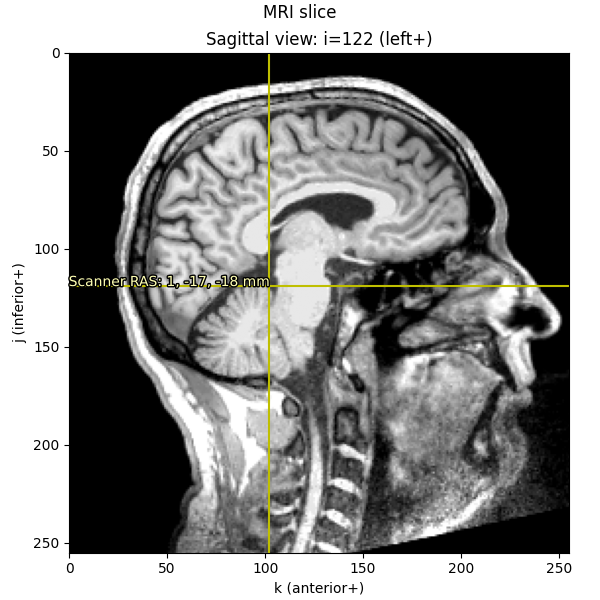
注意,坐标轴刻度(i、j 和 k)仍以体素为单位(范围 0-255);只有标注文字被我们换算成了以毫米表示的真实世界 RAS 坐标。
MNE-Python 中的“MRI 坐标”:FreeSurfer surface RAS#
虽然 nibabel 使用扫描仪 RAS (x, y, z) 坐标,但 FreeSurfer 使用的坐标框架略有不同:MRI surface RAS。从体素到 FreeSurfer MRI surface RAS 坐标框架的变换,在 FreeSurfer 文档中称为 Torig,在 nibabel 中称为 vox2ras_tkr。该变换将坐标框架的中心置于共形(conformed)体积维度的中间(N / 2.),各轴沿体积自身的轴向。更多信息参见 MEG/EEG and MRI coordinate systems。
注意
一般而言,应假定某个受试者的 MRI 坐标系是该受试者特有的,也就是说,它不同于其他任何 FreeSurfer 受试者所用的 MRI 坐标系。尽管 FreeSurfer 在处理过程中会将每个受试者的 MRI 对齐到 fsaverage 以完成重建,但所有数据(表面、MRI 等)都存储在该受试者特有的坐标框架中。这正是群体分析必须将数据变换到共同坐标框架的原因,例如通过表面或体积形变(morphing),甚至只是对点应用 FreeSurfer 的 MNI 仿射变换。
由于 MNE-Python 在表面计算(例如白质、内外颅骨网格)中大量使用 FreeSurfer,它在内部尽可能使用 FreeSurfer surface RAS 坐标系(而不是 nibabel 的扫描仪 RAS 系统)进行各类计算,例如所有源空间和 BEM 网格的顶点定义。
在 MNE-Python 文档中,每当你看到“MRI coordinates”或“MRI coords”,都应假定我们指的是“FreeSurfer MRI surface RAS”坐标框架!
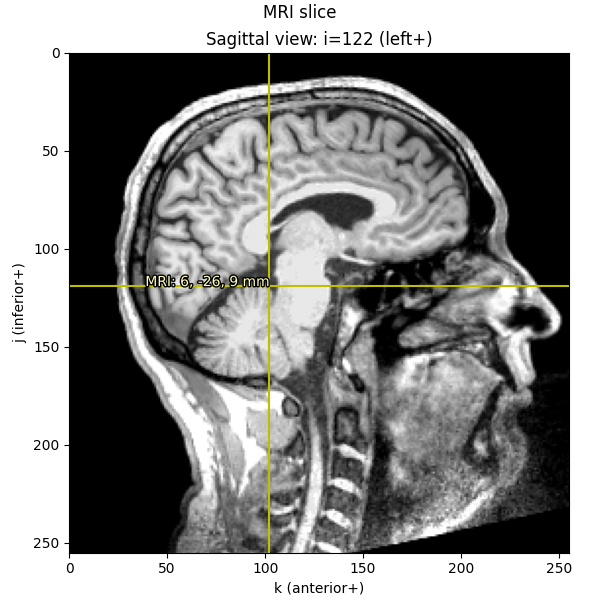
我们可以像前面那样进行类似计算,将给定的体素索引转换为 FreeSurfer MRI 坐标(即我们在 MNE 其他地方所称的“MRI 坐标”或“surface RAS”),就像上面把体素索引转换为扫描仪 RAS 一样:
[[-1.00000000e+00  1.15484021e-07 -1.91852465e-07  1.22726395e+02]
 [ 8.56816911e-08  1.57160827e-08  1.00000000e+00 -1.18960930e+02]
 [ 1.49011647e-08 -1.00000000e+00  6.40284092e-09  1.00712036e+02]
 [ 0.00000000e+00  0.00000000e+00  0.00000000e+00  1.00000000e+00]]
[[  -1.    0.    0.  128.]
 [   0.    0.    1. -128.]
 [   0.   -1.    0.  128.]
 [   0.    0.    0.    1.]]
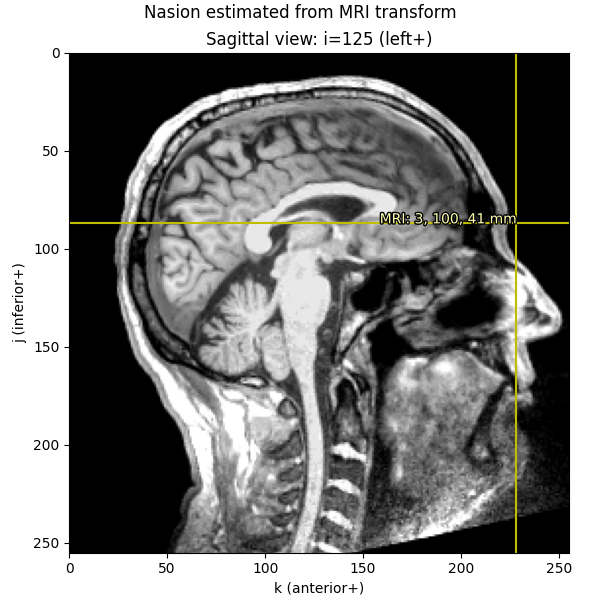
了解这些关系并有意识地处理坐标变换后,我们就能从任意给定空间中的一点到达任何其他空间。先从在矢状位 MRI 切片上绘制 nasion(鼻根点)开始:
fiducials = mne.coreg.get_mni_fiducials(subject, subjects_dir=subjects_dir)
nasion_mri = [d for d in fiducials if d["ident"] == FIFF.FIFFV_POINT_NASION][0]
print(nasion_mri)  # note it's in FreeSurfer MRI coords
<DigPoint | Nasion : (2.6, 99.8, 40.8) mm : MRI (surface RAS) frame>
打印 nasion 时,它显示为 DigPoint 并以毫米显示坐标,但要注意其底层数据实际以米存储,因此在变换和绘图之前,我们先将其转换为毫米:
nasion_mri = nasion_mri["r"] * 1000  # meters → millimeters
nasion_vox = np.round(apply_trans(np.linalg.inv(Torig), nasion_mri)).astype(int)
imshow_mri(
    data, t1, nasion_vox, dict(MRI=nasion_mri), "Nasion estimated from MRI transform"
)
我们也可以从 MEG 数据中取出数字化(digitization)点,它位于“head”坐标框架中。
下面查看 head 坐标框架中的 nasion:
info = mne.io.read_info(data_path / "MEG" / "sample" / "sample_audvis_raw.fif")
nasion_head = [
    d
    for d in info["dig"]
    if d["kind"] == FIFF.FIFFV_POINT_CARDINAL and d["ident"] == FIFF.FIFFV_POINT_NASION
][0]
print(nasion_head)  # note it's in "head" coordinates
    Read a total of 3 projection items:
        PCA-v1 (1 x 10²)  idle
        PCA-v2 (1 x 10²)  idle
        PCA-v3 (1 x 10²)  idle
<DigPoint |     Nasion : (0.0, 102.6, 0.0) mm      : head frame>
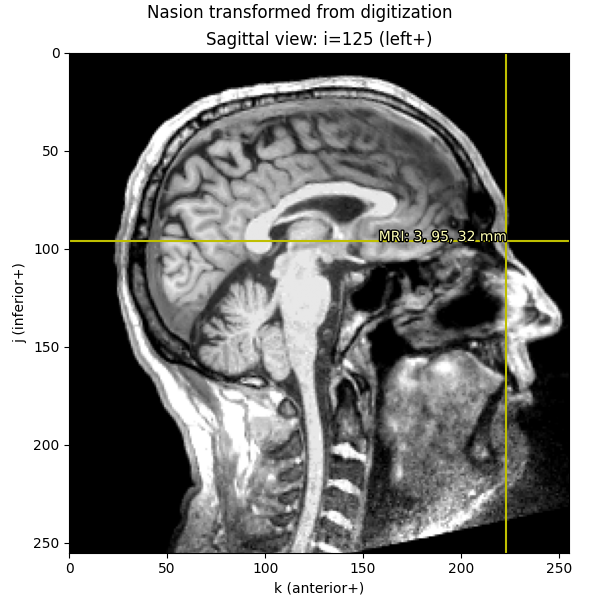
注意,在“head”坐标框架中,nasion 的 x 和 z 方向值为 0(这很合理,因为 nasion 在该系统中用于定义 y 轴)。要从头坐标系转换到体素,我们首先应用 trans 文件(通常由 MNE-Python 的配准 GUI 生成)中的 head → MRI(surface RAS)变换,然后把米转换为毫米,最后应用 Torig 的逆得到体素。
在底层,mne.setup_source_space()、mne.setup_volume_source_space() 和 mne.compute_source_morph() 等函数大量使用这些坐标框架。
trans = mne.read_trans(data_path / "MEG" / "sample" / "sample_audvis_raw-trans.fif")

# first we transform from head to MRI, and *then* convert to millimeters
nasion_dig_mri = apply_trans(trans, nasion_head["r"]) * 1000

# ...then we can use Torig to convert MRI to voxels:
nasion_dig_vox = np.round(apply_trans(np.linalg.inv(Torig), nasion_dig_mri)).astype(int)
imshow_mri(
    data,
    t1,
    nasion_dig_vox,
    dict(MRI=nasion_dig_mri),
    "Nasion transformed from digitization",
)
使用 FreeSurfer 的表面重建#
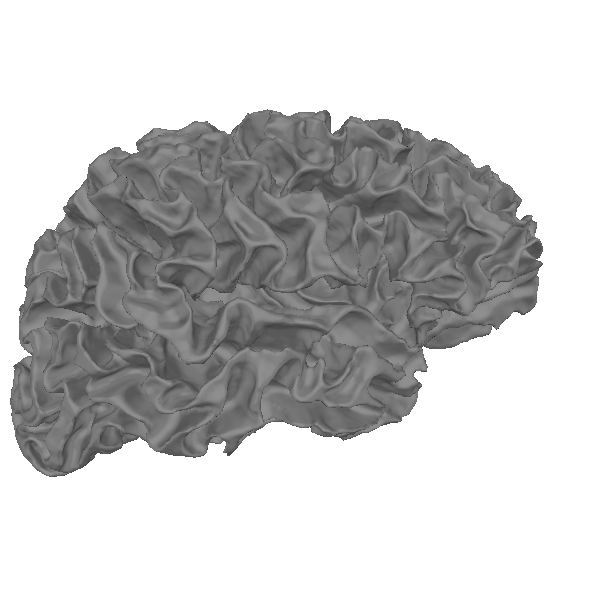
FreeSurfer 的重要功能之一是提供皮层表面重建。例如,我们加载并查看大脑的白质表面。它是由一组顶点(通常称为 rr,形状为 (n_vertices, 3))和一组三角形(tris,形状为 (n_tris, 3))定义的三维网格,三角形指明了 rr 中哪些顶点构成网格的每个三角面片。
fname = subjects_dir / subject / "surf" / "rh.white"
rr_mm, tris = mne.read_surface(fname)
print(f"rr_mm.shape == {rr_mm.shape}")
print(f"tris.shape == {tris.shape}")
print(f"rr_mm.max() = {rr_mm.max()}")  # just to show that we are in mm
rr_mm.shape == (156866, 3)
tris.shape == (313728, 3)
rr_mm.max() = 97.80481719970703
下面实际绘制它:
renderer = mne.viz.backends.renderer.create_3d_figure(
    size=(600, 600), bgcolor="w", scene=False
)
gray = (0.5, 0.5, 0.5)
renderer.mesh(*rr_mm.T, triangles=tris, color=gray)
view_kwargs = dict(elevation=90, azimuth=0)  # camera at +X with +Z up
mne.viz.set_3d_view(
    figure=renderer.figure, distance=350, focalpoint=(0.0, 0.0, 40.0), **view_kwargs
)
renderer.show()
我们还可以把网格叠加在 MRI 切片上。网格表面以毫米为单位定义在 MRI(FreeSurfer surface RAS)坐标框架中,因此可以应用 Torig 变换的逆将其转换为体素:
rr_vox = apply_trans(np.linalg.inv(Torig), rr_mm)
fig = imshow_mri(data, t1, vox, {"Scanner RAS": xyz_ras}, "MRI slice")

# Based on how imshow_mri works, the "X" here is the last dim of the MRI vol,
# the "Y" is the middle dim, and the "Z" is the first dim, so now that our
# points are in the correct coordinate frame, we need to ask matplotlib to
# do a tricontour slice like:
fig.axes[0].tricontour(
    rr_vox[:, 2],
    rr_vox[:, 1],
    tris,
    rr_vox[:, 0],
    levels=[vox[0]],
    colors="r",
    linewidths=1.0,
    zorder=1,
)
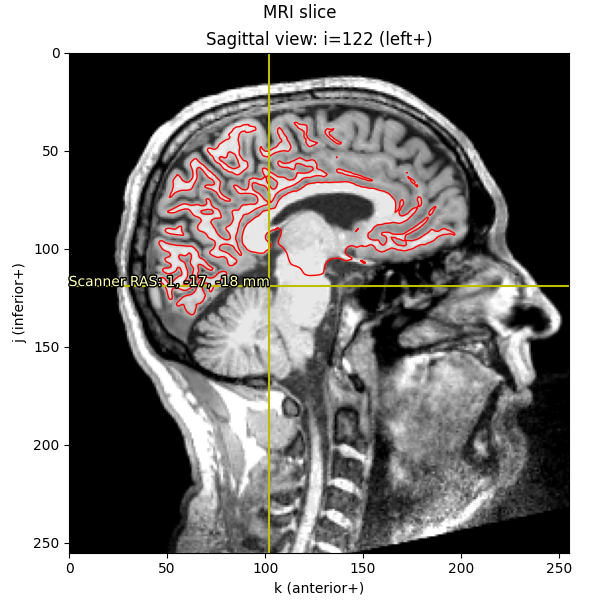
这正是 mne.viz.plot_bem() 用来显示 BEM 表面的方法。
皮层配准(球形)#
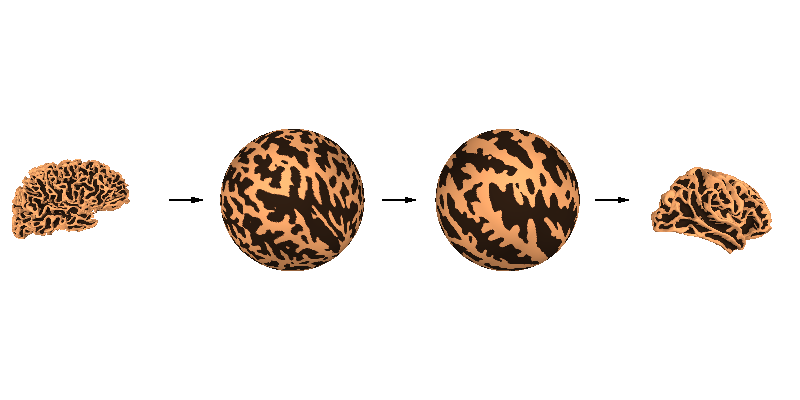
FreeSurfer 提供的一项关键功能是皮层表面的球形表面对齐,可最大化脑沟-脑回对齐。FreeSurfer 首先将皮层表面膨胀为球面,然后与 fsaverage 进行最优对齐。由于膨胀到球面时顶点顺序保持不变,源(sample)网格中的给定顶点可以轻松映射到目标(fsaverage)网格中的相同位置,反之亦然。
renderer_kwargs = dict(bgcolor="w")
renderer = mne.viz.backends.renderer.create_3d_figure(
    size=(800, 400), scene=False, **renderer_kwargs
)
curvs = [
    (
        mne.surface.read_curvature(
            subjects_dir / subj / "surf" / "rh.curv", binary=False
        )
        > 0
    ).astype(float)
    for subj in ("sample", "fsaverage")
    for _ in range(2)
]
fnames = [
    subjects_dir / subj / "surf" / surf
    for subj in ("sample", "fsaverage")
    for surf in ("rh.white", "rh.sphere")
]
y_shifts = [-450, -150, 450, 150]
z_shifts = [-40, 0, -30, 0]
for name, y_shift, z_shift, curv in zip(fnames, y_shifts, z_shifts, curvs):
    this_rr, this_tri = mne.read_surface(name)
    this_rr += [0, y_shift, z_shift]
    renderer.mesh(
        *this_rr.T,
        triangles=this_tri,
        color=None,
        scalars=curv,
        colormap="copper_r",
        vmin=-0.2,
        vmax=1.2,
    )
zero = [0.0, 0.0, 0.0]
width = 50.0
y = np.sort(y_shifts)
y = (y[1:] + y[:-1]) / 2.0 - width / 2.0
renderer.quiver3d(zero, y, zero, zero, [1] * 3, zero, "k", width, "arrow")
view_kwargs["focalpoint"] = (0.0, 0.0, 0.0)
mne.viz.set_3d_view(figure=renderer.figure, distance=1050, **view_kwargs)
renderer.show()
下面通过将两个球面网格以线框形式叠加并大幅放大,来更仔细地观察球面对齐(黑色网格的顶点间距约为 1 mm):
cyan = "#66CCEE"
black = "k"
renderer = mne.viz.backends.renderer.create_3d_figure(
    size=(800, 800), scene=False, **renderer_kwargs
)
surfs = [
    mne.read_surface(subjects_dir / subj / "surf" / "rh.sphere")
    for subj in ("fsaverage", "sample")
]
colors = [black, cyan]
line_widths = [2, 3]
for surf, color, line_width in zip(surfs, colors, line_widths):
    this_rr, this_tri = surf
    # cull to the subset of tris with all positive X (toward camera)
    this_tri = this_tri[(this_rr[this_tri, 0] > 0).all(axis=1)]
    renderer.mesh(
        *this_rr.T,
        triangles=this_tri,
        color=color,
        representation="wireframe",
        line_width=line_width,
        render_lines_as_tubes=True,
    )
mne.viz.set_3d_view(figure=renderer.figure, distance=150, **view_kwargs)
renderer.show()
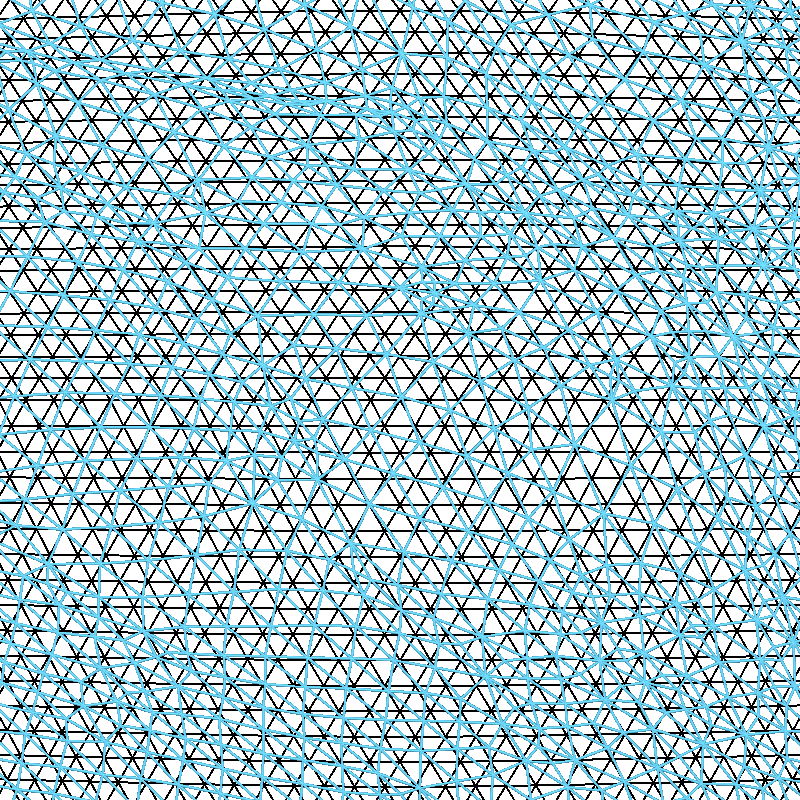
可以看到,fsaverage(黑色)网格是均匀间隔的,而受试者“sample”的网格(青色)已被 FreeSurfer 沿球面进行了变形。这种变形旨在优化脑沟-脑回对齐。
表面降采样#
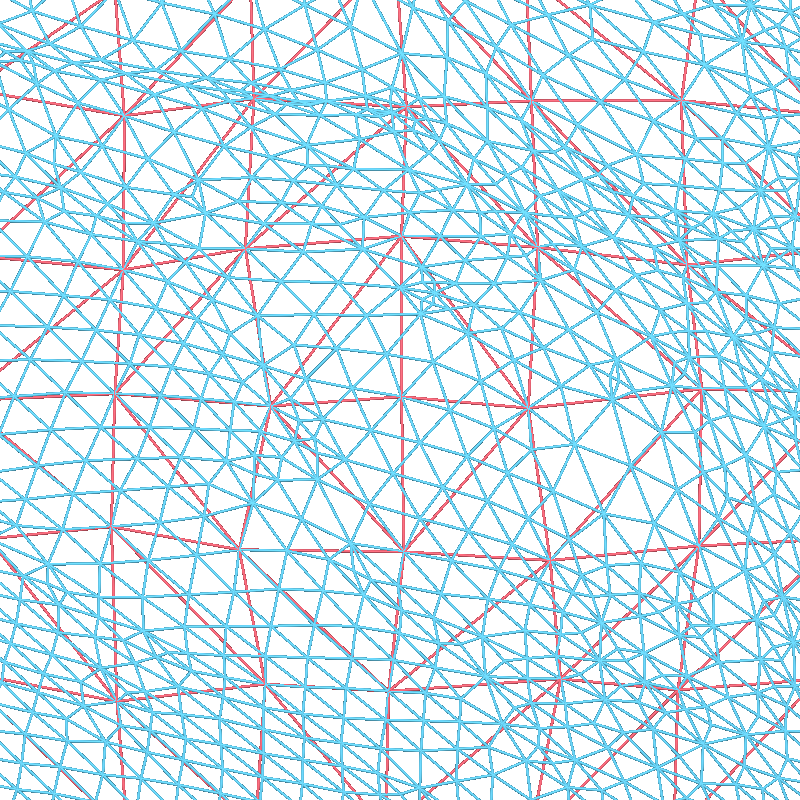
这些表面包含大量顶点,而通常创建源空间只需要其中一部分顶点。在球面空间中进行子采样即可轻松实现均匀采样。为此,我们使用递归细分的二十面体或八面体。例如,加载标准的 oct-6 源空间,并在与之前相同的缩放级别下,可视化它如何对稠密网格进行子采样(红色):
src = mne.read_source_spaces(subjects_dir / "sample" / "bem" / "sample-oct-6-src.fif")
print(src)

red = "#EE6677"
renderer = mne.viz.backends.renderer.create_3d_figure(
    size=(800, 800), scene=False, **renderer_kwargs
)
rr_sph, _ = mne.read_surface(fnames[1])
for tris, color in [(src[1]["tris"], cyan), (src[1]["use_tris"], red)]:
    # cull to the subset of tris with all positive X (toward camera)
    tris = tris[(rr_sph[tris, 0] > 0).all(axis=1)]
    renderer.mesh(
        *rr_sph.T,
        triangles=tris,
        color=color,
        representation="wireframe",
        line_width=3,
        render_lines_as_tubes=True,
    )
mne.viz.set_3d_view(figure=renderer.figure, distance=150, **view_kwargs)
renderer.show()
    Reading a source space...
    Computing patch statistics...
    Patch information added...
    Distance information added...
    [done]
    Reading a source space...
    Computing patch statistics...
    Patch information added...
    Distance information added...
    [done]
    2 source spaces read
<SourceSpaces: [<surface (lh), n_vertices=155407, n_used=4098>, <surface (rh), n_vertices=156866, n_used=4098>] MRI (surface RAS) coords, subject 'sample', ~27.5 MiB>
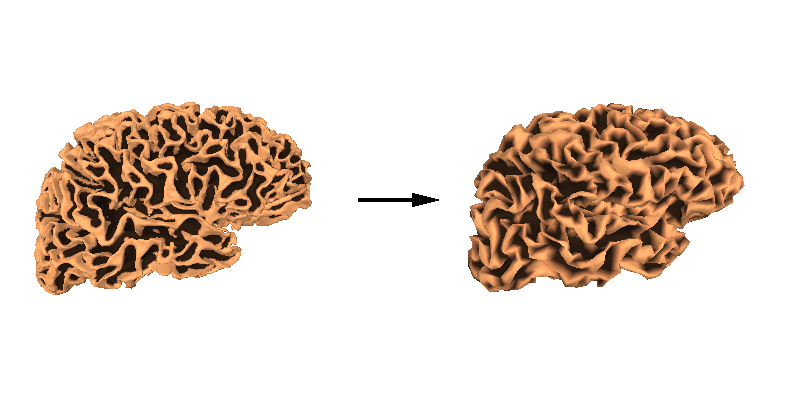
然后我们还可以同时绘制原始高密度网格和降采样后的白质表面,以比较这两个网格。
renderer = mne.viz.backends.renderer.create_3d_figure(
    size=(800, 400), scene=False, **renderer_kwargs
)
y_shifts = [-125, 125]
tris = [src[1]["tris"], src[1]["use_tris"]]
for y_shift, tris in zip(y_shifts, tris):
    this_rr = src[1]["rr"] * 1000.0 + [0, y_shift, -40]
    renderer.mesh(
        *this_rr.T,
        triangles=tris,
        color=None,
        scalars=curvs[0],
        colormap="copper_r",
        vmin=-0.2,
        vmax=1.2,
    )
renderer.quiver3d([0], [-width / 2.0], [0], [0], [1], [0], "k", width, "arrow")
mne.viz.set_3d_view(figure=renderer.figure, distance=450, **view_kwargs)
renderer.show()
警告
某些源空间顶点可能会在正向计算过程中被移除。更多信息参见 头模型与正向计算。
FreeSurfer 的 MNI 仿射变换#
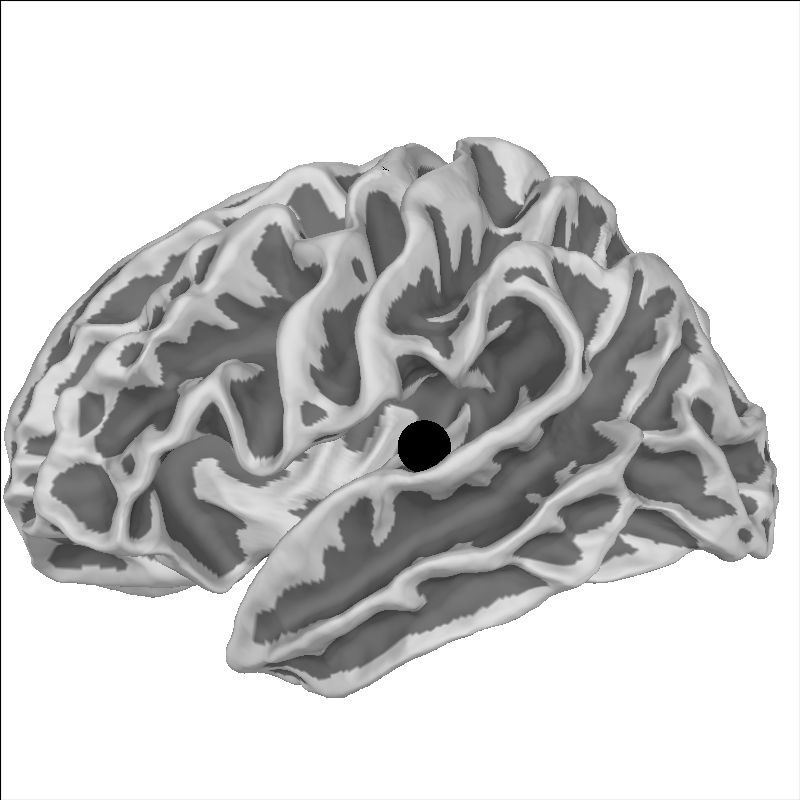
除基于表面的方法外,FreeSurfer 还提供将每个受试者数据与 fsaverage 受试者进行简单仿射配准的方法。我们为 sample 选一个点并绘制在脑上:
brain = mne.viz.Brain(
    "sample", "lh", "white", subjects_dir=subjects_dir, background="w"
)
xyz = np.array([[-55, -10, 35]])
brain.add_foci(xyz, hemi="lh", color="k")
brain.show_view("lat")
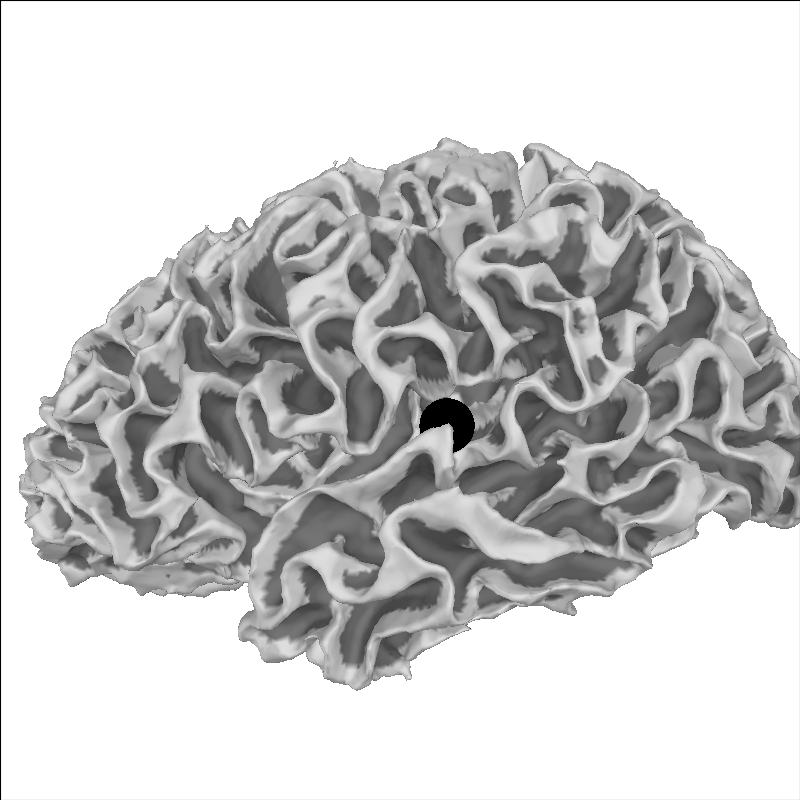
我们可以取这个点并将其变换到 MNI 空间:
mri_mni_trans = mne.read_talxfm(subject, subjects_dir)
print(mri_mni_trans)
xyz_mni = apply_trans(mri_mni_trans, xyz / 1000.0) * 1000.0
print(np.round(xyz_mni, 1))
<Transform | MRI (surface RAS)->MNI Talairach>
[[ 1.02248488 -0.00844919 -0.03621711  0.00111715]
 [ 0.07107091  0.91486582  0.40609791 -0.02300193]
 [ 0.00875602 -0.43369992  1.02811882 -0.03356932]
 [ 0.          0.          0.          1.        ]]
[[-56.3 -21.8   6.3]]
由于 fsaverage 的特殊之处在于它已位于 MNI 空间(其 MRI 到 MNI 的变换为单位矩阵),该点应落在等效的解剖位置上:
brain = mne.viz.Brain(
    "fsaverage", "lh", "white", subjects_dir=subjects_dir, background="w"
)
brain.add_foci(xyz_mni, hemi="lh", color="k")
brain.show_view("lat")
理解膨胀脑#
解读显示在膨胀脑上的数据需要一点时间。这种可视化非常有助于在一张图中展示更多脑部区域,因为脑沟内部难以观察。下面是一个将 pial 表面与膨胀表面联系起来的视频。如果你对其制作方式感兴趣,这里是用于生成该视频的 gist:https://gist.github.com/alexrockhill/b5a1ce6c6ba363cf3f277cd321a763bf 。
脚本总运行时间:(0 分 7.676 秒)