
说明
转到末尾下载完整示例代码。
计算并可视化 ERDS 图#
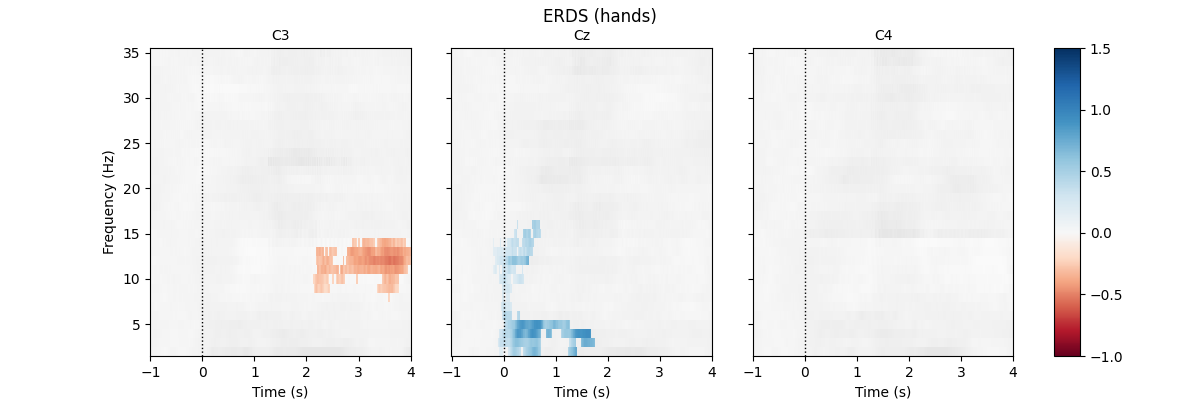
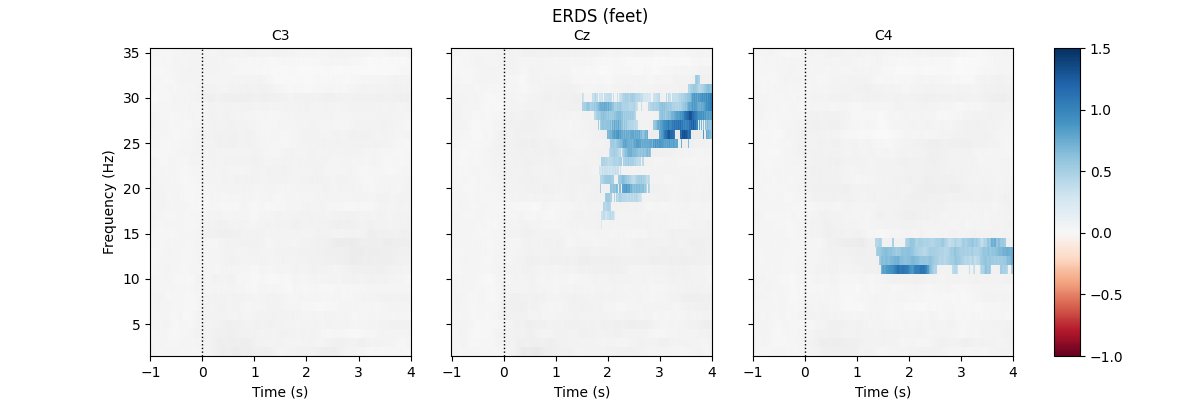
本示例计算并显示事件相关 EEG 数据的 ERDS 图。ERDS(有时写作 ERD/ERS)是事件相关去同步(ERD)与事件相关同步(ERS)的简称 [1]。概念上,ERD 指特定频段功率相对基线下降,ERS 则指功率上升。ERDS 图是一定频率范围内 ERD/ERS 的时频表示 [2],也称 ERSP(事件相关谱扰动)[3]。
本示例使用包含两种运动想象任务(想象手部与脚部运动)的 EEG BCI 数据集,目标是为两种任务分别生成 ERDS 图。
首先加载数据并创建 5 s 长的分段。数据集包含多个通道,但这里只考虑 C3、Cz 与 C4。计算 2 到 35 Hz 范围的图。按许多 ERDS 文献的惯例,把 ERD 映射为红色、ERS 映射为蓝色。最后进行基于簇的置换检验,以估计显著的 ERDS 值(并在通道内做多重比较校正)。
# Authors: Clemens Brunner <clemens.brunner@gmail.com>
#          Felix Klotzsche <klotzsche@cbs.mpg.de>
#
# License: BSD-3-Clause
# Copyright the MNE-Python contributors.
照例导入所需的一切。
import matplotlib.pyplot as plt
import numpy as np
import pandas as pd
import seaborn as sns
from matplotlib.colors import TwoSlopeNorm

import mne
from mne.datasets import eegbci
from mne.io import concatenate_raws, read_raw_edf
from mne.stats import permutation_cluster_1samp_test as pcluster_test
首先加载并预处理数据。使用受试者 1 的第 6、10、14 个 run(这些 run 包含手部与脚部运动想象)。
fnames = eegbci.load_data(subjects=1, runs=(6, 10, 14))
raw = concatenate_raws([read_raw_edf(f, preload=True) for f in fnames])

raw.rename_channels(lambda x: x.strip("."))  # remove dots from channel names
# rename descriptions to be more easily interpretable
raw.annotations.rename(dict(T1="hands", T2="feet"))
Extracting EDF parameters from /home/circleci/mne_data/MNE-eegbci-data/files/eegmmidb/1.0.0/S001/S001R06.edf...
Setting channel info structure...
Creating raw.info structure...
Reading 0 ... 19999  =      0.000 ...   124.994 secs...
Extracting EDF parameters from /home/circleci/mne_data/MNE-eegbci-data/files/eegmmidb/1.0.0/S001/S001R10.edf...
Setting channel info structure...
Creating raw.info structure...
Reading 0 ... 19999  =      0.000 ...   124.994 secs...
Extracting EDF parameters from /home/circleci/mne_data/MNE-eegbci-data/files/eegmmidb/1.0.0/S001/S001R14.edf...
Setting channel info structure...
Creating raw.info structure...
Reading 0 ... 19999  =      0.000 ...   124.994 secs...
现在可以在感兴趣事件周围创建 5 秒分段。
Used Annotations descriptions: ['T0', 'feet', 'hands']
Ignoring annotation durations and creating fixed-duration epochs around annotation onsets.
Not setting metadata
45 matching events found
No baseline correction applied
0 projection items activated
Using data from preloaded Raw for 45 events and 961 original time points ...
0 bad epochs dropped
这里为计算 ERDS 图设置合适的参数。特别注意 cnorm 变量,它建立一个非对称色图,使中间颜色映射到零,即使零不是色图范围的中间值。这有两个作用:确保零值显示为白色(下文选择 RdBu 色图),以及让同步与去同步在图中看起来同样突出,即使二者的极值幅度不同。
freqs = np.arange(2, 36)  # frequencies from 2-35Hz
vmin, vmax = -1, 1.5  # set min and max ERDS values in plot
baseline = (-1, 0)  # baseline interval (in s)
cnorm = TwoSlopeNorm(vmin=vmin, vcenter=0, vmax=vmax)  # min, center & max ERDS

kwargs = dict(
    n_permutations=100, step_down_p=0.05, rng=1, buffer_size=None, out_type="mask"
)  # for cluster test
最后对所有分段做时频分解。
tfr = epochs.compute_tfr(
    method="multitaper",
    freqs=freqs,
    n_cycles=freqs,
    use_fft=True,
    return_itc=False,
    average=False,
    decim=2,
)
tfr.crop(tmin, tmax).apply_baseline(baseline, mode="percent")

for event in event_ids:
    # select desired epochs for visualization
    tfr_ev = tfr[event]
    fig, axes = plt.subplots(
        1, 4, figsize=(12, 4), gridspec_kw={"width_ratios": [10, 10, 10, 1]}
    )
    for ch, ax in enumerate(axes[:-1]):  # for each channel
        # positive clusters
        _, c1, p1, _ = pcluster_test(tfr_ev.data[:, ch], tail=1, **kwargs)
        # negative clusters
        _, c2, p2, _ = pcluster_test(tfr_ev.data[:, ch], tail=-1, **kwargs)

        # note that we keep clusters with p <= 0.05 from the combined clusters
        # of two independent tests; in this example, we do not correct for
        # these two comparisons
        c = np.stack(c1 + c2, axis=2)  # combined clusters
        p = np.concatenate((p1, p2))  # combined p-values
        mask = c[..., p <= 0.05].any(axis=-1)

        # plot TFR (ERDS map with masking)
        tfr_ev.average().plot(
            [ch],
            cmap="RdBu",
            cnorm=cnorm,
            axes=ax,
            colorbar=False,
            show=False,
            mask=mask,
            mask_style="mask",
        )

        ax.set_title(epochs.ch_names[ch], fontsize=10)
        ax.axvline(0, linewidth=1, color="black", linestyle=":")  # event
        if ch != 0:
            ax.set_ylabel("")
            ax.set_yticklabels("")
    fig.colorbar(axes[0].images[-1], cax=axes[-1]).ax.set_yscale("linear")
    fig.suptitle(f"ERDS ({event})")
    plt.show()
Applying baseline correction (mode: percent)
Using a threshold of 1.724718
stat_fun(H1): min=-8.559572924066778 max=3.1802691358477366
Running initial clustering …
Found 78 clusters

  0%|          | Permuting : 0/99 [00:00<?,       ?it/s]
 81%|████████  | Permuting : 80/99 [00:00<00:00, 2203.41it/s]
100%|██████████| Permuting : 99/99 [00:00<00:00, 2178.54it/s]
Step-down-in-jumps iteration #1 found 0 clusters to exclude from subsequent iterations
Using a threshold of -1.724718
stat_fun(H1): min=-8.559572924066778 max=3.1802691358477366
Running initial clustering …
Found 71 clusters

  0%|          | Permuting : 0/99 [00:00<?,       ?it/s]
 83%|████████▎ | Permuting : 82/99 [00:00<00:00, 2229.91it/s]
100%|██████████| Permuting : 99/99 [00:00<00:00, 2248.88it/s]
Step-down-in-jumps iteration #1 found 1 cluster to exclude from subsequent iterations

  0%|          | Permuting : 0/99 [00:00<?,       ?it/s]
 79%|███████▉  | Permuting : 78/99 [00:00<00:00, 2276.96it/s]
100%|██████████| Permuting : 99/99 [00:00<00:00, 2286.59it/s]
Step-down-in-jumps iteration #2 found 0 additional clusters to exclude from subsequent iterations
No baseline correction applied
Using a threshold of 1.724718
stat_fun(H1): min=-4.519473510988147 max=3.6995798232707275
Running initial clustering …
Found 83 clusters

  0%|          | Permuting : 0/99 [00:00<?,       ?it/s]
 80%|███████▉  | Permuting : 79/99 [00:00<00:00, 2323.36it/s]
100%|██████████| Permuting : 99/99 [00:00<00:00, 2292.15it/s]
Step-down-in-jumps iteration #1 found 1 cluster to exclude from subsequent iterations

  0%|          | Permuting : 0/99 [00:00<?,       ?it/s]
 85%|████████▍ | Permuting : 84/99 [00:00<00:00, 2323.32it/s]
100%|██████████| Permuting : 99/99 [00:00<00:00, 2301.09it/s]
Step-down-in-jumps iteration #2 found 0 additional clusters to exclude from subsequent iterations
Using a threshold of -1.724718
stat_fun(H1): min=-4.519473510988147 max=3.6995798232707275
Running initial clustering …
Found 56 clusters

  0%|          | Permuting : 0/99 [00:00<?,       ?it/s]
 76%|███████▌  | Permuting : 75/99 [00:00<00:00, 2191.92it/s]
100%|██████████| Permuting : 99/99 [00:00<00:00, 2234.55it/s]
Step-down-in-jumps iteration #1 found 0 clusters to exclude from subsequent iterations
No baseline correction applied
Using a threshold of 1.724718
stat_fun(H1): min=-6.4592553718811 max=3.334719139698971
Running initial clustering …
Found 61 clusters

  0%|          | Permuting : 0/99 [00:00<?,       ?it/s]
 85%|████████▍ | Permuting : 84/99 [00:00<00:00, 2308.66it/s]
100%|██████████| Permuting : 99/99 [00:00<00:00, 2285.18it/s]
Step-down-in-jumps iteration #1 found 0 clusters to exclude from subsequent iterations
Using a threshold of -1.724718
stat_fun(H1): min=-6.4592553718811 max=3.334719139698971
Running initial clustering …
Found 64 clusters

  0%|          | Permuting : 0/99 [00:00<?,       ?it/s]
 81%|████████  | Permuting : 80/99 [00:00<00:00, 2214.32it/s]
100%|██████████| Permuting : 99/99 [00:00<00:00, 2243.02it/s]
Step-down-in-jumps iteration #1 found 0 clusters to exclude from subsequent iterations
No baseline correction applied
Using a threshold of 1.713872
stat_fun(H1): min=-3.6760366758717375 max=3.3443493979849728
Running initial clustering …
Found 70 clusters

  0%|          | Permuting : 0/99 [00:00<?,       ?it/s]
 83%|████████▎ | Permuting : 82/99 [00:00<00:00, 2240.05it/s]
100%|██████████| Permuting : 99/99 [00:00<00:00, 2260.45it/s]
Step-down-in-jumps iteration #1 found 0 clusters to exclude from subsequent iterations
Using a threshold of -1.713872
stat_fun(H1): min=-3.6760366758717375 max=3.3443493979849728
Running initial clustering …
Found 77 clusters

  0%|          | Permuting : 0/99 [00:00<?,       ?it/s]
 82%|████████▏ | Permuting : 81/99 [00:00<00:00, 2204.35it/s]
100%|██████████| Permuting : 99/99 [00:00<00:00, 2223.75it/s]
Step-down-in-jumps iteration #1 found 0 clusters to exclude from subsequent iterations
No baseline correction applied
Using a threshold of 1.713872
stat_fun(H1): min=-4.956834187075391 max=5.467989936693932
Running initial clustering …
Found 100 clusters

  0%|          | Permuting : 0/99 [00:00<?,       ?it/s]
 83%|████████▎ | Permuting : 82/99 [00:00<00:00, 2252.26it/s]
100%|██████████| Permuting : 99/99 [00:00<00:00, 2248.09it/s]
Step-down-in-jumps iteration #1 found 1 cluster to exclude from subsequent iterations

  0%|          | Permuting : 0/99 [00:00<?,       ?it/s]
 84%|████████▍ | Permuting : 83/99 [00:00<00:00, 2298.17it/s]
100%|██████████| Permuting : 99/99 [00:00<00:00, 2306.60it/s]
Step-down-in-jumps iteration #2 found 0 additional clusters to exclude from subsequent iterations
Using a threshold of -1.713872
stat_fun(H1): min=-4.956834187075391 max=5.467989936693932
Running initial clustering …
Found 66 clusters

  0%|          | Permuting : 0/99 [00:00<?,       ?it/s]
 82%|████████▏ | Permuting : 81/99 [00:00<00:00, 2258.57it/s]
100%|██████████| Permuting : 99/99 [00:00<00:00, 2276.20it/s]
Step-down-in-jumps iteration #1 found 0 clusters to exclude from subsequent iterations
No baseline correction applied
Using a threshold of 1.713872
stat_fun(H1): min=-5.954856152984689 max=4.091828652270905
Running initial clustering …
Found 93 clusters

  0%|          | Permuting : 0/99 [00:00<?,       ?it/s]
 78%|███████▊  | Permuting : 77/99 [00:00<00:00, 2283.53it/s]
100%|██████████| Permuting : 99/99 [00:00<00:00, 2280.46it/s]
Step-down-in-jumps iteration #1 found 0 clusters to exclude from subsequent iterations
Using a threshold of -1.713872
stat_fun(H1): min=-5.954856152984689 max=4.091828652270905
Running initial clustering …
Found 53 clusters

  0%|          | Permuting : 0/99 [00:00<?,       ?it/s]
 82%|████████▏ | Permuting : 81/99 [00:00<00:00, 2258.74it/s]
100%|██████████| Permuting : 99/99 [00:00<00:00, 2251.99it/s]
Step-down-in-jumps iteration #1 found 0 clusters to exclude from subsequent iterations
No baseline correction applied
与 Epochs 对象类似,也可以把 EpochsTFR 与 AverageTFR 对象的数据导出为 Pandas DataFrame。默认情况下,导出数据帧的时间列为毫秒;这里为与时频图一致,希望以秒为单位,可通过设置 time_format=None 实现:
df = tfr.to_data_frame(time_format=None)
df.head()
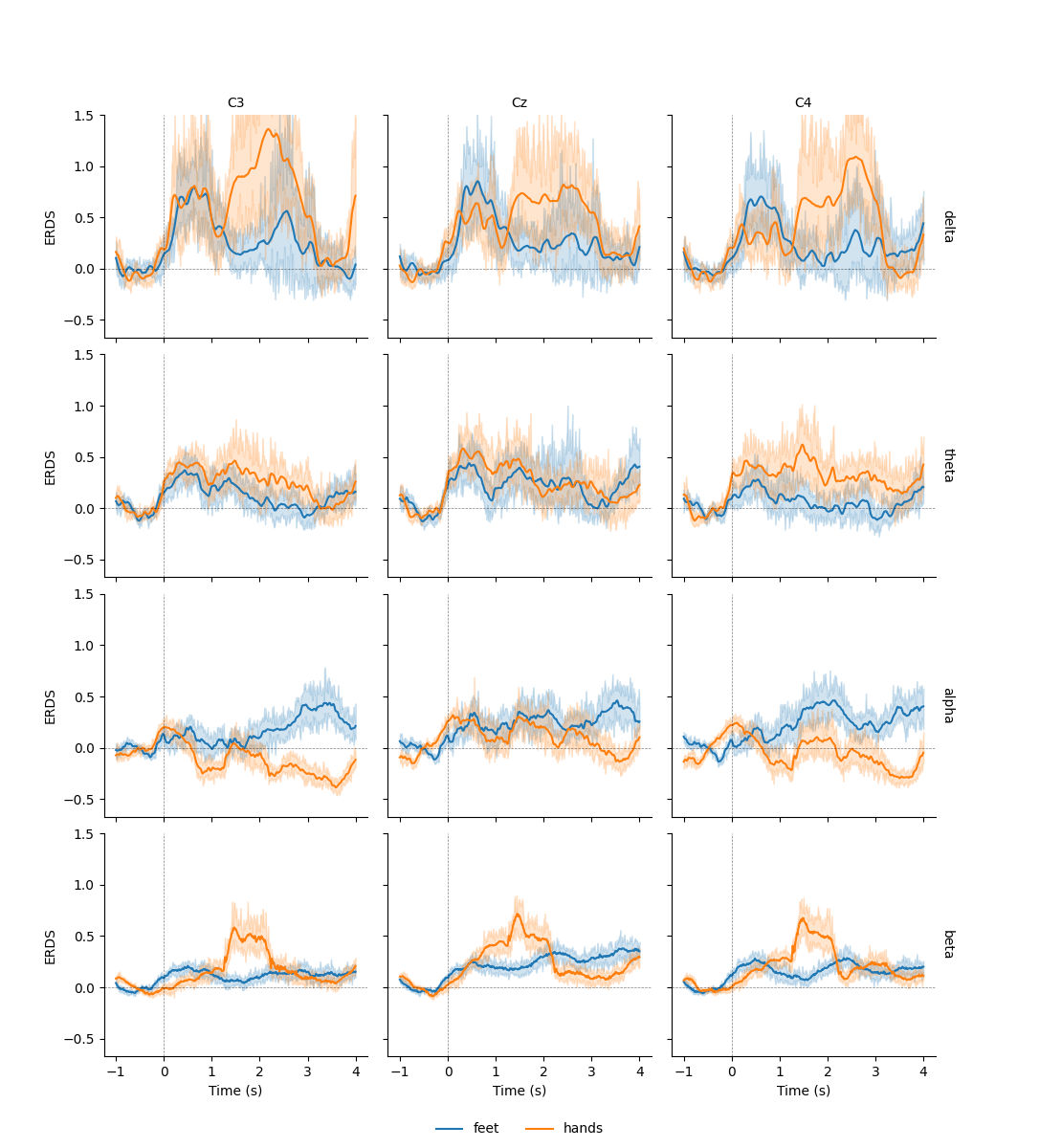
这样就可以使用 seaborn.lineplot() 等额外绘图函数绘制置信带:
df = tfr.to_data_frame(time_format=None, long_format=True)

# Map to frequency bands:
freq_bounds = {"_": 0, "delta": 3, "theta": 7, "alpha": 13, "beta": 35, "gamma": 140}
df["band"] = pd.cut(
    df["freq"], list(freq_bounds.values()), labels=list(freq_bounds)[1:]
)

# Filter to retain only relevant frequency bands:
freq_bands_of_interest = ["delta", "theta", "alpha", "beta"]
df = df[df.band.isin(freq_bands_of_interest)]
df["band"] = df["band"].cat.remove_unused_categories()

# Order channels for plotting:
df["channel"] = df["channel"].cat.reorder_categories(("C3", "Cz", "C4"), ordered=True)

g = sns.FacetGrid(df, row="band", col="channel", margin_titles=True)
g.map(sns.lineplot, "time", "value", "condition", n_boot=10)
axline_kw = dict(color="black", linestyle="dashed", linewidth=0.5, alpha=0.5)
g.map(plt.axhline, y=0, **axline_kw)
g.map(plt.axvline, x=0, **axline_kw)
g.set(ylim=(None, 1.5))
g.set_axis_labels("Time (s)", "ERDS")
g.set_titles(col_template="{col_name}", row_template="{row_name}")
g.add_legend(ncol=2, loc="lower center")
g.fig.subplots_adjust(left=0.1, right=0.9, top=0.9, bottom=0.08)
Converting "condition" to "category"...
Converting "epoch" to "category"...
Converting "channel" to "category"...
Converting "ch_type" to "category"...
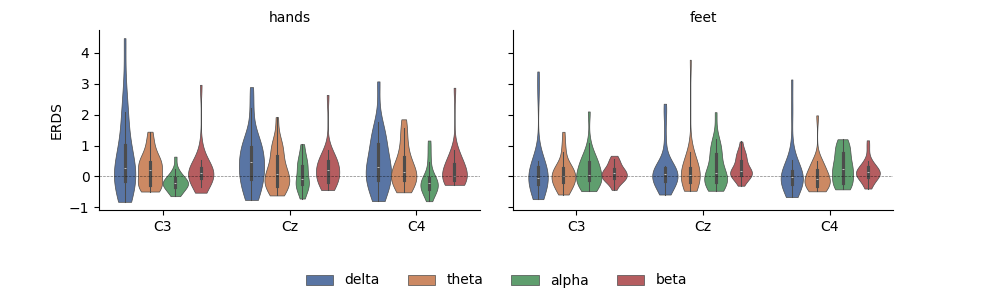
把数据存为 DataFrame 也便于取子集、分组与其他变换。这里用 seaborn 绘制运动想象区间内平均 ERDS 随频段与想象条件变化的图:
df_mean = (
    df.query("time > 1")
    .groupby(["condition", "epoch", "band", "channel"], observed=False)[["value"]]
    .mean()
    .reset_index()
)

g = sns.FacetGrid(
    df_mean, col="condition", col_order=["hands", "feet"], margin_titles=True
)
g = g.map(
    sns.violinplot,
    "channel",
    "value",
    "band",
    cut=0,
    palette="deep",
    order=["C3", "Cz", "C4"],
    hue_order=freq_bands_of_interest,
    linewidth=0.5,
).add_legend(ncol=4, loc="lower center")

g.map(plt.axhline, **axline_kw)
g.set_axis_labels("", "ERDS")
g.set_titles(col_template="{col_name}", row_template="{row_name}")
g.fig.subplots_adjust(left=0.1, right=0.9, top=0.9, bottom=0.3)
参考文献#
脚本总运行时间:(0 分 9.594 秒)