
说明
转到末尾下载完整示例代码。
对体源估计进行变形#
本示例演示如何把单个受试者的 mne.VolSourceEstimate 变形到共同参考空间。我们使用 mne.SourceMorph 完成,数据将基于仿射变换与 [1] 提出的对称微分同胚配准(SDR)非线性配准方法进行变形。
变换由受试者的解剖 T1 加权 MRI(脑)到 FreeSurfer 的 ‘fsaverage’ T1 加权 MRI(脑)估计得到。
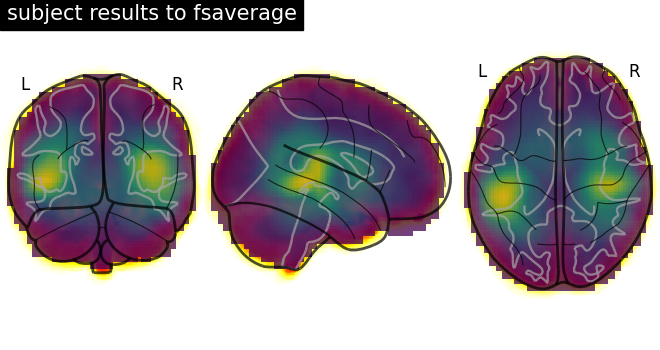
随后把变换应用于体源估计,并绘制结果:显示 fsaverage 的 T1 加权解剖 MRI,并叠加变形后的体源估计。
# Author: Tommy Clausner <tommy.clausner@gmail.com>
#
# License: BSD-3-Clause
# Copyright the MNE-Python contributors.
import nibabel as nib
from nilearn.plotting import plot_glass_brain

import mne
from mne.datasets import fetch_fsaverage, sample
from mne.minimum_norm import apply_inverse, read_inverse_operator

print(__doc__)
设置路径
sample_dir_raw = sample.data_path()
sample_dir = sample_dir_raw / "MEG" / "sample"
subjects_dir = sample_dir_raw / "subjects"

fname_evoked = sample_dir / "sample_audvis-ave.fif"
fname_inv = sample_dir / "sample_audvis-meg-vol-7-meg-inv.fif"

fname_t1_fsaverage = subjects_dir / "fsaverage" / "mri" / "brain.mgz"
fetch_fsaverage(subjects_dir)  # ensure fsaverage src exists
fname_src_fsaverage = subjects_dir / "fsaverage" / "bem" / "fsaverage-vol-5-src.fif"
0 files missing from root.txt in /home/circleci/mne_data/MNE-sample-data/subjects
0 files missing from bem.txt in /home/circleci/mne_data/MNE-sample-data/subjects/fsaverage
计算示例数据。参考资料见 在体源空间中计算诱发数据的 MNE-dSPM 逆解。
加载数据:
evoked = mne.read_evokeds(fname_evoked, condition=0, baseline=(None, 0))
inverse_operator = read_inverse_operator(fname_inv)

# Apply inverse operator
stc = apply_inverse(evoked, inverse_operator, 1.0 / 3.0**2, "dSPM")

# To save time
stc.crop(0.09, 0.09)
Reading /home/circleci/mne_data/MNE-sample-data/MEG/sample/sample_audvis-ave.fif ...
    Read a total of 4 projection items:
        PCA-v1 (1 x 10²) active
        PCA-v2 (1 x 10²) active
        PCA-v3 (1 x 10²) active
        Average EEG reference (1 x 60) active
    Found the data of interest:
        t =    -199.80 ...     499.49 ms (Left Auditory)
        0 CTF compensation matrices available
        nave = 55 - aspect type = 100
Projections have already been applied. Setting proj attribute to True.
Applying baseline correction (mode: mean)
Reading inverse operator decomposition from /home/circleci/mne_data/MNE-sample-data/MEG/sample/sample_audvis-meg-vol-7-meg-inv.fif...
    Reading inverse operator info...
    [done]
    Reading inverse operator decomposition...
    [done]
    305 x 305 full covariance (kind = 1) found.
    Read a total of 4 projection items:
        PCA-v1 (1 x 10²) active
        PCA-v2 (1 x 10²) active
        PCA-v3 (1 x 10²) active
        Average EEG reference (1 x 60) active
    Noise covariance matrix read.
    11271 x 11271 diagonal covariance (kind = 2) found.
    Source covariance matrix read.
    Did not find the desired covariance matrix (kind = 6)
    11271 x 11271 diagonal covariance (kind = 5) found.
    Depth priors read.
    Did not find the desired covariance matrix (kind = 3)
    Reading a source space...
    [done]
    1 source spaces read
    Read a total of 4 projection items:
        PCA-v1 (1 x 10²) active
        PCA-v2 (1 x 10²) active
        PCA-v3 (1 x 10²) active
        Average EEG reference (1 x 60) active
    Source spaces transformed to the inverse solution coordinate frame
Preparing the inverse operator for use...
    Scaled noise and source covariance from nave = 1 to nave = 55
    Created the regularized inverter
    Created an SSP operator (subspace dimension = 3)
    Created the whitener using a noise covariance matrix with rank 302 (3 small eigenvalues omitted)
    Computing noise-normalization factors (dSPM)...
[done]
Applying inverse operator to "Left Auditory"...
    Picked 305 channels from the data
    Computing inverse...
    Eigenleads need to be weighted ...
    Computing residual...
    Explained  59.7% variance
    Combining the current components...
    dSPM...
[done]
为 VolSourceEstimate 获取 SourceMorph 对象#
subject_from 通常可从 src 推断,subject_to 默认为 ‘fsaverage’。若已在环境中设置,subjects_dir 可为 None,此时 SourceMorph 可只以 src 为参数初始化。详见 mne.SourceMorph。
zooms 的默认设置会使参考体积在计算变换前重采样。取值为 ‘5’ 时会重采样到 5 mm 的各向同性体素;该值越大,计算越快但越不精确。
推荐用法是变形到指定的目标源空间,使不同 subject_from 的变形都落到同一空间。体数据的标准用法如下:
src_fs = mne.read_source_spaces(fname_src_fsaverage)
morph = mne.compute_source_morph(
    inverse_operator["src"],
    subject_from="sample",
    subjects_dir=subjects_dir,
    niter_affine=[10, 10, 5],
    niter_sdr=[10, 10, 5],  # just for speed
    src_to=src_fs,
    verbose=True,
)
    Reading a source space...
    [done]
    1 source spaces read
Volume source space(s) present...
    Loading /home/circleci/mne_data/MNE-sample-data/subjects/sample/mri/brain.mgz as "from" volume
    Loading /home/circleci/mne_data/MNE-sample-data/subjects/fsaverage/mri/brain.mgz as "to" volume
Computing registration...
Reslicing to zooms=(4.999999888241291, 4.999999888241291, 4.999999888241291) for translation ...
Optimizing translation:
[2026-10-28 04:57:42][dipy] INFO: ➞ Running center_of_mass step from affine registration...
[2026-10-28 04:57:42][dipy] INFO: ➞ Running translation step from affine registration...
    Translation:   22.6 mm
    R²:            92.5%
Optimizing rigid:
[2026-10-28 04:57:43][dipy] INFO: ➞ Running rigid step from affine registration...
    Translation:   22.6 mm
    Rotation:      21.0°
    R²:            96.5%
Optimizing affine:
[2026-10-28 04:57:43][dipy] INFO: ➞ Running affine step from affine registration...
    R²:            97.0%
Optimizing sdr:
[2026-10-28 04:57:44][dipy] INFO: Creating scale space from the moving image. Levels: 3. Sigma factor: 0.200000.
[2026-10-28 04:57:44][dipy] INFO: Creating scale space from the static image. Levels: 3. Sigma factor: 0.200000.
[2026-10-28 04:57:44][dipy] INFO: Optimizing level 2
[2026-10-28 04:57:44][dipy] INFO: Optimizing level 1
[2026-10-28 04:57:44][dipy] INFO: Optimizing level 0
    R²:            98.8%
[done]
对 VolSourceEstimate 应用变形#
把源估计数据作为第一个参数传给 morph.apply() 方法,即可对源估计数据应用变形。
说明
体变形比表面变形慢得多,因为每个时间点的体积都要单独重采样并做 SDR 变形。可用 mne.SourceMorph.compute_vol_morph_mat() 方法逐个源点计算变换,得到等价的稀疏矩阵表示。这通常需要几分钟计算,但可保存到磁盘重复使用;所得稀疏矩阵运算应用起来非常快(约快 400 倍)。当需要变形的时间点数超过源空间点数(通常有数千个)时,这种方法更高效,在变形多个时间点与多个条件时很容易出现这种情况。
  0%|          | Time : 0/1 [00:00<?,       ?it/s]
100%|██████████| Time : 1/1 [00:00<00:00,   20.41it/s]
100%|██████████| Time : 1/1 [00:00<00:00,   20.32it/s]
把变形后的 VolSourceEstimate 转换为 NIfTI#
可用 morph.apply(..., output='nifti1') 把变形后的源估计转换为 NIfTI 体积。
# Create mri-resolution volume of results
img_fsaverage = morph.apply(stc, mri_resolution=2, output="nifti1")
  0%|          | Time : 0/1 [00:00<?,       ?it/s]
100%|██████████| Time : 1/1 [00:00<00:00,   18.95it/s]
100%|██████████| Time : 1/1 [00:00<00:00,   18.87it/s]
绘制结果#
# Load fsaverage anatomical image
t1_fsaverage = nib.load(fname_t1_fsaverage)

# Plot glass brain (change to plot_anat to display an overlaid anatomical T1)
display = plot_glass_brain(
    t1_fsaverage, title="subject results to fsaverage", draw_cross=False, annotate=True
)

# Add functional data as overlay
display.add_overlay(img_fsaverage, transparency=0.75)
从磁盘读写 SourceMorph#
调用 morph.save 可以保存 SourceMorph 实例。该方法可指定文件名,morph 将以 “.h5” 格式保存;若未提供扩展名,会在相应文件名后追加 “-morph.h5”:
该方法可指定保存 morph 的文件名,morph 将以“.h5”格式保存;若未提供扩展名,会在相应文件名后追加“-morph.h5”:
>>> morph.save('my-file-name')
使用 mne.read_source_morph() 可读取已保存的源 morph:
>>> morph = mne.read_source_morph('my-file-name-morph.h5')
环境配置正确后,无需提供 subject_from 或 subjects_dir 等信息,因为它们可从数据推断,并默认变形到 ‘fsaverage’,例如:
>>> morph.apply(stc)
参考文献#
脚本总运行时间:(0 分 6.819 秒)