
注意
转到末尾下载完整示例代码。
处理 ECoG 数据#
MNE 不仅支持处理 MEG 和 EEG 数据。这里我们展示一些可用于辅助处理皮层脑电图(ECoG)数据的函数。
本示例演示如何使用:
来自一名癫痫患者发作期间的 ECoG 数据(可在此处获取)
FreeSurfer
fsaverageMRI 空间中的通道位置投影到软脑膜(pial)表面
若需要涉及 sEEG 数据、MNI 空间中的通道位置或投影到体积的补充示例,请参阅 处理 sEEG 数据。
请注意,本教程需要 3D 绘图依赖(参见 通过 pip 或 conda 安装),还需要 mne-bids,后者可使用 pip 安装。
# Authors: Eric Larson <larson.eric.d@gmail.com>
#          Chris Holdgraf <choldgraf@gmail.com>
#          Adam Li <adam2392@gmail.com>
#          Alex Rockhill <aprockhill@mailbox.org>
#          Liberty Hamilton <libertyhamilton@gmail.com>
#
# License: BSD-3-Clause
# Copyright the MNE-Python contributors.
import matplotlib.pyplot as plt
import numpy as np
from matplotlib import colormaps
from mne_bids import BIDSPath, read_raw_bids

import mne
from mne.viz import plot_alignment, snapshot_brain_montage

print(__doc__)

# paths to mne datasets - sample ECoG and FreeSurfer subject
bids_root = mne.datasets.epilepsy_ecog.data_path()
sample_path = mne.datasets.sample.data_path()
subjects_dir = sample_path / "subjects"
加载数据并进行基本预处理#
下面我们使用 MNE-BIDS 加载一些 ECoG 电极数据。
注意
本示例中降采样只是为了节省执行时间,一般情况下你并不需要这样做!
# first define the bids path
bids_path = BIDSPath(
    root=bids_root,
    subject="pt1",
    session="presurgery",
    task="ictal",
    datatype="ieeg",
    extension=".vhdr",
)

# Then we'll use it to load in the sample dataset. This function changes the
# units of some channels, so we suppress a related warning here by using
# verbose='error'.
raw = read_raw_bids(bids_path=bids_path, verbose="error")

# Pick only the ECoG channels, removing the EKG channels
raw.pick(picks="ecog")

# Load the data
raw.load_data()

# Then we remove line frequency interference
raw.notch_filter([60], trans_bandwidth=3)

# drop bad channels
raw.drop_channels(raw.info["bads"])

# the coordinate frame of the montage
montage = raw.get_montage()
print(montage.get_positions()["coord_frame"])

# add fiducials to montage
montage.add_mni_fiducials(subjects_dir)

# now with fiducials assigned, the montage will be properly converted
# to "head" which is what MNE requires internally (this is the coordinate
# system with the origin between LPA and RPA whereas MNI has the origin
# at the posterior commissure)
raw.set_montage(montage)

# Make a 25 second epoch that spans before and after the seizure onset
epoch_length = 25  # seconds
epochs = mne.Epochs(
    raw,
    event_id="onset",
    tmin=13,
    tmax=13 + epoch_length,
    baseline=None,
)
# Make evoked from the one epoch and resample
evoked = epochs.average().resample(200)
del epochs
Reading 0 ... 269079  =      0.000 ...   269.079 secs...
Filtering raw data in 1 contiguous segment
Setting up band-stop filter from 58 - 62 Hz

FIR filter parameters
---------------------
Designing a one-pass, zero-phase, non-causal bandstop filter:
- Windowed time-domain design (firwin) method
- Hamming window with 0.0194 passband ripple and 53 dB stopband attenuation
- Lower passband edge: 58.35
- Lower transition bandwidth: 1.50 Hz (-6 dB cutoff frequency: 57.60 Hz)
- Upper passband edge: 61.65 Hz
- Upper transition bandwidth: 1.50 Hz (-6 dB cutoff frequency: 62.40 Hz)
- Filter length: 2201 samples (2.201 s)

mni_tal
Used Annotations descriptions: ['AD1-4, ATT1,2', 'AST1,3', 'G16', 'PD', 'SLT1-3', 'offset', 'onset']
Not setting metadata
1 matching events found
No baseline correction applied
0 projection items activated
在模板脑上查看电极位置#
我们的电极是在配准到 fsaverage 脑之后显示的,因此我们将使用这个 fsaverage 脑来绘制电极位置。我们会用 snapshot_brain_montage() 将绘图保存为图像数据(同时保存图像中每个电极的 xy 位置),以便之后在其上绘制频带功率。
fig = plot_alignment(
    raw.info,
    trans="fsaverage",
    subject="fsaverage",
    subjects_dir=subjects_dir,
    surfaces=["pial"],
    coord_frame="head",
    sensor_colors=(1.0, 1.0, 1.0, 0.5),
)
mne.viz.set_3d_view(fig, azimuth=0, elevation=70, focalpoint="auto", distance="auto")

xy, im = snapshot_brain_montage(fig, raw.info)
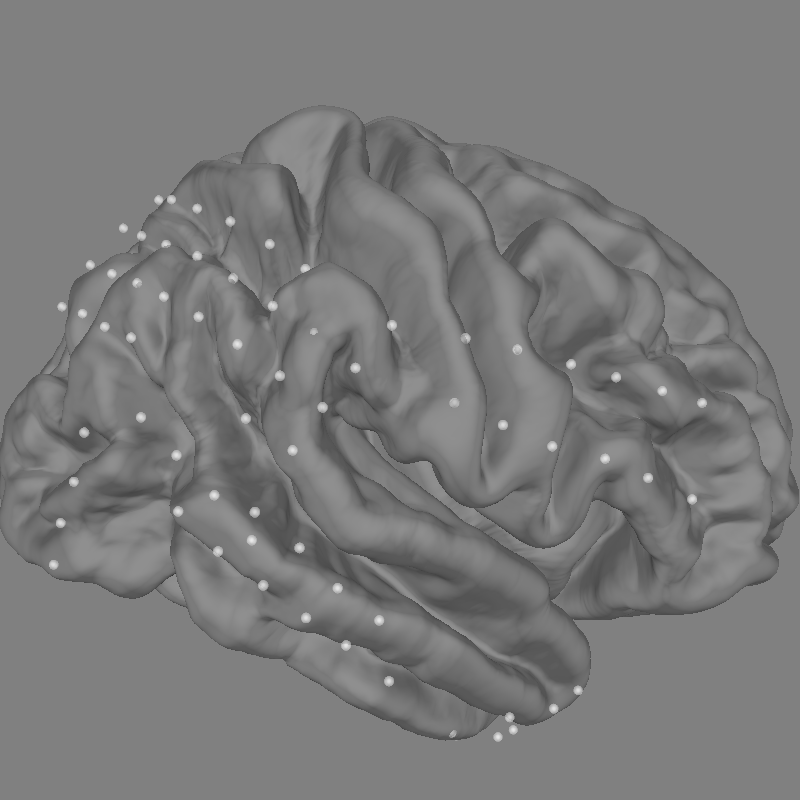
Channel types:: ecog: 84
计算数据的频域特征#
接下来,我们计算伽马(30-90 Hz)频段的信号功率,并将结果降采样到 10 Hz(以节省时间)。
sfreq = 10
gamma_power_t = (
    evoked.copy().filter(30, 90).apply_hilbert(envelope=True).resample(sfreq)
)
gamma_info = gamma_power_t.info
Setting up band-pass filter from 30 - 90 Hz

FIR filter parameters
---------------------
Designing a one-pass, zero-phase, non-causal bandpass filter:
- Windowed time-domain design (firwin) method
- Hamming window with 0.0194 passband ripple and 53 dB stopband attenuation
- Lower passband edge: 30.00
- Lower transition bandwidth: 7.50 Hz (-6 dB cutoff frequency: 26.25 Hz)
- Upper passband edge: 90.00 Hz
- Upper transition bandwidth: 10.00 Hz (-6 dB cutoff frequency: 95.00 Hz)
- Filter length: 89 samples (0.445 s)
在皮层传感器上绘制伽马功率#
现在我们将使用诱发的伽马功率在皮层表面上绘图。为此,我们提取 15 s 处的诱发时间采样点,并将其归一化到 0 至 1 的范围,以便使用 matplotlib 颜色映射进行映射。
gamma_power_at_15s = gamma_power_t.to_data_frame(index="time").loc[15]
# scale values to be between 0 and 1, then map to colors
gamma_power_at_15s -= gamma_power_at_15s.min()
gamma_power_at_15s /= gamma_power_at_15s.max()
rgba = colormaps.get_cmap("viridis")
sensor_colors = np.array(gamma_power_at_15s.map(rgba).tolist(), float)
sensor_colors[:, 3] = 0.5

fig = plot_alignment(
    raw.info,
    trans="fsaverage",
    subject="fsaverage",
    subjects_dir=subjects_dir,
    surfaces=["pial"],
    coord_frame="head",
    sensor_colors=sensor_colors,
)

mne.viz.set_3d_view(fig, azimuth=0, elevation=70, focalpoint="auto", distance="auto")

xy, im = snapshot_brain_montage(fig, raw.info)
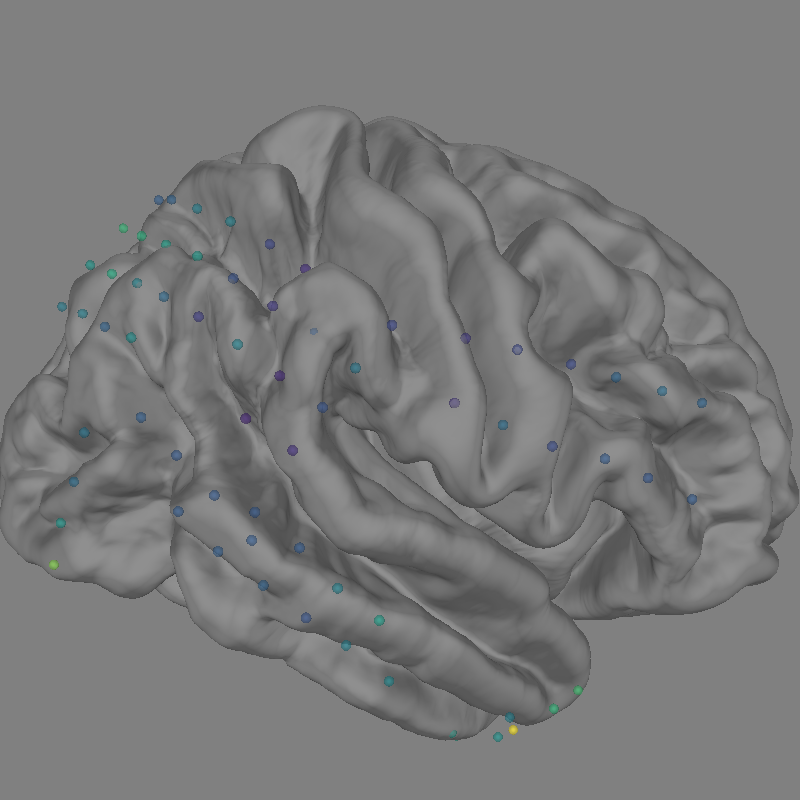
Channel types:: ecog: 84
可视化伽马功率在脑上的时间演变#
假设我们想可视化伽马频段功率随时间的演变,而不只是绘制平均值。我们可以使用 matplotlib.animation.FuncAnimation 创建动画,并将其应用到脑图上。
# convert from a dictionary to array to plot
xy_pts = np.vstack([xy[ch] for ch in raw.info["ch_names"]])

# get a colormap to color nearby points similar colors
cmap = plt.colormaps["viridis"]

# create the figure of the brain with the electrode positions
fig, ax = plt.subplots(figsize=(5, 5))
ax.set_title("Gamma power over time", size="large")
ax.imshow(im)
ax.set_axis_off()

# normalize gamma power for plotting
gamma_power = -100 * gamma_power_t.data / gamma_power_t.data.max()
# add the time course overlaid on the positions
x_line = np.linspace(
    -0.025 * im.shape[0], 0.025 * im.shape[0], gamma_power_t.data.shape[1]
)
for i, pos in enumerate(xy_pts):
    x, y = pos
    color = cmap(i / xy_pts.shape[0])
    ax.plot(x_line + x, gamma_power[i] + y, linewidth=0.5, color=color)
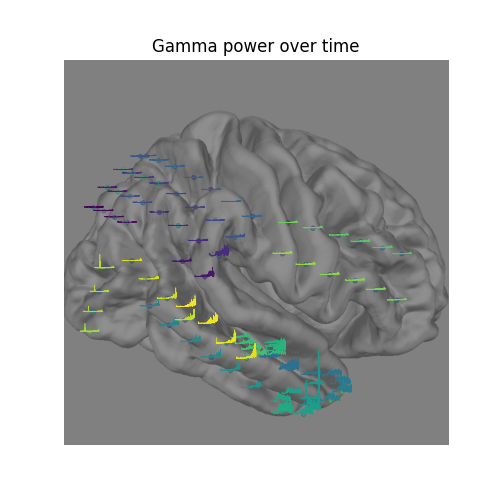
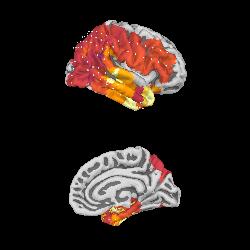
我们可以将传感器数据中的伽马功率投影到软脑膜表面上最近的位置,并将其可视化:
如该图所示,癫痫样活动起始于颞叶,并向后方进展。在本示例所示的短暂时间段之后,发作最终会发展为全面性发作。该数据集可通过 mne.datasets.epilepsy_ecog.data_path() 获取,供你进一步研究。
xyz_pts = np.array([dig["r"] for dig in evoked.info["dig"]])

src = mne.read_source_spaces(
    subjects_dir / "fsaverage" / "bem" / "fsaverage-ico-5-src.fif"
)
stc = mne.stc_near_sensors(
    gamma_power_t,
    trans="fsaverage",
    subject="fsaverage",
    subjects_dir=subjects_dir,
    src=src,
    surface="pial",
    mode="nearest",
    distance=0.02,
)
vmin, vmid, vmax = np.percentile(gamma_power_t.data, [10, 25, 90])
clim = dict(kind="value", lims=[vmin, vmid, vmax])
brain = stc.plot(
    surface="pial",
    hemi="rh",
    colormap="inferno",
    colorbar=False,
    clim=clim,
    views=["lat", "med"],
    subjects_dir=subjects_dir,
    size=(250, 250),
    smoothing_steps="nearest",
    time_viewer=False,
)
brain.add_sensors(raw.info, trans="fsaverage")
del brain

# You can save a movie like the one on our documentation website with:
# brain.save_movie(time_dilation=1, interpolation='linear', framerate=3,
#                  time_viewer=True)
    Reading a source space...
    [done]
    Reading a source space...
    [done]
    2 source spaces read
Projecting data from 84 sensors onto 20484 surface vertices: nearest mode
    Projecting sensors onto surface
    Minimum projected intra-sensor distance: 2.3 mm
    4932 / 20484 non-zero vertices
Channel types:: ecog: 84
Channel types:: ecog: 84
脚本总运行时间:(0 分钟 4.621 秒)