
注意
转到末尾下载完整示例代码。
源空间对齐与坐标框架#
本教程展示如何以可视化方式评估 MEG 传感器位置、数字化头皮标志点与传感器位置以及 MRI 体积之间的空间对齐。这一对齐过程对于计算正向解至关重要,理解其中涉及的各个坐标框架同样重要。
我们先加载一些数据。
# Authors: The MNE-Python contributors.
# License: BSD-3-Clause
# Copyright the MNE-Python contributors.
import nibabel as nib
import numpy as np
from scipy import linalg

import mne
from mne.io.constants import FIFF

data_path = mne.datasets.sample.data_path()
subjects_dir = data_path / "subjects"
raw_fname = data_path / "MEG" / "sample" / "sample_audvis_raw.fif"
trans_fname = data_path / "MEG" / "sample" / "sample_audvis_raw-trans.fif"
raw = mne.io.read_raw_fif(raw_fname)
trans = mne.read_trans(trans_fname)
src = mne.read_source_spaces(subjects_dir / "sample" / "bem" / "sample-oct-6-src.fif")

# Load the T1 file and change the header information to the correct units
t1w = nib.load(data_path / "subjects" / "sample" / "mri" / "T1.mgz")
t1w = nib.Nifti1Image(t1w.dataobj, t1w.affine)
t1w.header["xyzt_units"] = np.array(10, dtype="uint8")
t1_mgh = nib.MGHImage(t1w.dataobj, t1w.affine)
Opening raw data file /home/circleci/mne_data/MNE-sample-data/MEG/sample/sample_audvis_raw.fif...
    Read a total of 3 projection items:
        PCA-v1 (1 x 10²)  idle
        PCA-v2 (1 x 10²)  idle
        PCA-v3 (1 x 10²)  idle
    Range : 25800 ... 192599 =     42.956 ...   320.670 secs
Ready.
    Reading a source space...
    Computing patch statistics...
    Patch information added...
    Distance information added...
    [done]
    Reading a source space...
    Computing patch statistics...
    Patch information added...
    Distance information added...
    [done]
    2 source spaces read
理解坐标框架#
在 M/EEG 源成像中,需要借助两个三维变换矩阵把三个坐标框架对齐,这两个矩阵定义了如何将一个坐标框架中的点旋转和平移,使其对应到另一个坐标框架中的等效位置。三个主要坐标框架是:
“meg”:MEG 传感器物理位置所在的坐标框架
“mri”:MRI 图像以及由 MRI 图像导出的头皮/颅骨/大脑表面所在的坐标框架
“head”:数字化传感器位置与头皮基准点(“fiducials”)所在的坐标框架
下一节将对它们逐一做更详细的介绍。
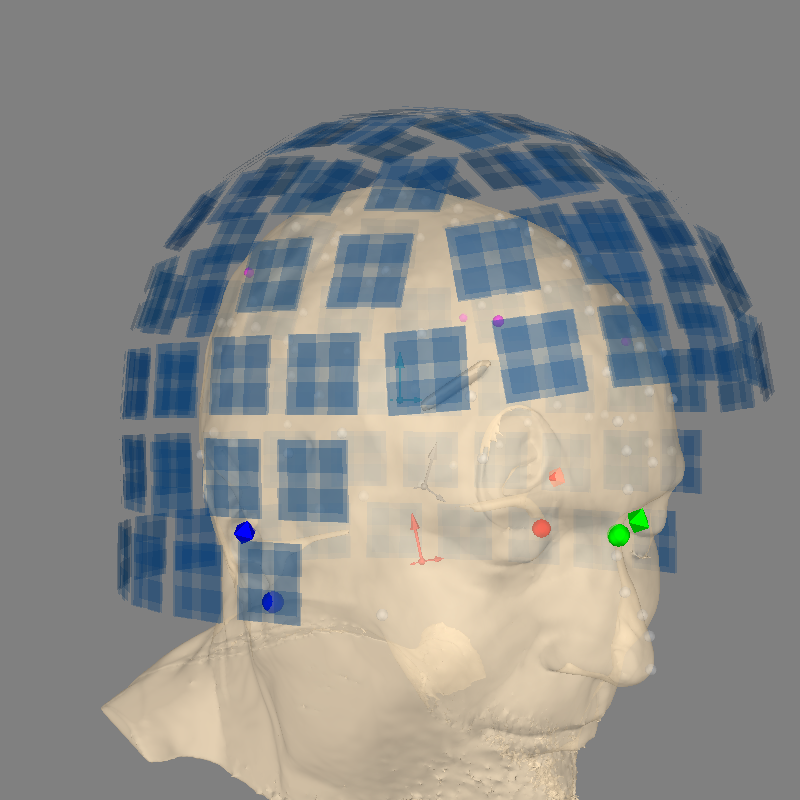
开始可视化这些坐标框架的一个好方法是使用 mne.viz.plot_alignment 函数,它用于创建或检查使这些坐标框架对齐的变换,并显示 EEG 传感器、MEG 传感器、大脑源和导体模型对齐后的结果。如果提供 subjects_dir 和 subject 参数,该函数会自动加载被试的 FreeSurfer MRI 表面。对我们的目的而言很重要的一点是,向 plot_alignment 传入 show_axes=True 会用不同颜色绘制每个坐标框架的原点,并用不同长度的箭头表示各坐标轴:
最短箭头:(R)ight / X
中等长度箭头:forward / (A)nterior / Y
最长箭头:up / (S)uperior / Z
请注意,这三个坐标系都是 RAS 坐标框架,因此也都是右手坐标系。最后,coord_frame 参数决定相机初始与哪个坐标框架对齐。让我们来看一下:
fig = mne.viz.plot_alignment(
    raw.info,
    trans=trans,
    subject="sample",
    subjects_dir=subjects_dir,
    surfaces="head-dense",
    show_axes=True,
    dig=True,
    eeg=[],
    meg="sensors",
    coord_frame="meg",
    mri_fiducials="estimated",
)
mne.viz.set_3d_view(fig, 45, 90, distance=0.6, focalpoint=(0.0, 0.0, 0.0))
print(
    "Distance from head origin to MEG origin: "
    f"{1000 * np.linalg.norm(raw.info['dev_head_t']['trans'][:3, 3]):.1f} mm"
)
print(
    "Distance from head origin to MRI origin: "
    f"{1000 * np.linalg.norm(trans['trans'][:3, 3]):.1f} mm"
)
dists = mne.dig_mri_distances(raw.info, trans, "sample", subjects_dir=subjects_dir)
print(
    f"Distance from {len(dists)} digitized points to head surface: "
    f"{1000 * np.mean(dists):0.1f} mm"
)
Using lh.seghead for head surface.
Channel types:: grad: 203, mag: 102
Distance from head origin to MEG origin: 65.0 mm
Distance from head origin to MRI origin: 29.9 mm
Using surface from /home/circleci/mne_data/MNE-sample-data/subjects/sample/bem/sample-head.fif.
Distance from 72 digitized points to head surface: 1.7 mm
坐标框架的定义#
- Neuromag/Elekta/MEGIN 头部坐标框架(“head”,粉色坐标轴)
- Neuromag/Elekta/MEGIN 头部坐标框架(“head”,粉色坐标轴) 头部坐标框架由被试头部解剖标志点的坐标定义:通常是鼻根点(Nasion,NAS)以及左右耳前点(LPA 和 RPA)。不同的 MEG 厂商可能对头部坐标框架有不同的定义。FieldTrip 关于坐标系统的常见问题(FAQ)给出了很好的概述。对于 Neuromag/Elekta/MEGIN,头部坐标框架由 LPA(红色球)与 RPA(紫色球)之间的连线,与经过鼻根点(绿色球)且垂直于该连线的直线的交点定义。各坐标轴的取向为:X 由原点→RPA,Y 由原点→NAS,Z 轴由原点指向上方(与 X、Y 正交)。注意 定义头部坐标框架所需的 3D 坐标(NAS、LPA、RPA)是在 MEG 数据记录之外的另一个阶段测量的。执行此类测量的设备很多,通常称为“数字化仪”(digitizers)。例如可参见 Polhemus 公司的设备。
- MEG 设备坐标框架(“meg”,蓝色坐标轴)
- MEG 设备坐标框架(“meg”,蓝色坐标轴) MEG 设备坐标框架由各 MEG 厂商定义。所有 MEG 数据都是相对于该坐标框架采集的。为了考虑被试头部的解剖结构与位置,我们使用所谓的头部位置指示器(head position indicator,HPI)线圈。HPI 线圈放置在被试头皮上的已知位置,并发出高频磁场,用于将头部坐标框架与设备坐标框架配准。摘自 Neuromag/Elekta/MEGIN 用户手册:设备坐标系的原点位于头盔后部球面部分的中心,X 轴从左向右,Y 轴指向正前方。Z 轴同样垂直于该平面,正方向向上。注意 HPI 线圈显示为洋红色球。配准在记录开始时完成,head↔meg 变换矩阵保存在
raw.info['dev_head_t']中。
- MRI 坐标框架(“mri”,灰色坐标轴)
- MRI 坐标框架(“mri”,灰色坐标轴) “MRI surface RAS”坐标框架由 FreeSurfer 定义,其原点位于 256×256×256、1 mm 的各向异性体积的中心(不过该中心不一定对应被试头部的解剖中心)。注意 我们通常通过一个旋转平移矩阵将 MRI 坐标框架对齐到头部坐标框架,在 MNE 中称之为
trans。
一个错误的示例#
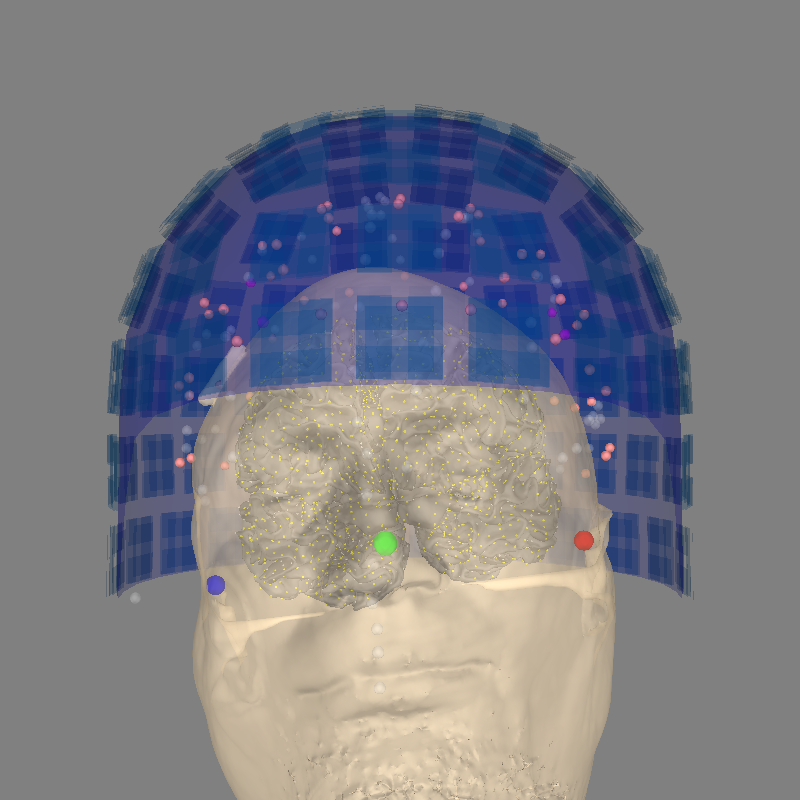
让我们把 trans 设为恒等变换,试试 plot_alignment。这会(错误地!)将 MRI 与头部坐标框架等同起来。
identity_trans = mne.transforms.Transform("head", "mri")
mne.viz.plot_alignment(
    raw.info,
    trans=identity_trans,
    subject="sample",
    src=src,
    subjects_dir=subjects_dir,
    dig=True,
    surfaces=["head-dense", "white"],
    coord_frame="meg",
)
Using lh.seghead for head surface.
Getting helmet for system 306m
Channel types:: grad: 203, mag: 102, eeg: 59
一个正确的示例#
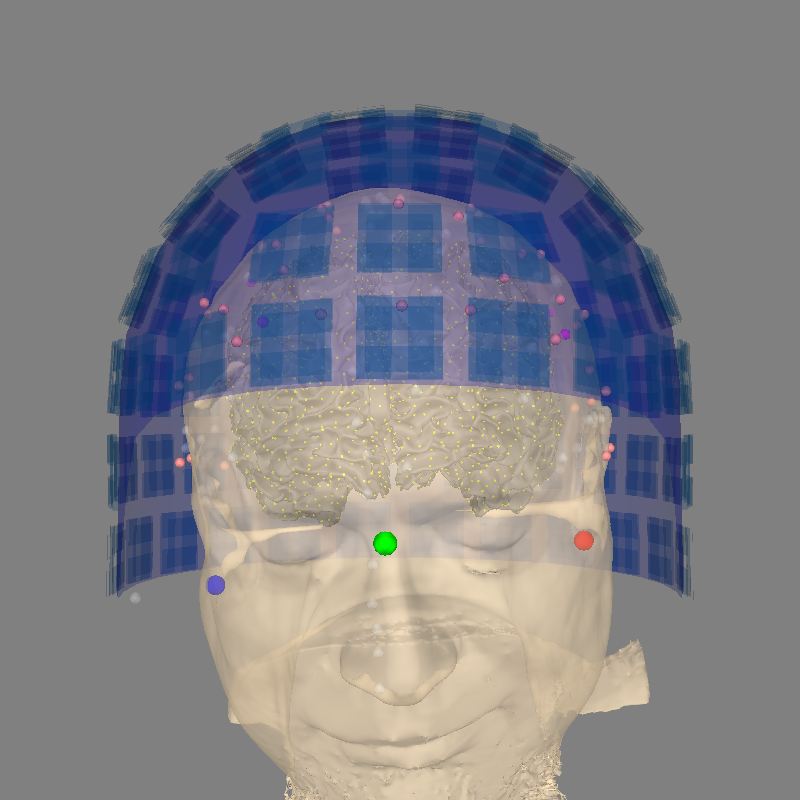
下面是同样的图,这次 trans 已正确定义(使用预先计算的变换矩阵)。
mne.viz.plot_alignment(
    raw.info,
    trans=trans,
    subject="sample",
    src=src,
    subjects_dir=subjects_dir,
    dig=True,
    surfaces=["head-dense", "white"],
    coord_frame="meg",
)
Using lh.seghead for head surface.
Getting helmet for system 306m
Channel types:: grad: 203, mag: 102, eeg: 59
可视化变换过程#
让我们只用头皮表面来可视化这些坐标框架,这样更容易看出它们的相对取向。为此,我们先加载 FreeSurfer 头皮表面,然后对其施加几种不同的变换。除上面讨论的三个坐标框架外,我们还会显示“mri_voxel”坐标框架。与 MRI Surface RAS 不同,“mri_voxel”的原点位于体积的角落(最下方 MRI 切片上最靠左、最靠后的坐标),而不是体积中心。“mri_voxel”也不是 RAS 坐标系:其 XYZ 方向取决于 T1 图像切片的采集顺序。
# The head surface is stored in "mri" coordinate frame
# (origin at center of volume, units=mm)
seghead_rr, seghead_tri = mne.read_surface(
    subjects_dir / "sample" / "surf" / "lh.seghead"
)

# To put the scalp in the "head" coordinate frame, we apply the inverse of
# the precomputed `trans` (which maps head → mri)
mri_to_head = linalg.inv(trans["trans"])
scalp_pts_in_head_coord = mne.transforms.apply_trans(mri_to_head, seghead_rr, move=True)

# To put the scalp in the "meg" coordinate frame, we use the inverse of
# raw.info['dev_head_t']
head_to_meg = linalg.inv(raw.info["dev_head_t"]["trans"])
scalp_pts_in_meg_coord = mne.transforms.apply_trans(
    head_to_meg, scalp_pts_in_head_coord, move=True
)

# The "mri_voxel"→"mri" transform is embedded in the header of the T1 image
# file. We'll invert it and then apply it to the original `seghead_rr` points.
# No unit conversion necessary: this transform expects mm and the scalp surface
# is defined in mm.
vox_to_mri = t1_mgh.header.get_vox2ras_tkr()
mri_to_vox = linalg.inv(vox_to_mri)
scalp_points_in_vox = mne.transforms.apply_trans(mri_to_vox, seghead_rr, move=True)
现在所有点都已变换完毕,我们来绘制它们。我们将使用 plot_alignment 所用的相同颜色,并用绿色表示“mri_voxel”坐标框架:
def add_head(renderer, points, color, opacity=0.95):
    renderer.mesh(*points.T, triangles=seghead_tri, color=color, opacity=opacity)


renderer = mne.viz.backends.renderer.create_3d_figure(
    size=(600, 600), bgcolor="w", scene=False
)
add_head(renderer, seghead_rr, "gray")
add_head(renderer, scalp_pts_in_meg_coord, "blue")
add_head(renderer, scalp_pts_in_head_coord, "pink")
add_head(renderer, scalp_points_in_vox, "green")
mne.viz.set_3d_view(
    figure=renderer.figure,
    distance=800,
    focalpoint=(0.0, 30.0, 30.0),
    elevation=105,
    azimuth=180,
)
renderer.show()
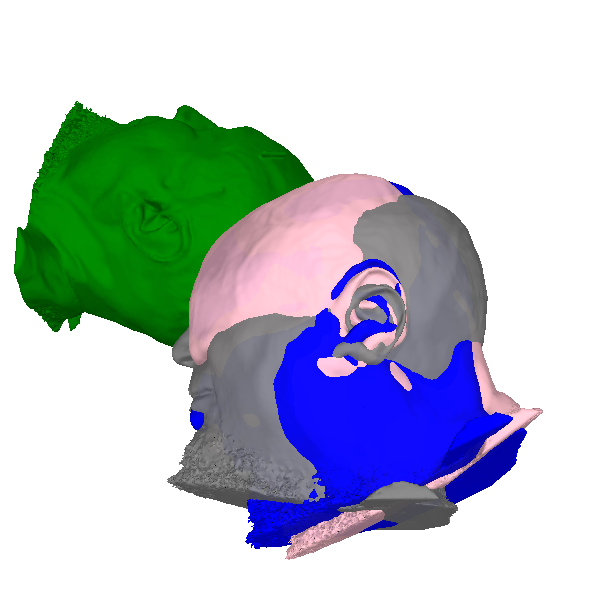
通过观察被试鼻子的朝向,可以推断各坐标框架的相对取向。还要注意,mri_voxel 坐标框架的原点位于体积的角落(在被试的上方、后方和左侧),而其他三个坐标框架的原点大致位于头部中心。
示例:MRI 去脸化#
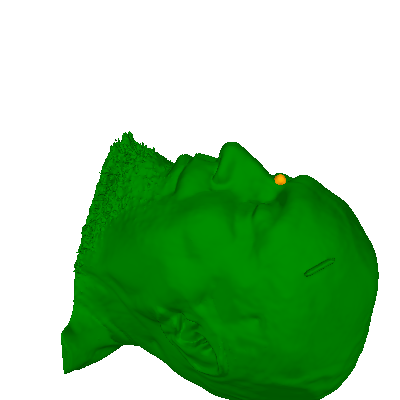
举一个使用这些变换的实际例子:对 MRI 进行去脸化(defacing)以保护被试的匿名性。如果你已知“head”坐标框架中的点(例如基于数字化点进行去脸化时),就需要把它们变换到“mri”或“mri_voxel”坐标框架,才能对 MRI 表面或图像施加模糊或平滑操作。具体做法如下(我们以鼻根点标志作为代表性示例):
# Get the nasion:
nasion = [
    p
    for p in raw.info["dig"]
    if p["kind"] == FIFF.FIFFV_POINT_CARDINAL and p["ident"] == FIFF.FIFFV_POINT_NASION
][0]
assert nasion["coord_frame"] == FIFF.FIFFV_COORD_HEAD
nasion = nasion["r"]  # get just the XYZ values

# Transform it from head to MRI space (recall that `trans` is head → mri)
nasion_mri = mne.transforms.apply_trans(trans, nasion, move=True)
# Then transform to voxel space, after converting from meters to millimeters
nasion_vox = mne.transforms.apply_trans(mri_to_vox, nasion_mri * 1e3, move=True)
# Plot it to make sure the transforms worked
renderer = mne.viz.backends.renderer.create_3d_figure(
    size=(400, 400), bgcolor="w", scene=False
)
add_head(renderer, scalp_points_in_vox, "green", opacity=1)
renderer.sphere(center=nasion_vox, color="orange", scale=10)
mne.viz.set_3d_view(
    figure=renderer.figure,
    distance=600.0,
    focalpoint=(0.0, 125.0, 250.0),
    elevation=45,
    azimuth=180,
)
renderer.show()
使用 GUI 定义 head↔MRI 变换(trans)#
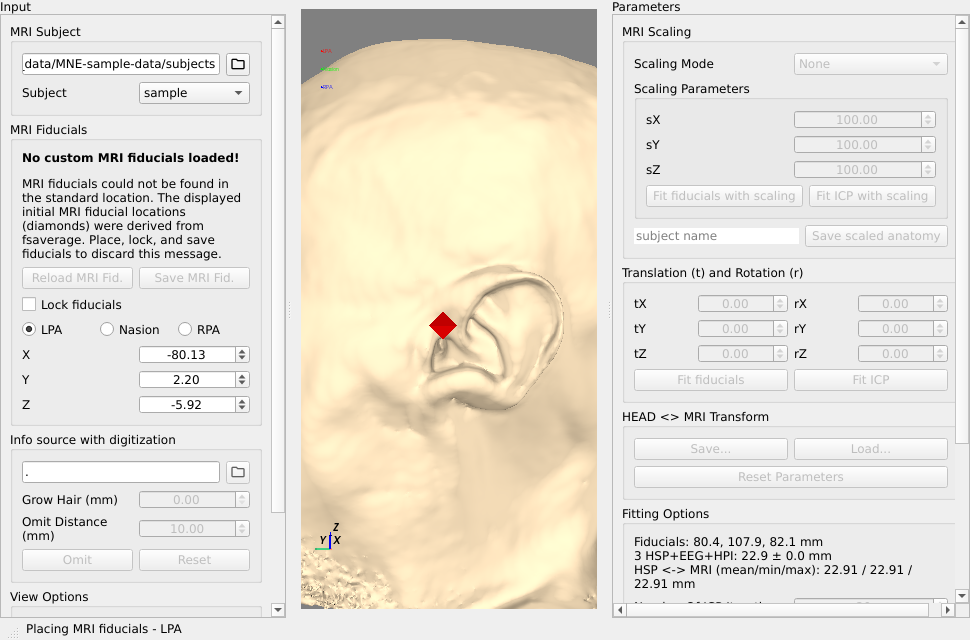
你可以使用 mne.gui.coregistration() 自己创建 head↔MRI 变换。
要设置 MRI 基准点,请确保 Lock Fiducials 处于关闭状态。
点击单选按钮(LPA、Nasion、RPA),然后在图像中点击相应的点,即可设置标志点。
注意
所使用的每个基准点的位置就是八面体图标的中心。
为所有标志点完成上述操作后,切换 Lock Fiducials 单选按钮,并可选择点击 Save MRI Fid.,这会把结果保存到 FreeSurfer 被试目录下
bem文件夹中的默认位置。然后你可以从原始文件加载数字化数据(Path to info)。
点击 Fit ICP。这会将数字化点对齐到头部表面。有时拟合算法无法立即找到正确的对齐,你可以先使用 LPA/RPA 或基准点进行拟合,再根据数字化点对齐。也可以使用面板右侧的控件手动微调。
点击面板右下角的 Save,设置文件名,然后用
mne.read_trans()读取它。
更多信息请参见这个视频:
注意
配准也可以通过自动化的方式完成,具体参见“使用自动配准方法”。
mne.gui.coregistration(subject="sample", subjects_dir=subjects_dir)
    Triangle neighbors and vertex normals...
Using high resolution head model in /home/circleci/mne_data/MNE-sample-data/subjects/sample/surf/lh.seghead
    Triangle neighbors and vertex normals...
Estimating fiducials from fsaverage.
Using high resolution head model in /home/circleci/mne_data/MNE-sample-data/subjects/fsaverage/bem/fsaverage-head-dense.fif
    Triangle neighbors and vertex normals...
Using fiducials from: /home/circleci/mne_data/MNE-sample-data/subjects/fsaverage/bem/fsaverage-fiducials.fif.
Loading MRI fiducials from /home/circleci/mne_data/MNE-sample-data/subjects/fsaverage/bem/fsaverage-fiducials.fif... Done!
    Triangle neighbors and vertex normals...
Using high resolution head model in /home/circleci/mne_data/MNE-sample-data/subjects/sample/surf/lh.seghead
    Triangle neighbors and vertex normals...
Estimating fiducials from fsaverage.
Estimating fiducials from fsaverage.
Placing MRI fiducials - LPA
Using lh.seghead for head surface.
Placing MRI fiducials - LPA
没有 MRI 时的对齐#
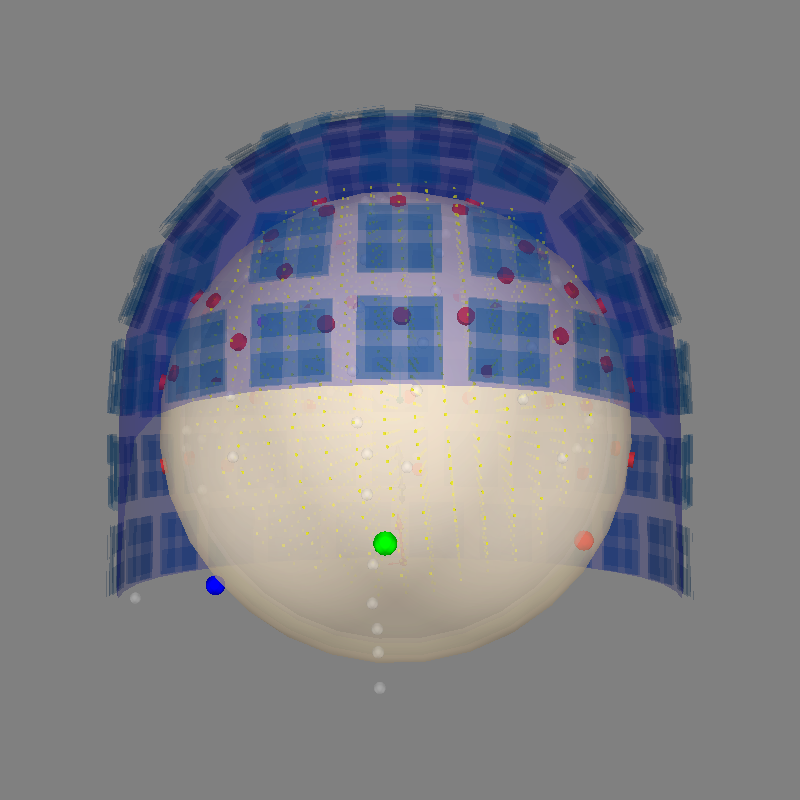
如果你拥有由 FreeSurfer 生成的表面,上述表面对齐就可以实现。mne.viz.plot_alignment() 会根据所提供的 subjects_dir 自动搜索正确的表面。另一种选择是使用球形导体模型,它通过 bem 参数传入。
sphere = mne.make_sphere_model(info=raw.info, r0="auto", head_radius="auto")
src = mne.setup_volume_source_space(sphere=sphere, pos=10.0)
mne.viz.plot_alignment(
    raw.info,
    trans=trans,
    eeg="projected",
    bem=sphere,
    src=src,
    dig=True,
    surfaces=["brain", "inner_skull", "outer_skull", "outer_skin"],
    coord_frame="meg",
    show_axes=True,
)
Fitted sphere radius:         91.2 mm
Origin head coordinates:      -4.2 16.4 51.8 mm
Origin device coordinates:    1.5 18.2 -10.1 mm

Equiv. model fitting -> RV = 0.00347813 %%
mu1 = 0.944815    lambda1 = 0.13694
mu2 = 0.667658    lambda2 = 0.683728
mu3 = -0.286487    lambda3 = -0.0102992
Set up EEG sphere model with scalp radius    91.2 mm

Sphere                : origin at (-4.2 16.4 51.8) mm
              radius  : 82.1 mm
grid                  : 10.0 mm
mindist               : 5.0 mm

Setting up the sphere...
Surface CM = (  -4.2   16.4   51.8) mm
Surface fits inside a sphere with radius   82.1 mm
Surface extent:
    x =  -86.2 ...   77.9 mm
    y =  -65.7 ...   98.4 mm
    z =  -30.2 ...  133.9 mm
Grid extent:
    x =  -90.0 ...   80.0 mm
    y =  -70.0 ...  100.0 mm
    z =  -40.0 ...  140.0 mm
6156 sources before omitting any.
2313 sources after omitting infeasible sources not within 0.0 - 82.1 mm.
Source spaces are in MRI coordinates.
Checking that the sources are inside the surface and at least    5.0 mm away (will take a few...)
    396 source space point omitted because of the    5.0-mm distance limit.
1917 sources remaining after excluding the sources outside the surface and less than    5.0 mm inside.
Adjusting the neighborhood info.
Source space : MRI voxel -> MRI (surface RAS)
    0.010000 0.000000 0.000000     -90.00 mm
    0.000000 0.010000 0.000000     -70.00 mm
    0.000000 0.000000 0.010000     -40.00 mm
    0.000000 0.000000 0.000000       1.00
Getting helmet for system 306m
Channel types:: grad: 203, mag: 102, eeg: 59
Projecting sensors to the head surface
也可以使用 mne.gui.coregistration() 将某个被试(通常是 fsaverage)变形(warp)到被试的数字化数据,参见这些幻灯片。
脚本总运行时间:(0 分钟 21.345 秒)