非官方中文翻译
本页译自 MNE-Python 官方文档:
查看英文原文 ↗。
文档版权归 MNE Developers 所有(BSD-3-Clause)。
说明
转到末尾下载完整示例代码。
基于时间差定义目标事件并绘制诱发响应#
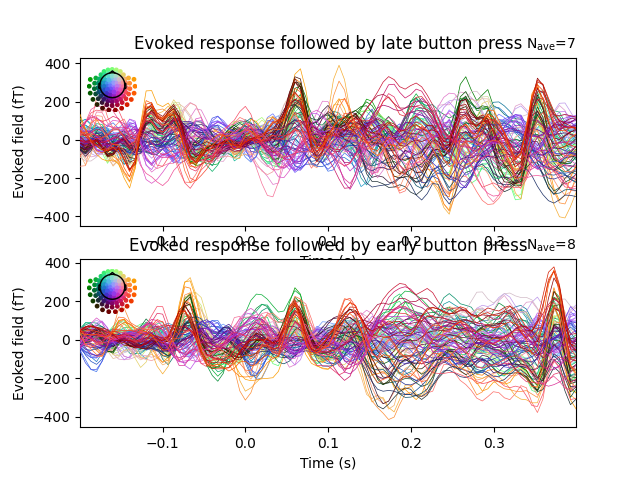
本脚本展示如何根据参考事件与目标事件之间的时间差定义高阶事件。为便于说明,我们把呈现的面孔刺激分为两类:1)随后出现早期按键(590 毫秒内);2)随后出现晚期按键(晚于 590 毫秒)。最后可视化“快速加工”与“慢速加工”面孔刺激的诱发响应。
# Authors: Denis Engemann <denis.engemann@gmail.com>
#
# License: BSD-3-Clause
# Copyright the MNE-Python contributors.
import matplotlib.pyplot as plt

import mne
from mne import io
from mne.datasets import sample
from mne.event import define_target_events

print(__doc__)

data_path = sample.data_path()
设置参数
meg_path = data_path / "MEG" / "sample"
raw_fname = meg_path / "sample_audvis_filt-0-40_raw.fif"
event_fname = meg_path / "sample_audvis_filt-0-40_raw-eve.fif"

#   Setup for reading the raw data
raw = io.read_raw_fif(raw_fname)
events = mne.read_events(event_fname)

#   Set up pick list: EEG + STI 014 - bad channels (modify to your needs)
include = []  # or stim channels ['STI 014']
raw.info["bads"] += ["EEG 053"]  # bads

# pick MEG channels
picks = mne.pick_types(
    raw.info,
    meg="mag",
    eeg=False,
    stim=False,
    eog=True,
    include=include,
    exclude="bads",
)
Opening raw data file /home/circleci/mne_data/MNE-sample-data/MEG/sample/sample_audvis_filt-0-40_raw.fif...
    Read a total of 4 projection items:
        PCA-v1 (1 x 10²)  idle
        PCA-v2 (1 x 10²)  idle
        PCA-v3 (1 x 10²)  idle
        Average EEG reference (1 x 60)  idle
    Range : 6450 ... 48149 =     42.956 ...   320.665 secs
Ready.
查找随后出现快速按键的刺激事件
reference_id = 5  # presentation of a smiley face
target_id = 32  # button press
sfreq = raw.info["sfreq"]  # sampling rate
tmin = 0.1  # trials leading to very early responses will be rejected
tmax = 0.59  # ignore face stimuli followed by button press later than 590 ms
new_id = 42  # the new event id for a hit. If None, reference_id is used.
fill_na = 99  # the fill value for misses

events_, lag = define_target_events(
    events, reference_id, target_id, sfreq, tmin, tmax, new_id, fill_na
)

print(events_)  # The 99 indicates missing or too late button presses

# besides the events also the lag between target and reference is returned
# this could e.g. be used as parametric regressor in subsequent analyses.

print(lag[lag != fill_na])  # lag in milliseconds

# #############################################################################
# Construct epochs

tmin_ = -0.2
tmax_ = 0.4
event_id = dict(early=new_id, late=fill_na)

epochs = mne.Epochs(
    raw,
    events_,
    event_id,
    tmin_,
    tmax_,
    picks=picks,
    baseline=(None, 0),
    reject=dict(mag=4e-12),
)

# average epochs and get an Evoked dataset.

early, late = (epochs[k].average() for k in event_id)
[[ 8522     0    99]
 [10649     0    42]
 [12859     0    99]
 [14830     0    99]
 [16850     0    99]
 [18826     0    42]
 [21224     0    42]
 [23200     0    42]
 [25272     0    99]
 [27243     0    99]
 [29525     0    42]
 [31530     0    42]
 [33481     0    99]
 [35611     0    99]
 [38007     0    42]]
[         nan 566.08643728          nan          nan          nan
 532.78723509 352.97154325 359.63138369          nan          nan
 446.20930939 579.40611816          nan          nan 512.80771377]
Not setting metadata
15 matching events found
Setting baseline interval to [-0.19979521315838786, 0.0] s
Applying baseline correction (mode: mean)
Created an SSP operator (subspace dimension = 3)
3 projection items activated
查看诱发响应
times = 1e3 * epochs.times  # time in milliseconds
title = "Evoked response followed by {} button press"

fig, axes = plt.subplots(2, 1)
early.plot(axes=axes[0], time_unit="s")
axes[0].set(title=title.format("late"), ylabel="Evoked field (fT)")
late.plot(axes=axes[1], time_unit="s")
axes[1].set(title=title.format("early"), ylabel="Evoked field (fT)")
plt.show()