
注意
转到末尾下载完整示例代码。
在 MNE-Python 中处理眼动追踪数据#
在本教程中,我们将探索瞳孔对光反射任务中同步记录的眼动追踪与 EEG 数据。我们会合并眼动追踪与 EEG 数据,并绘制光闪刺激诱发的事件相关电位(ERP)与瞳孔反应(即瞳孔对光反射)。
# Authors: Scott Huberty <seh33@uw.edu>
#          Dominik Welke <dominik.welke@web.de>
#
# License: BSD-3-Clause
# Copyright the MNE-Python contributors.
数据加载#
和往常一样,我们首先导入所需的模块并加载一些示例数据:以 SR Research 的 '.asc' 文件格式记录的眼动追踪数据,以及以 EGI 的 '.mff' 文件格式记录的 EEG 数据。我们会向 read_raw_eyelink() 传入 create_annotations=["blinks"],以便只创建眨眼注释(默认情况下,会为眨眼、扫视、注视和实验消息创建注释)。
import mne
from mne.datasets.eyelink import data_path
from mne.preprocessing.eyetracking import read_eyelink_calibration
from mne.viz.eyetracking import plot_gaze

et_fpath = data_path() / "eeg-et" / "sub-01_task-plr_eyetrack.asc"
eeg_fpath = data_path() / "eeg-et" / "sub-01_task-plr_eeg.mff"

raw_et = mne.io.read_raw_eyelink(et_fpath, create_annotations=["blinks"])
raw_eeg = mne.io.read_raw_egi(eeg_fpath, events_as_annotations=True).load_data()
raw_eeg.filter(1, 30)
Loading /home/circleci/mne_data/MNE-eyelink-data/eeg-et/sub-01_task-plr_eyetrack.asc
Pixel coordinate data detected. Pass `scalings=dict(eyegaze=1e3)` when using plot method to make traces more legible.
Pupil-size area detected.
Found 64 button event(s) in this file.
No button events found in this file.
There are 2 recording blocks in this file. Times between blocks will be annotated with BAD_ACQ_SKIP.
Reading EGI MFF Header from /home/circleci/mne_data/MNE-eyelink-data/eeg-et/sub-01_task-plr_eeg.mff...
    Reading events ...
    Assembling measurement info ...
    Excluding events {} ...
Reading 0 ... 190020  =      0.000 ...   190.020 secs...
categories.xml not found or of wrong type. `Epoch.name` will default to "epoch" for all epochs.
Filtering raw data in 1 contiguous segment
Setting up band-pass filter from 1 - 30 Hz

FIR filter parameters
---------------------
Designing a one-pass, zero-phase, non-causal bandpass filter:
- Windowed time-domain design (firwin) method
- Hamming window with 0.0194 passband ripple and 53 dB stopband attenuation
- Lower passband edge: 1.00
- Lower transition bandwidth: 1.00 Hz (-6 dB cutoff frequency: 0.50 Hz)
- Upper passband edge: 30.00 Hz
- Upper transition bandwidth: 7.50 Hz (-6 dB cutoff frequency: 33.75 Hz)
- Filter length: 3301 samples (3.301 s)
眼动追踪数据的 info 结构告诉我们,加载的是一条单眼记录,包含 2 个眼动注视通道(x 和 y 坐标位置)、1 个瞳孔通道、1 个刺激通道,以及 3 个用于头部距离和位置的通道(因为该数据是使用 EyeLink 的 Remote 模式采集的)。
raw_et.info
眼部事件注释#
默认情况下,EyeLink 文件会输出眼部事件(眨眼、扫视和注视)以及实验消息。MNE 会将这些事件存储为 mne.Annotations。眼部注释在 'ch_names' 键中包含通道信息。这意味着我们可以看出某个眼部事件发生在哪只眼睛,这对双眼记录很有用:
print(raw_et.annotations[0]["ch_names"]) # a blink in the right eye
('xpos_right', 'ypos_right', 'pupil_right')
检查校准#
EyeLink 的 .asc 文件还可以包含校准信息。MNE-Python 能够加载并可视化这些眼动校准,这是评估眼动数据质量的有用第一步。read_eyelink_calibration() 会返回一个 Calibration 实例列表,每个校准对应一个实例。我们可以对该列表进行索引,以访问特定的校准。
Reading calibration data from /home/circleci/mne_data/MNE-eyelink-data/eeg-et/sub-01_task-plr_eyetrack.asc
number of calibrations: 1
Calibration |
  onset: -11.543 seconds
  model: HV5
  eye: right
  average error: 0.71 degrees
  max error: 0.99 degrees
  screen size: None meters
  screen distance: None meters
  screen resolution: (1920, 1080) pixels
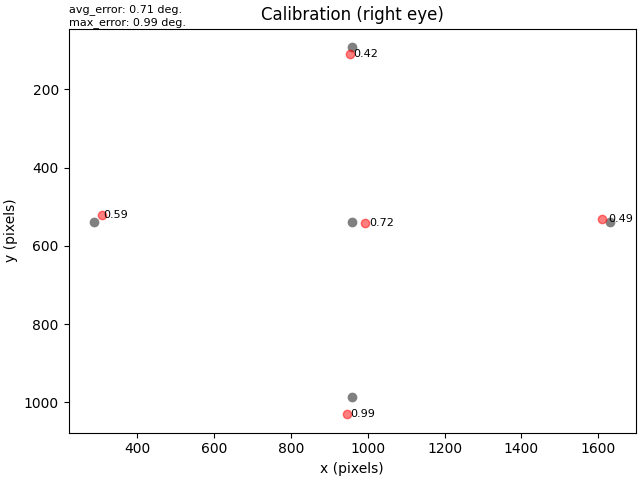
校准对象支持类似字典的属性访问;除上面输出中显示的属性外,其他属性还有 'positions'(每个校准点的 x 和 y 坐标)、'gaze'(每个校准点对应的实际注视位置的 x 和 y 坐标)以及 'offsets'(每个校准点的校准位置与实际注视位置之间的视角偏差,单位为度)。下面是如何访问这些数据的示例:
offset of the first calibration point: 0.72
offset for each calibration point: [0.72 0.42 0.99 0.59 0.49]
x-coordinate for each calibration point: [ 960.  960.  960.  288. 1631.]
让我们绘制校准图以便更清楚地查看。下图中,灰点表示每个校准点显示的位置,红色表示实际注视位置,偏差(单位为视角的度)表示每个校准点的校准位置与实际注视位置之间的差异。
提示
如果将眼动仪显示器的屏幕分辨率传给 Calibration,plot() 会自动相应地设置画布边界。
将眼动数据标准化为 SI 单位#
EyeLink 以像素存储眼动注视位置,瞳孔大小则以任意单位存储。MNE-Python 期望眼动注视位置以视角的弧度为单位,瞳孔大小以米为单位。我们可以使用 convert_units() 将眼动注视位置转换为弧度。除屏幕分辨率外,在调用单位转换函数之前,还需要向 Calibration 对象提供眼动仪的屏幕尺寸和屏幕距离。
first_cal["screen_size"] = (0.53, 0.3)
first_cal["screen_distance"] = 0.9
mne.preprocessing.eyetracking.convert_units(raw_et, calibration=first_cal, to="radians")
Converted ['xpos_right', 'ypos_right'] to radians.
绘制原始眼动追踪数据#
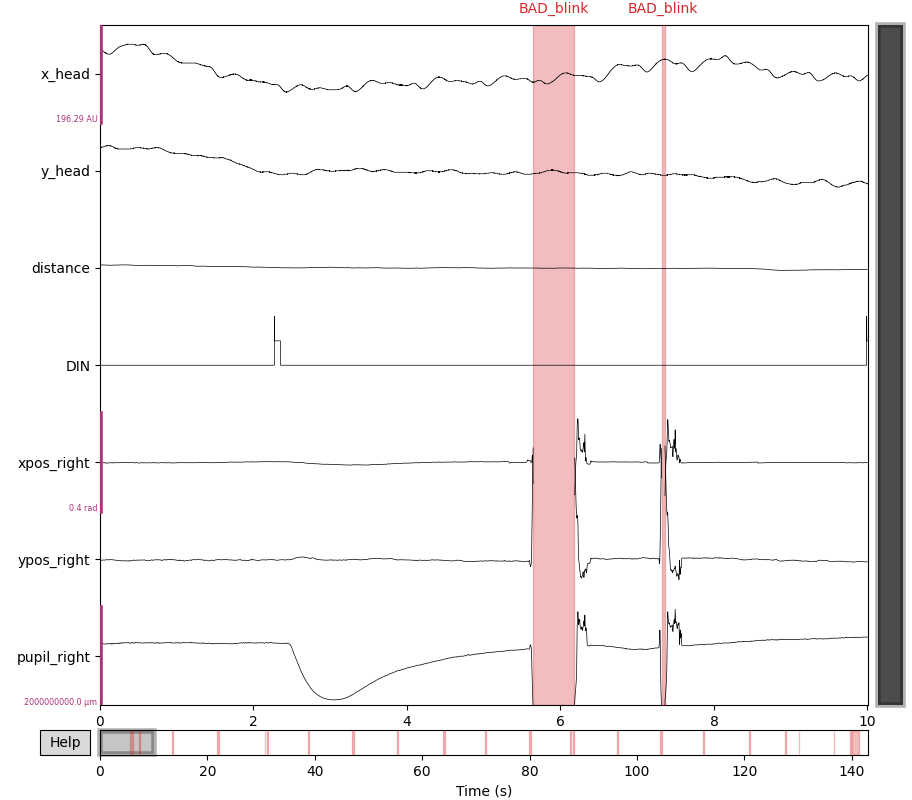
让我们绘制原始眼动追踪数据。由于我们没有将瞳孔大小转换为米,我们会向 scalings 参数传入自定义字典,以便绘图时瞳孔大小曲线清晰可读。
ps_scalings = dict(pupil=1e3)
raw_et.plot(scalings=ps_scalings)
处理眨眼伪迹#
我们的数据中自然存在眨眼,它们位于 'BAD_blink' 注释内。在眨眼期间,不报告眼动注视坐标,瞳孔大小数据为 0。
注意
SR Research 的 EyeLink 文件本身已附带眨眼注释,这就是我们使用 create_annotations=["blinks"] 加载数据时会创建这些注释的原因。许多其他眼动仪则不会。对于这些设备,你可以用 find_blinks() 从瞳孔通道检测眨眼,它会将由瞳孔信号缺失的片段标注出来。EyeLink 将数据缺失编码为 0(因此下面使用 dropout_value=0;默认查找的是 np.nan)。该函数返回注释,而不是就地修改 raw,因此你可以在用 set_annotations() 附加它们之前先检查或编辑。
blink_annots = mne.preprocessing.eyetracking.find_blinks(raw_et, dropout_value=0)
print(blink_annots)
Found 22 blink(s).
<Annotations | 22 segments, channel-specific: BAD_blink (22)>
我们不希望这些眨眼伪迹影响分析,因此有两种选择:在分段时丢弃眨眼时段,或对缺失数据进行插值。本教程中我们选择插值,向 interpolate_blinks() 传入 (0.05, 0.2),将插值窗口向每个眨眼前后分别扩展 50 ms 和 200 ms,从而把眨眼周围的噪声数据也一并插值。
mne.preprocessing.eyetracking.interpolate_blinks(
    raw_et, buffer=(0.05, 0.2), interpolate_gaze=True
)
Interpolating missing data during blinks...
Interpolated 3 channels: ['xpos_right', 'ypos_right', 'pupil_right']
Removing 'BAD_' from BAD_blink.
重要
默认情况下,interpolate_blinks() 只会插值瞳孔通道中的眨眼。传入 interpolate_gaze=True 还会插值眼动注视通道的眨眼时段。但要注意,眨眼期间可能发生眼动,这会使注视数据不太适合插值。
从数据中提取共同的刺激事件#
在本实验中,附着在显示屏上的光电二极管同时连接到了 EEG 和眼动追踪系统。光电二极管由光闪刺激触发,从而向两个系统同时发送信号,标志闪光的发生。光电二极管信号在 EEG 和眼动追踪数据中被记录为数字输入通道。MNE 将这些数据加载为刺激通道。
我们将从 EEG 和眼动追踪数据中提取闪光事件的起始时刻,因为它们对于对齐两次记录的数据是必需的。
et_events = mne.find_events(raw_et, min_duration=0.01, shortest_event=1, uint_cast=True)
eeg_events = mne.find_events(raw_eeg, stim_channel="DIN3")
Finding events on: DIN
16 events found on stim channel DIN
Event IDs: [2]
Finding events on: DIN3
16 events found on stim channel DIN3
Event IDs: [1]
上面的输出显示,EEG 和 EyeLink 数据都使用事件 ID 2 表示闪光事件,因此我们会创建一个字典,稍后绘图时用于标记这些事件。
event_dict = dict(Flash=2)
将眼动追踪数据与 EEG 数据对齐#
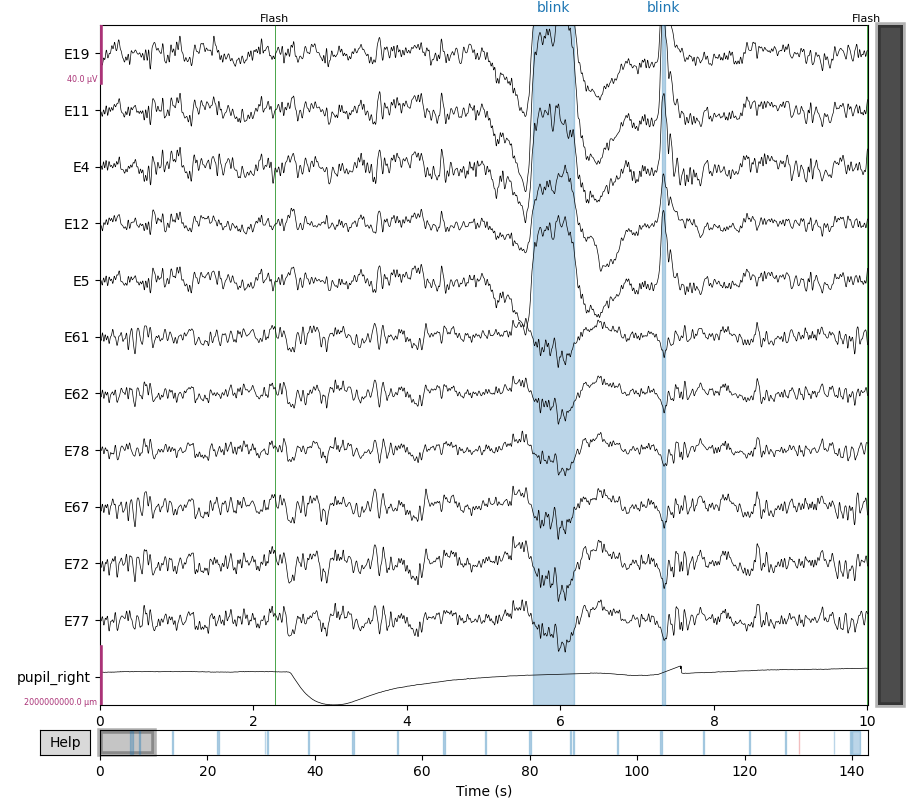
在本数据集中,眼动追踪和 EEG 数据是同时记录的,但记录在不同系统上,因此在将它们一起分析之前需要先对齐。我们可以使用 realign_raw() 函数,它会根据两个 Raw 对象中共有事件的时间来对齐数据。我们将使用上面提取的共同光电二极管事件,但首先需要把事件起始时刻从采样点转换为秒。数据对齐后,我们会将 EEG 通道添加到眼动追踪的 raw 对象中。
# Convert event onsets from samples to seconds
et_flash_times = et_events[:, 0] / raw_et.info["sfreq"]
eeg_flash_times = eeg_events[:, 0] / raw_eeg.info["sfreq"]
# Align the data
mne.preprocessing.realign_raw(
    raw_et, raw_eeg, et_flash_times, eeg_flash_times, verbose="error"
)
# Add EEG channels to the eye-tracking raw object
raw_et.add_channels([raw_eeg], force_update_info=True)
del raw_eeg  # free up some memory

# Define a few channel groups of interest and plot the data
frontal = ["E19", "E11", "E4", "E12", "E5"]
occipital = ["E61", "E62", "E78", "E67", "E72", "E77"]
pupil = ["pupil_right"]
# picks must be numeric (not string) when passed to `raw.plot(..., order=)`
picks_idx = mne.pick_channels(
    raw_et.ch_names, frontal + occipital + pupil, ordered=True
)
raw_et.plot(
    events=et_events,
    event_id=event_dict,
    event_color="g",
    order=picks_idx,
    scalings=ps_scalings,
)
展示瞳孔对光反射#
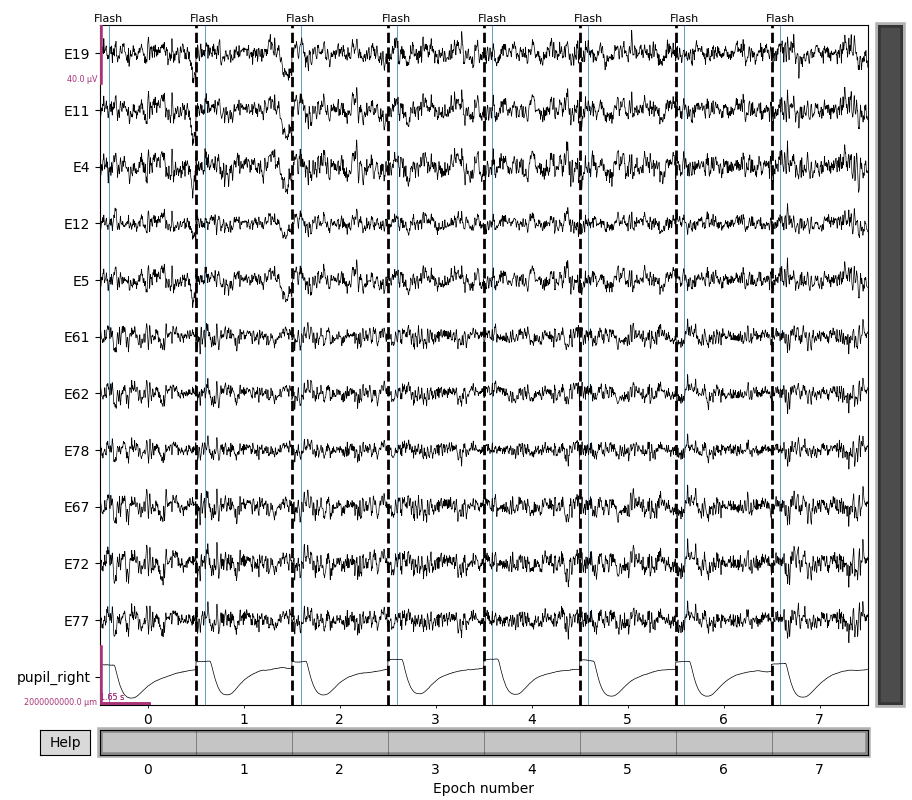
现在让我们围绕闪光事件提取 epoch。我们应该能看到对闪光明显的瞳孔收缩反应。
# Skip baseline correction for now. We will apply baseline correction later.
epochs = mne.Epochs(
    raw_et,
    events=et_events,
    event_id=event_dict,
    tmin=-0.3,
    tmax=3,
    baseline=None,
    picks="all",  # include eyetracking channels in the epochs
)
del raw_et  # free up some memory
epochs[:8].plot(
    events=et_events, event_id=event_dict, order=picks_idx, scalings=ps_scalings
)
Not setting metadata
16 matching events found
No baseline correction applied
0 projection items activated
Using data from preloaded Raw for 8 events and 3301 original time points ...
0 bad epochs dropped
Using data from preloaded Raw for 8 events and 3301 original time points ...
Using data from preloaded Raw for 8 events and 3301 original time points ...
Using data from preloaded Raw for 8 events and 3301 original time points ...
Using data from preloaded Raw for 8 events and 3301 original time points ...
在本实验中,参与者被要求注视屏幕中央的十字。让我们绘制注视位置数据,以确认参与者主要将注视保持在屏幕中央。
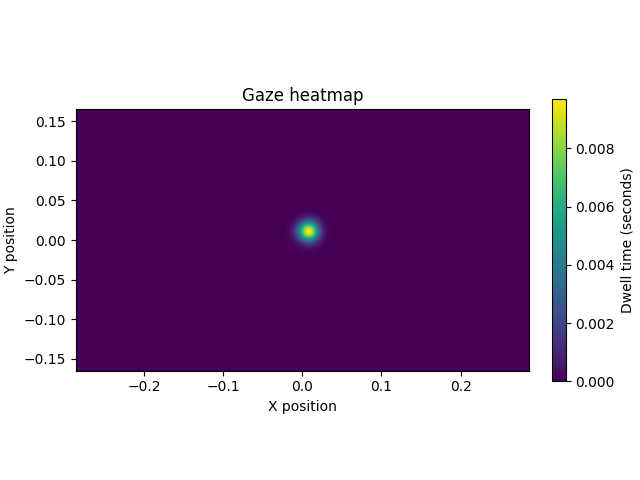
Using data from preloaded Raw for 16 events and 3301 original time points ...
0 bad epochs dropped
另请参阅
最后,让我们绘制光闪刺激的诱发反应,以了解平均瞳孔对光反射以及 EEG 数据中相关的 ERP。
epochs.apply_baseline().average(picks="all").plot(picks=occipital + pupil)
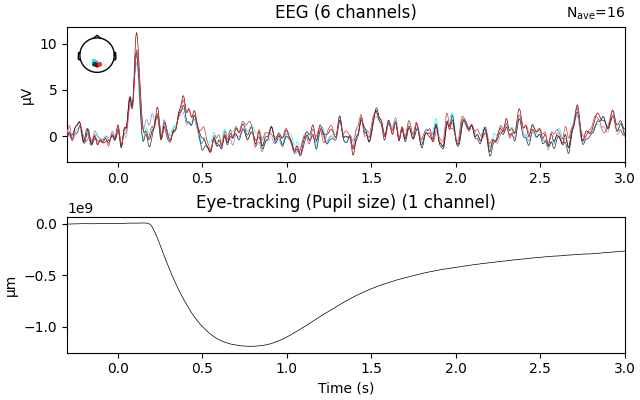
Applying baseline correction (mode: mean)
脚本总运行时间:(0 分钟 4.740 秒)