
说明
转到末尾下载完整示例代码。
使用引导式等效电流偶极子(ECD)拟合进行源定位#
这种将手动指定与自动拟合相结合的方法,是最古老的 MEG 源估计技术之一 [ 1 ]。我们将手动确定偶极子源在何处、何时活动,随后由拟合算法为该源寻找最佳位置。其结果是若干等效电流偶极子(ECD)构成的稀疏源估计,它们共同解释了(大部分)MEG 诱发响应。ECD 特别适合捕捉诱发响应的各个成分(例如 N100m、N400m 等)。一旦确定了 ECD 集合,就可以针对多个 Evoked 对象(例如不同的实验条件)计算它们的时间进程。
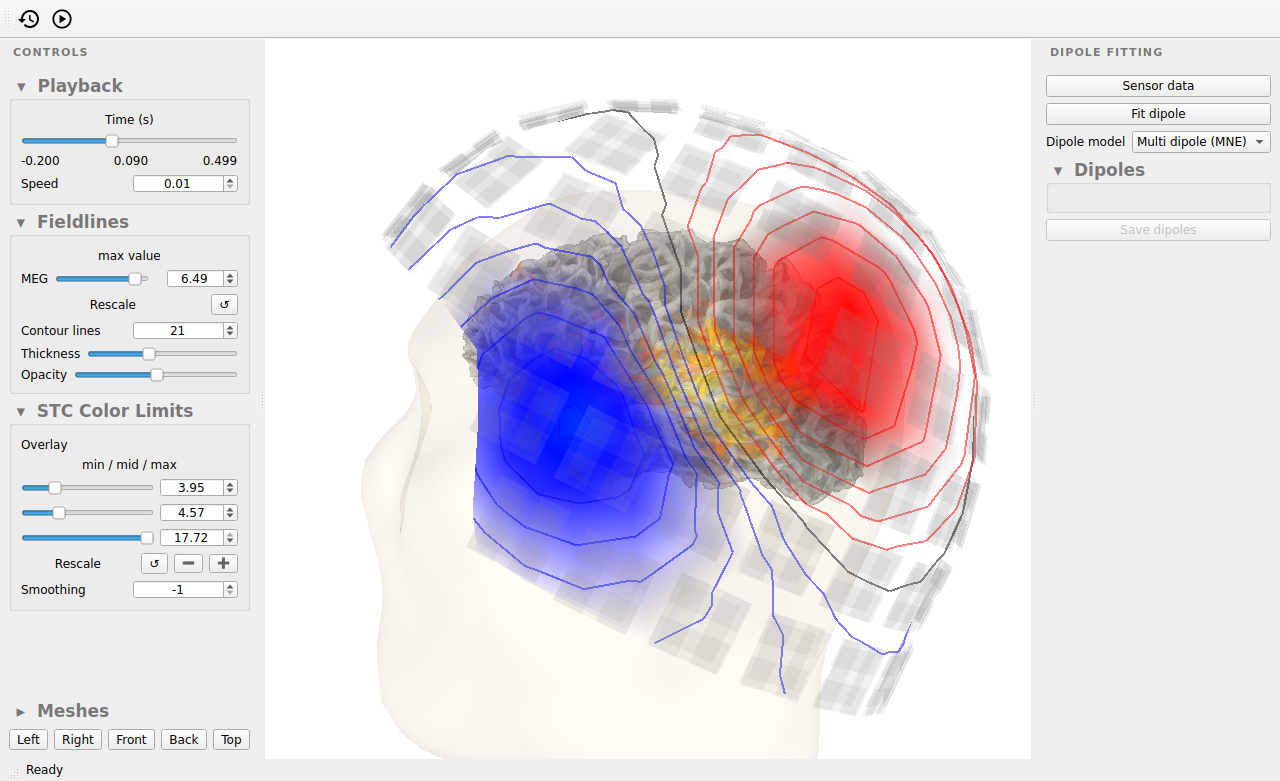
本教程将演示如何使用交互式 GUI 拟合 ECD,以及如何通过 Python 代码驱动同一个 GUI。下面的每张截图都来自同一个 GUI 窗口,因此您可以跟随我们观察它的状态如何逐步变化。
# Authors: The MNE-Python contributors.
# License: BSD-3-Clause
# Copyright the MNE-Python contributors.
使用 GUI 进行引导式 ECD 拟合#
启动 GUI#
我们可以从命令行启动 GUI,将诱发文件(文件名通常以 *-ave.fif 结尾)传给 mne dipolefit 程序:
$ mne dipolefit sample_audvis-ave.fif
GUI 也可以从交互式 Python 控制台启动。可用于拟合偶极子的最小配置只需要一个 Evoked 对象,无需其他任何内容:
当只指定诱发对象时,GUI 会显示传感器、球形头模型以及传感器记录的电磁场,并使用临时构建的噪声协方差矩阵。如果我们提供更多信息,就能建立更准确的头模型,从而得到更好的 ECD 拟合,并为确定源提供更多指导。在命令行中,可以通过多种选项指定包含协方差矩阵、BEM 模型以及 MRI 与头坐标系之间变换的文件,参见 mne dipolefit --help 的输出。在交互式 Python 控制台中,我们可以在启动 GUI 时提供相应的 MNE-Python 对象:
import mne

path = mne.datasets.sample.data_path()
meg_dir = path / "MEG" / "sample"
subjects_dir = path / "subjects"

evoked = mne.read_evokeds(meg_dir / "sample_audvis-ave.fif", condition="Left Auditory")
evoked.apply_baseline()

cov = mne.read_cov(meg_dir / "sample_audvis-cov.fif")
bem = mne.read_bem_solution(
    subjects_dir / "sample" / "bem" / "sample-5120-5120-5120-bem-sol.fif"
)
trans = mne.read_trans(meg_dir / "sample_audvis_raw-trans.fif")

# A distributed source estimate is a helpful guide for our dipole fits.
inv = mne.minimum_norm.read_inverse_operator(
    meg_dir / "sample_audvis-meg-oct-6-meg-inv.fif"
)
stc = mne.minimum_norm.apply_inverse(evoked, inv)

# Open the GUI with a better head model.
fitting_gui = mne.gui.dipolefit(
    evoked,
    cov=cov,
    bem=bem,
    trans=trans,
    stc=stc,
    ch_type="meg",  # only use MEG sensors for this tutorial
    subject="sample",
    subjects_dir=subjects_dir,
)
Reading /home/circleci/mne_data/MNE-sample-data/MEG/sample/sample_audvis-ave.fif ...
    Read a total of 4 projection items:
        PCA-v1 (1 x 10²) active
        PCA-v2 (1 x 10²) active
        PCA-v3 (1 x 10²) active
        Average EEG reference (1 x 60) active
    Found the data of interest:
        t =    -199.80 ...     499.49 ms (Left Auditory)
        0 CTF compensation matrices available
        nave = 55 - aspect type = 100
Projections have already been applied. Setting proj attribute to True.
No baseline correction applied
Applying baseline correction (mode: mean)
    366 x 366 full covariance (kind = 1) found.
    Read a total of 4 projection items:
        PCA-v1 (1 x 10²) active
        PCA-v2 (1 x 10²) active
        PCA-v3 (1 x 10²) active
        Average EEG reference (1 x 60) active
Loading surfaces...

Loading the solution matrix...

Three-layer model surfaces loaded.
Loaded linear collocation BEM solution from /home/circleci/mne_data/MNE-sample-data/subjects/sample/bem/sample-5120-5120-5120-bem-sol.fif
Reading inverse operator decomposition from /home/circleci/mne_data/MNE-sample-data/MEG/sample/sample_audvis-meg-oct-6-meg-inv.fif...
    Reading inverse operator info...
    [done]
    Reading inverse operator decomposition...
    [done]
    305 x 305 full covariance (kind = 1) found.
    Read a total of 4 projection items:
        PCA-v1 (1 x 10²) active
        PCA-v2 (1 x 10²) active
        PCA-v3 (1 x 10²) active
        Average EEG reference (1 x 60) active
    Noise covariance matrix read.
    22494 x 22494 diagonal covariance (kind = 2) found.
    Source covariance matrix read.
    22494 x 22494 diagonal covariance (kind = 6) found.
    Orientation priors read.
    22494 x 22494 diagonal covariance (kind = 5) found.
    Depth priors read.
    Did not find the desired covariance matrix (kind = 3)
    Reading a source space...
    Computing patch statistics...
    Patch information added...
    Distance information added...
    [done]
    Reading a source space...
    Computing patch statistics...
    Patch information added...
    Distance information added...
    [done]
    2 source spaces read
    Read a total of 4 projection items:
        PCA-v1 (1 x 10²) active
        PCA-v2 (1 x 10²) active
        PCA-v3 (1 x 10²) active
        Average EEG reference (1 x 60) active
    Source spaces transformed to the inverse solution coordinate frame
Preparing the inverse operator for use...
    Scaled noise and source covariance from nave = 1 to nave = 55
    Created the regularized inverter
    Created an SSP operator (subspace dimension = 3)
    Created the whitener using a noise covariance matrix with rank 302 (3 small eigenvalues omitted)
    Computing noise-normalization factors (dSPM)...
[done]
Applying inverse operator to "Left Auditory"...
    Picked 305 channels from the data
    Computing inverse...
    Eigenleads need to be weighted ...
    Computing residual...
    Explained  59.4% variance
    Combining the current components...
    dSPM...
[done]
Noise covariance  : <Covariance | kind : full, shape : (366, 366), range : [-1.3e-11, +5.1e-11], n_samples : 15972>
Getting helmet for system 306m
    Automatic origin fit: head of radius 91.2 mm
Prepare MEG mapping...
Computing dot products for 305 coils...
Computing dot products for 304 surface locations...
Field mapping data ready
    Preparing the mapping matrix...
    Truncating at 85/305 components to omit less than 0.0001 (9.4e-05)

Read 0 source spaces a total of 0 active source locations

Coordinate transformation: MRI (surface RAS) -> head
    0.999310 0.009985 -0.035787      -3.17 mm
    0.012759 0.812405 0.582954       6.86 mm
    0.034894 -0.583008 0.811716      28.88 mm
    0.000000 0.000000 0.000000       1.00

Read 306 MEG channels from info
105 coil definitions read
Coordinate transformation: MEG device -> head
    0.991420 -0.039936 -0.124467      -6.13 mm
    0.060661 0.984012 0.167456       0.06 mm
    0.115790 -0.173570 0.977991      64.74 mm
    0.000000 0.000000 0.000000       1.00
MEG coil definitions created in head coordinates.

Employing the head->MRI coordinate transform with the BEM model.
BEM model  is now set up


Checking surface interior status for 306 points...
    Found   0/306 points inside  an interior sphere of radius   79.1 mm
    Found   0/306 points outside an exterior sphere of radius  161.3 mm
    Found 306/306 points outside using surface Qhull
    Found   0/  0 points outside using solid angles
    Total 0/306 points inside the surface
Interior check completed in 6.7 ms

Composing the field computation matrix...
Using control points [ 3.95048042  4.569413   17.72451426]
Channel types:: grad: 203, mag: 102
拟合偶极子#
在引导式 ECD 拟合过程中,我们会在电磁场中寻找模式,以判断源可能在何时、何处活动。我们可以使用时间滑块查看场随时间的变化。示例数据是对受试者左侧播放听觉音调所产生的诱发响应,可以看到右侧半球在约 85 ms 处出现初始听觉响应的峰值。该场呈现典型的偶极模式,在源的两侧各有一个红色/蓝色焦点,该源应位于听觉皮层(分布式源估计显示了它的位置)。
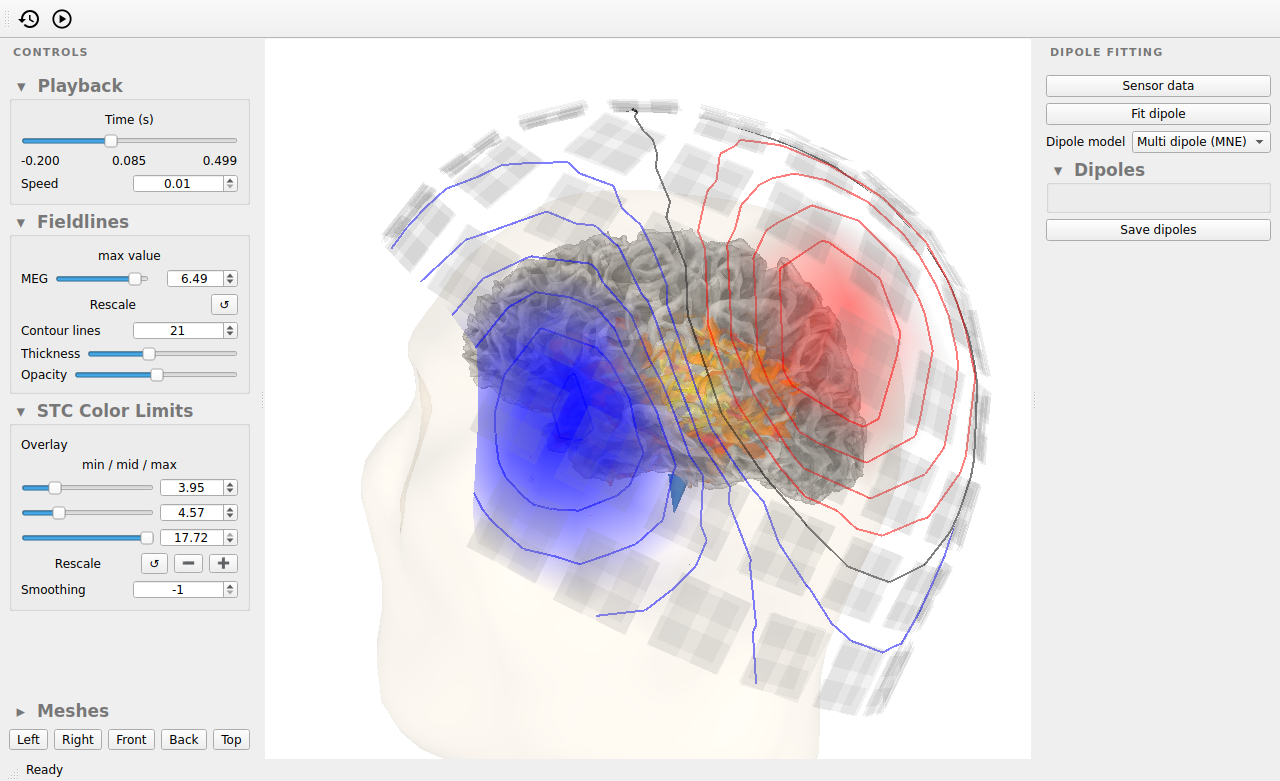
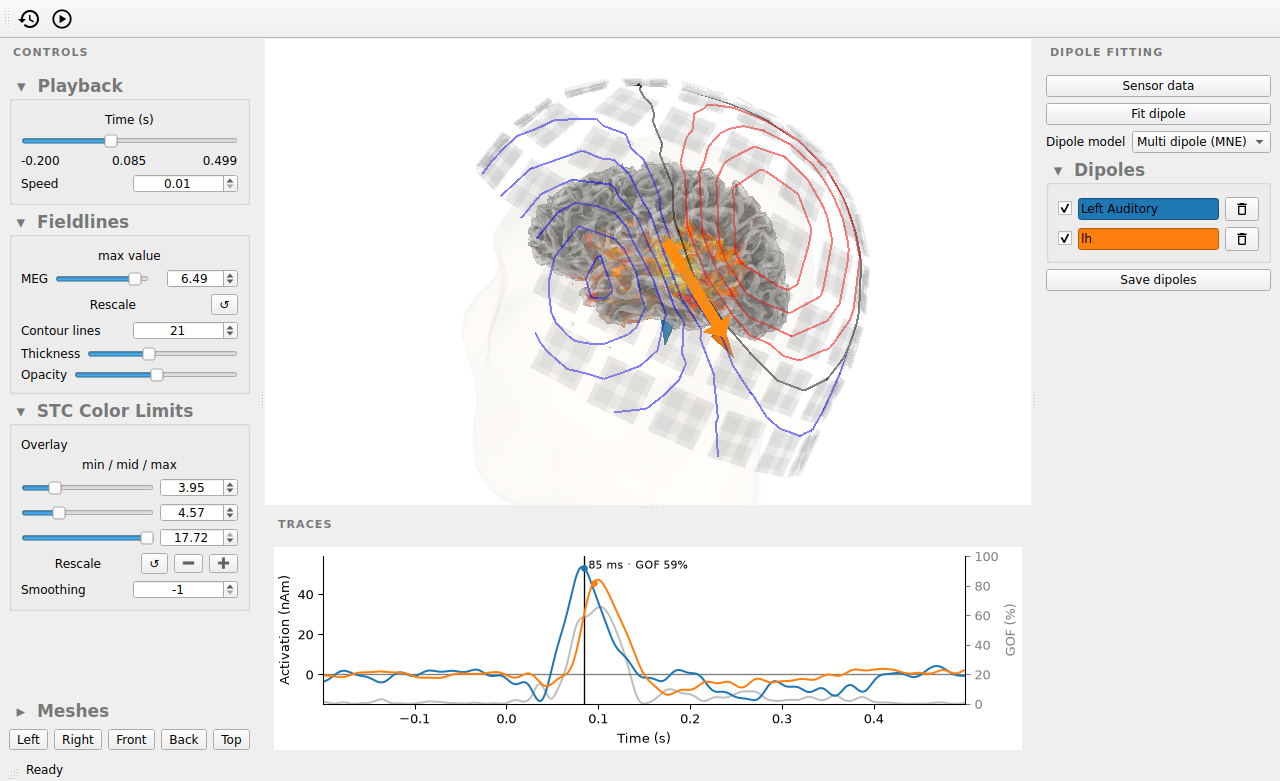
按下 Fit dipole 按钮,我们便指示算法在当前时刻拟合一个偶极子。经过几秒钟的计算,得到的偶极子会以箭头形式显示在大脑中,指示其源位置;MEG 头盔上也会出现一个箭头,指示偶极子与场模式之间的拟合情况。偶极子的时间进程显示在下方。右侧的控件可用于命名、删除、临时停用/启用偶极子,以及将其保存到文件。此外还有一个开关,可使偶极子的方向动态变化,或将其固定为拟合时所处的方向。
拖动时间滑块和点击 Fit dipole 按钮都有对应的程序化操作,我们将在这里使用这些操作来生成教程中的各张图:
fitting_gui.set_time(0.085)
fitting_gui.fit_dipole()
Positions (in meters) and orientations
1 sources
Source spaces are in head coordinates.
Checking that the sources are inside the surface (will take a few...)
Checking surface interior status for 1 point ...
    Found 0/1 points inside  an interior sphere of radius   43.6 mm
    Found 0/1 points outside an exterior sphere of radius   91.8 mm
    Found 0/1 points outside using surface Qhull
    Found 0/1 points outside using solid angles
    Total 1/1 point  inside the surface
Interior check completed in 0.5 ms
Computing MEG at 1 source location (free orientations)...
info["bads"] and noise_cov["bads"] do not match, excluding bad channels from both
Computing inverse operator with 305 channels.
    305 out of 306 channels remain after picking
Selected 305 channels
    No patch info available. The standard source space normals will be employed in the rotation to the local surface coordinates....
    Changing to fixed-orientation forward solution with surface-based source orientations...
    [done]
Whitening the forward solution.
    Created an SSP operator (subspace dimension = 3)
Computing rank from covariance with rank='info'
    MEG: rank 302 after 3 projectors applied to 305 channels
    Setting small MEG eigenvalues to zero (without PCA)
Creating the source covariance matrix
Adjusting source covariance matrix.
Computing SVD of whitened and weighted lead field matrix.
    largest singular value = 17.3781
    scaling factor to adjust the trace = 8.51891e+15 (nchan = 305 nzero = 3)
Preparing the inverse operator for use...
    Scaled noise and source covariance from nave = 1 to nave = 55
    Created the regularized inverter
    Created an SSP operator (subspace dimension = 3)
    Created the whitener using a noise covariance matrix with rank 302 (3 small eigenvalues omitted)
Applying inverse operator to "Left Auditory"...
    Picked 305 channels from the data
    Computing inverse...
    Eigenleads need to be weighted ...
    Computing residual...
    Explained   6.1% variance
[done]
调整 3D 视图#
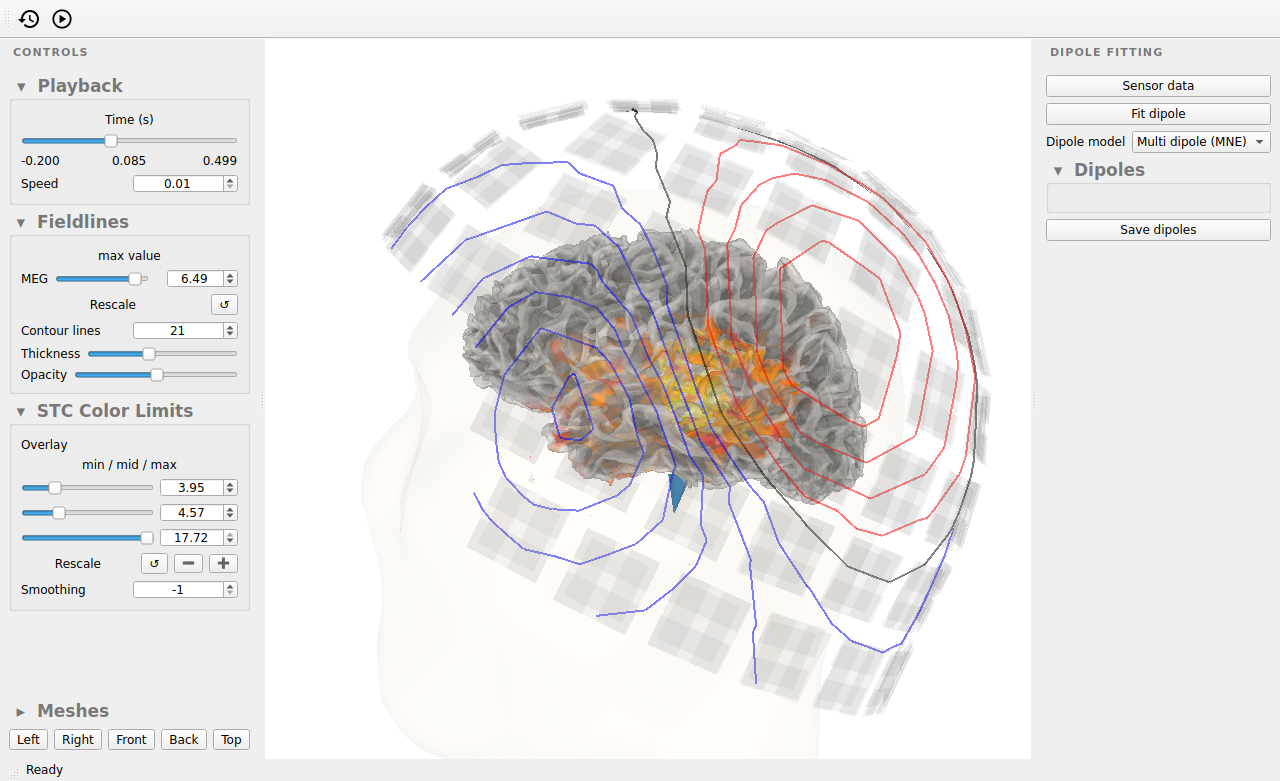
每个偶极子都绘制在头部深处,因此左侧的 Meshes 面板为每个表面(皮层、头部、MEG 头盔、传感器以及分布式源估计的颜色条)提供了可见性复选框和不透明度滑块,以便显露拟合所需的内容。其下方是头部五个标准视图的按钮。两者都有对应的程序化操作:
fitting_gui.toggle_mesh("helmet", show=False)
fitting_gui.set_mesh_opacity("head", 0.1)
选择用于引导 ECD 建模的通道#
几乎在同一时间,左右两侧的听觉皮层都在产生听觉响应。因此,我们在没有任何引导的情况下拟合的单个偶极子会存在一定偏差,因为算法试图将该 ECD 拟合到整个双侧场模式。
为了分离出场模式中只包含一对红色/蓝色焦点的部分(这是算法理想的拟合目标),我们可以将分析限制在部分传感器上。为此,首先按下 Sensor data 按钮,它会打开一个新窗口,显示所有传感器的诱发响应。通过点击并拖动鼠标,我们可以在希望纳入分析的传感器周围进行套索选择。按住 CTRL 可加入当前选择,按住 CTRL + SHIFT 可将其从当前选择中移除。当前选中的传感器会在主窗口中以绿色高亮显示,展示它们所覆盖的那部分场模式。当您对选择满意后,可以像之前一样使用 Fit dipole 按钮,在当前时间点用所选传感器拟合偶极子。
请移除或停用我们之前对整个场模式拟合的偶极子,并分别使用左侧和右侧传感器拟合两个偶极子。为它们命名会很有帮助。这部分工作流程本质上是交互式的,因此我们无法在这里用代码复现。
多偶极子/单偶极子模式#
默认情况下,拟合算法处于 Multi dipole (MNE) 模式,这意味着归属于某个偶极子的那部分信号不能同时归属于第二个偶极子。您会注意到,如果有两个方向相近且彼此靠近的偶极子,它们的时间进程会变成一种奇怪的混合,因为每个偶极子都会认领同一信号的一部分。为避免这种情况,我们可以使用 Dipole model 下拉菜单将算法切换为 Single dipole。在此模式下,每个偶极子的时间进程都会在忽略其他所有偶极子的情况下计算,这在评估同一源的多个候选偶极子时很有用。
保存和加载偶极子集合#
我们可以使用 Save dipoles 按钮保存拟合好的偶极子。可用的文件格式有两种:纯文本(.dip)和二进制格式(.bdip)。这些格式与 MEGIN 的软件兼容,可实现 MNE-Python 与 Xfit 之间的互操作。保存的偶极子可以用 mne.read_dipole() 读回,并添加到已有的偶极子拟合 GUI 中,还可以选择使用我们指定的名称。这里,我们添加用套索选择左侧传感器本应产生的那个偶极子:
dips_to_add = mne.read_dipole(meg_dir / "sample_audvis_set1.dip")
dips_to_add = dips_to_add[[33]]  # add only one of the 34 dipoles in the file
fitting_gui.add_dipole(dips_to_add, name="lh")
34 dipole(s) found
Positions (in meters) and orientations
2 sources
Source spaces are in head coordinates.
Checking that the sources are inside the surface (will take a few...)
Checking surface interior status for 2 points...
    Found 0/2 points inside  an interior sphere of radius   43.6 mm
    Found 0/2 points outside an exterior sphere of radius   91.8 mm
    Found 0/2 points outside using surface Qhull
    Found 0/2 points outside using solid angles
    Total 2/2 points inside the surface
Interior check completed in 0.6 ms
Computing MEG at 2 source locations (free orientations)...
info["bads"] and noise_cov["bads"] do not match, excluding bad channels from both
Computing inverse operator with 305 channels.
    305 out of 306 channels remain after picking
Selected 305 channels
    No patch info available. The standard source space normals will be employed in the rotation to the local surface coordinates....
    Changing to fixed-orientation forward solution with surface-based source orientations...
    [done]
Whitening the forward solution.
    Created an SSP operator (subspace dimension = 3)
Computing rank from covariance with rank='info'
    MEG: rank 302 after 3 projectors applied to 305 channels
    Setting small MEG eigenvalues to zero (without PCA)
Creating the source covariance matrix
Adjusting source covariance matrix.
Computing SVD of whitened and weighted lead field matrix.
    largest singular value = 14.3806
    scaling factor to adjust the trace = 2.60588e+16 (nchan = 305 nzero = 3)
Preparing the inverse operator for use...
    Scaled noise and source covariance from nave = 1 to nave = 55
    Created the regularized inverter
    Created an SSP operator (subspace dimension = 3)
    Created the whitener using a noise covariance matrix with rank 302 (3 small eigenvalues omitted)
Applying inverse operator to "Left Auditory"...
    Picked 305 channels from the data
    Computing inverse...
    Eigenleads need to be weighted ...
    Computing residual...
    Explained  18.0% variance
[done]
在 Python 中处理偶极子#
尽管每个偶极子是在单个时间点拟合的,但其时间进程是在整个 epoch 上估计的,因此我们可以将时间光标移到任意潜伏期,以检查该处的偶极子模型。偶极子本身以 mne.Dipole 对象列表的形式提供,完全无需操作 GUI 即可保存:
fitting_gui.set_time(0.115)
fitted_dipoles = fitting_gui.dipoles  # the dipoles we fitted
print([dip.name for dip in fitted_dipoles])
# save with: fitting_gui.save("my_file.dip")
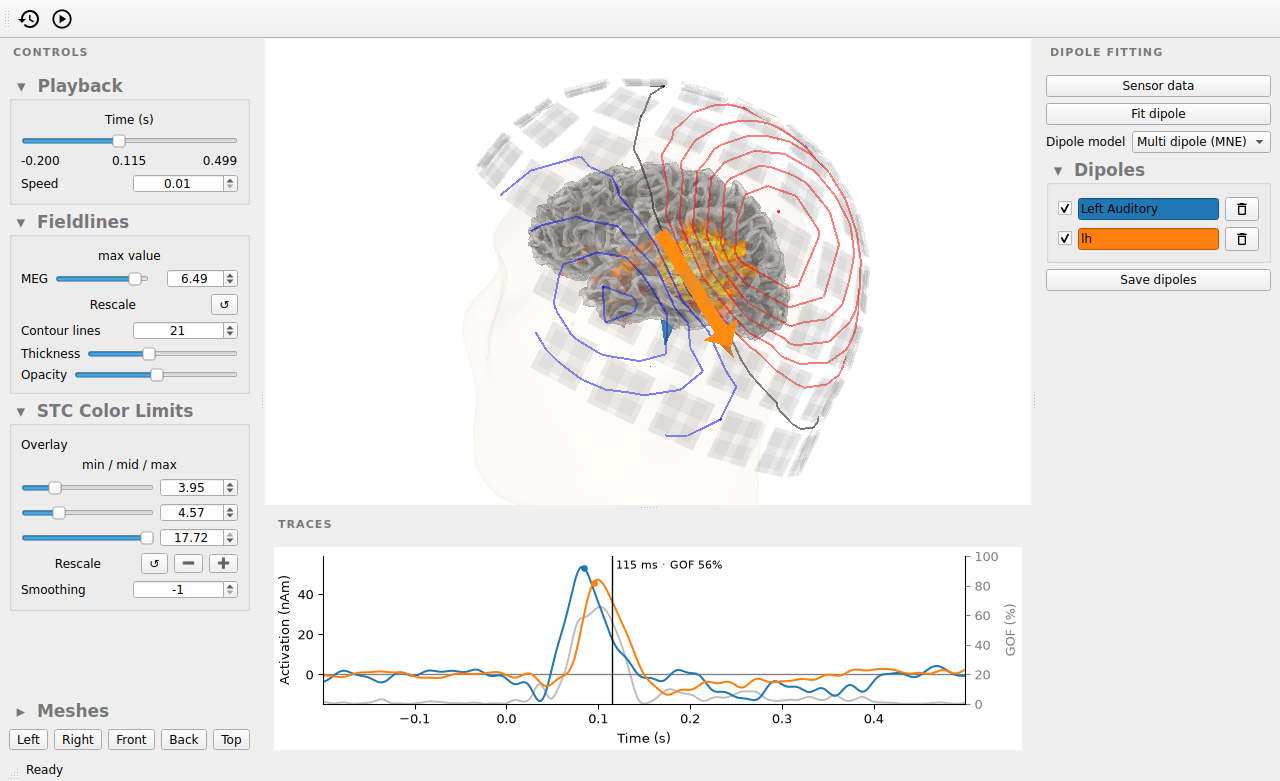
['Left Auditory', 'lh']
参考文献#
脚本总运行时间:(0 分钟 36.282 秒)