
说明
转到末尾下载完整示例代码。
使用 ICA 修复伪迹#
本教程介绍独立成分分析(ICA)的基础知识,并说明如何用 ICA 进行伪迹修复;随后通过一个扩展示例演示眼动伪迹与心跳伪迹的修复过程。有关 ICA 的概念背景,请参阅这篇 scikit-learn 教程。
和往常一样,我们首先导入所需的 Python 模块并加载一些示例数据。由于 ICA 的计算量可能较大,我们还会把数据裁剪到 60 秒;同时为了不必反复输入 mne.preprocessing,我们直接从该子模块导入几个函数和类:
# Authors: The MNE-Python contributors.
# License: BSD-3-Clause
# Copyright the MNE-Python contributors.
import os

import mne
from mne.preprocessing import ICA, corrmap, create_ecg_epochs, create_eog_epochs

sample_data_folder = mne.datasets.sample.data_path()
sample_data_raw_file = os.path.join(
    sample_data_folder, "MEG", "sample", "sample_audvis_filt-0-40_raw.fif"
)
raw = mne.io.read_raw_fif(sample_data_raw_file)

# Here we'll crop to 60 seconds and drop gradiometer channels for speed
raw.crop(tmax=60.0).pick(picks=["mag", "eeg", "stim", "eog"])
raw.load_data()
Opening raw data file /home/circleci/mne_data/MNE-sample-data/MEG/sample/sample_audvis_filt-0-40_raw.fif...
    Read a total of 4 projection items:
        PCA-v1 (1 x 10²)  idle
        PCA-v2 (1 x 10²)  idle
        PCA-v3 (1 x 10²)  idle
        Average EEG reference (1 x 60)  idle
    Range : 6450 ... 48149 =     42.956 ...   320.665 secs
Ready.
Reading 0 ... 9009  =      0.000 ...    59.999 secs...
说明
在应用 ICA(或任何伪迹修复策略)之前,务必先观察数据中的伪迹,以确保选择了合适的修复工具。有时最好的工具就是不用工具——如果伪迹足够小,甚至可能无需修复就能获得良好的分析结果。关于检测和可视化各类伪迹的指导,参见 伪迹检测概览。
什么是 ICA?#
独立成分分析(ICA)是一种从一组记录中估计独立源信号的技术,这些记录中的源信号以未知比例混合在一起。一个常见的例子是盲源分离:同一房间里有 3 件乐器在演奏,3 个麦克风同时录音(每个麦克风都拾取全部 3 件乐器,但强度不同),你能否以某种方式把 3 个麦克风记录的信号“解混”,最终得到分别隔离每件乐器声音的独立“录音”?
不难看出这一类比如何应用于 EEG/MEG 分析:有许多“麦克风”(传感器通道)同时记录许多“乐器”(眨眼、心跳、大脑不同区域的活动、咬紧牙关或吞咽产生的肌肉活动等)。只要这些不同的源信号在统计上相互独立且非高斯,通常就可以用 ICA 将它们分离,然后在排除不需要的源之后重建传感器信号。
MNE-Python 中的 ICA#
MNE-Python 实现了四种 ICA 算法:fastica(默认)、picard、infomax 和 jamica。FastICA 和 Infomax 的使用都相当广泛;Picard 是较新的算法(2017 年),预计比 FastICA 和 Infomax 收敛更快,并且在源并非完全独立的情况下(真实 EEG/MEG 数据中通常如此)比其他算法更稳健。更多信息见 [ 1 ]。JAMICA 是 Adaptive Mixture ICA(AMICA)的可选 Python 实现。在 ICA 中,method='jamica' 只拟合一个 ICA 模型;如需多模型分解及其其他高级功能,请直接使用 jamica 包。AMICA 方法见 [ 2 ]。
MNE-Python 中的 ICA 接口与 scikit-learn 中的接口类似:创建 ICA 对象时指定一些通用参数,然后使用其 fit 方法将 ICA 对象拟合到数据上。拟合结果会以以下划线(_)结尾的属性形式添加到 ICA 对象中,例如 ica.mixing_matrix_ 和 ica.unmixing_matrix_。拟合完成后,必须选择要移除的 ICA 成分,然后使用 ICA 对象的 apply 方法将 ICA 拟合结果应用到 Raw 或 Epochs 对象上。
按照 ICA 的常见做法,在执行 ICA 分解之前,数据首先会被缩放到单位方差,并使用主成分分析(PCA)进行白化。这是一个两阶段过程:
为处理不同通道类型具有不同单位的情况(例如 EEG 为伏特、MEG 为特斯拉),必须对数据进行预白化。如果
noise_cov=None(默认),则某一通道类型的所有数据都会按所有通道的标准差进行缩放。如果noise_cov是一个Covariance,则使用该协方差对通道进行预白化。随后使用 PCA 对预白化后的数据进行分解。
如果 n_components 是整数,则把得到的各个主成分(PC)中的前 n_components 个送入 ICA 算法。它也可以是 0 到 1 之间的浮点数,表示这些 PC 应解释的方差比例;此时会把适当数量的 PC(即恰好足以解释给定总方差比例的那些 PC)送入 ICA。
在可视化独立成分(IC)并排除任何捕捉到你想要修复的伪迹的成分之后,可以使用 ICA 对象的 apply 方法重建传感器信号。默认情况下,信号重建使用全部 IC(减去 ICA.exclude 中列出的 IC)加上未参与 ICA 分解的全部 PC(即“PCA 残差”)。如果你想减少重建阶段使用的成分数量,可通过 n_pca_components 参数控制(这会进而降低数据的秩;默认 n_pca_components=None,即不进行额外的降维)。下图总结了拟合与重建流程,以及在各阶段控制维度的参数:
更多细节参见 ICA 文档的 Notes 部分。接下来我们将通过一个扩展示例,更详细地演示上述每个步骤。
示例:EOG 与 ECG 伪迹修复#
可视化伪迹#
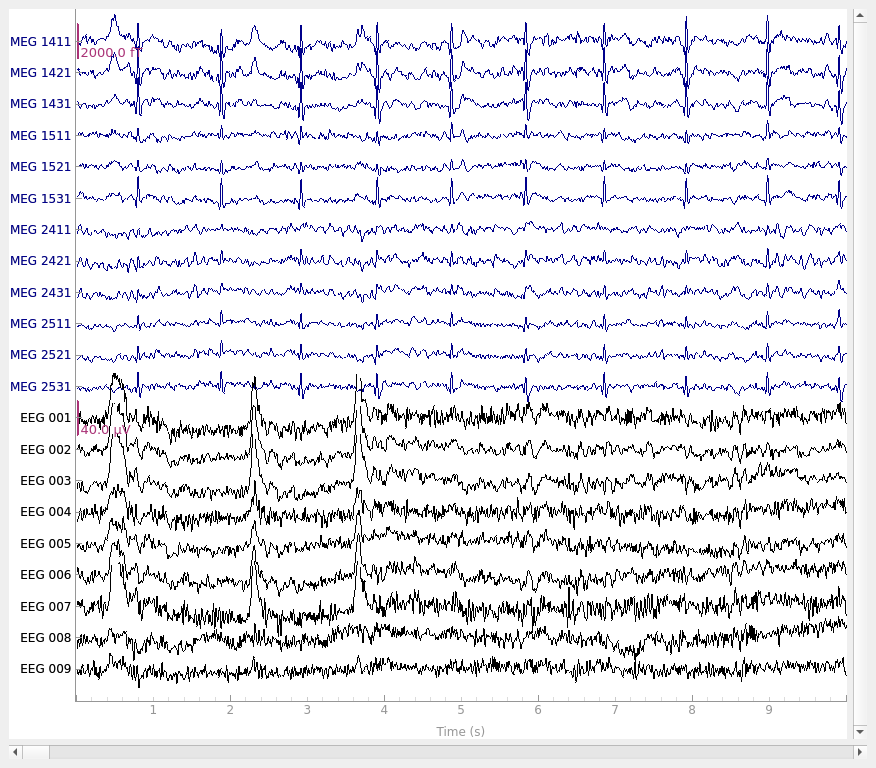
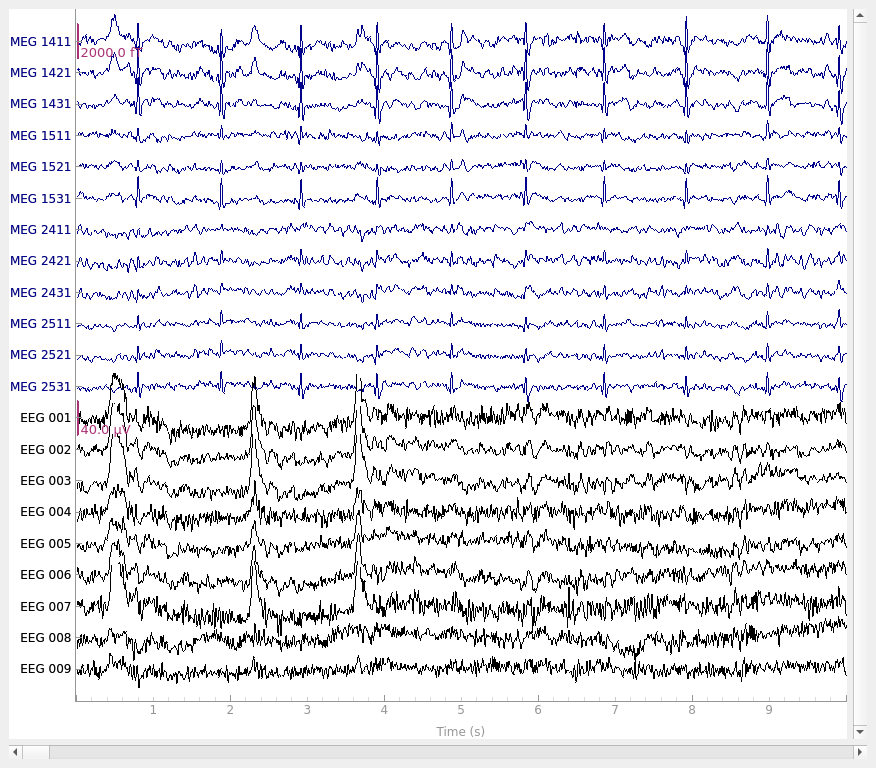
让我们先可视化想要修复的伪迹。在这个数据集中,伪迹足够明显,在原始数据中很容易看到:
# pick some channels that clearly show heartbeats and blinks
regexp = r"(MEG [12][45][123]1|EEG 00.)"
artifact_picks = mne.pick_channels_regexp(raw.ch_names, regexp=regexp)
raw.plot(order=artifact_picks, n_channels=len(artifact_picks), show_scrollbars=False)
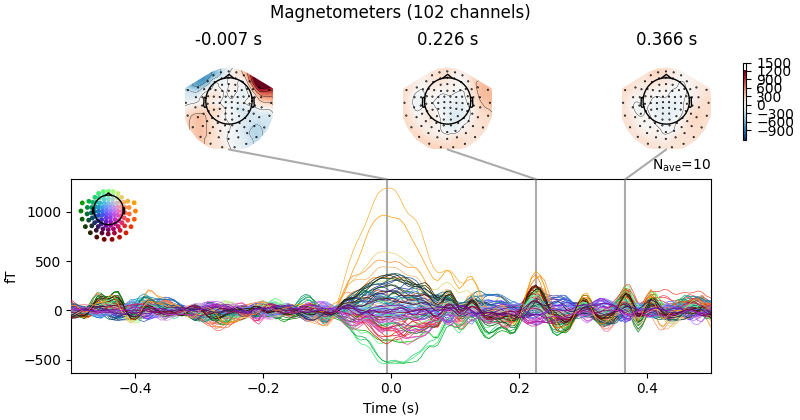
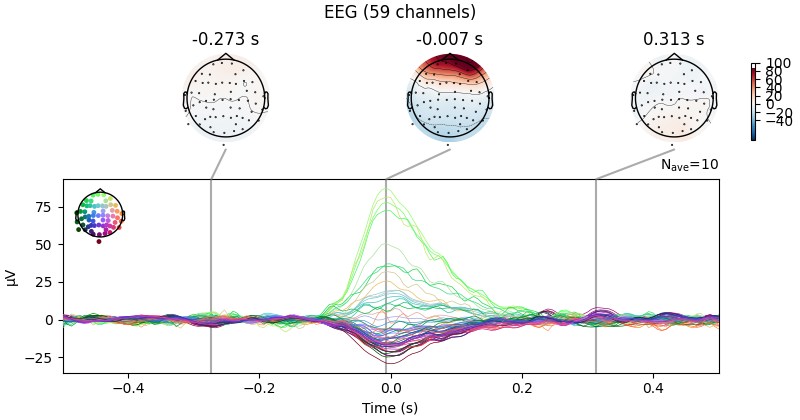
我们可以使用 create_eog_epochs 汇总眼动伪迹在各通道类型中的表现,就像在 伪迹检测概览 教程中所做的那样:
eog_evoked = create_eog_epochs(raw).average()
eog_evoked.apply_baseline(baseline=(None, -0.2))
eog_evoked.plot_joint()
Using EOG channel: EOG 061
EOG channel index for this subject is: [171]
Filtering the data to remove DC offset to help distinguish blinks from saccades
Selecting channel EOG 061 for blink detection
Setting up band-pass filter from 1 - 10 Hz

FIR filter parameters
---------------------
Designing a two-pass forward and reverse, zero-phase, non-causal bandpass filter:
- Windowed frequency-domain design (firwin2) method
- Hann window
- Lower passband edge: 1.00
- Lower transition bandwidth: 0.50 Hz (-12 dB cutoff frequency: 0.75 Hz)
- Upper passband edge: 10.00 Hz
- Upper transition bandwidth: 0.50 Hz (-12 dB cutoff frequency: 10.25 Hz)
- Filter length: 1502 samples (10.003 s)

Now detecting blinks and generating corresponding events
Found 10 significant peaks
Number of EOG events detected: 10
Not setting metadata
10 matching events found
No baseline correction applied
Created an SSP operator (subspace dimension = 4)
Using data from preloaded Raw for 10 events and 151 original time points ...
0 bad epochs dropped
Applying baseline correction (mode: mean)
Created an SSP operator (subspace dimension = 4)
4 projection items activated
SSP projectors applied...
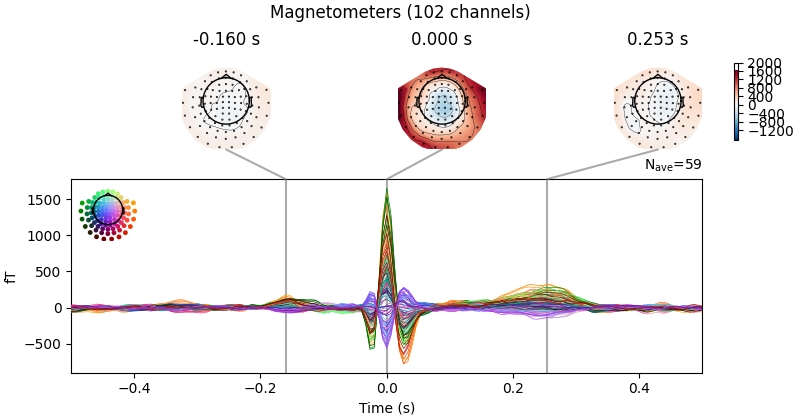
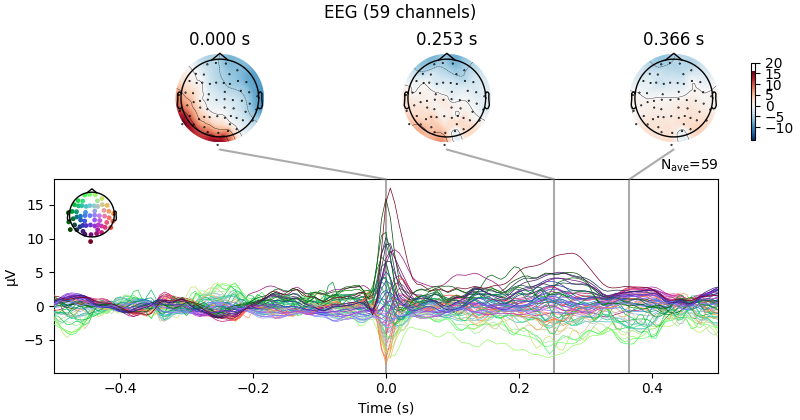
现在对心跳伪迹做同样的处理,使用 create_ecg_epochs:
ecg_evoked = create_ecg_epochs(raw).average()
ecg_evoked.apply_baseline(baseline=(None, -0.2))
ecg_evoked.plot_joint()
Reconstructing ECG signal from Magnetometers
Setting up band-pass filter from 8 - 16 Hz

FIR filter parameters
---------------------
Designing a two-pass forward and reverse, zero-phase, non-causal bandpass filter:
- Windowed frequency-domain design (firwin2) method
- Hann window
- Lower passband edge: 8.00
- Lower transition bandwidth: 0.50 Hz (-12 dB cutoff frequency: 7.75 Hz)
- Upper passband edge: 16.00 Hz
- Upper transition bandwidth: 0.50 Hz (-12 dB cutoff frequency: 16.25 Hz)
- Filter length: 1502 samples (10.003 s)

Number of ECG events detected : 59 (average pulse 58.99492412402019 / min.)
Not setting metadata
59 matching events found
No baseline correction applied
Created an SSP operator (subspace dimension = 4)
Using data from preloaded Raw for 59 events and 151 original time points ...
0 bad epochs dropped
Applying baseline correction (mode: mean)
Created an SSP operator (subspace dimension = 4)
4 projection items activated
SSP projectors applied...
滤波以去除缓慢漂移#
在运行 ICA 之前,一个重要步骤是对数据进行滤波以去除低频漂移,因为低频漂移会负面影响 ICA 拟合的质量。缓慢漂移之所以有问题,是因为它们会降低那些本应独立的源之间的独立性(例如在缓慢上升的漂移期间,神经、心跳、眨眼及其他肌肉源都会倾向于呈现更高的数值),使算法更难找到准确的解。推荐使用截止频率为 1 Hz 的高通滤波器。不过,由于滤波是线性操作,从滤波后信号得到的 ICA 解可以应用到未滤波的信号上(更多信息见 [ 3 ]),因此我们会保留一份未滤波 Raw 对象的副本,以便之后把 ICA 解应用到它上面。
filt_raw = raw.copy().filter(l_freq=1.0, h_freq=None)
Filtering raw data in 1 contiguous segment
Setting up high-pass filter at 1 Hz

FIR filter parameters
---------------------
Designing a one-pass, zero-phase, non-causal highpass filter:
- Windowed time-domain design (firwin) method
- Hamming window with 0.0194 passband ripple and 53 dB stopband attenuation
- Lower passband edge: 1.00
- Lower transition bandwidth: 1.00 Hz (-6 dB cutoff frequency: 0.50 Hz)
- Filter length: 497 samples (3.310 s)
拟合 ICA#
现在我们准备设置并拟合 ICA。由于我们(从观察原始数据中)知道 EOG 和 ECG 伪迹相当强,可以预期这些伪迹会被 ICA 之前 PCA 分解的前几个维度捕捉到。因此,我们可能不需要非常多的成分就能很好地分离伪迹(不过通常更倾向于包含更多成分以获得更准确的解)。作为初步尝试,我们用 n_components=15 运行 ICA(仅使用前 15 个 PCA 成分来计算 ICA 分解)——相对于超过 300 个通道的数据而言这个数字很小,但好处是运行很快,而且我们能轻易判断它是否有效(因为我们已经知道 EOG / ECG 伪迹应该是什么样子)。
ICA 拟合不是确定性的(例如不同运行中成分可能出现符号翻转,或返回顺序不总是相同),因此我们还会指定随机种子,以便本教程每次由我们的 Web 服务器构建时都得到相同的结果。
警告
用于拟合 ICA 的 Epochs 不应进行基线校正。由于通过 ICA 清洗数据可能引入直流偏移,如果你需要基线校正,建议在清洗之后(而不是之前)对数据进行基线校正。
Fitting ICA to data using 161 channels (please be patient, this may take a while)
    Rejecting  epoch based on EEG : ['EEG 001', 'EEG 002', 'EEG 003', 'EEG 004', 'EEG 006', 'EEG 007']
Artifact detected in [2107, 2408]
    Rejecting  epoch based on EEG : ['EEG 003']
Artifact detected in [4515, 4816]
Selecting by number: 15 components
Fitting ICA took 0.2s.
我们本可以传给 fit 方法的一些可选参数包括 decim(在计算 IC 时只使用每第 N 个采样点,可显著提速)和 reject(提供拒绝字典,为每种通道类型指定可接受的最大峰峰幅度,就像我们在 MNE-Python MEG/EEG 分析概览 教程中创建分段数据时所用的那样)。
查看 ICA 解#
现在我们可以检查这些 IC,看看它们捕捉到了什么。
使用 get_explained_variance_ratio(),我们可以以字典形式获取 ICA 成分所解释的原始数据方差比例:
explained_var_ratio = ica.get_explained_variance_ratio(filt_raw)
for channel_type, ratio in explained_var_ratio.items():
    print(f"Fraction of {channel_type} variance explained by all components: {ratio}")
Fraction of mag variance explained by all components: 0.9337595733809022
Fraction of eeg variance explained by all components: 0.7850710053477967
这些数值是针对所有 ICA 成分共同计算的,但按通道类型分别给出(此处为磁强计和 EEG)。
我们也可以明确指定要对哪些成分和哪些通道类型进行计算:
explained_var_ratio = ica.get_explained_variance_ratio(
    filt_raw, components=[0], ch_type="eeg"
)
# This time, print as percentage.
ratio_percent = round(100 * explained_var_ratio["eeg"])
print(
    f"Fraction of variance in EEG signal explained by first component: {ratio_percent}%"
)
Fraction of variance in EEG signal explained by first component: 34%
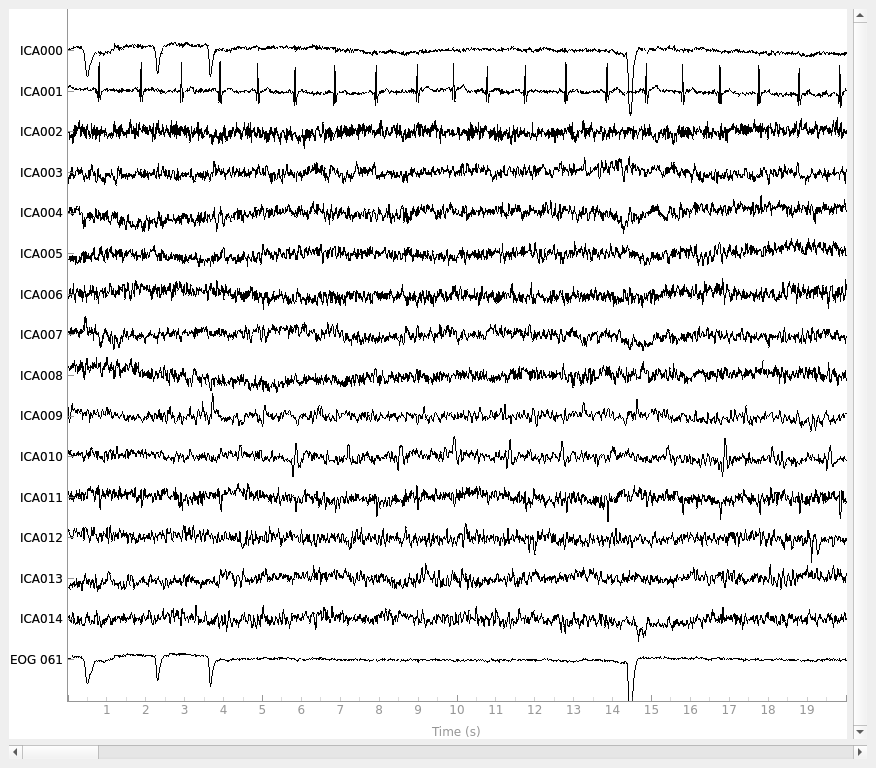
plot_sources 会显示各 IC 的时间序列。注意,在调用 plot_sources 时我们可以使用原始的、未滤波的 Raw 对象。一个有用的提示是:右键单击(或在触控板上按住 control 单击)成分名称会弹出其属性图。在该图中,你还可以用“t”键切换地形图中的通道类型(如果你有多种通道类型),并用“l”键切换频谱是否采用对数刻度。
raw.load_data()
ica.plot_sources(raw, show_scrollbars=False)
Creating RawArray with float64 data, n_channels=16, n_times=9010
    Range : 6450 ... 15459 =     42.956 ...   102.954 secs
Ready.
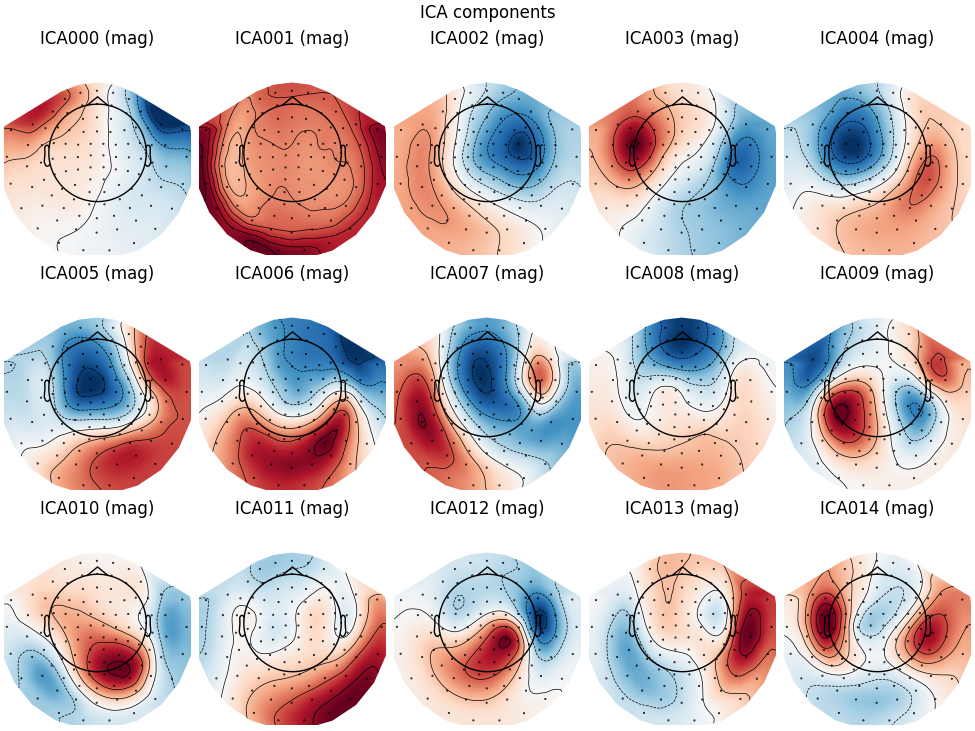
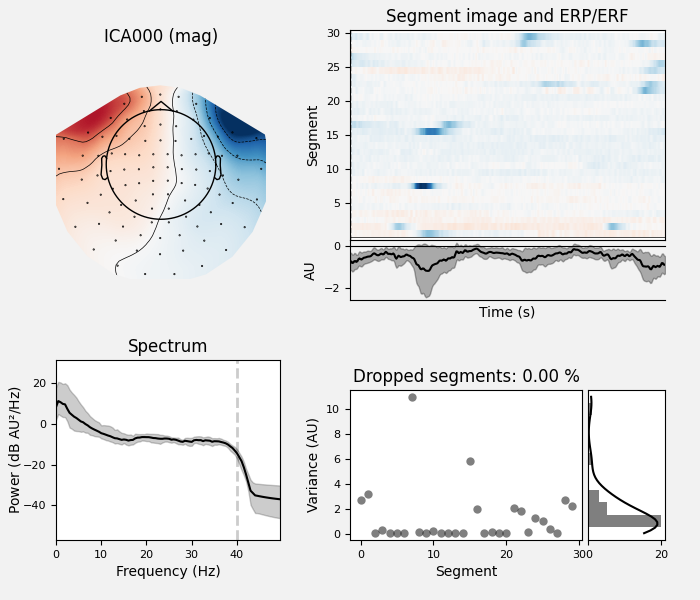
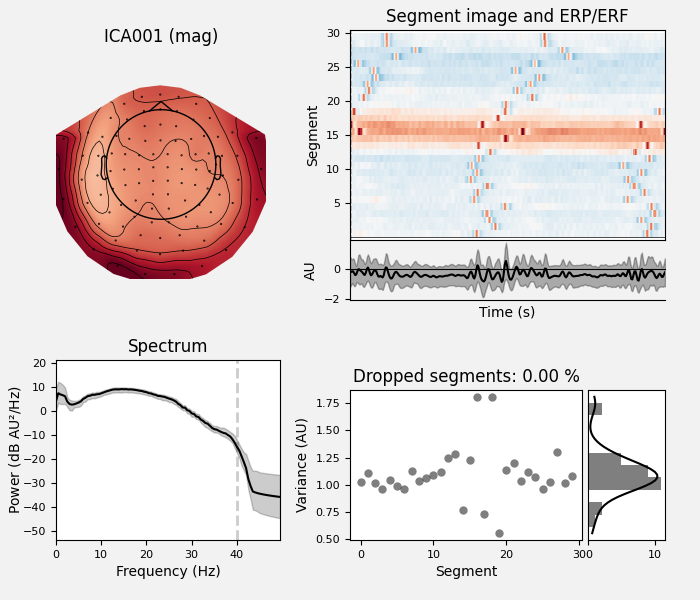
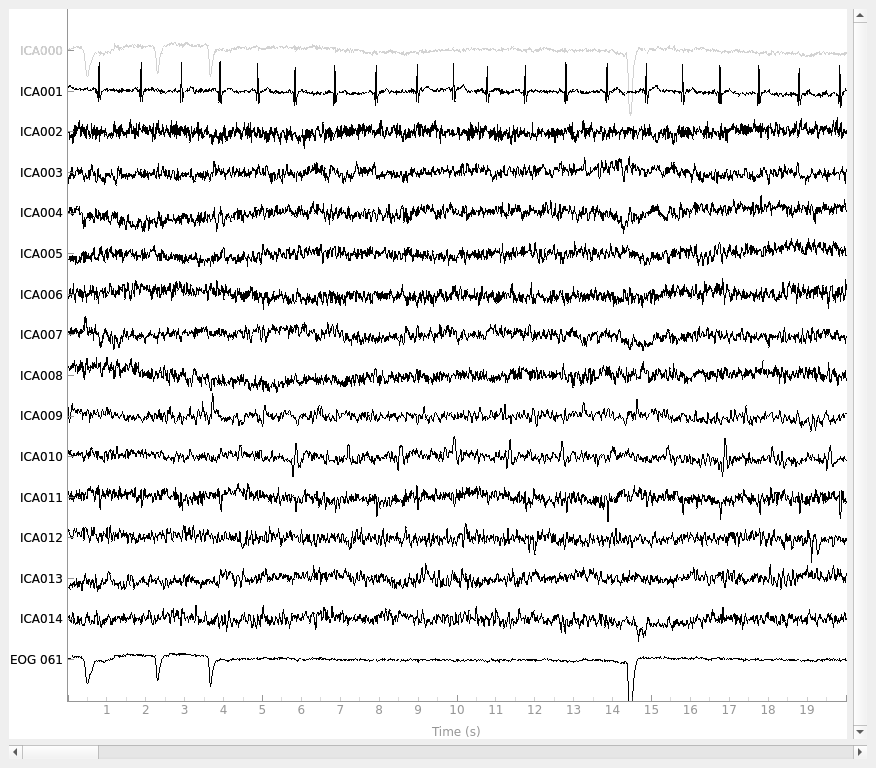
在这里可以相当清楚地看到,第一个成分(ICA000)很好地捕捉到了 EOG 信号,第二个成分(ICA001)看起来很像心跳(关于如何通过视觉识别独立成分的更多信息,这篇 EEGLAB 教程是很好的资源)。我们还可以使用 plot_components 可视化每个成分的头皮场分布。这些分布是根据 ICA 混合矩阵中的数值插值得到的:
说明
plot_components(绘制每个成分的头皮场地形图)有一个可选参数 inst,可接受 Raw 或 Epochs 实例。传入 inst 后,头皮地形图会变为交互式:单击其中一个会弹出该成分的诊断性 plot_properties 窗口(见下文)。
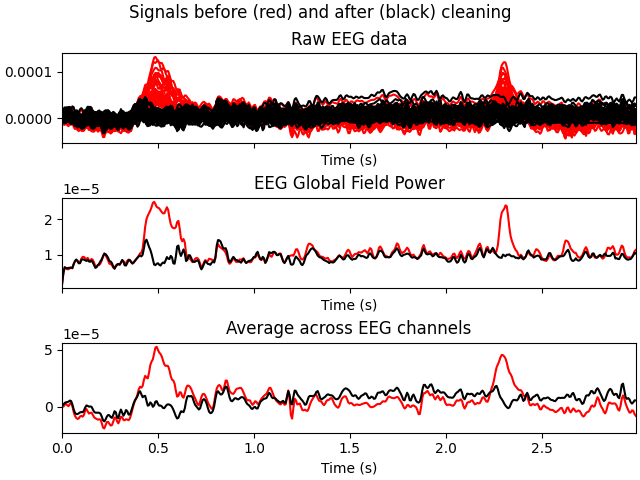
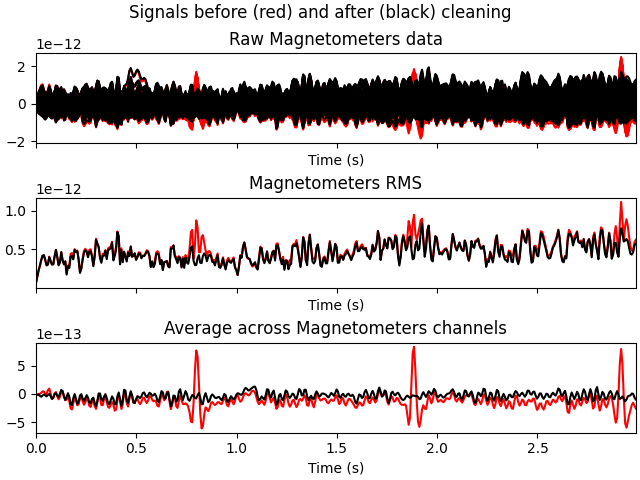
在上面的图中,哪些 IC 捕捉到了 EOG 和 ECG 伪迹相当明显,但为了确认,还有其他可视化方法。首先,我们可以使用 plot_overlay 绘制原始信号与排除伪迹 IC 后重建信号的叠加图:
# blinks
ica.plot_overlay(raw, exclude=[0], picks="eeg")
# heartbeats
ica.plot_overlay(raw, exclude=[1], picks="mag")
Applying ICA to Raw instance
    Transforming to ICA space (15 components)
    Zeroing out 1 ICA component
    Projecting back using 161 PCA components
Applying ICA to Raw instance
    Transforming to ICA space (15 components)
    Zeroing out 1 ICA component
    Projecting back using 161 PCA components
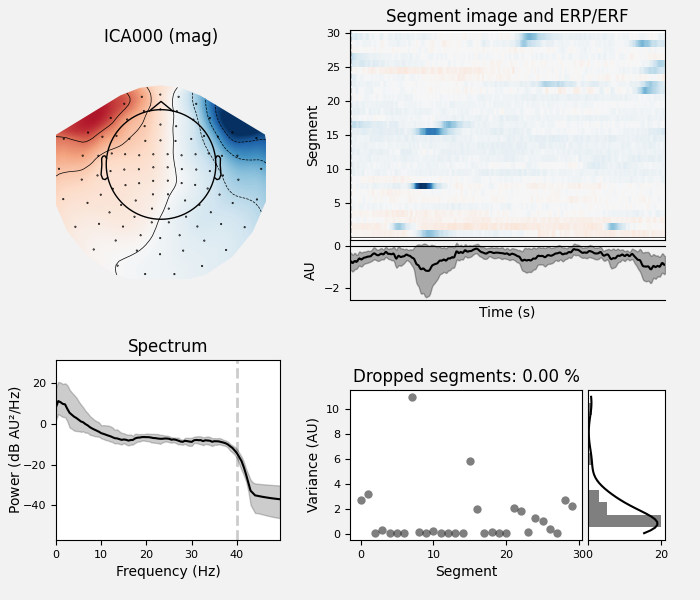
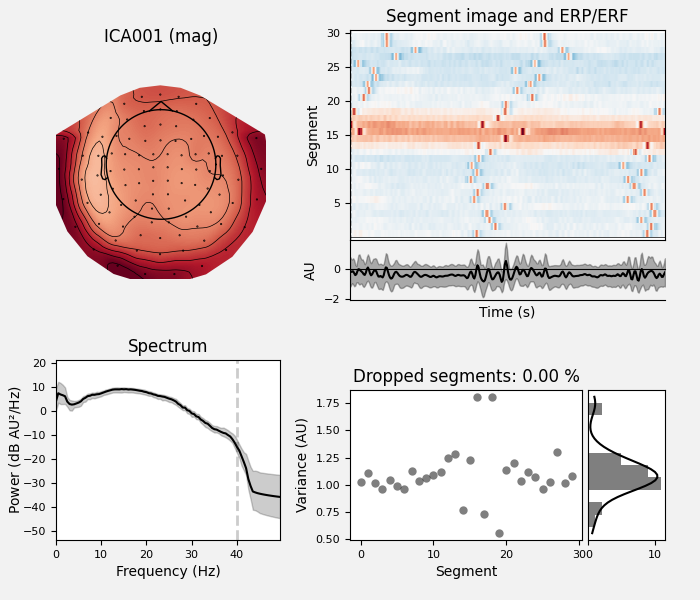
我们还可以使用 plot_properties 绘制每个 IC 的一些诊断信息:
ica.plot_properties(raw, picks=[0, 1])
    Using multitaper spectrum estimation with 7 DPSS windows
Not setting metadata
30 matching events found
No baseline correction applied
0 projection items activated
Not setting metadata
30 matching events found
No baseline correction applied
0 projection items activated
在接下来的各节中,我们将介绍在重建传感器信号之前选择要排除哪些 IC 的不同方法。
手动选择 ICA 成分#
一旦确定要排除哪些成分,我们可以通过设置 ica.exclude 属性来手动指定。与标记坏通道类似,仅仅设置 ica.exclude 不会立即产生任何效果(它只是把排除的 IC 加入一个列表,供之后需要时使用)。设置排除项之后,像 plot_overlay 这样的 ICA 方法即使没有传入 exclude 参数也会排除这些成分,并且在使用 mne.preprocessing.ICA.save 和 mne.preprocessing.read_ica 时,排除成分的列表会被保留。
ica.exclude = [0, 1] # indices chosen based on various plots above
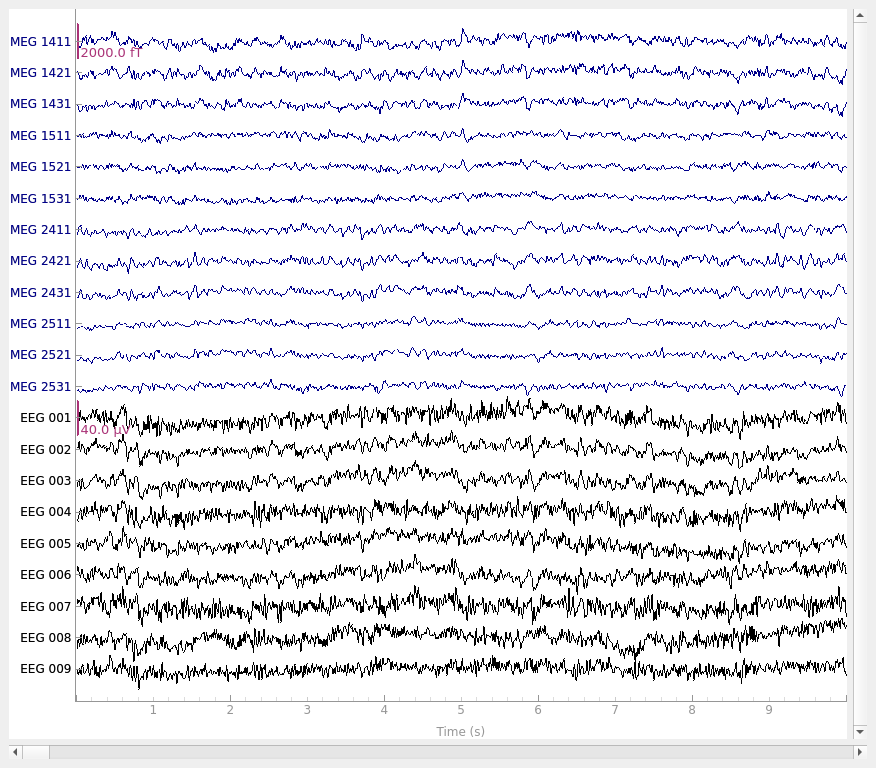
现在排除项已经设置好,我们可以使用 apply 方法重建去除伪迹后的传感器信号(记住,我们是将滤波后数据得到的 ICA 解应用到原始未滤波信号上)。将原始数据与重建数据绘制在一起可以看出,心跳和眨眼伪迹已被修复。
# ica.apply() changes the Raw object in-place, so let's make a copy first:
reconst_raw = raw.copy()
ica.apply(reconst_raw)

raw.plot(order=artifact_picks, n_channels=len(artifact_picks), show_scrollbars=False)
reconst_raw.plot(
    order=artifact_picks, n_channels=len(artifact_picks), show_scrollbars=False
)
del reconst_raw
Applying ICA to Raw instance
    Transforming to ICA space (15 components)
    Zeroing out 2 ICA components
    Projecting back using 161 PCA components
使用 EOG 通道选择 ICA 成分#
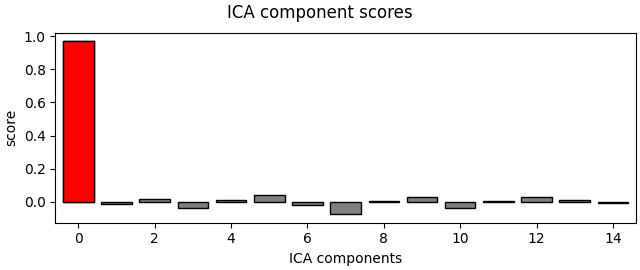
回顾图形并手动选择要排除的 IC 可能看起来很容易,但在处理几十或几百名被试时,这可能成为分析流程中繁琐且限制效率的一步。一种替代方法是使用专用的 EOG 或 ECG 传感器作为“模板”来检查各个 IC,并自动标记任何与 EOG/ECG 模式匹配的 IC 以排除。这里我们将使用 find_bads_eog 自动寻找与 EOG 信号最匹配的 IC,然后结合其他绘图函数使用 plot_scores 查看它挑选了哪些 IC。首先把 ica.exclude 重置为空列表:
ica.exclude = []
# find which ICs match the EOG pattern
eog_indices, eog_scores = ica.find_bads_eog(raw)
ica.exclude = eog_indices

# barplot of ICA component "EOG match" scores
ica.plot_scores(eog_scores)

# plot diagnostics
ica.plot_properties(raw, picks=eog_indices)

# plot ICs applied to raw data, with EOG matches highlighted
ica.plot_sources(raw, show_scrollbars=False)

# plot ICs applied to the averaged EOG epochs, with EOG matches highlighted
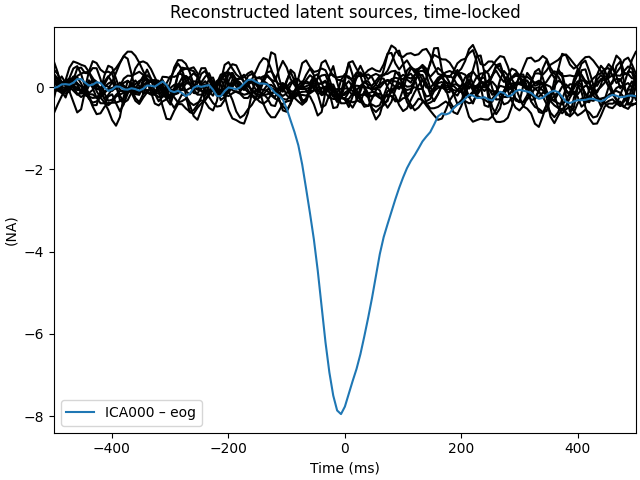
ica.plot_sources(eog_evoked)
Using EOG channel: EOG 061
... filtering ICA sources
Setting up band-pass filter from 1 - 10 Hz

FIR filter parameters
---------------------
Designing a two-pass forward and reverse, zero-phase, non-causal bandpass filter:
- Windowed frequency-domain design (firwin2) method
- Hann window
- Lower passband edge: 1.00
- Lower transition bandwidth: 0.50 Hz (-12 dB cutoff frequency: 0.75 Hz)
- Upper passband edge: 10.00 Hz
- Upper transition bandwidth: 0.50 Hz (-12 dB cutoff frequency: 10.25 Hz)
- Filter length: 1502 samples (10.003 s)

... filtering target
Setting up band-pass filter from 1 - 10 Hz

FIR filter parameters
---------------------
Designing a two-pass forward and reverse, zero-phase, non-causal bandpass filter:
- Windowed frequency-domain design (firwin2) method
- Hann window
- Lower passband edge: 1.00
- Lower transition bandwidth: 0.50 Hz (-12 dB cutoff frequency: 0.75 Hz)
- Upper passband edge: 10.00 Hz
- Upper transition bandwidth: 0.50 Hz (-12 dB cutoff frequency: 10.25 Hz)
- Filter length: 1502 samples (10.003 s)

    Using multitaper spectrum estimation with 7 DPSS windows
Not setting metadata
30 matching events found
No baseline correction applied
0 projection items activated
Creating RawArray with float64 data, n_channels=16, n_times=9010
    Range : 6450 ... 15459 =     42.956 ...   102.954 secs
Ready.
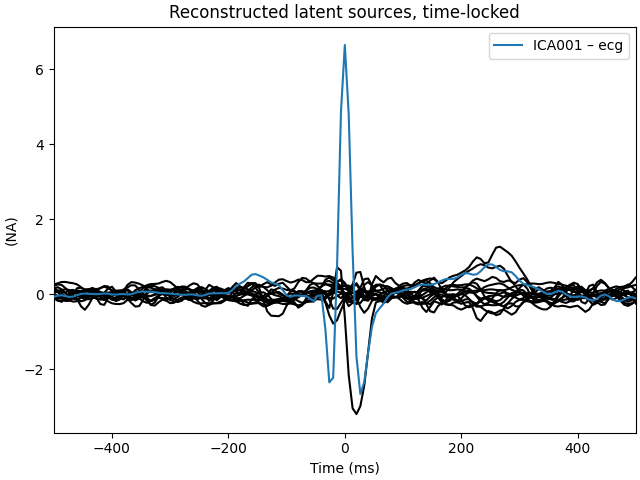
注意,上面我们同时对原始 Raw 实例和提取出的 EOG 伪迹的 Evoked 实例调用了 plot_sources()。这可以作为另一种方式,确认 find_bads_eog() 找出了正确的成分。
使用模拟通道选择 ICA 成分#
如果你没有 EOG 通道,find_bads_eog 有一个 ch_name 参数,可以用作 EOG 的替代。你可以使用单个通道,或从额叶 EEG 传感器创建双极参考并将其作为虚拟 EOG 通道。但这存在风险:你必须期望额叶 EEG 通道只反映 EOG 而不反映前额叶的脑动态(或者你必须不在意那些前额叶信号)。
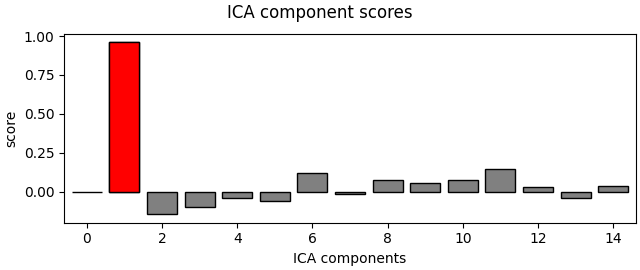
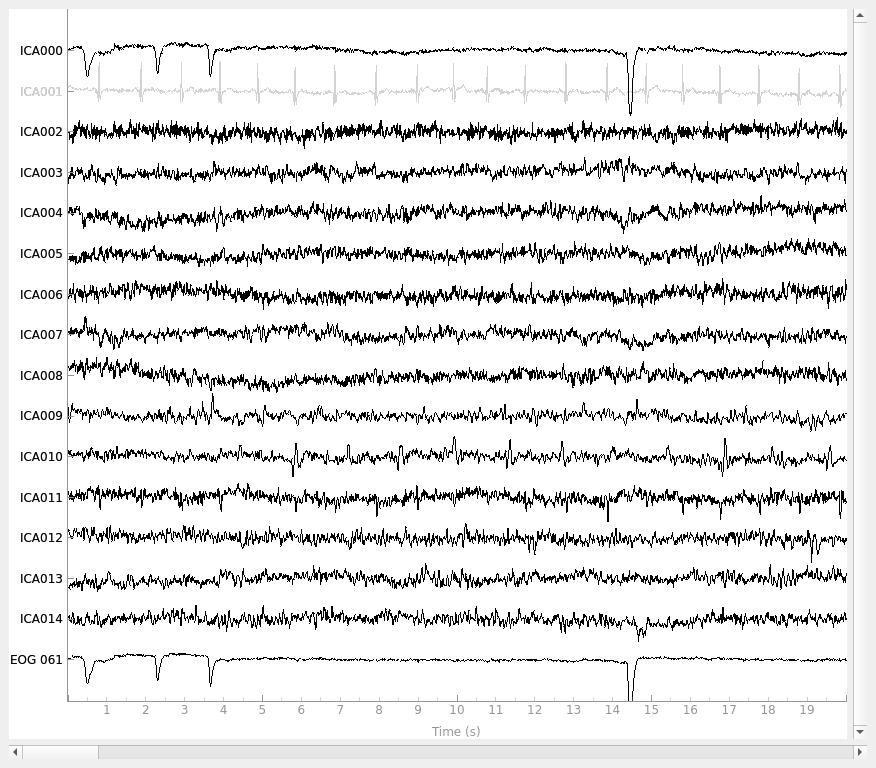
对于 ECG 则更容易:find_bads_ecg 可以利用磁强计或梯度计通道的跨通道平均来构建虚拟 ECG 通道,因此如果你有 MEG 通道,通常不必传入特定通道名。find_bads_ecg 的 method 参数还有两个选项:'ctps'(跨试次相位统计 [ 4 ])和 'correlation'(数据与 ECG 通道之间的 Pearson 相关)。
ica.exclude = []
# find which ICs match the ECG pattern
ecg_indices, ecg_scores = ica.find_bads_ecg(raw, method="correlation", threshold="auto")
ica.exclude = ecg_indices

# barplot of ICA component "ECG match" scores
ica.plot_scores(ecg_scores)

# plot diagnostics
ica.plot_properties(raw, picks=ecg_indices)

# plot ICs applied to raw data, with ECG matches highlighted
ica.plot_sources(raw, show_scrollbars=False)

# plot ICs applied to the averaged ECG epochs, with ECG matches highlighted
ica.plot_sources(ecg_evoked)
Reconstructing ECG signal from Magnetometers
... filtering ICA sources
Setting up band-pass filter from 8 - 16 Hz

FIR filter parameters
---------------------
Designing a two-pass forward and reverse, zero-phase, non-causal bandpass filter:
- Windowed frequency-domain design (firwin2) method
- Hann window
- Lower passband edge: 8.00
- Lower transition bandwidth: 0.50 Hz (-12 dB cutoff frequency: 7.75 Hz)
- Upper passband edge: 16.00 Hz
- Upper transition bandwidth: 0.50 Hz (-12 dB cutoff frequency: 16.25 Hz)
- Filter length: 1502 samples (10.003 s)

... filtering target
Setting up band-pass filter from 8 - 16 Hz

FIR filter parameters
---------------------
Designing a two-pass forward and reverse, zero-phase, non-causal bandpass filter:
- Windowed frequency-domain design (firwin2) method
- Hann window
- Lower passband edge: 8.00
- Lower transition bandwidth: 0.50 Hz (-12 dB cutoff frequency: 7.75 Hz)
- Upper passband edge: 16.00 Hz
- Upper transition bandwidth: 0.50 Hz (-12 dB cutoff frequency: 16.25 Hz)
- Filter length: 1502 samples (10.003 s)

    Using multitaper spectrum estimation with 7 DPSS windows
Not setting metadata
30 matching events found
No baseline correction applied
0 projection items activated
Creating RawArray with float64 data, n_channels=16, n_times=9010
    Range : 6450 ... 15459 =     42.956 ...   102.954 secs
Ready.
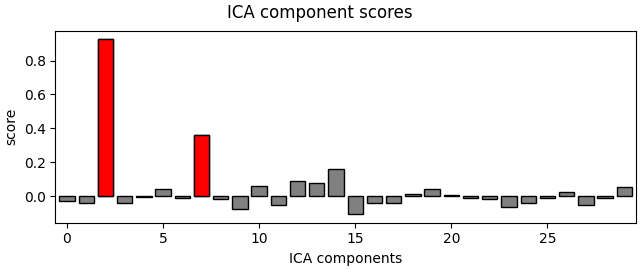
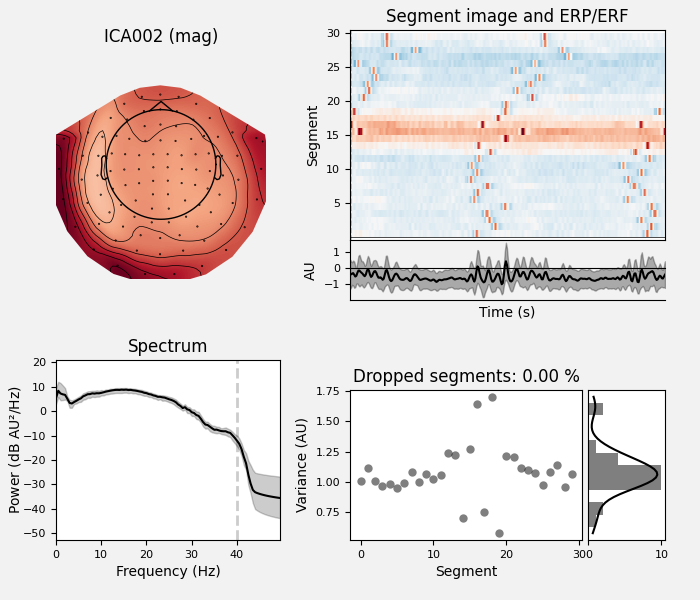
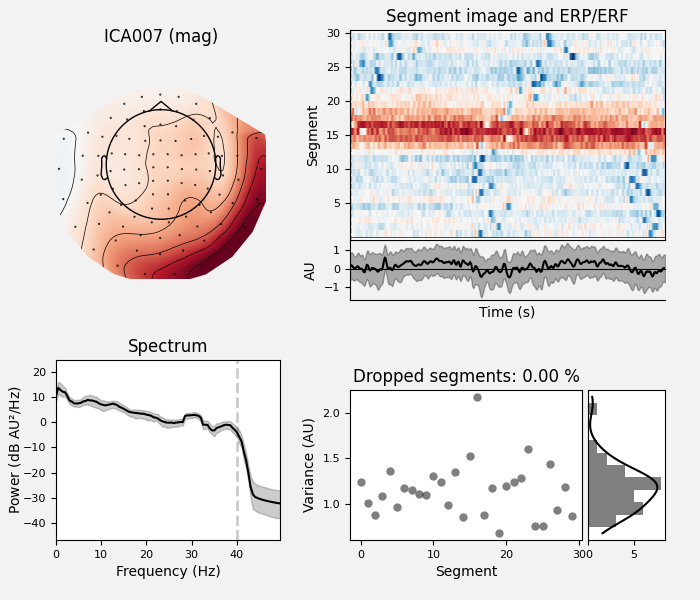
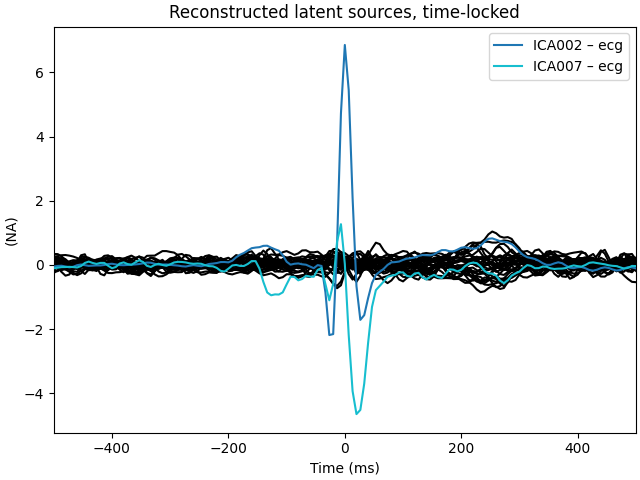
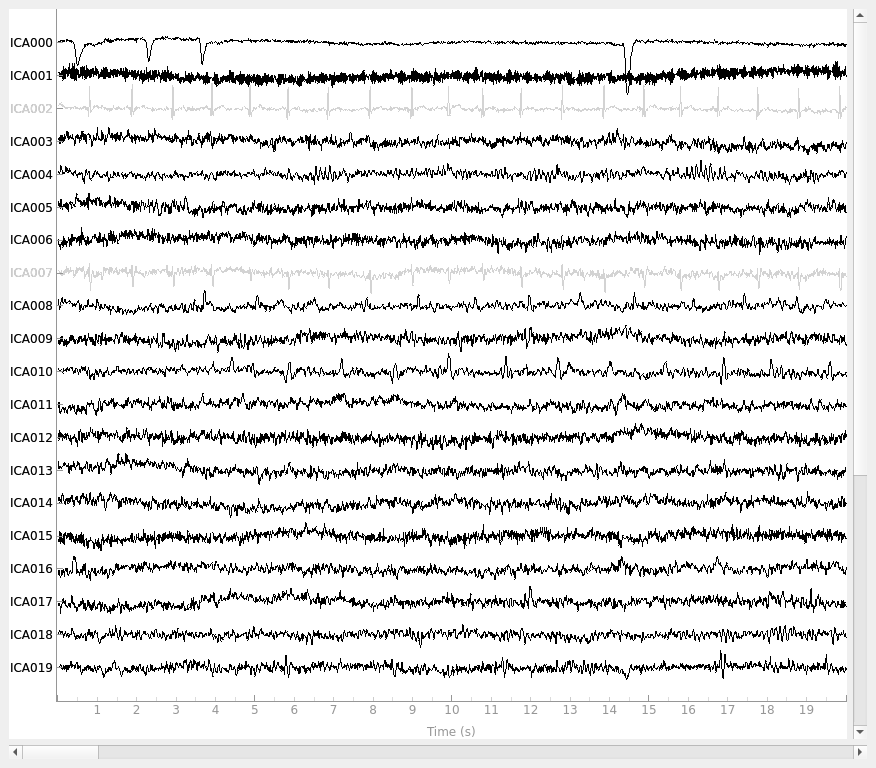
最后一张图尤其有用:它显示心跳伪迹出现在两个 IC 上,而我们只捕捉到了其中一个。事实上,如果仔细观察 plot_sources 的输出(在网页上可以右键 →“查看图像”放大),ICA014 似乎有一个与 ICA001 同相的微弱周期成分。用更多成分重新运行 ICA,看看第二个心跳伪迹是否能更好地分离出来,可能是值得的:
# refit the ICA with 30 components this time
new_ica = ICA(n_components=30, max_iter="auto", rng=97)
new_ica.fit(filt_raw)

# find which ICs match the ECG pattern
ecg_indices, ecg_scores = new_ica.find_bads_ecg(
    raw, method="correlation", threshold="auto"
)
new_ica.exclude = ecg_indices

# barplot of ICA component "ECG match" scores
new_ica.plot_scores(ecg_scores)

# plot diagnostics
new_ica.plot_properties(raw, picks=ecg_indices)

# plot ICs applied to raw data, with ECG matches highlighted
new_ica.plot_sources(raw, show_scrollbars=False)

# plot ICs applied to the averaged ECG epochs, with ECG matches highlighted
new_ica.plot_sources(ecg_evoked)
Fitting ICA to data using 161 channels (please be patient, this may take a while)
Selecting by number: 30 components
Fitting ICA took 0.2s.
Reconstructing ECG signal from Magnetometers
... filtering ICA sources
Setting up band-pass filter from 8 - 16 Hz

FIR filter parameters
---------------------
Designing a two-pass forward and reverse, zero-phase, non-causal bandpass filter:
- Windowed frequency-domain design (firwin2) method
- Hann window
- Lower passband edge: 8.00
- Lower transition bandwidth: 0.50 Hz (-12 dB cutoff frequency: 7.75 Hz)
- Upper passband edge: 16.00 Hz
- Upper transition bandwidth: 0.50 Hz (-12 dB cutoff frequency: 16.25 Hz)
- Filter length: 1502 samples (10.003 s)

... filtering target
Setting up band-pass filter from 8 - 16 Hz

FIR filter parameters
---------------------
Designing a two-pass forward and reverse, zero-phase, non-causal bandpass filter:
- Windowed frequency-domain design (firwin2) method
- Hann window
- Lower passband edge: 8.00
- Lower transition bandwidth: 0.50 Hz (-12 dB cutoff frequency: 7.75 Hz)
- Upper passband edge: 16.00 Hz
- Upper transition bandwidth: 0.50 Hz (-12 dB cutoff frequency: 16.25 Hz)
- Filter length: 1502 samples (10.003 s)

    Using multitaper spectrum estimation with 7 DPSS windows
Not setting metadata
30 matching events found
No baseline correction applied
0 projection items activated
Not setting metadata
30 matching events found
No baseline correction applied
0 projection items activated
Creating RawArray with float64 data, n_channels=31, n_times=9010
    Range : 6450 ... 15459 =     42.956 ...   102.954 secs
Ready.
好多了!现在我们捕捉到了反映心跳伪迹的两个 IC(因此得到了两张诊断图:每个反映心跳的 IC 各一张)。这说明在接受 find_bads_ecg 等自动化方法的结果之前先检查其结果是有价值的。
对于 EEG,用于头颈部姿势控制的肌肉激活也会污染信号。这类伪迹通常无法被 MEG 检测到。关于如何移除这些成分的示例,参见 Removing muscle ICA components。
# clean up memory before moving on
del raw, ica, new_ica
使用模板匹配选择 ICA 成分#
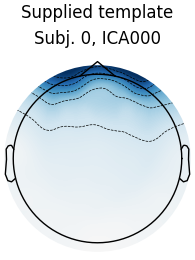
处理多个被试时,也可以在一个被试上手动选择一个要排除的 IC,然后使用 mne.preprocessing.corrmap [ 5 ] 将该成分作为模板,选择要从其他被试数据中排除的 IC。corrmap 的思路是:不同被试之间的伪迹模式足够相似,因此可以通过将每个 ICA 解中的 IC 与一个公共模板做相关,挑选相关性最强的 IC 来识别对应的 IC。corrmap 接受一个 ICA 解列表,以及一个 template 参数,用于指定以哪个 ICA 对象中的哪个成分作为模板。
由于我们的示例数据集只包含一名被试的数据,我们将使用另一个包含多名被试的数据集:EEGBCI 数据集 [ 6 ] [ 7 ]。该数据集有 109 名被试,我们只从前 4 名被试各下载一个 run(左右手运动任务):
raws = list()
icas = list()

for subj in range(1, 5):
    # EEGBCI subjects are 1-indexed; run 3 is a left/right hand movement task
    fname = mne.datasets.eegbci.load_data(subj, runs=[3])[0]
    raw = mne.io.read_raw_edf(fname).load_data().resample(50)
    # remove trailing `.` from channel names so we can set montage
    mne.datasets.eegbci.standardize(raw)
    raw.set_montage("spherical_1005")
    # high-pass filter
    raw_filt = raw.copy().load_data().filter(l_freq=1.0, h_freq=None)
    # fit ICA, using low max_iter for speed
    ica = ICA(n_components=30, max_iter=100, rng=97)
    ica.fit(raw_filt, verbose="error")
    raws.append(raw)
    icas.append(ica)
Extracting EDF parameters from /home/circleci/mne_data/MNE-eegbci-data/files/eegmmidb/1.0.0/S001/S001R03.edf...
Setting channel info structure...
Creating raw.info structure...
Reading 0 ... 19999  =      0.000 ...   124.994 secs...
Filtering raw data in 1 contiguous segment
Setting up high-pass filter at 1 Hz

FIR filter parameters
---------------------
Designing a one-pass, zero-phase, non-causal highpass filter:
- Windowed time-domain design (firwin) method
- Hamming window with 0.0194 passband ripple and 53 dB stopband attenuation
- Lower passband edge: 1.00
- Lower transition bandwidth: 1.00 Hz (-6 dB cutoff frequency: 0.50 Hz)
- Filter length: 165 samples (3.300 s)

Extracting EDF parameters from /home/circleci/mne_data/MNE-eegbci-data/files/eegmmidb/1.0.0/S002/S002R03.edf...
Setting channel info structure...
Creating raw.info structure...
Reading 0 ... 19679  =      0.000 ...   122.994 secs...
Filtering raw data in 1 contiguous segment
Setting up high-pass filter at 1 Hz

FIR filter parameters
---------------------
Designing a one-pass, zero-phase, non-causal highpass filter:
- Windowed time-domain design (firwin) method
- Hamming window with 0.0194 passband ripple and 53 dB stopband attenuation
- Lower passband edge: 1.00
- Lower transition bandwidth: 1.00 Hz (-6 dB cutoff frequency: 0.50 Hz)
- Filter length: 165 samples (3.300 s)

Extracting EDF parameters from /home/circleci/mne_data/MNE-eegbci-data/files/eegmmidb/1.0.0/S003/S003R03.edf...
Setting channel info structure...
Creating raw.info structure...
Reading 0 ... 19999  =      0.000 ...   124.994 secs...
Filtering raw data in 1 contiguous segment
Setting up high-pass filter at 1 Hz

FIR filter parameters
---------------------
Designing a one-pass, zero-phase, non-causal highpass filter:
- Windowed time-domain design (firwin) method
- Hamming window with 0.0194 passband ripple and 53 dB stopband attenuation
- Lower passband edge: 1.00
- Lower transition bandwidth: 1.00 Hz (-6 dB cutoff frequency: 0.50 Hz)
- Filter length: 165 samples (3.300 s)

/home/circleci/python_env/lib/python3.14/site-packages/sklearn/decomposition/_fastica.py:132: ConvergenceWarning: FastICA did not converge. Consider increasing tolerance or the maximum number of iterations.
  warnings.warn(
Extracting EDF parameters from /home/circleci/mne_data/MNE-eegbci-data/files/eegmmidb/1.0.0/S004/S004R03.edf...
Setting channel info structure...
Creating raw.info structure...
Reading 0 ... 19679  =      0.000 ...   122.994 secs...
Filtering raw data in 1 contiguous segment
Setting up high-pass filter at 1 Hz

FIR filter parameters
---------------------
Designing a one-pass, zero-phase, non-causal highpass filter:
- Windowed time-domain design (firwin) method
- Hamming window with 0.0194 passband ripple and 53 dB stopband attenuation
- Lower passband edge: 1.00
- Lower transition bandwidth: 1.00 Hz (-6 dB cutoff frequency: 0.50 Hz)
- Filter length: 165 samples (3.300 s)

/home/circleci/python_env/lib/python3.14/site-packages/sklearn/decomposition/_fastica.py:132: ConvergenceWarning: FastICA did not converge. Consider increasing tolerance or the maximum number of iterations.
  warnings.warn(
现在运行 corrmap:
# use the first subject as template; use Fpz as proxy for EOG
raw = raws[0]
ica = icas[0]
eog_inds, eog_scores = ica.find_bads_eog(raw, ch_name="Fpz")
corrmap(icas, template=(0, eog_inds[0]))
Using EOG channel: Fpz
... filtering ICA sources
Setting up band-pass filter from 1 - 10 Hz

FIR filter parameters
---------------------
Designing a two-pass forward and reverse, zero-phase, non-causal bandpass filter:
- Windowed frequency-domain design (firwin2) method
- Hann window
- Lower passband edge: 1.00
- Lower transition bandwidth: 0.50 Hz (-12 dB cutoff frequency: 0.75 Hz)
- Upper passband edge: 10.00 Hz
- Upper transition bandwidth: 0.50 Hz (-12 dB cutoff frequency: 10.25 Hz)
- Filter length: 500 samples (10.000 s)

... filtering target
Setting up band-pass filter from 1 - 10 Hz

FIR filter parameters
---------------------
Designing a two-pass forward and reverse, zero-phase, non-causal bandpass filter:
- Windowed frequency-domain design (firwin2) method
- Hann window
- Lower passband edge: 1.00
- Lower transition bandwidth: 0.50 Hz (-12 dB cutoff frequency: 0.75 Hz)
- Upper passband edge: 10.00 Hz
- Upper transition bandwidth: 0.50 Hz (-12 dB cutoff frequency: 10.25 Hz)
- Filter length: 500 samples (10.000 s)

Median correlation with constructed map: 0.978
Displaying selected ICs per subject.
At least 1 IC detected for each subject.
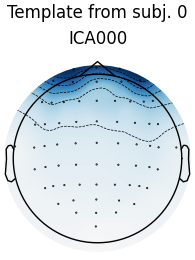
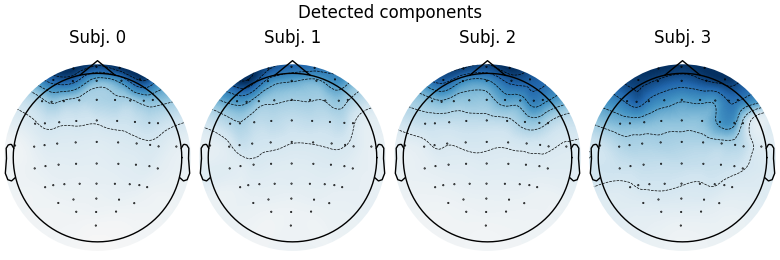
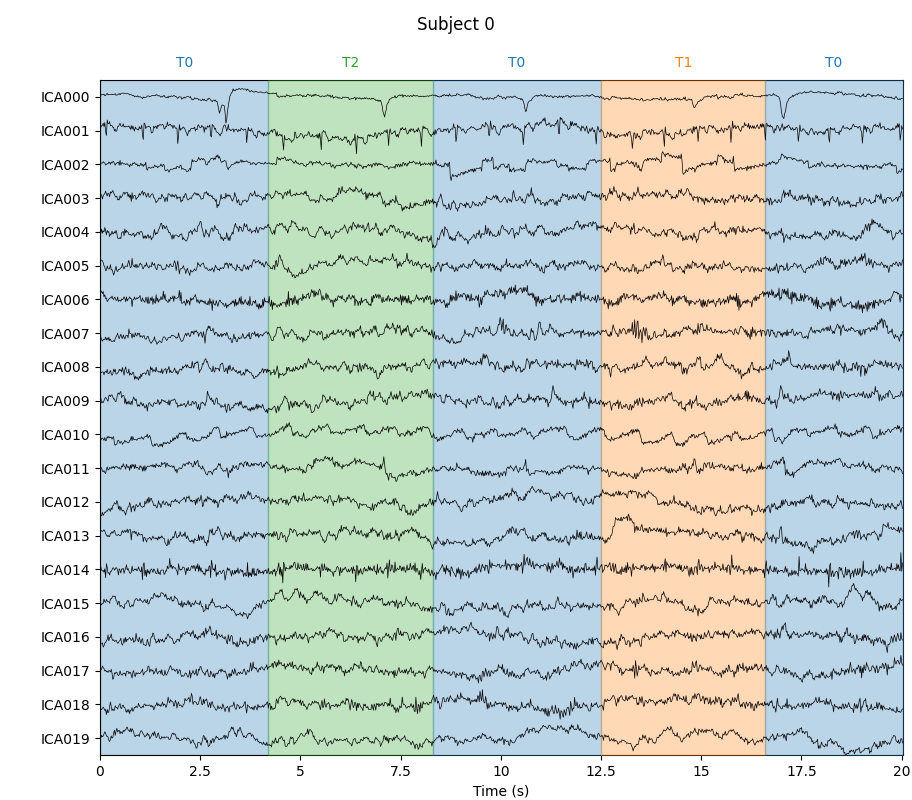
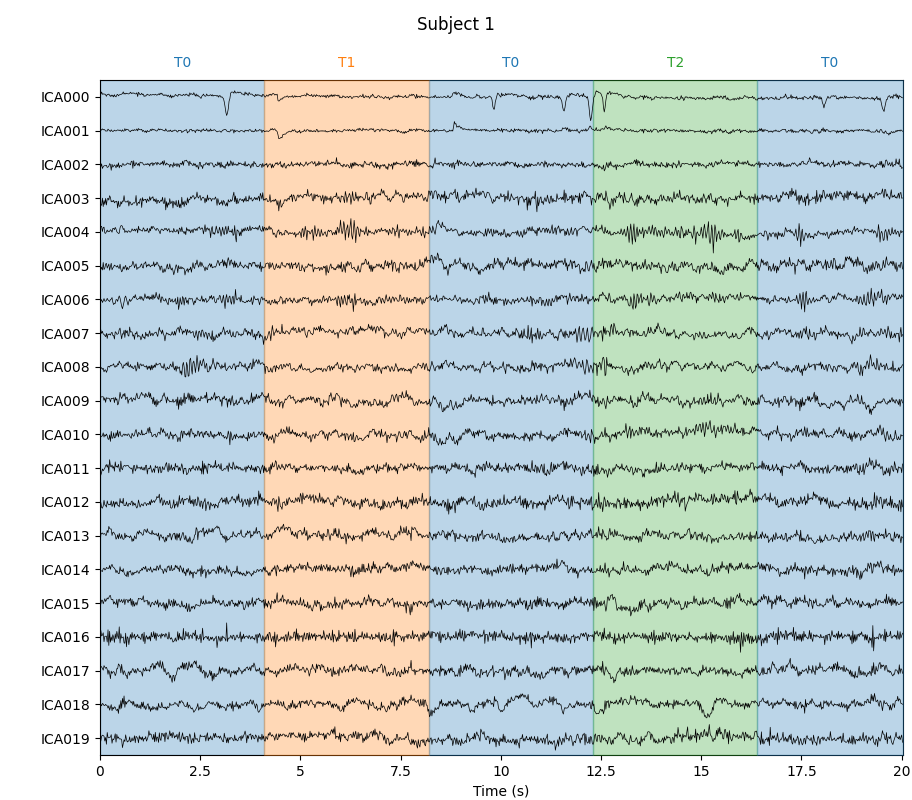
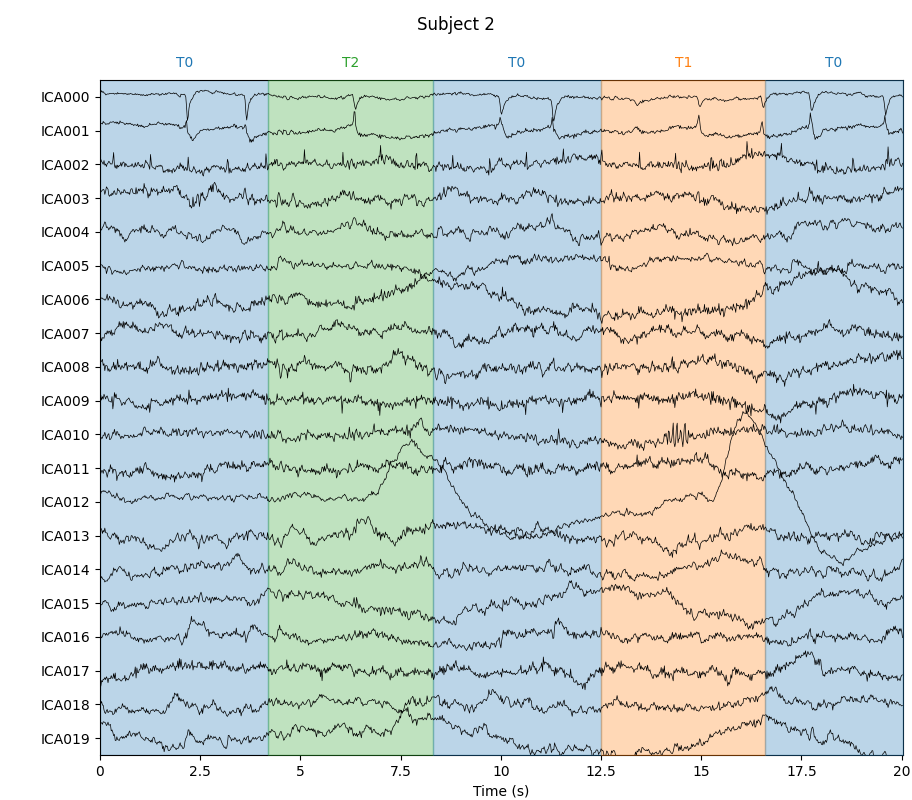
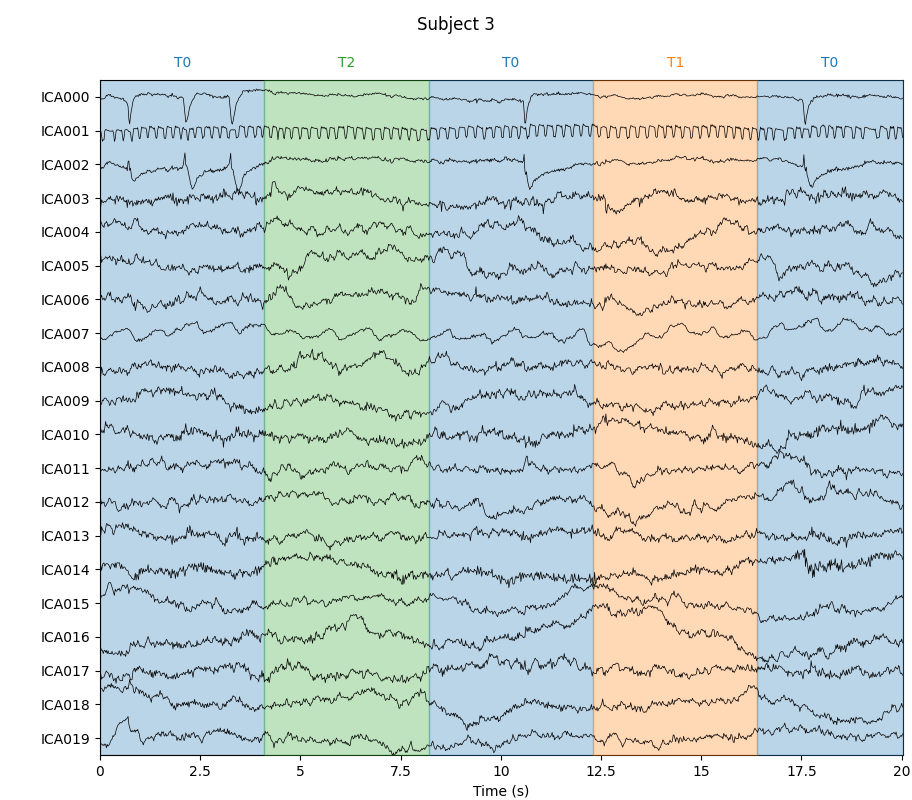
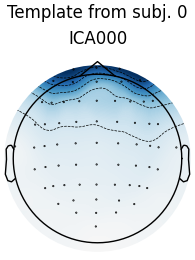
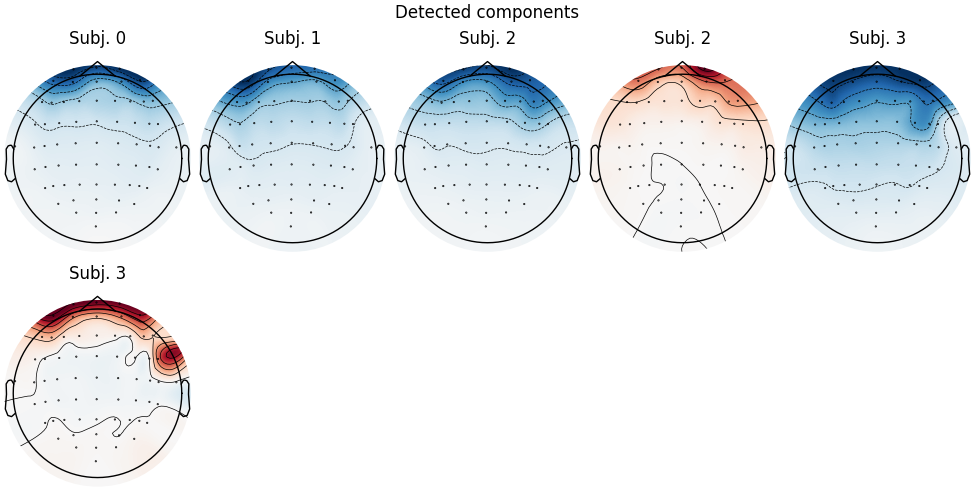
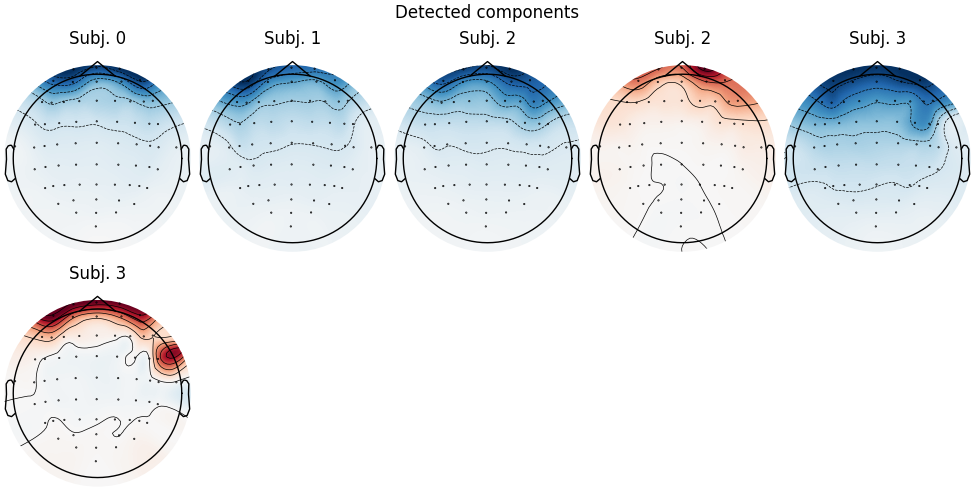
第一张图显示模板图,第二张图显示所有被认为与模板“匹配”的图(包括模板本身)。每名被试都有一个匹配,但最好也再次检查每名被试的 ICA 源:
for index, (ica, raw) in enumerate(zip(icas, raws)):
    with mne.viz.use_browser_backend("matplotlib"):
        fig = ica.plot_sources(raw, show_scrollbars=False)
    fig.subplots_adjust(top=0.9)  # make space for title
    fig.suptitle(f"Subject {index}")
Using matplotlib as 2D backend.
Creating RawArray with float64 data, n_channels=30, n_times=6250
    Range : 0 ... 6249 =      0.000 ...   124.980 secs
Ready.
Using qt as 2D backend.
Using matplotlib as 2D backend.
Creating RawArray with float64 data, n_channels=30, n_times=6150
    Range : 0 ... 6149 =      0.000 ...   122.980 secs
Ready.
Using qt as 2D backend.
Using matplotlib as 2D backend.
Creating RawArray with float64 data, n_channels=30, n_times=6250
    Range : 0 ... 6249 =      0.000 ...   124.980 secs
Ready.
Using qt as 2D backend.
Using matplotlib as 2D backend.
Creating RawArray with float64 data, n_channels=30, n_times=6150
    Range : 0 ... 6149 =      0.000 ...   122.980 secs
Ready.
Using qt as 2D backend.
注意,被试 2 和被试 3 似乎各有两个反映眼动活动的 IC(成分 ICA000 和 ICA002),但 corrmap 只捕捉到一个。我们试着手动设置阈值:
Median correlation with constructed map: 0.958
Displaying selected ICs per subject.
At least 1 IC detected for each subject.
这次为被试 2 和被试 3 各找到了 2 个 IC(这很好)。此时我们将用参数 label='blink'、plot=False 重新运行 corrmap,为每名被试中捕捉眨眼伪迹的 IC 添加标签(不再绘图)。
Median correlation with constructed map: 0.958
At least 1 IC detected for each subject.
[{'eog/0/Fpz': [np.int64(0)], 'eog': [np.int64(0)], 'blink': [np.int64(0)]}, {'blink': [np.int64(0)]}, {'blink': [np.int64(0), np.int64(1)]}, {'blink': [np.int64(0), np.int64(2)]}]
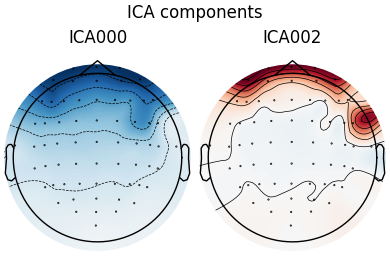
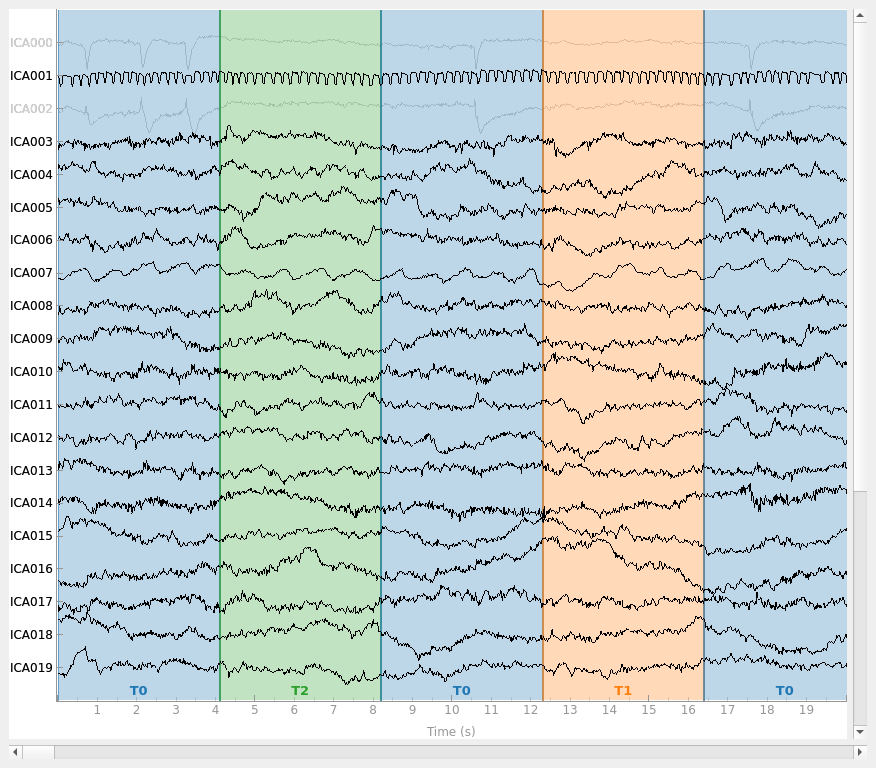
注意,第一名被试在索引 0 处的 IC 有 3 个不同的标签:“eog/0/Fpz”、“eog”和“blink”。前两个由 find_bads_eog 添加;“blink”标签由最后一次调用 corrmap 添加。还要注意,每名被试至少有一个 IC 索引被标记为“blink”,而被试 2 和被试 3 各有两个成分(0 和 2)被标记为“blink”(与上面的 IC 源图一致)。ICA 对象的 labels_ 属性也可以手动编辑,用自定义标签标注 IC。它们在绘图时也很有用:
Creating RawArray with float64 data, n_channels=30, n_times=6150
    Range : 0 ... 6149 =      0.000 ...   122.980 secs
Ready.
最后一点:可以使用 ICA 对象的 get_components 方法以数值形式提取 IC。它会返回一个 NumPy 数组,可以传给 corrmap,代替我们之前传入的 (subject_index, component_index) 元组,结果相同:
template_eog_component = icas[0].get_components()[:, eog_inds[0]]
corrmap(icas, template=template_eog_component, threshold=0.9)
print(template_eog_component)
Median correlation with constructed map: 0.958
Displaying selected ICs per subject.
At least 1 IC detected for each subject.
[-0.33638605 -0.32708878 -0.32846765 -0.32807248 -0.35916344 -0.37615216
 -0.42464993 -0.21789139 -0.22387812 -0.22237922 -0.21342143 -0.2425263
 -0.26757238 -0.27806995 -0.15470616 -0.1693302  -0.17711037 -0.17373137
 -0.19651749 -0.21091786 -0.22459439 -1.68783519 -1.46717407 -1.64182737
 -1.34165002 -1.28991817 -0.76938995 -1.0057612  -1.54311043 -0.54567127
 -0.63806031 -0.57058636 -0.52637437 -0.51788659 -0.55774431 -0.56188149
 -0.69340923 -0.73333856 -0.2829121  -0.39253171 -0.16120286 -0.25431324
 -0.06352167 -0.1647002  -0.11930156 -0.1811579  -0.10112171 -0.12638332
 -0.13623739 -0.1301851  -0.14380943 -0.15329772 -0.1715539  -0.16560352
 -0.13293812 -0.08175318 -0.10173655 -0.10764581 -0.12707317 -0.09785876
 -0.07433338 -0.08470678 -0.07373196 -0.03379354]
用这种 IC 的数值表示来捕捉特定伪迹模式的一个优点是:它可以被保存下来,并作为模板用于以后的 corrmap 模板匹配任务,而无需加载或重新计算最初产生该模板的 ICA 解。换句话说,当模板是一个 NumPy 数组时,包含该模板的 ICA 对象不需要出现在传给 corrmap 的 ICA 列表中。
在 Epochs 上计算 ICA 成分#
现在 ICA 是在分段后的 MEG 数据(而非原始数据)上拟合的。我们假设非平稳的 EOG 伪迹已被去除。与 ECG 匹配的源会被自动找到并显示。
说明
这个示例计算量较大,可能需要几分钟才能完成。
读取数据后,预处理包括:
MEG 通道选择
1-30 Hz 带通滤波
以事件为参照,分割为 -0.2 至 0.5 秒的 epoch
基于峰峰幅度的剔除
注意,这里我们不对 epoch 做基线校正——我们会在用 ICA 完成清洗之后再做。MNE-Python 开发者不建议在 ICA 之前进行基线校正,因为这不能保证获得最佳结果。
filt_raw.pick(picks=["meg", "stim"], exclude="bads").load_data()
filt_raw.filter(1, 30, fir_design="firwin")

# peak-to-peak amplitude rejection parameters
reject = dict(mag=4e-12)
# create longer and more epochs for more artifact exposure
events = mne.find_events(filt_raw, stim_channel="STI 014")
# don't baseline correct epochs
epochs = mne.Epochs(
    filt_raw, events, event_id=None, tmin=-0.2, tmax=0.5, reject=reject, baseline=None
)
Filtering raw data in 1 contiguous segment
Setting up band-pass filter from 1 - 30 Hz

FIR filter parameters
---------------------
Designing a one-pass, zero-phase, non-causal bandpass filter:
- Windowed time-domain design (firwin) method
- Hamming window with 0.0194 passband ripple and 53 dB stopband attenuation
- Lower passband edge: 1.00
- Lower transition bandwidth: 1.00 Hz (-6 dB cutoff frequency: 0.50 Hz)
- Upper passband edge: 30.00 Hz
- Upper transition bandwidth: 7.50 Hz (-6 dB cutoff frequency: 33.75 Hz)
- Filter length: 497 samples (3.310 s)

Finding events on: STI 014
86 events found on stim channel STI 014
Event IDs: [ 1  2  3  4  5 32]
Not setting metadata
86 matching events found
No baseline correction applied
Created an SSP operator (subspace dimension = 3)
3 projection items activated
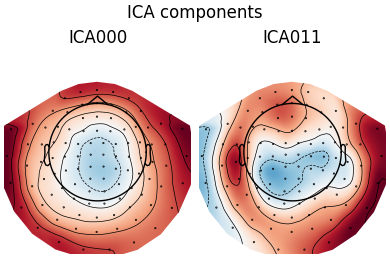
使用 FastICA 算法拟合 ICA 模型,检测并绘制解释 ECG 伪迹的成分。
ica = ICA(n_components=15, method="fastica", max_iter="auto", rng=97)
ica.fit(epochs)

ecg_epochs = create_ecg_epochs(filt_raw, tmin=-0.5, tmax=0.5)
ecg_inds, scores = ica.find_bads_ecg(ecg_epochs, threshold="auto")

ica.plot_components(ecg_inds)
Fitting ICA to data using 102 channels (please be patient, this may take a while)
Using data from preloaded Raw for 86 events and 106 original time points ...
0 bad epochs dropped
    Applying projection operator with 3 vectors (pre-whitener computation)
    Applying projection operator with 3 vectors (pre-whitener application)
Selecting by number: 15 components
Using data from preloaded Raw for 86 events and 106 original time points ...
    Applying projection operator with 3 vectors (pre-whitener application)
Fitting ICA took 0.1s.
Reconstructing ECG signal from Magnetometers
Setting up band-pass filter from 8 - 16 Hz

FIR filter parameters
---------------------
Designing a two-pass forward and reverse, zero-phase, non-causal bandpass filter:
- Windowed frequency-domain design (firwin2) method
- Hann window
- Lower passband edge: 8.00
- Lower transition bandwidth: 0.50 Hz (-12 dB cutoff frequency: 7.75 Hz)
- Upper passband edge: 16.00 Hz
- Upper transition bandwidth: 0.50 Hz (-12 dB cutoff frequency: 16.25 Hz)
- Filter length: 1502 samples (10.003 s)

Number of ECG events detected : 59 (average pulse 58.99492412402019 / min.)
Not setting metadata
59 matching events found
No baseline correction applied
Created an SSP operator (subspace dimension = 3)
Using data from preloaded Raw for 59 events and 151 original time points ...
0 bad epochs dropped
Reconstructing ECG signal from Magnetometers
    Applying projection operator with 3 vectors (pre-whitener application)
Using threshold: 0.30 for CTPS ECG detection
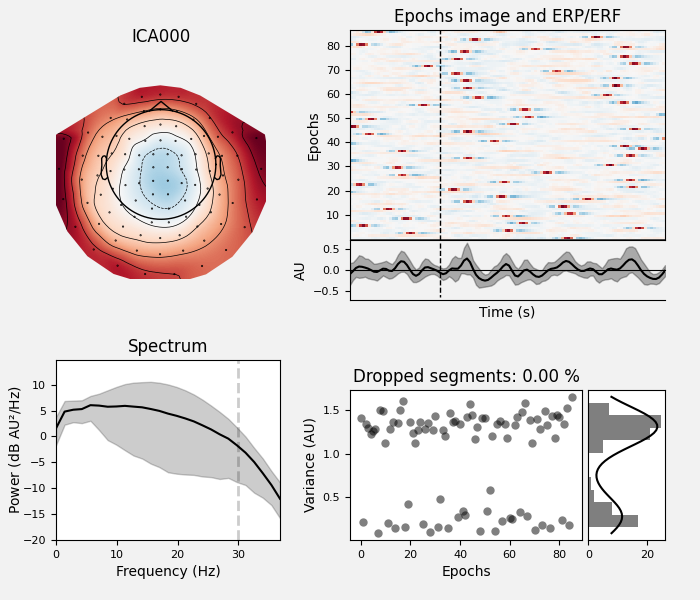
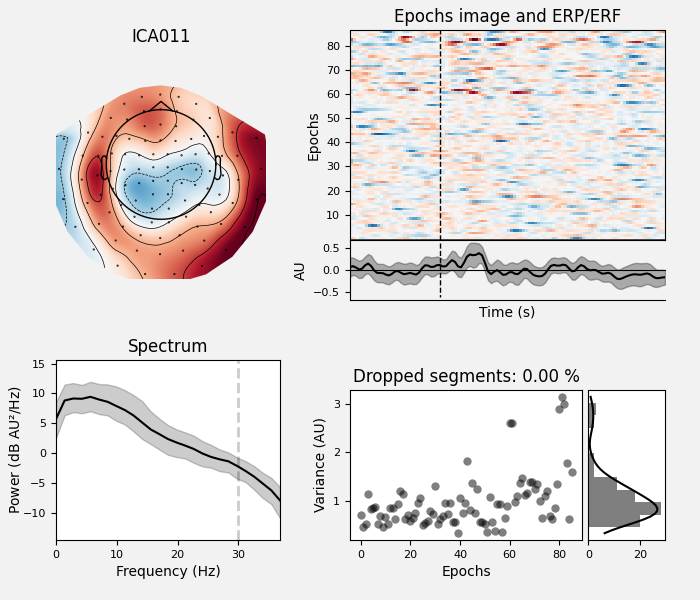
绘制 ECG 成分的属性:
ica.plot_properties(epochs, picks=ecg_inds)
Using data from preloaded Raw for 86 events and 106 original time points ...
    Applying projection operator with 3 vectors (pre-whitener application)
    Using multitaper spectrum estimation with 7 DPSS windows
Not setting metadata
86 matching events found
No baseline correction applied
0 projection items activated
Not setting metadata
86 matching events found
No baseline correction applied
0 projection items activated
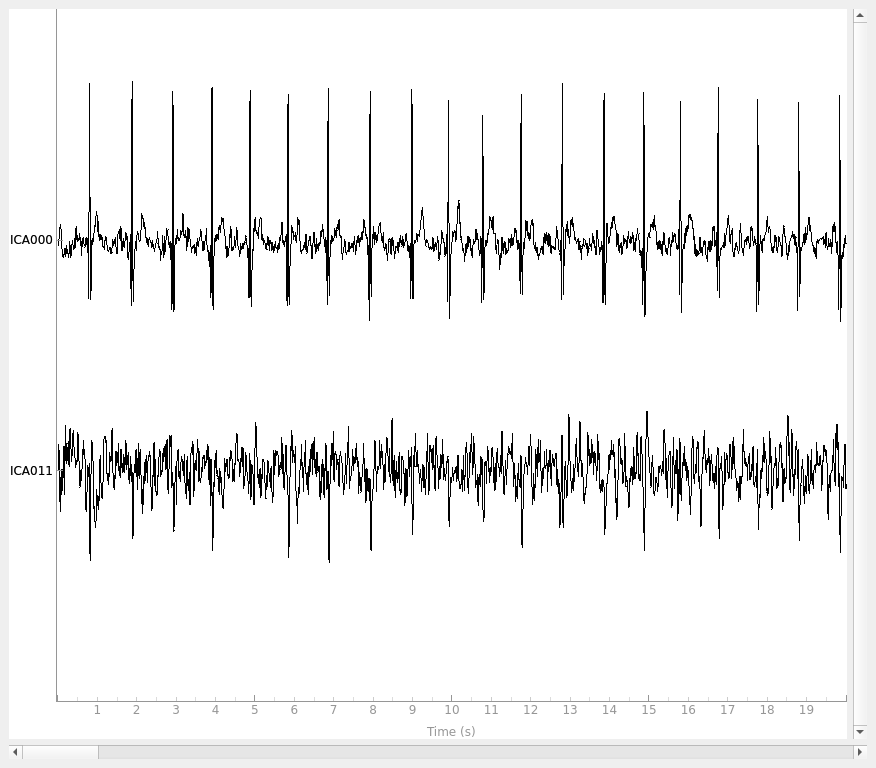
绘制检测到的 ECG 相关成分的估计源:
ica.plot_sources(filt_raw, picks=ecg_inds)
    Applying projection operator with 3 vectors (pre-whitener application)
Creating RawArray with float64 data, n_channels=2, n_times=9010
    Range : 6450 ... 15459 =     42.956 ...   102.954 secs
Ready.
参考文献#
脚本总运行时间:(0 分钟 17.742 秒)