
注意
转到末尾下载完整示例代码。
标注连续数据#
本教程介绍如何向 Raw 对象添加标注,以及标注在后续数据处理阶段中的用途。
与往常一样,我们先导入所需的模块、加载一些示例数据,并且(由于本教程并不会真正分析原始数据)在将 Raw 对象载入 RAM 之前先将其裁剪到仅 60 秒,以节省内存:
# Authors: The MNE-Python contributors.
# License: BSD-3-Clause
# Copyright the MNE-Python contributors.
import os
from datetime import timedelta

import mne

sample_data_folder = mne.datasets.sample.data_path()
sample_data_raw_file = os.path.join(
    sample_data_folder, "MEG", "sample", "sample_audvis_raw.fif"
)
raw = mne.io.read_raw_fif(sample_data_raw_file, verbose=False)
raw.crop(tmax=60).load_data()
Reading 0 ... 36037 = 0.000 ... 60.000 secs...
MNE-Python 中的标注(Annotations)是一种存储 Raw 对象各时间区间简短信息的方式。在内部,Annotations 是类似列表的对象,其中每个元素包含三部分信息:起始时间(onset,单位为秒)、持续时间(duration,单位为秒)和描述(description,一个文本字符串)。此外,Annotations 对象本身还会记录 orig_time,它是一个 POSIX 时间戳,表示解释标注起始时间时所参照的真实世界时间。
以编程方式创建标注#
如果你事先知道要标注 Raw 对象的哪些时间区间,就可以用编程方式创建 Annotations;甚至可以向 Annotations 构造函数传入列表或数组,一次性标注多个区间:
my_annot = mne.Annotations(
    onset=[3, 5, 7],  # in seconds
    duration=[1, 0.5, 0.25],  # in seconds, too
    description=["AAA", "BBB", "CCC"],
)
print(my_annot)
<Annotations | 3 segments: AAA (1), BBB (1), CCC (1)>
注意 orig_time 为 None,因为我们没有指定它。在这种情况下,当你把标注添加到 Raw 对象时,会假定 orig_time 与记录中第一个采样点的时间一致,因此 orig_time 将被设置为与该记录的测量日期(raw.info['meas_date'])相匹配。
raw.set_annotations(my_annot)
print(raw.annotations)

# convert meas_date (a tuple of seconds, microseconds) into a float:
meas_date = raw.info["meas_date"]
orig_time = raw.annotations.orig_time
print(meas_date == orig_time)
<Annotations | 3 segments: AAA (1), BBB (1), CCC (1)>
True
由于示例数据来自 Neuromag 系统,而该系统在记录开始之前就已开始计算采样点编号,因此将 my_annot 添加到 Raw 对象时还涉及另一项自动更改:每个标注的起始时间值都被加上了一个偏移量,其大小等于第一个被记录采样点的时间(raw.first_samp / raw.info['sfreq'])(有关 raw.first_samp 的更多信息,参见“时间、采样点编号与采样索引”):
time_of_first_sample = raw.first_samp / raw.info["sfreq"]
print(my_annot.onset + time_of_first_sample)
print(raw.annotations.onset)
[45.95597083 47.95597083 49.95597083]
[45.95597083 47.95597083 49.95597083]
如果你知道标注的起始时间是相对于其他某个时间点,可以在调用 set_annotations() 之前设置 orig_time,此时起始时间会根据你指定的 orig_time 与 raw.info['meas_date'] 之间的时间差进行调整,但不会额外针对 raw.first_samp 做调整。orig_time 有多种指定方式(可选值参见 Annotations 的文档);这里我们使用 ISO 8601 格式的字符串,并将其设为比 raw.info['meas_date'] 晚 50 秒。
time_format = "%Y-%m-%d %H:%M:%S.%f"
new_orig_time = (meas_date + timedelta(seconds=50)).strftime(time_format)
print(new_orig_time)

later_annot = mne.Annotations(
    onset=[3, 5, 7],
    duration=[1, 0.5, 0.25],
    description=["DDD", "EEE", "FFF"],
    orig_time=new_orig_time,
)

raw2 = raw.copy().set_annotations(later_annot)
print(later_annot.onset)
print(raw2.annotations.onset)
2002-12-03 19:02:00.720100
[3. 5. 7.]
[53. 55. 57.]
注意
如果你的标注落在 Raw 对象数据时间范围之外,那么超出数据范围的标注不会被添加到 raw.annotations,并会发出警告。
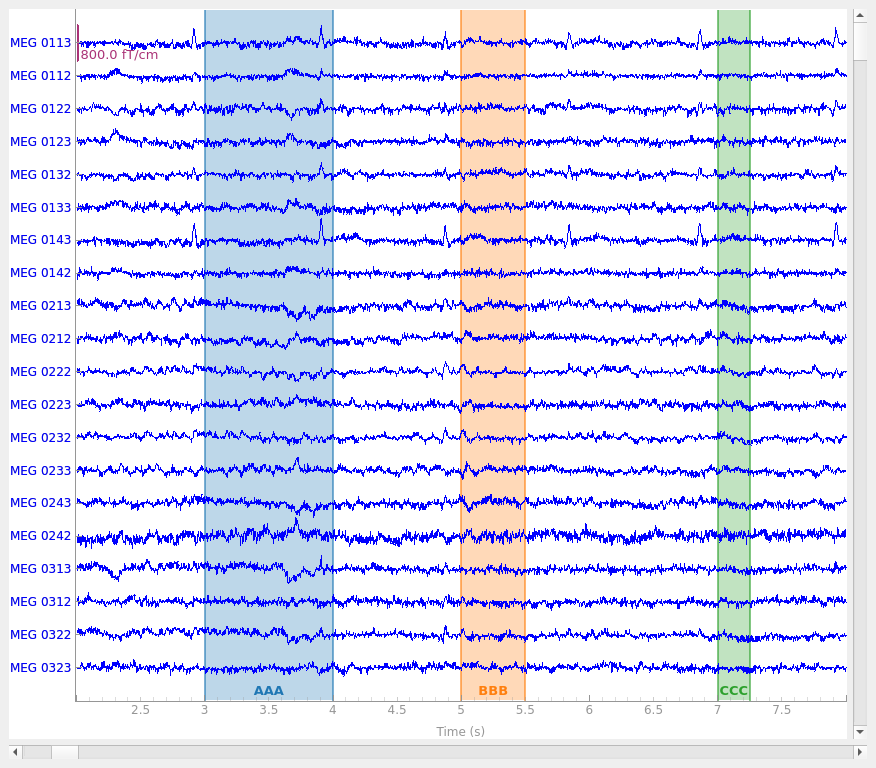
现在标注已添加到 Raw 对象,在可视化该 Raw 对象时就能看到它们:
Using qt as 2D backend.
这三个标注显示为颜色各异的矩形,因为它们的 description 值不同(这些值会打印在绘图区域的顶部边缘)。另请注意,绘图窗口底部的小滚动条中也会出现彩色条段,便于快速查看标注位于 Raw 对象的何处,从而轻松浏览数据以找到并检查它们。
交互式标注 Raw 对象#
也可以在绘图窗口中通过鼠标点击并拖动,以交互方式向 Raw 对象添加标注。为此,必须先让绘图窗口获得焦点,然后按 a 键进入“标注模式”,这会调出标注控件:
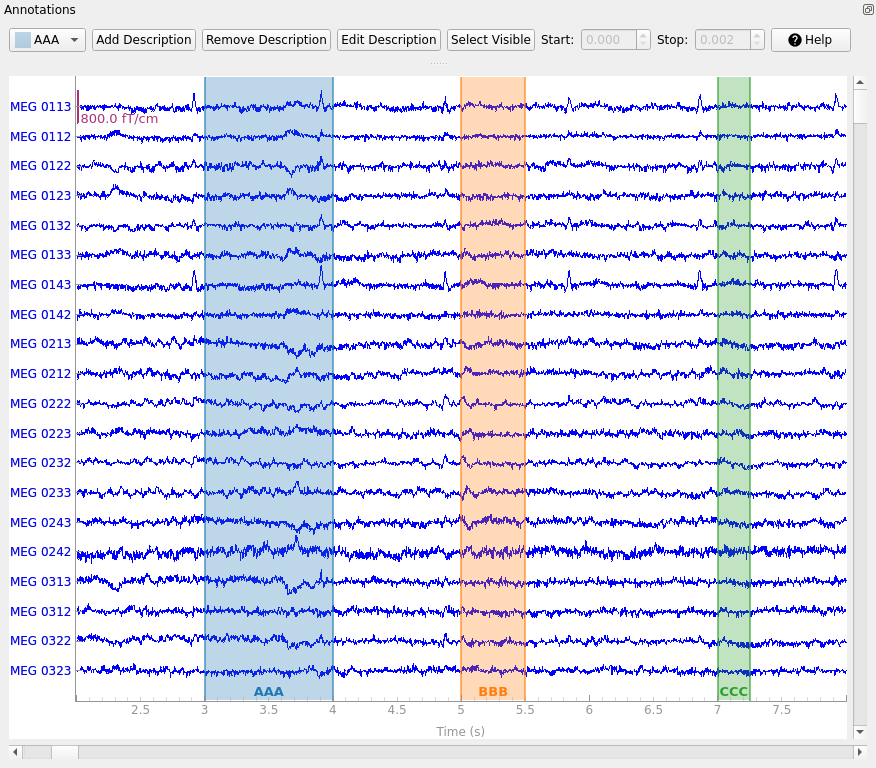
左侧的下拉菜单决定主绘图窗口中下一次点击并拖动的操作会创建哪个已有标签。点击 Add description 按钮可以添加新的标注描述;新描述会加入描述列表并被自动选中。以下功能都与下拉菜单中当前选中的描述相关:使用 Remove description 可以删除描述及其包含的标注;使用 Edit description 可以只编辑一个标注(当前选中的那个)的描述,或编辑某个描述下的所有标注;使用 Set Visible 可以显示或隐藏描述。
在交互式标注过程中,还可以点击并拖动某个标注对应高亮矩形的左边缘或右边缘,来调整已有标注的开始与结束时间。当某个标注被选中时(底部标签的背景会变深),start 和 stop 的值会显示在两个数值框中,也可以在那里编辑。
警告
调用 set_annotations() 会替换 Raw 对象中当前存储的所有标注,因此在处理以交互方式创建的标注时要格外小心(如果不小心覆盖了交互式标注,可能会丢失大量工作)。一个好的保护措施是在结束交互式标注会话后运行 interactive_annot = raw.annotations,这样标注就会保存在 Raw 对象之外的独立变量中。
标注如何影响预处理与分析#
你可能已经注意到,标注控件窗口中新标签的描述默认为 BAD_。原因在于,标注常被用来标记数据中的不良时间段(例如无法通过投影或滤波等其他方式去除的运动伪迹或环境干扰)。MNE-Python 的若干操作具有“标注感知”(annotation aware)能力,会避免使用描述以 “bad” 或 “BAD” 开头的数据;这类操作通常带有一个布尔参数 reject_by_annotation。此类操作的例子包括独立成分分析(mne.preprocessing.ICA)、用于查找心跳与眨眼伪迹的函数(find_ecg_events()、find_eog_events()),以及从连续数据创建分段数据(mne.Epochs)。详情参见“剔除不良数据段与中断”。
对 Annotations 对象的操作#
只要 Annotations 对象共享相同的 orig_time,就可以直接用 + 运算符相加来合并它们:
new_annot = mne.Annotations(onset=3.75, duration=0.75, description="AAA")
raw.set_annotations(my_annot + new_annot)
raw.plot(start=2, duration=6)
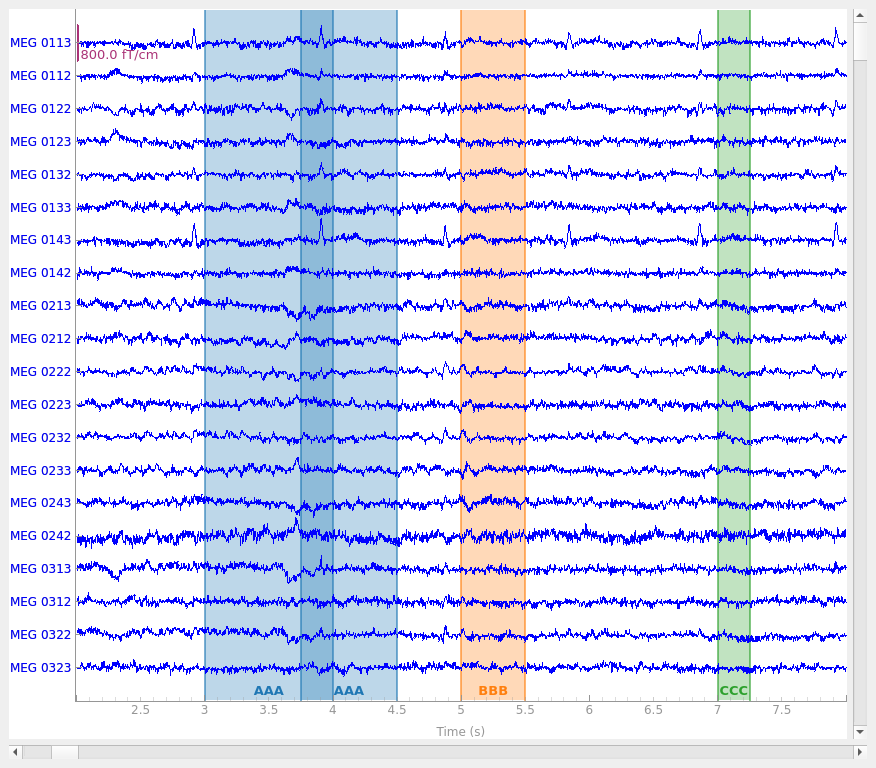
注意,即使多个标注共享相同的描述,也可以创建相互重叠的标注。以交互方式标注时则无法做到这一点:如果通过点击拖动创建的新标注与具有相同描述的已有标注重叠,新旧标注将被合并。
可以通过对 Annotations 对象进行索引来访问单个标注,也可以通过切片,或使用索引列表、元组或数组进行索引,来获取标注的子集:
print(raw.annotations[0])  # just the first annotation
print(raw.annotations[:2])  # the first two annotations
print(raw.annotations[(3, 2)])  # the fourth and third annotations
OrderedDict({'onset': np.float64(45.95597082905339), 'duration': np.float64(1.0), 'description': 'AAA', 'orig_time': datetime.datetime(2002, 12, 3, 19, 1, 10, 720100, tzinfo=datetime.timezone.utc), 'extras': {}})
<Annotations | 2 segments: AAA (2)>
<Annotations | 2 segments: BBB (1), CCC (1)>
还可以遍历 Annotations 对象中的各个标注:
'AAA' goes from 45.95597082905339 to 46.95597082905339
'AAA' goes from 46.70597082905339 to 47.45597082905339
'BBB' goes from 47.95597082905339 to 48.45597082905339
'CCC' goes from 49.95597082905339 to 50.20597082905339
请注意,遍历、索引和切片 Annotations 都会返回副本,因此对索引、切片或遍历得到的元素所做的修改不会影响原始的 Annotations 对象。
# later_annot WILL be changed, because we're modifying the first element of
# later_annot.onset directly:
later_annot.onset[0] = 99

# later_annot WILL NOT be changed, because later_annot[0] returns a copy
# before the 'onset' field is changed:
later_annot[0]["onset"] = 77

print(later_annot[0]["onset"])
99.0
从文件读写 Annotations#
Annotations 对象有一个 save() 方法,可以写出 .fif、.csv 和 .txt 格式(写入格式由你提供的文件名扩展名推断)。请注意,写入文件的起始时间信息格式取决于文件扩展名:.csv 文件将起始时间存储为时间戳,而 .txt 文件写入的是浮点数(单位为秒)。有一个对应的 read_annotations() 函数可用于从磁盘加载它们:
raw.annotations.save("saved-annotations.csv", overwrite=True)
annot_from_file = mne.read_annotations("saved-annotations.csv")
print(annot_from_file)
<Annotations | 4 segments: AAA (2), BBB (1), CCC (1)>