
注意
转到末尾下载完整示例代码。
伪迹检测概览#
本教程介绍伪迹检测的基础知识,并简要介绍 MNE-Python 提供的伪迹检测工具。
照例,我们首先导入所需的 Python 模块并加载一些示例数据:
# Authors: The MNE-Python contributors.
# License: BSD-3-Clause
# Copyright the MNE-Python contributors.
import os

import numpy as np

import mne

sample_data_folder = mne.datasets.sample.data_path()
sample_data_raw_file = os.path.join(
    sample_data_folder, "MEG", "sample", "sample_audvis_raw.fif"
)
raw = mne.io.read_raw_fif(sample_data_raw_file)
raw.crop(0, 60).load_data()  # just use a fraction of data for speed here
Opening raw data file /home/circleci/mne_data/MNE-sample-data/MEG/sample/sample_audvis_raw.fif...
    Read a total of 3 projection items:
        PCA-v1 (1 x 10²)  idle
        PCA-v2 (1 x 10²)  idle
        PCA-v3 (1 x 10²)  idle
    Range : 25800 ... 192599 =     42.956 ...   320.670 secs
Ready.
Reading 0 ... 36037  =      0.000 ...    60.000 secs...
什么是伪迹?#
伪迹是记录信号中并非来自感兴趣源(即大脑神经活动)的部分。因此,相对于感兴趣的信号,伪迹是一种干扰或噪声。这类干扰可能有许多来源,例如:
- 环境伪迹
- 围绕交流工频(通常为 50 或 60 Hz)的持续振荡 建筑物振动(如关门)引起的短暂信号跳变 来自附近电梯、手机、地磁场等的电磁场噪声
- 设备伪迹
- 刺激呈现带来的电磁干扰(例如 EEG 传感器拾取到未屏蔽耳机产生的场) 由头位指示(HPI)线圈所用特定频率引起的持续振荡 传感器故障导致的单个通道随机高幅波动(或反之,信号恒为零),例如表面电极与头皮接触不良
- 生理性伪迹
- 心脏电活动引起的周期性类 QRS 信号模式(尤其见于磁强计通道) 眼动引起的短促阶跃样偏转(尤其见于额区 EEG 通道) 眨眼引起的大幅瞬态偏转(尤其见于额区 EEG 通道) 吞咽时肌肉活动引起的多个通道短暂高频波动爆发
在某些情况下,来自大脑内部的信号也可能被视为伪迹。例如,如果研究者主要关注对刺激的感觉响应,但实验范式包含行为反应(如按键),那么与计划和执行按键相关的神经活动,相对于感兴趣的信号(即诱发感觉响应),就可以被视为伪迹。
注意
由于传感器设计不同(例如被动式与主动式 EEG 电极、轴向与平面梯度计等),相同来源的伪迹在不同 EEG 或 MEG 系统的记录中可能表现不同。
如何处理伪迹#
面对记录中的伪迹,通常有三种基本选择:
忽略伪迹,继续进行分析
剔除被污染的数据部分,分析剩余数据
修复伪迹,即抑制记录中的伪迹成分,同时(希望)保持感兴趣的信号不受影响
修复伪迹有许多不同的方法,MNE-Python 提供了多种伪迹修复工具,包括数字滤波、独立成分分析(ICA)、Maxwell 滤波 / 信号空间分离(SSS)以及信号空间投影(SSP)。后续的独立教程将分别演示这些伪迹修复技术。许多修复技术既可作用于连续(原始)数据,也可作用于已分段的 Epochs 数据(不过效果未必相同);有些技术可用于内存映射数据,另一些则要求将数据复制到内存中。当然,在选用任何策略之前,你必须先检测出伪迹,这正是下一节的主题。
伪迹检测#
MNE-Python 提供了一些用于自动检测特定伪迹(如心跳和眨眼)的工具,当然你也可以随时通过目视检查数据来识别并标注伪迹。
我们在入门教程中已经看到,示例数据包含 SSP 投影器(projectors),因此在查看伪迹之前,我们先把这些投影器保存到一个单独的变量中,然后用 del_proj() 方法将它们从 Raw 对象中移除,以便在原始状态下检查数据:
ssp_projectors = raw.info["projs"]
raw.del_proj()
低频漂移#
低频漂移最容易通过目视检查发现,可使用基本的 plot() 方法;绘制较长的时间跨度并关闭逐通道的直流偏移校正会更有帮助。下面我们绘制 60 秒的数据并显示所有磁强计通道:
mag_channels = mne.pick_types(raw.info, meg="mag")
raw.plot(duration=60, order=mag_channels, n_channels=len(mag_channels), remove_dc=False)
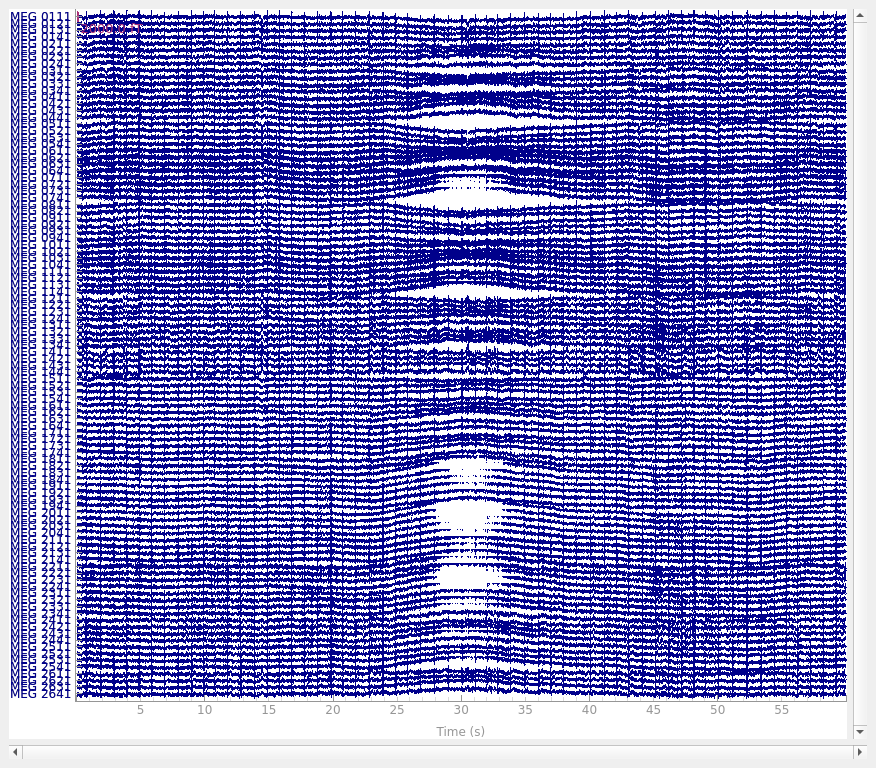
使用较低截止频率的高通滤波即可轻松去除低频漂移(上面看到的漂移周期大约为 20 秒,因此本例中 0.1 Hz 的截止频率大概可以抑制大部分漂移)。
工频噪声#
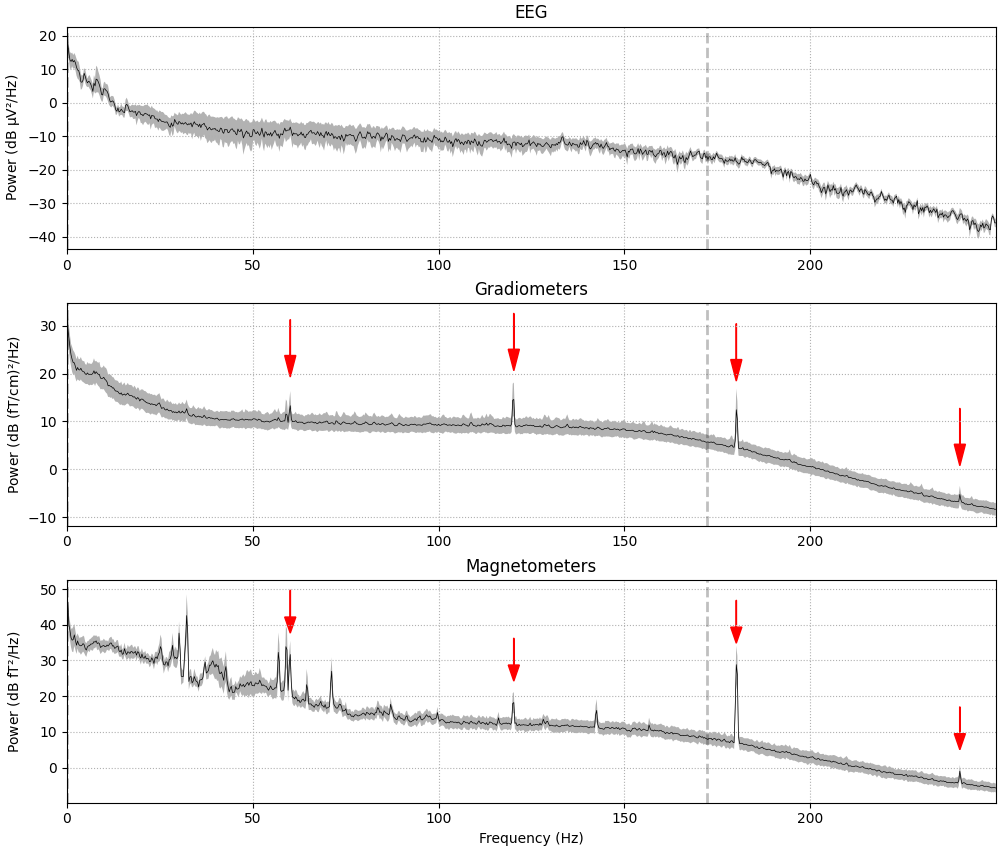
工频伪迹在频谱图上最容易看出,因此我们用 compute_psd() 来演示。
fig = raw.compute_psd(tmax=np.inf, fmax=250).plot(
    average=True, amplitude=False, picks="data", exclude="bads"
)
# add some arrows at 60 Hz and its harmonics:
for ax in fig.axes[1:]:
    freqs = ax.lines[-1].get_xdata()
    psds = ax.lines[-1].get_ydata()
    for freq in (60, 120, 180, 240):
        idx = np.searchsorted(freqs, freq)
        ax.arrow(
            x=freqs[idx],
            y=psds[idx] + 18,
            dx=0,
            dy=-12,
            color="red",
            width=0.1,
            head_width=3,
            length_includes_head=True,
        )
Effective window size : 3.410 (s)
Plotting power spectral density (dB=True).
这里可以看到 60、120、180 和 240 Hz 处的窄带频率峰——即美国(示例数据采集地)的工频及其 2、3、4 次谐波。其他峰(约 25 至 30 Hz 处及其二次谐波)可能与心跳有关;如下一节所述,使用专门的心跳检测函数在时域中更容易观察到。
心电伪迹(ECG)#
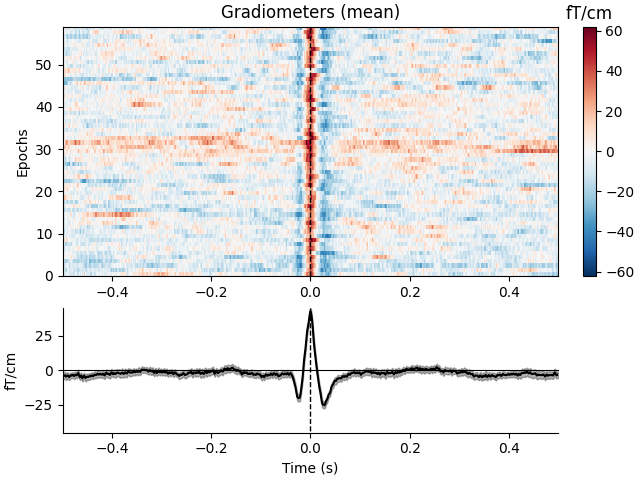
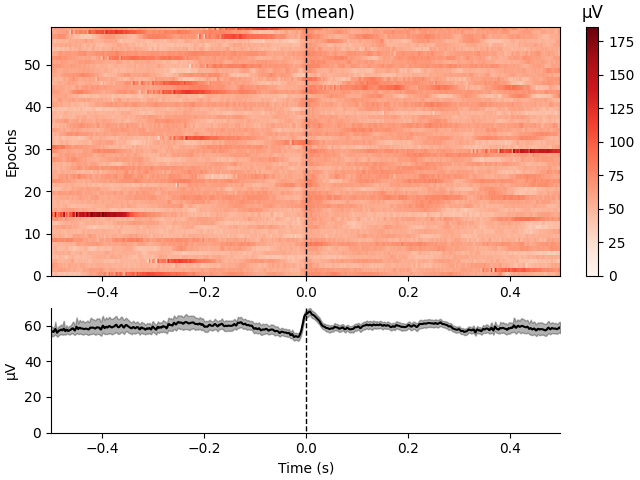
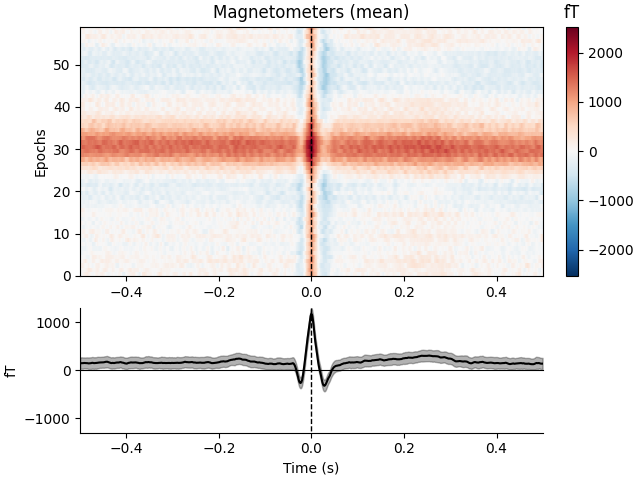
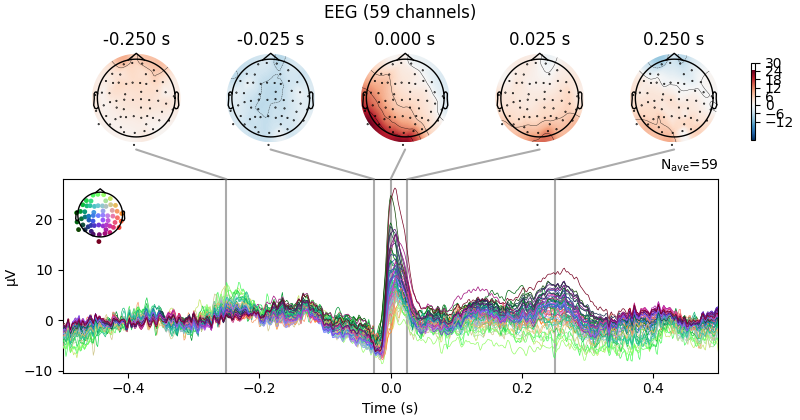
MNE-Python 在 mne.preprocessing 子模块中提供了专用函数 find_ecg_events(),用于从专用 ECG 通道或磁强计(若没有 ECG 通道)中检测心电伪迹。此外,create_ecg_epochs() 函数会在内部调用 find_ecg_events(),并利用得到的事件数组提取以检测到的心电伪迹为中心的 Epochs。下面我们创建这些 Epochs,然后展示检测到的心电伪迹的图像,以及跨伪迹平均的 ERF。尽管 EEG 通道受心电伪迹影响较弱,我们仍会展示全部三种通道类型:
ecg_epochs = mne.preprocessing.create_ecg_epochs(raw)
ecg_epochs.plot_image(combine="mean")
Reconstructing ECG signal from Magnetometers
Setting up band-pass filter from 8 - 16 Hz

FIR filter parameters
---------------------
Designing a two-pass forward and reverse, zero-phase, non-causal bandpass filter:
- Windowed frequency-domain design (firwin2) method
- Hann window
- Lower passband edge: 8.00
- Lower transition bandwidth: 0.50 Hz (-12 dB cutoff frequency: 7.75 Hz)
- Upper passband edge: 16.00 Hz
- Upper transition bandwidth: 0.50 Hz (-12 dB cutoff frequency: 16.25 Hz)
- Filter length: 6007 samples (10.001 s)

Number of ECG events detected : 59 (average pulse 58.9981981638739 / min.)
Not setting metadata
59 matching events found
No baseline correction applied
Using data from preloaded Raw for 59 events and 601 original time points ...
0 bad epochs dropped
Not setting metadata
59 matching events found
No baseline correction applied
0 projection items activated
Not setting metadata
59 matching events found
No baseline correction applied
0 projection items activated
Not setting metadata
59 matching events found
No baseline correction applied
0 projection items activated
combining channels using "mean"
combining channels using "mean"
combining channels using "mean"
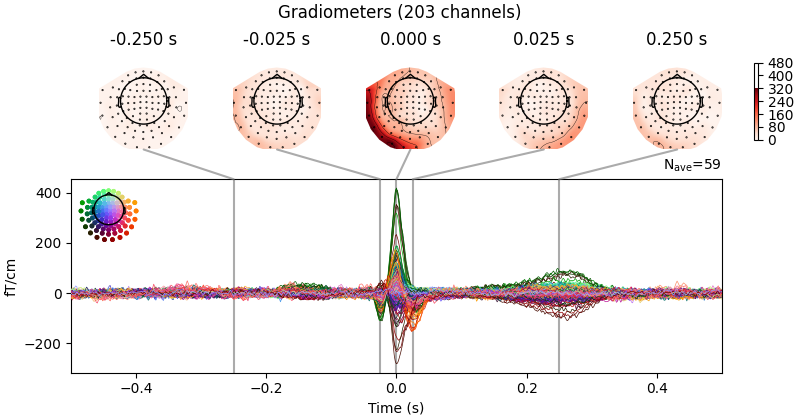
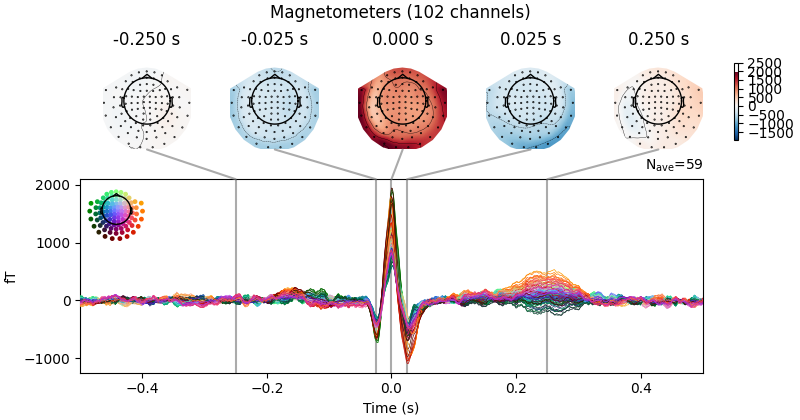
磁强计图像中的水平条纹反映了心电伪迹叠加在低频漂移之上(如前文所见);为避免这种情况,可以在调用 create_ecg_epochs() 时传入 baseline=(-0.5, -0.2)。你还可以通过 average() 方法对 ECG Epochs 求平均,再用 mne.Evoked.plot_topomap() 方法快速查看各传感器上与 ECG 相关的场模式:
avg_ecg_epochs = ecg_epochs.average().apply_baseline((-0.5, -0.2))
Applying baseline correction (mode: mean)
同样,我们可以可视化相对于 EOG 响应峰值的不同时刻所对应的场空间模式:
avg_ecg_epochs.plot_topomap(times=np.linspace(-0.05, 0.05, 11))

或者,我们可以用 plot() 得到 ERP/F 图,或用 plot_joint() 得到头皮场图与 ERP/F 的组合图。这里我们手动指定了绘制头皮场图的时间点;若不指定,则会根据信号峰值自动选择:
avg_ecg_epochs.plot_joint(times=[-0.25, -0.025, 0, 0.025, 0.25])
No projector specified for this dataset. Please consider the method self.add_proj.
眼电伪迹(EOG)#
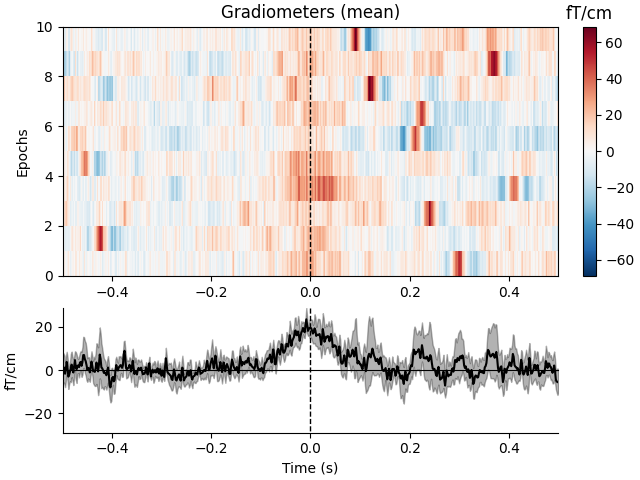
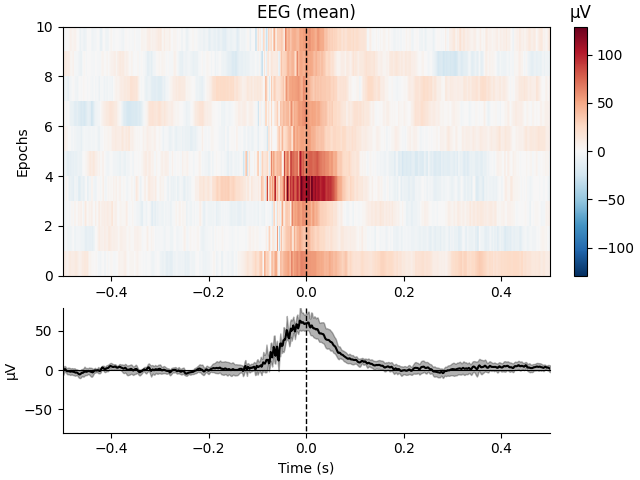
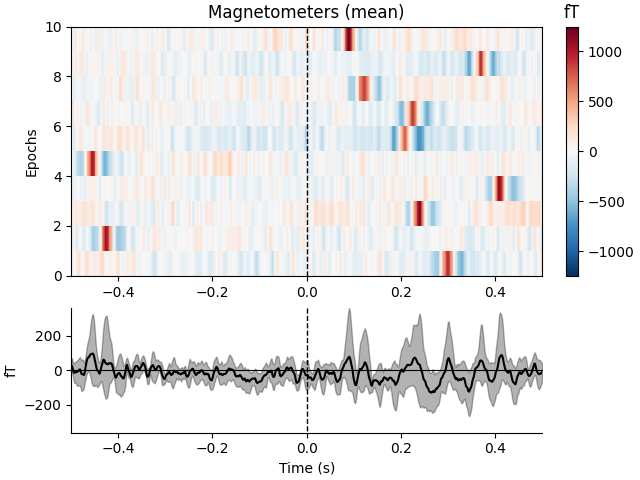
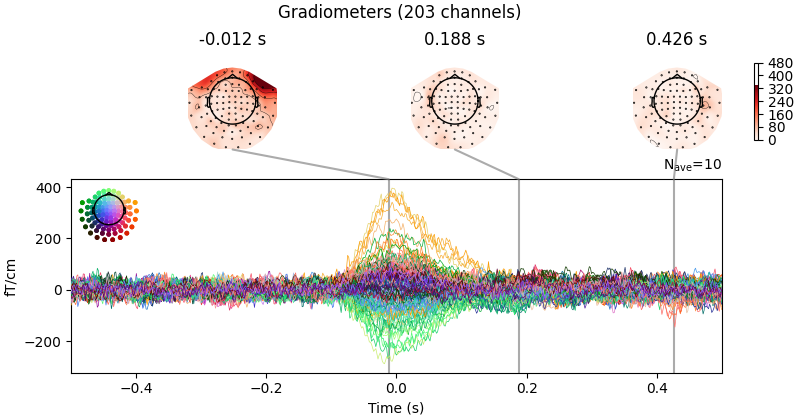
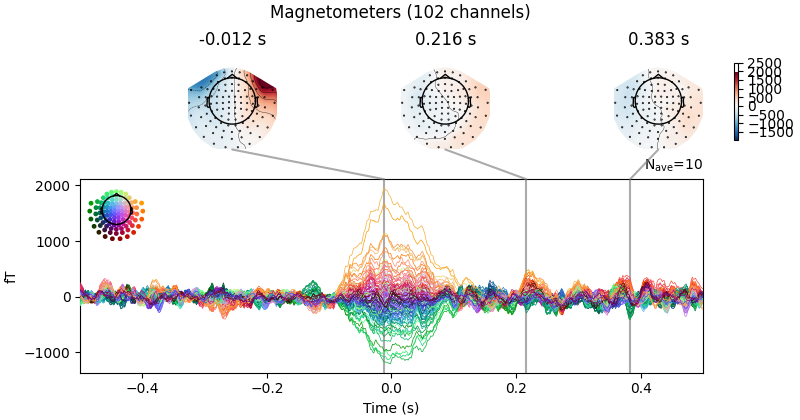
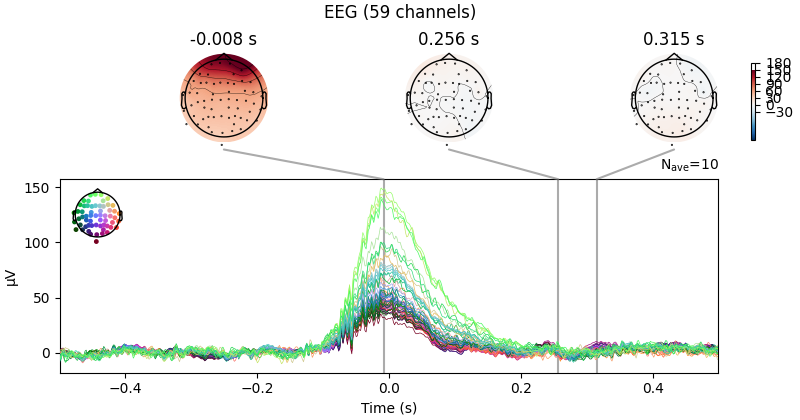
与上述心电检测和分段方法类似,MNE-Python 也提供了检测和提取眼电伪迹的函数:find_eog_events() 和 create_eog_epochs()。这里我们同样使用更高层的便捷函数,一步自动查找伪迹并将其提取到 Epochs 对象中。与上面的心电伪迹不同,眼电伪迹通常在 EEG 通道中最明显,但我们仍会展示全部三种通道类型。这次我们也会使用 baseline 参数;注意眨眼次数远少于心跳,因此图像看起来会比较块状:
eog_epochs = mne.preprocessing.create_eog_epochs(raw, baseline=(-0.5, -0.2))
eog_epochs.plot_image(combine="mean")
eog_epochs.average().plot_joint()
Using EOG channel: EOG 061
EOG channel index for this subject is: [375]
Filtering the data to remove DC offset to help distinguish blinks from saccades
Selecting channel EOG 061 for blink detection
Setting up band-pass filter from 1 - 10 Hz

FIR filter parameters
---------------------
Designing a two-pass forward and reverse, zero-phase, non-causal bandpass filter:
- Windowed frequency-domain design (firwin2) method
- Hann window
- Lower passband edge: 1.00
- Lower transition bandwidth: 0.50 Hz (-12 dB cutoff frequency: 0.75 Hz)
- Upper passband edge: 10.00 Hz
- Upper transition bandwidth: 0.50 Hz (-12 dB cutoff frequency: 10.25 Hz)
- Filter length: 6007 samples (10.001 s)

Now detecting blinks and generating corresponding events
Found 10 significant peaks
Number of EOG events detected: 10
Not setting metadata
10 matching events found
Applying baseline correction (mode: mean)
Using data from preloaded Raw for 10 events and 601 original time points ...
0 bad epochs dropped
Not setting metadata
10 matching events found
No baseline correction applied
0 projection items activated
Not setting metadata
10 matching events found
No baseline correction applied
0 projection items activated
Not setting metadata
10 matching events found
No baseline correction applied
0 projection items activated
combining channels using "mean"
combining channels using "mean"
combining channels using "mean"
No projector specified for this dataset. Please consider the method self.add_proj.
小结#
熟悉典型的伪迹形态和幅值,是评估后续伪迹修复效果的关键第一步。一个经验法则是:伪迹幅值应比感兴趣的信号大若干个数量级,并且这类事件应出现多次,这样才有可能找到能有效估计并修复伪迹的信号分解。
本节的其他几个教程演示了各种伪迹修复工具,并讨论了每种技术的优缺点,例如:
此外还有关于通用预处理步骤的教程,例如滤波与重采样,以及剔除坏通道或坏数据段。
脚本总运行时间:(0 分钟 8.753 秒)