
注意
转到末尾下载完整示例代码。
处理 sEEG 数据#
MNE-Python 不仅能处理 MEG 和 EEG 数据,也支持其他数据类型。这里我们展示一些可用于处理立体定向脑电图(sEEG)数据的函数。
本示例展示如何使用:
sEEG 数据
MNI 空间中的通道位置
投影到体积中
请注意,我们的示例 sEEG 电极已假定位于 MNI 空间。如果你希望将受试者 MRI 空间中的位置映射到 MNI fsaverage 空间,则必须对数据集应用 FreeSurfer 的 talairach.xfm 变换。更多信息可参阅 MNE 如何使用 FreeSurfer 输出。
关于涉及 ECoG 数据、受试者个体 MRI 中的通道位置或投影到表面的示例,请参阅 处理 ECoG 数据 。在 ECoG 示例中,我们展示了如何在脑上可视化表面网格通道。
请注意,本教程需要 3D 绘图依赖,参见 通过 pip 或 conda 安装 。
# Authors: Eric Larson <larson.eric.d@gmail.com>
#          Adam Li <adam2392@gmail.com>
#          Alex Rockhill <aprockhill@mailbox.org>
#
# License: BSD-3-Clause
# Copyright the MNE-Python contributors.
import numpy as np

import mne
from mne.datasets import fetch_fsaverage

# paths to mne datasets - sample sEEG and FreeSurfer's fsaverage subject
# which is in MNI space
misc_path = mne.datasets.misc.data_path()
sample_path = mne.datasets.sample.data_path()
subjects_dir = sample_path / "subjects"

# use mne-python's fsaverage data
fetch_fsaverage(subjects_dir=subjects_dir, verbose=True)  # downloads if needed
0 files missing from root.txt in /home/circleci/mne_data/MNE-sample-data/subjects
0 files missing from bem.txt in /home/circleci/mne_data/MNE-sample-data/subjects/fsaverage
下面加载一些带通道位置的 sEEG 数据并创建 epochs。
raw = mne.io.read_raw(misc_path / "seeg" / "sample_seeg_ieeg.fif")

epochs = mne.Epochs(raw, detrend=1, baseline=None)
epochs = epochs["Response"][0]  # just process one epoch of data for speed
Opening raw data file /home/circleci/mne_data/MNE-misc-data/seeg/sample_seeg_ieeg.fif...
    Range : 1310640 ... 1370605 =   1311.411 ...  1371.411 secs
Ready.
Used Annotations descriptions: ['Fixation', 'Go Cue', 'ISI Onset', 'Response']
Ignoring annotation durations and creating fixed-duration epochs around annotation onsets.
Not setting metadata
32 matching events found
No baseline correction applied
0 projection items activated
我们使用 FreeSurfer recon-all 中计算的 Talairach 变换,来应用从 FreeSurfer 表面 RAS(mri)到 MNI(mni_tal)的变换。
montage = epochs.get_montage()

# first we need a head to mri transform since the data is stored in "head"
# coordinates, let's load the mri to head transform and invert it
this_subject_dir = misc_path / "seeg"
head_mri_t = mne.coreg.estimate_head_mri_t("sample_seeg", this_subject_dir)
# apply the transform to our montage
montage.apply_trans(head_mri_t)

# now let's load our Talairach transform and apply it
mri_mni_t = mne.read_talxfm("sample_seeg", misc_path / "seeg")
montage.apply_trans(mri_mni_t)  # mri to mni_tal (MNI Taliarach)

# for fsaverage, "mri" and "mni_tal" are equivalent and, since
# we want to plot in fsaverage "mri" space, we need use an identity
# transform to equate these coordinate frames
montage.apply_trans(mne.transforms.Transform(fro="mni_tal", to="mri", trans=np.eye(4)))

epochs.set_montage(montage)
我们来检查一下所有内容是否对齐。
注意
颞叶中最靠嘴侧(前侧)的电极位于 fsaverage 模板脑之外。这并不理想,但已是线性 Talairach 变换所能达到的最好结果。若要获得更准确的形变,需要使用更复杂的变换,参见 定位颅内电极触点 。
# compute the transform to head for plotting
trans = mne.channels.compute_native_head_t(montage)
# note that this is the same as:
# ``mne.transforms.invert_transform(
#      mne.transforms.combine_transforms(head_mri_t, mri_mni_t))``

view_kwargs = dict(azimuth=105, elevation=100, focalpoint=(0, 0, -15))
brain = mne.viz.Brain(
    "fsaverage",
    subjects_dir=subjects_dir,
    cortex="low_contrast",
    alpha=0.25,
    background="white",
)
brain.add_sensors(epochs.info, trans=trans)
brain.add_head(alpha=0.25, color="tan")
brain.show_view(distance=400, **view_kwargs)
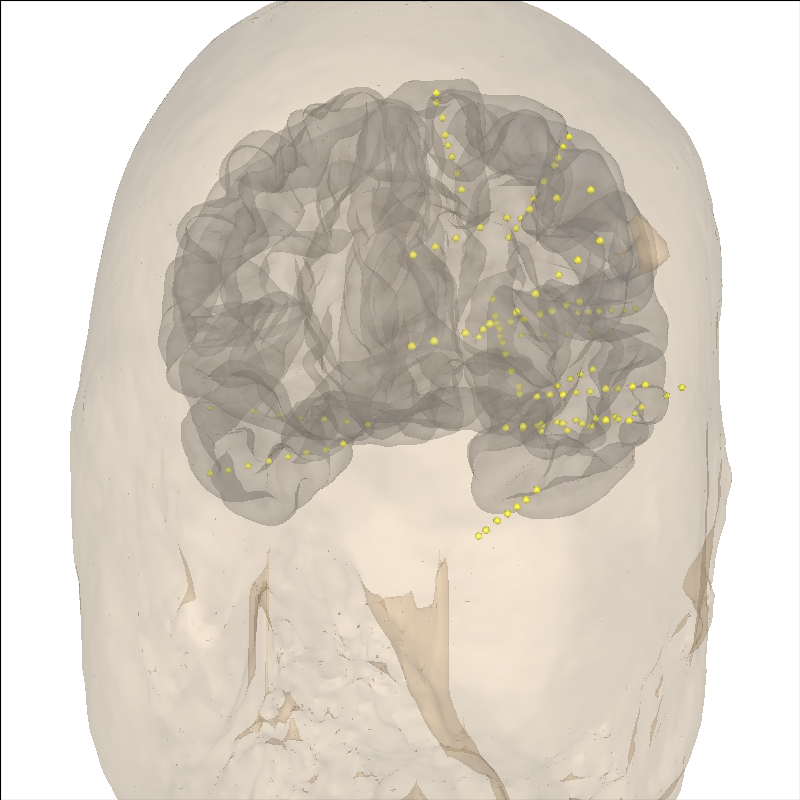
Channel types:: seeg: 119
Using fsaverage-head-dense.fif for head surface.
    1 BEM surfaces found
    Reading a surface...
[done]
    1 BEM surfaces read
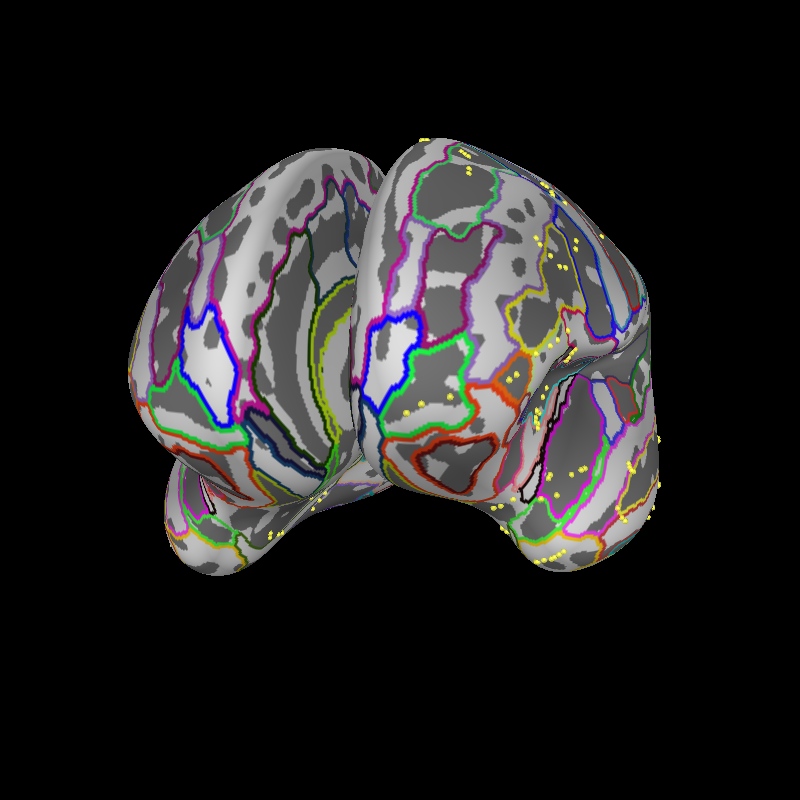
现在,我们将其投影到膨胀脑表面上以便可视化。这段视频可能有助于理解 pial 表面上的标注如何对应到膨胀脑和平面图:
brain = mne.viz.Brain(
    "fsaverage", subjects_dir=subjects_dir, surf="inflated", background="black"
)
brain.add_annotation("aparc.a2009s")
brain.add_sensors(epochs.info, trans=trans)
brain.show_view(distance=500, **view_kwargs)
Reading labels from parcellation...
   read 75 labels from /home/circleci/mne_data/MNE-sample-data/subjects/fsaverage/label/lh.aparc.a2009s.annot
Reading labels from parcellation...
   read 75 labels from /home/circleci/mne_data/MNE-sample-data/subjects/fsaverage/label/rh.aparc.a2009s.annot
Channel types:: seeg: 119
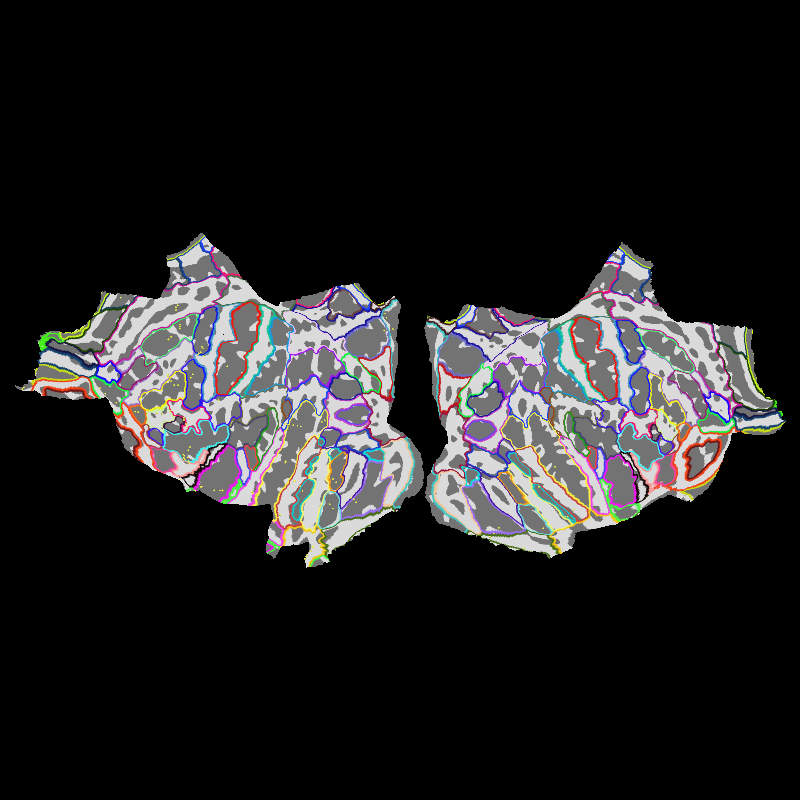
我们还在平面脑上显示传感器。
brain = mne.viz.Brain(
    "fsaverage", subjects_dir=subjects_dir, surf="flat", background="black"
)
brain.add_annotation("aparc.a2009s")
brain.add_sensors(epochs.info, trans=trans)
Reading labels from parcellation...
   read 75 labels from /home/circleci/mne_data/MNE-sample-data/subjects/fsaverage/label/lh.aparc.a2009s.annot
Reading labels from parcellation...
   read 75 labels from /home/circleci/mne_data/MNE-sample-data/subjects/fsaverage/label/rh.aparc.a2009s.annot
Channel types:: seeg: 119
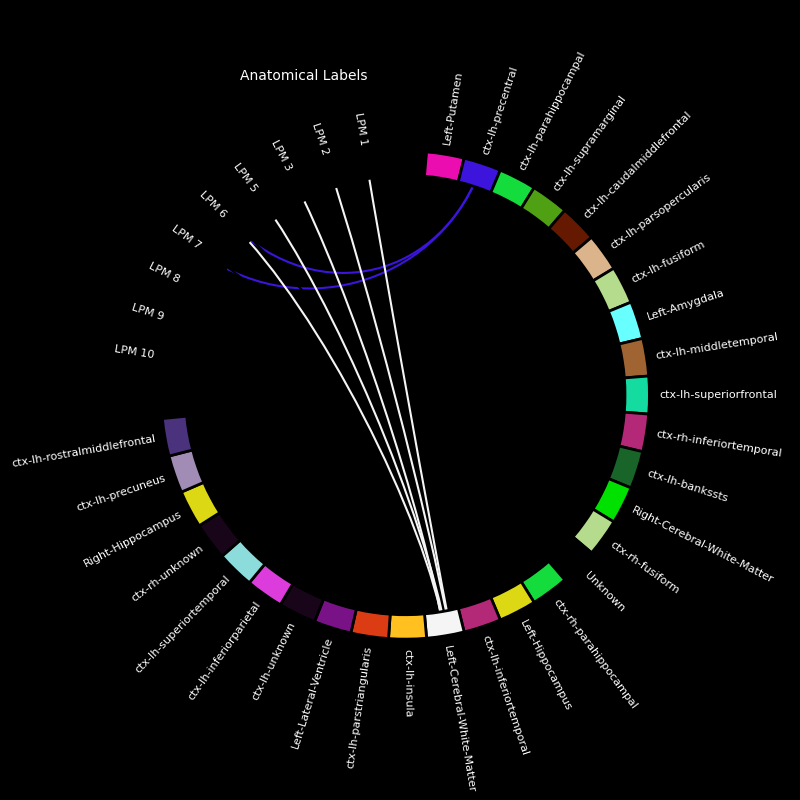
再看看哪些感兴趣区靠近我们的电极触点。
aseg = "aparc+aseg"  # parcellation/anatomical segmentation atlas
labels, colors = mne.get_montage_volume_labels(
    montage, "fsaverage", subjects_dir=subjects_dir, aseg=aseg
)

# separate by electrodes which have names like LAMY 1
electrodes = set(
    [
        "".join([lttr for lttr in ch_name if not lttr.isdigit() and lttr != " "])
        for ch_name in montage.ch_names
    ]
)
print(f"Electrodes in the dataset: {electrodes}")

electrodes = ("LPM", "LSMA")  # choose two for this example
for elec in electrodes:
    picks = [ch_name for ch_name in epochs.ch_names if elec in ch_name]
    fig, ax = mne.viz.plot_channel_labels_circle(labels, colors, picks=picks)
    fig.text(0.3, 0.9, "Anatomical Labels", color="white")
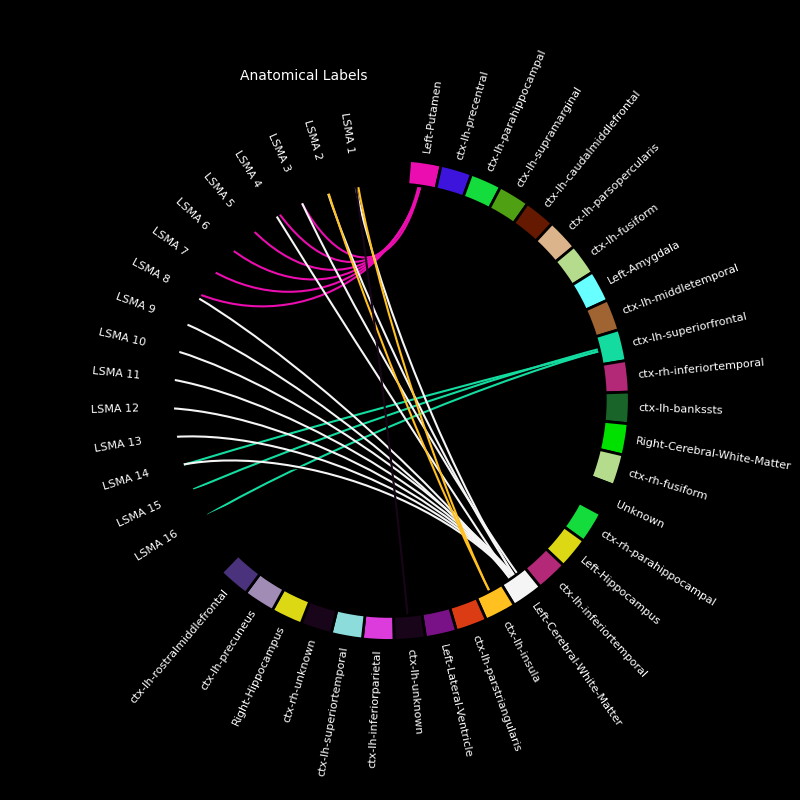
Electrodes in the dataset: {'LENT', 'LTPO', 'LOFC', 'LPCN', 'LAMY', 'LACN', 'LPLI', 'LBRI', 'LSMA', 'LPM', 'RAHP', 'LSTG', 'RPHP', 'LPIT', 'LPHG'}
现在,我们来绘制电极以及电极触点邻近的几个感兴趣区。
picks = [
    ii
    for ii, ch_name in enumerate(epochs.ch_names)
    if any([elec in ch_name for elec in electrodes])
]
labels = (
    "ctx-lh-caudalmiddlefrontal",
    "ctx-lh-precentral",
    "ctx-lh-superiorfrontal",
    "Left-Putamen",
)

fig = mne.viz.plot_alignment(
    mne.pick_info(epochs.info, picks),
    trans,
    "fsaverage",
    subjects_dir=subjects_dir,
    surfaces=[],
    coord_frame="mri",
)

brain = mne.viz.Brain(
    "fsaverage",
    alpha=0.1,
    cortex="low_contrast",
    subjects_dir=subjects_dir,
    units="m",
    figure=fig,
)
brain.add_volume_labels(aseg="aparc+aseg", labels=labels)
brain.show_view(azimuth=120, elevation=90, distance=0.25)
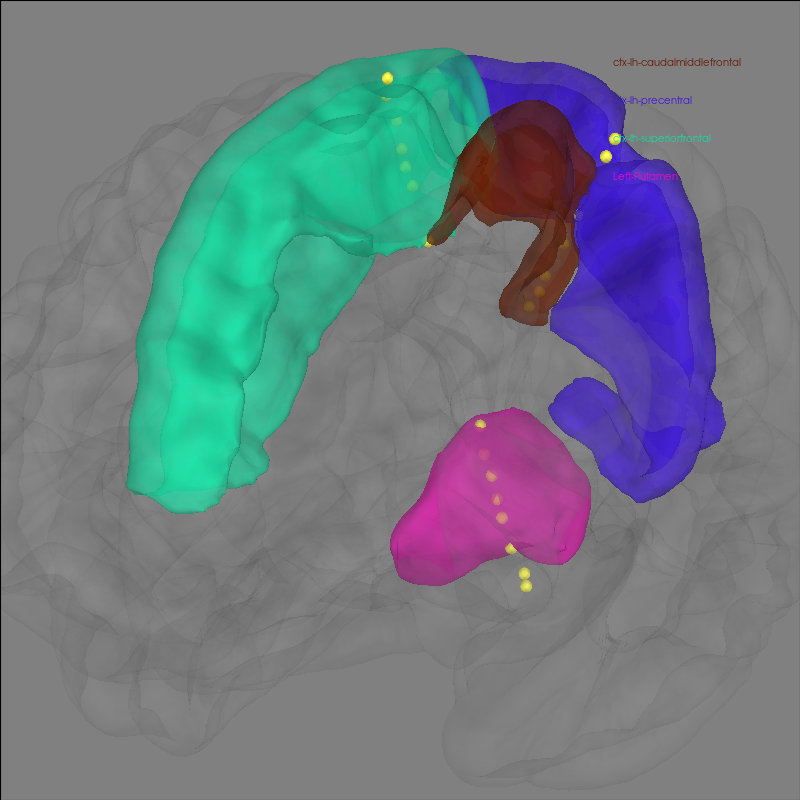
Channel types:: seeg: 25
    Smoothing by a factor of 0.9
接下来,我们获取 epoch 数据并绘制其振幅随时间的变化。
epochs.plot(events=True)
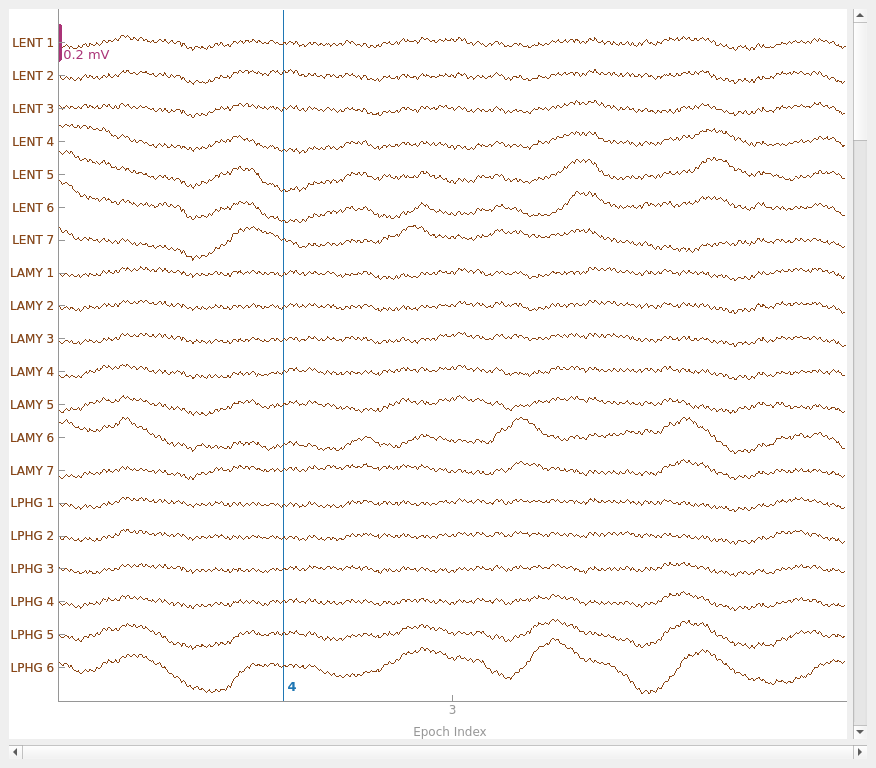
Loading data for 1 events and 701 original time points ...
0 bad epochs dropped
Using qt as 2D backend.
Loading data for 1 events and 701 original time points ...
Loading data for 1 events and 701 original time points ...
我们可以将这段原始数据以热图形式显示在 fsaverage 脑(MNI 空间)上。具体做法是先根据感兴趣的数据(本例中就是原始 LFP)创建 Evoked 数据结构,然后生成 stc 数据结构,后者能够以多种不同形式在脑上可视化源活动。
# get standard fsaverage volume (5mm grid) source space
fname_src = subjects_dir / "fsaverage" / "bem" / "fsaverage-vol-5-src.fif"
vol_src = mne.read_source_spaces(fname_src)

evoked = epochs.average()
stc = mne.stc_near_sensors(
    evoked,
    trans,
    "fsaverage",
    subjects_dir=subjects_dir,
    src=vol_src,
    surface=None,
    verbose="error",
)
stc = abs(stc)  # just look at magnitude
clim = dict(kind="value", lims=np.percentile(abs(evoked.data), [10, 50, 75]))
Reading a source space...
[done]
1 source spaces read
绘制 3D 源(脑区)可视化:
默认情况下,stc.plot_3d() 会显示在任一时刻绝对值最大的源的时间过程。在本例中,它就是原始信号值最大的源。其位置在脑上用一个蓝色小球标出。
brain = stc.plot_3d(
    src=vol_src,
    subjects_dir=subjects_dir,
    view_layout="horizontal",
    views=["axial", "coronal", "sagittal"],
    size=(800, 300),
    show_traces=0.4,
    clim=clim,
    add_data_kwargs=dict(colorbar_kwargs=dict(label_font_size=8)),
)

# You can save a movie like the one on our documentation website with:
# brain.save_movie(time_dilation=3, interpolation='linear', framerate=5,
#                  time_viewer=True, filename='./mne-test-seeg.m4')
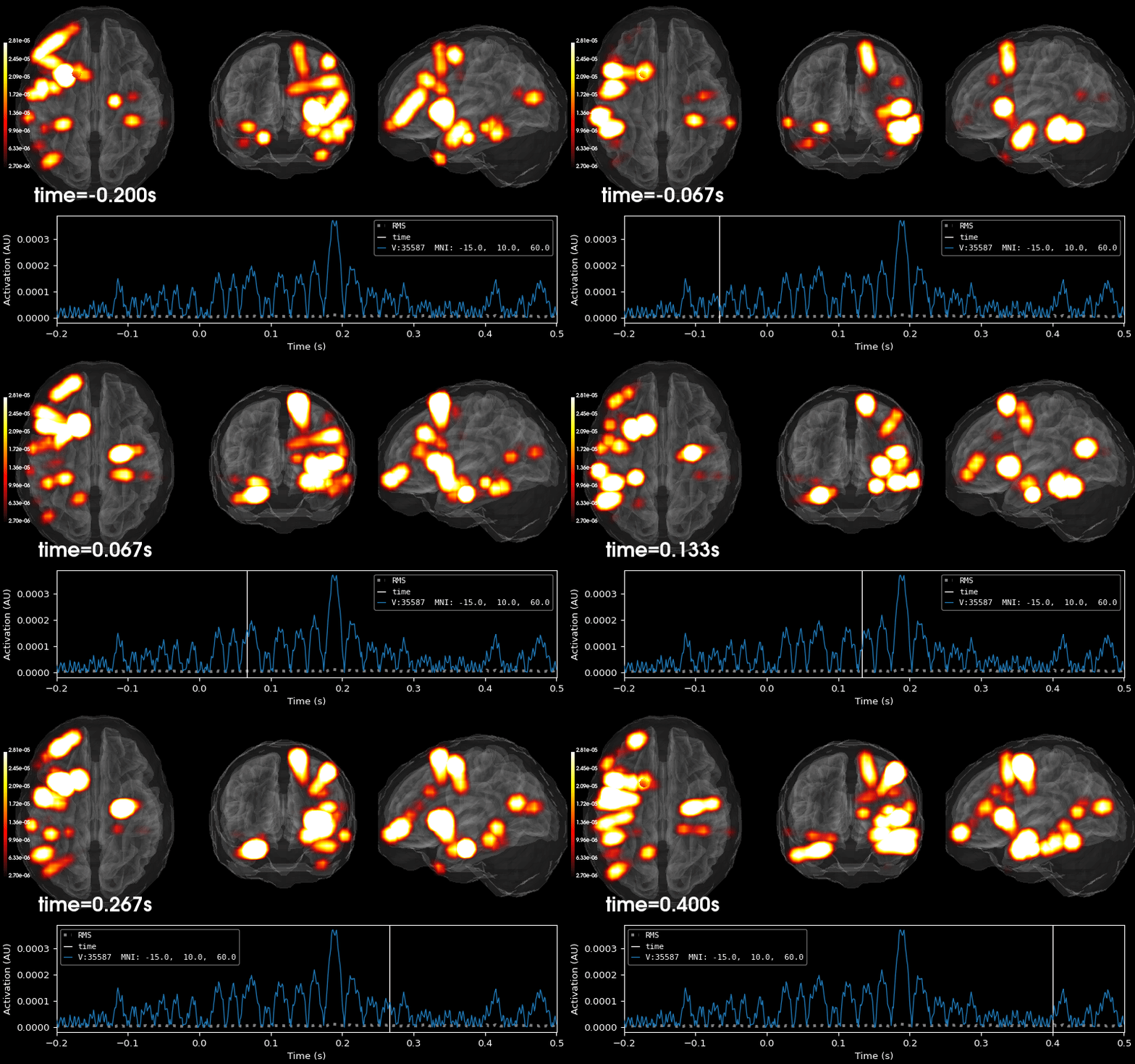
在本教程中,我们为 FreeSurfer 的 fsaverage 受试者使用了 BEM 表面。
关于其他常见的感兴趣分析,请参阅以下内容:
关于体积绘图选项,包括将绘图限制在图谱等指定的特定体积区域内,或绘制不同类型的源可视化,请参阅:可视化源时间过程(STC) 。
关于在特定 FreeSurfer 体积内提取激活以及使用不同的 FreeSurfer 体积,请参阅:MNE 如何使用 FreeSurfer 输出 。
关于处理 BEM 表面以及使用 FreeSurfer 或 MNE 生成它们,请参阅:头模型与正向计算 。
脚本总运行时间:(0 分钟 48.283 秒)