
注意
转到末尾下载完整示例代码。
可视化 Evoked 数据#
本教程介绍 Evoked 对象的多种可视化方法。
照例,我们先导入所需的模块:
# Authors: The MNE-Python contributors.
# License: BSD-3-Clause
# Copyright the MNE-Python contributors.
test
import numpy as np

import mne
这次我们不从 Epochs 对象创建 Evoked 对象,而是从磁盘加载已有的 Evoked 对象。请记住,.fif 格式可以存储多个 Evoked 对象,因此加载后我们会得到一个 Evoked 对象列表。另外,回顾 Evoked 入门教程中 Loading and saving Evoked data 一节可知,示例 Evoked 对象尚未进行基线校正,且含有未应用的投影器,因此我们会在加载时一并处理:
root = mne.datasets.sample.data_path() / "MEG" / "sample"
evoked_file = root / "sample_audvis-ave.fif"
evokeds_list = mne.read_evokeds(
    evoked_file, baseline=(None, 0), proj=True, verbose=False
)

# Show condition names and baseline intervals
for e in evokeds_list:
    print(f"Condition: {e.comment}, baseline: {e.baseline}")
Condition: Left Auditory, baseline: (-0.19979521315838786, 0.0)
Condition: Right Auditory, baseline: (-0.19979521315838786, 0.0)
Condition: Left visual, baseline: (-0.19979521315838786, 0.0)
Condition: Right visual, baseline: (-0.19979521315838786, 0.0)
为方便起见,我们把这个 Evoked 对象列表转换为字典。我们将使用以 / 分隔的字典键来编码实验条件(这在分段时很常见),因为某些绘图方法可以利用这种编码方式。
conds = ("aud/left", "aud/right", "vis/left", "vis/right")
evks = dict(zip(conds, evokeds_list))
#      ^^^^^^^^^^^^^^^^^^^^^^^^^^^^^^ this is equivalent to:
# {'aud/left': evokeds_list[0], 'aud/right': evokeds_list[1],
#  'vis/left': evokeds_list[2], 'vis/right': evokeds_list[3]}
绘制信号波形#
对 Evoked 对象最基本的绘图是按通道类型分别绘制的蝶形图,由 evoked.plot() 方法生成。默认情况下,标记为“坏”的通道会被隐藏,但你可以通过向 exclude 参数传入空列表来控制这一行为(默认值为 exclude='bads'):
evks["aud/left"].plot(exclude=[])
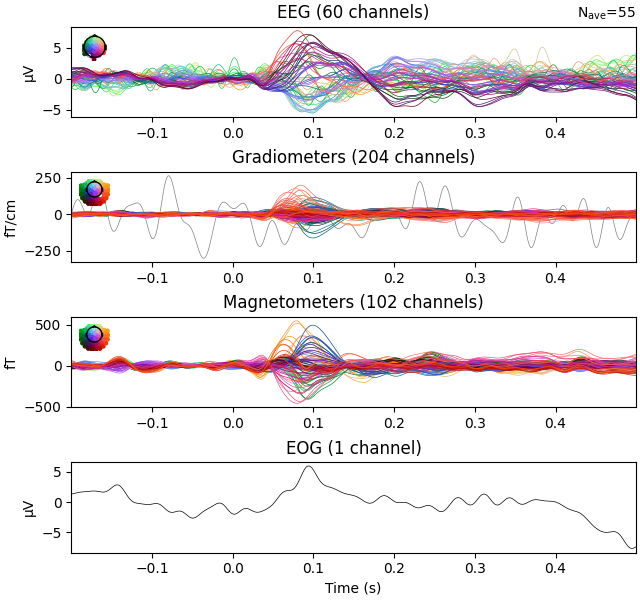
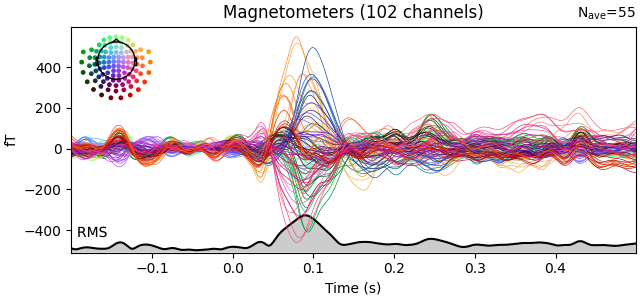
请注意那条完全平坦的 EEG 通道和以红色绘制的含噪梯度计通道。与许多 MNE-Python 绘图函数一样,evoked.plot() 有一个 picks 参数,可以按名称、索引或类型选择要绘制的通道。在下一幅图中,我们只显示磁强计通道,并通过传入 spatial_colors=True 按通道位置为波形着色。最后,我们通过传入 gfp=True 叠加一条跨通道信号均方根(RMS)的曲线。该参数因历史原因命名为 gfp,但对所有支持的通道类型都能正确工作:对于 MEG 数据,它会绘制 RMS;而对于 EEG,它会绘制全局场强(global field power,一种以平均参考计算的 RMS),这正是其名称的由来:
evks["aud/left"].plot(picks="mag", spatial_colors=True, gfp=True)
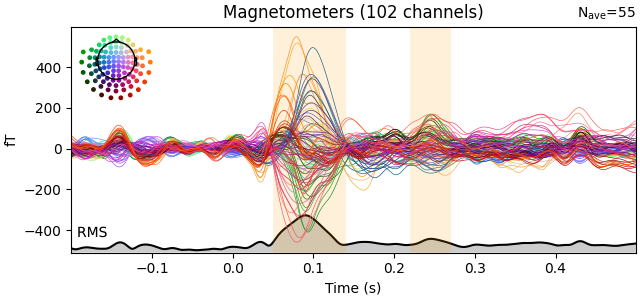
可以通过 highlight 参数高亮感兴趣的时间段。
time_ranges_of_interest = [(0.05, 0.14), (0.22, 0.27)]
evks["aud/left"].plot(
    picks="mag", spatial_colors=True, gfp=True, highlight=time_ranges_of_interest
)
绘制头皮地形图#
在交互式会话中,可以对上面看到的蝶形图进行单击拖动以选择时间区域,此时会弹出所选时间段内头皮平均场分布的图。你也可以使用 plot_topomap() 方法在特定时刻或时间段生成头皮地形图:
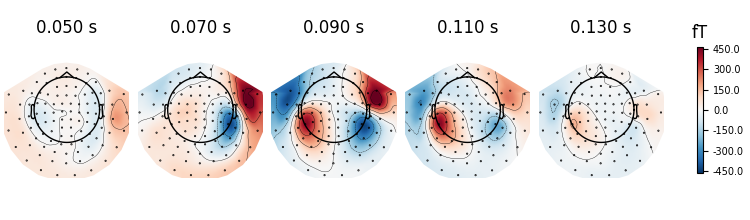
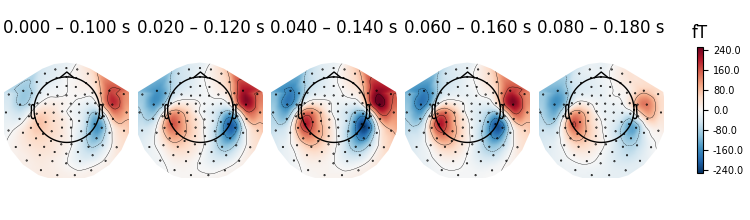
还可以为每个时间点传入不同的平均时间宽度。传入 None 将禁用该时间点的平均:
averaging_durations = [0.01, 0.02, 0.03, None, None]
fig = evks["aud/left"].plot_topomap(
    ch_type="mag", times=times, average=averaging_durations
)
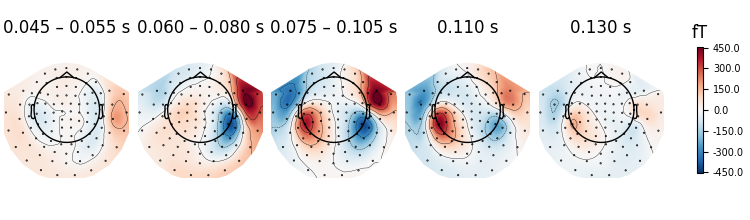
更多绘制头皮地形图的示例见 Plotting topographic maps of evoked data。
箭头图#
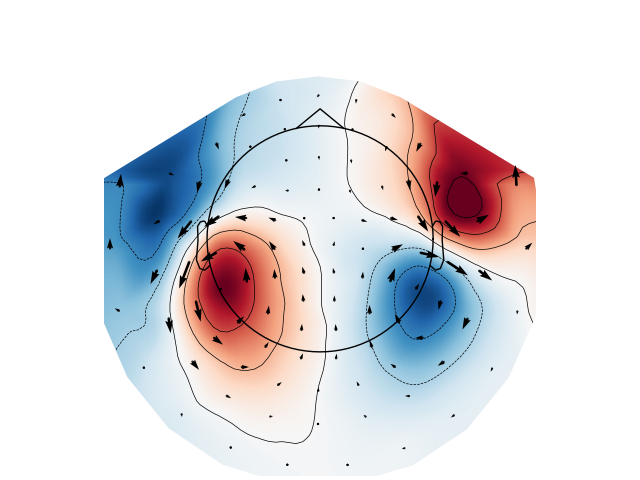
使用 mne.viz.plot_arrowmap() 函数,可以为给定时刻的头皮地形图添加箭头,以显示磁场的估计大小和方向:
mags = evks["aud/left"].copy().pick(picks="mag")
mne.viz.plot_arrowmap(mags.data[:, 175], mags.info, extrapolate="local")
联合图#
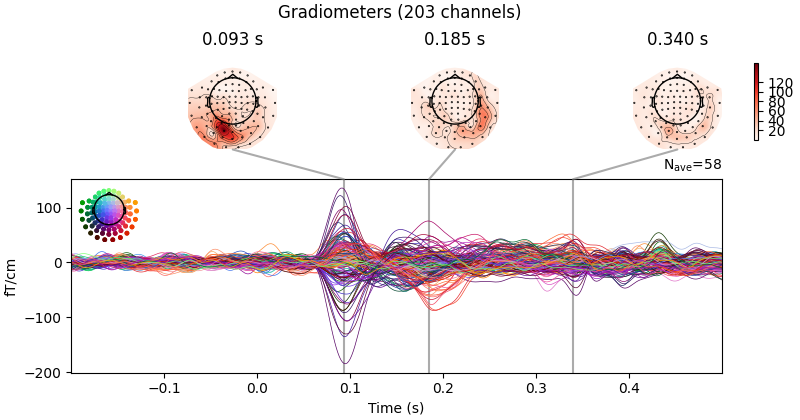
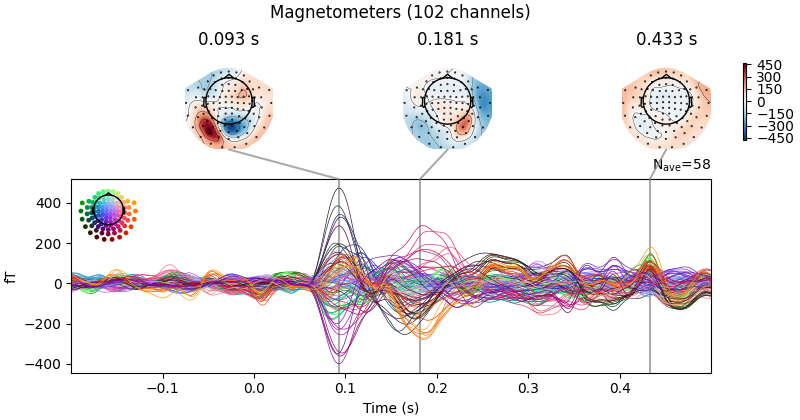
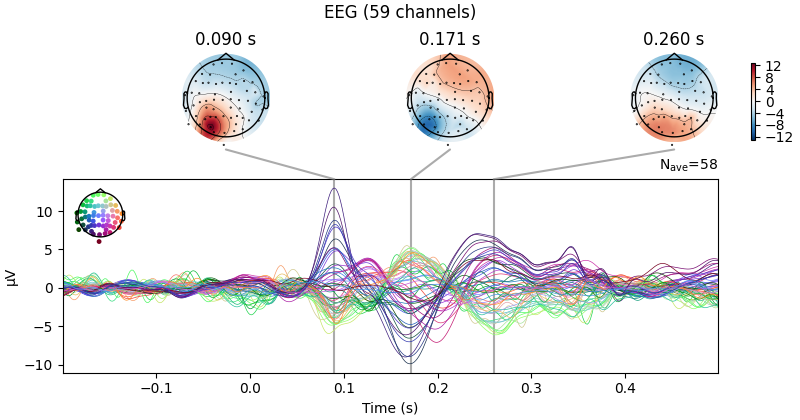
联合图将蝶形图与头皮地形图结合在一起,是初步查看诱发数据的绝佳方式;默认情况下,地形图会根据峰值检测自动放置。这里我们绘制右视野条件;如果没有指定 picks,我们会为每种通道类型分别得到一幅图:
evks["vis/right"].plot_joint()
Projections have already been applied. Setting proj attribute to True.
与 plot_topomap() 类似,你可以指定计算头皮地形图的时刻,还可以通过多种其他方式自定义图形。详见 mne.Evoked.plot_joint()。
比较 Evoked 对象#
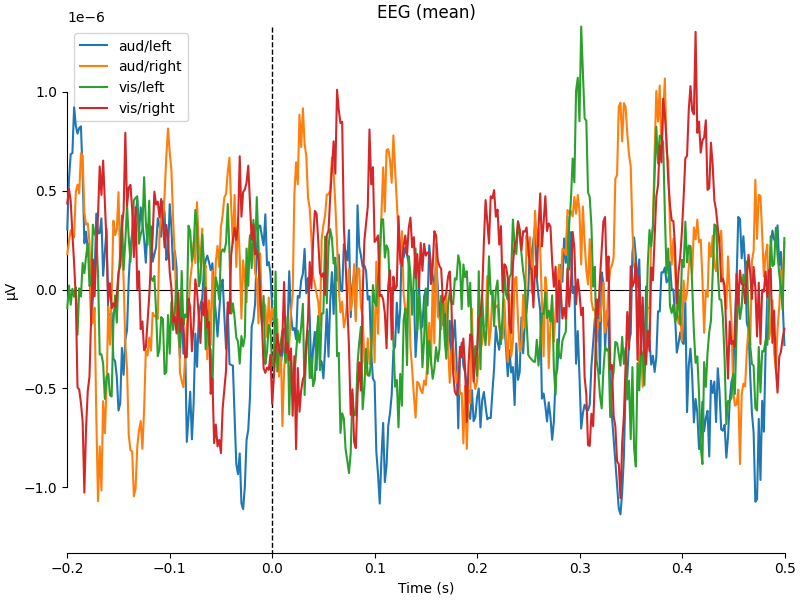
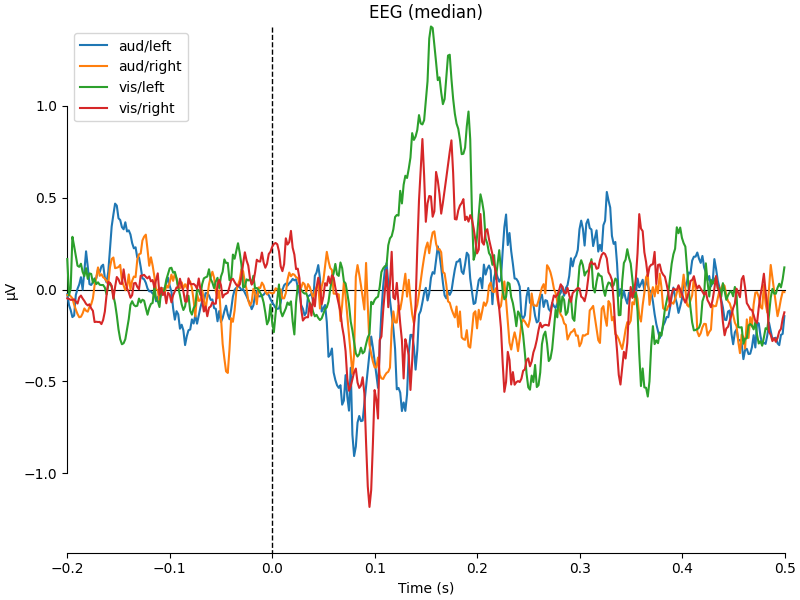
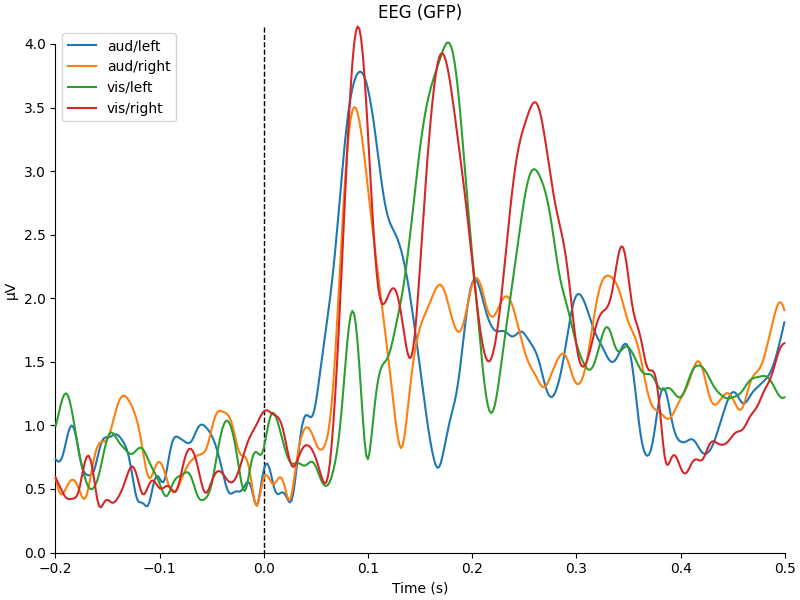
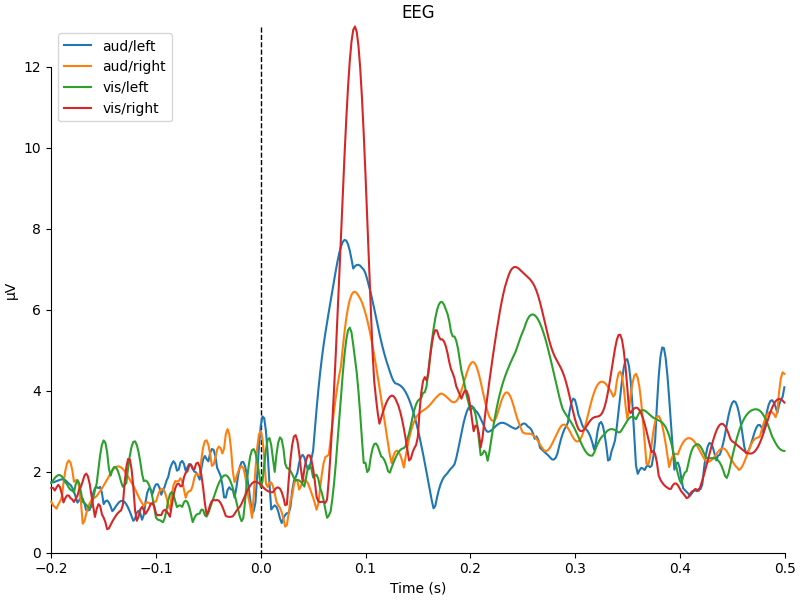
要比较来自不同实验条件的 Evoked 对象,mne.viz.plot_compare_evokeds() 函数可以接受 Evoked 对象的列表或字典,并将它们全部绘制在同一坐标轴上。与大多数 MNE-Python 可视化函数一样,它有一个用于选择通道的 picks 参数,但默认会为每种通道类型生成一幅图,并通过计算全局场强来合并同一类型各通道的信息。跨通道的信息也可以通过其他方式合并;内置支持按均值、中位数或标准差合并,也可以使用自定义的可调用函数,如下所示:
def custom_func(x):
    return x.max(axis=1)


for combine in ("mean", "median", "gfp", custom_func):
    mne.viz.plot_compare_evokeds(evks, picks="eeg", combine=combine)
combining channels using "mean"
combining channels using "mean"
combining channels using "mean"
combining channels using "mean"
combining channels using "median"
combining channels using "median"
combining channels using "median"
combining channels using "median"
combining channels using GFP (eeg channels)
combining channels using GFP (eeg channels)
combining channels using GFP (eeg channels)
combining channels using GFP (eeg channels)
combining channels using "<function custom_func at 0x79a27108d380>"
combining channels using "<function custom_func at 0x79a27108d380>"
combining channels using "<function custom_func at 0x79a27108d380>"
combining channels using "<function custom_func at 0x79a27108d380>"
plot_compare_evokeds() 的一个便利之处在于,当以字典形式传入 evokeds 时,它允许根据字典键中以 / 分隔的子字符串来指定绘图样式(类似于 Epoch 选择;见 Subselecting epochs)。这里,我们为 “aud” 和 “vis” 条件指定颜色,为 “left” 和 “right” 条件指定线型,波形和图例会相应地设置样式。这里我们还演示了 time_unit='ms' 参数的实际效果。
mne.viz.plot_compare_evokeds(
    evks,
    picks="MEG 1811",
    colors=dict(aud=0, vis=1),
    linestyles=dict(left="solid", right="dashed"),
    time_unit="ms",
)
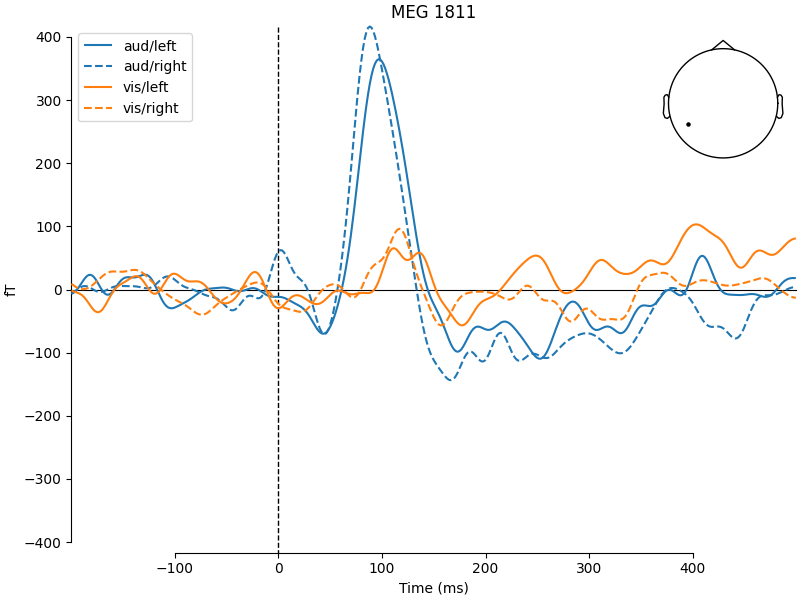
上面由 plot_compare_evokeds() 生成的图例使用了 evks 变量提供的字典键。如果你改为传入 Evoked 对象的列表或元组,图例键将根据 Evoked 对象的 comment 属性自动生成(如果 comment 属性为空或有歧义,则使用连续整数)。为了说明这一点,我们将创建一个包含五个 Evoked 对象的列表:两个具有相同的 comment,两个具有空的 comment(空字符串或 None),以及一个具有唯一的非空 comment:
temp_list = list()
for idx, _comment in enumerate(("foo", "foo", "", None, "bar"), start=1):
    _evk = evokeds_list[0].copy()
    _evk.comment = _comment
    _evk.data *= idx  # so we can tell the traces apart
    temp_list.append(_evk)

mne.viz.plot_compare_evokeds(temp_list, picks="mag")
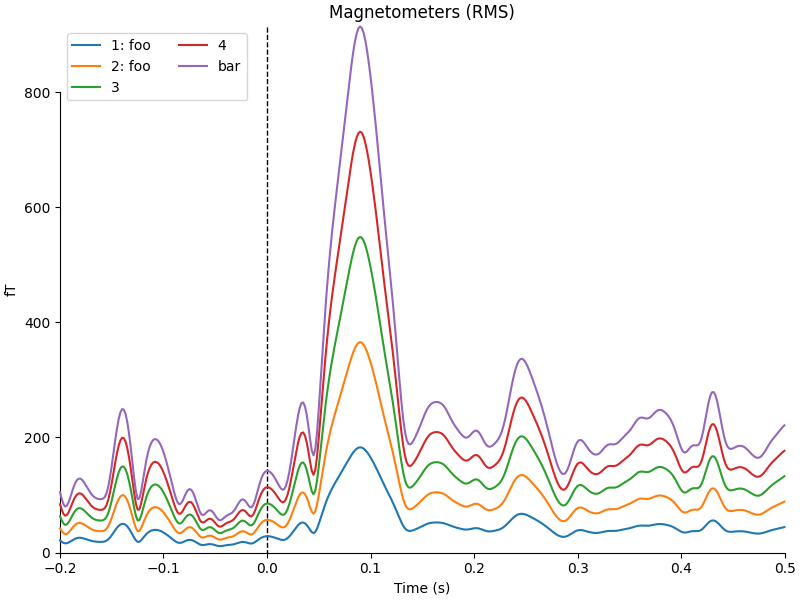
combining channels using RMS (mag channels)
combining channels using RMS (mag channels)
combining channels using RMS (mag channels)
combining channels using RMS (mag channels)
combining channels using RMS (mag channels)
图像绘图#
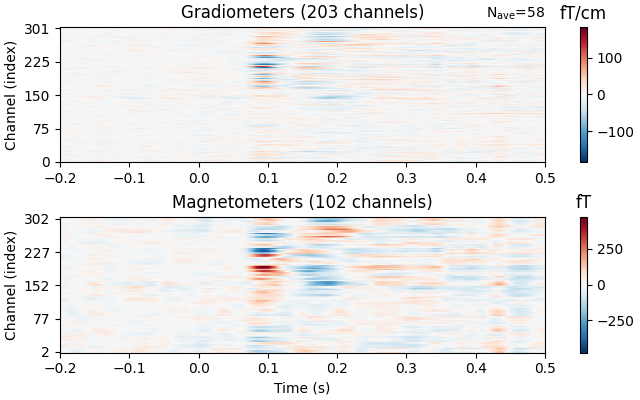
与 Epochs 一样,Evoked 对象也有 plot_image() 方法,但与 epochs.plot_image() 不同,evoked.plot_image() 每行显示一个通道,而不是每行一个 epoch。同样,可以使用 picks 参数以及其他多种自定义选项;详见 plot_image()。
evks["vis/right"].plot_image(picks="meg")
地形子图#
对于传感器水平的分析,按地形布局绘制每个传感器的响应可能很有用。如果传入 axes='topo',plot_compare_evokeds() 函数就能实现这一点,但当传感器数量过多时会相当慢,因此这里我们只绘制 EEG 通道:
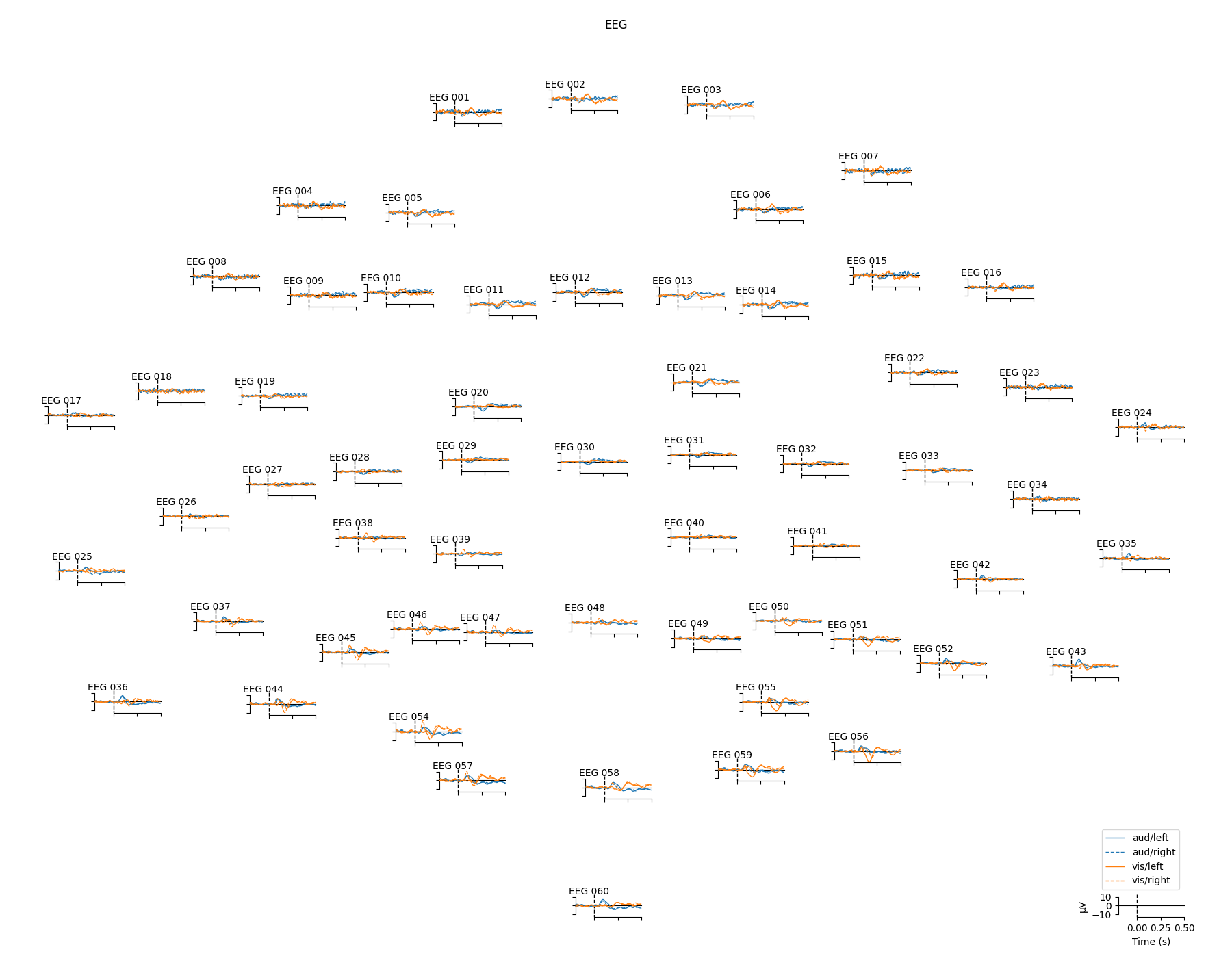
当传感器数量较多时,可以同时使用 evoked.plot_topo() 方法和 mne.viz.plot_evoked_topo() 函数。plot_topo() 方法只绘制单个条件,而 plot_evoked_topo() 函数在传入 Evoked 对象列表时,可以在同一坐标轴上绘制一个或多个条件。图例条目将根据 Evoked 对象的 comment 属性自动生成:
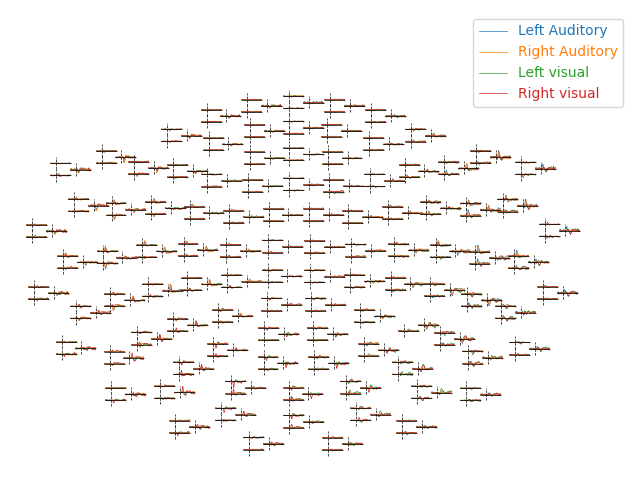
默认情况下,plot_evoked_topo() 会绘制所有 MEG 传感器(如果存在),因此要得到 EEG 传感器,你需要先修改 evoked 对象(例如使用 mne.pick_types)。
注意
在交互式会话中,两种地形绘图方式都允许你单击某个传感器子图,以打开该传感器处诱发响应的放大图。在此视图中,你可以通过单击时间过程中的某个位置来选择时间。所选时间会在所有通道上以竖线标记,原始图形以及其他所有已打开的单通道图形中也会显示。
三维场图#
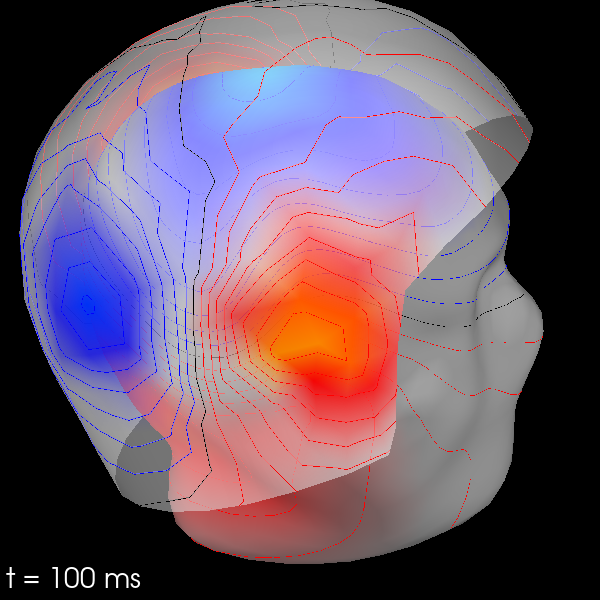
上面所有的头皮地形图都被投影为场的二维俯视图,但也可以用三维方式绘制场图。这需要一个 trans 文件,用于在 MEG 设备坐标系与头部表面(基于 MRI)坐标系之间转换位置。你可以在没有 trans 文件的情况下计算三维场图,但这只适用于根据 MEG 传感器计算 MEG 头盔上的场。
subjects_dir = root.parents[1] / "subjects"
trans_file = root / "sample_audvis_raw-trans.fif"
默认情况下,将使用 MEG 传感器估计头盔表面上的场,而使用 EEG 传感器估计头皮上的场。计算出这些图后,你可以用 evoked.plot_field() 绘制它们:
maps = mne.make_field_map(
    evks["aud/left"],
    trans=str(trans_file),
    subject="sample",
    subjects_dir=subjects_dir,
    origin="auto",
)
evks["aud/left"].plot_field(maps, time=0.1)
Using surface from /home/circleci/mne_data/MNE-sample-data/subjects/sample/bem/sample-5120-5120-5120-bem.fif.
Getting helmet for system 306m
    Automatic origin fit: head of radius 91.2 mm
Prepare EEG mapping...
Computing dot products for 59 electrodes...
Computing dot products for 2562 surface locations...
Field mapping data ready
    Preparing the mapping matrix...
    Truncating at 25/59 components to omit less than 0.001 (0.00096)
    The map has an average electrode reference (2562 channels)
    Automatic origin fit: head of radius 91.2 mm
Prepare MEG mapping...
Computing dot products for 305 coils...
Computing dot products for 304 surface locations...
Field mapping data ready
    Preparing the mapping matrix...
    Truncating at 85/305 components to omit less than 0.0001 (9.4e-05)
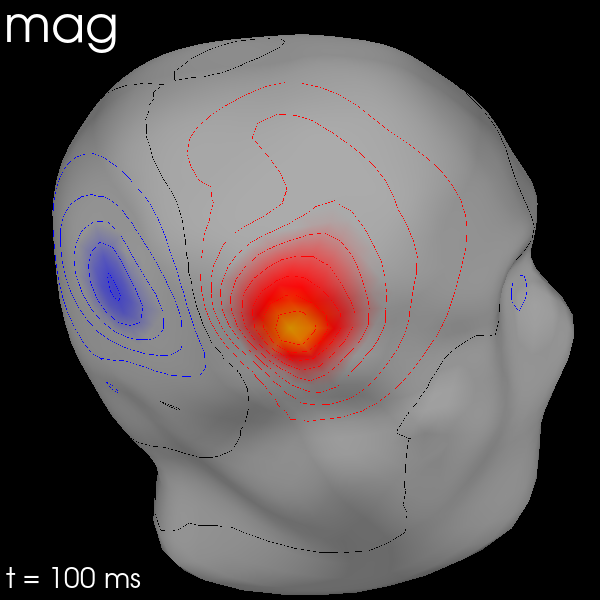
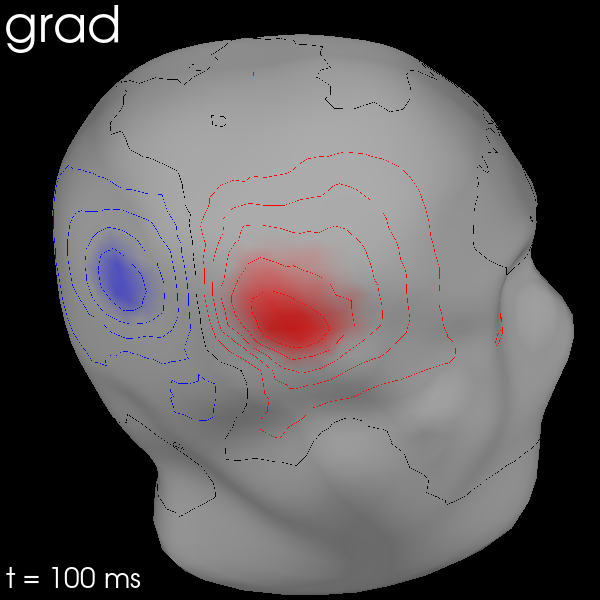
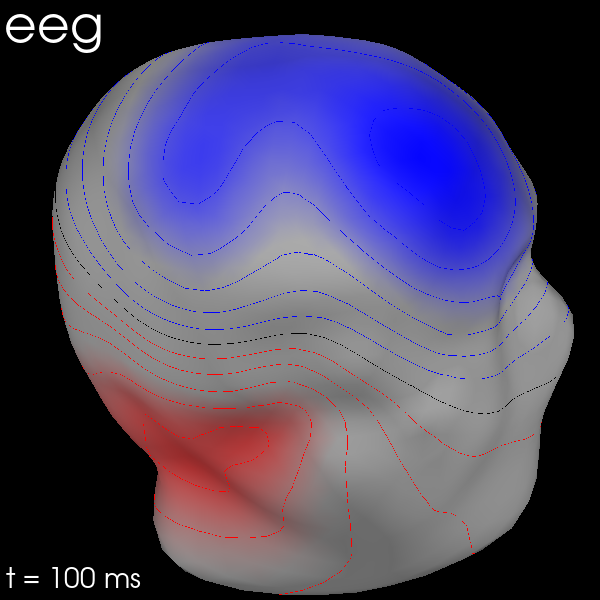
你也可以通过传入 meg_surf='head' 使用 MEG 传感器来估计头皮场。依次选择每种传感器类型,即可比较各自的头皮场估计结果。
for ch_type in ("mag", "grad", "eeg"):
    evk = evks["aud/right"].copy().pick(ch_type)
    _map = mne.make_field_map(
        evk,
        trans=str(trans_file),
        subject="sample",
        subjects_dir=subjects_dir,
        meg_surf="head",
        origin="auto",
    )
    fig = evk.plot_field(_map, time=0.1)
    mne.viz.set_3d_title(fig, ch_type, size=20)
Using surface from /home/circleci/mne_data/MNE-sample-data/subjects/sample/bem/sample-5120-5120-5120-bem.fif.
    Automatic origin fit: head of radius 91.2 mm
Prepare MEG mapping...
Computing dot products for 102 coils...
Computing dot products for 2562 surface locations...
Field mapping data ready
    Preparing the mapping matrix...
    Truncating at 61/102 components to omit less than 0.0001 (9.8e-05)
Using surface from /home/circleci/mne_data/MNE-sample-data/subjects/sample/bem/sample-5120-5120-5120-bem.fif.
    Automatic origin fit: head of radius 91.2 mm
Prepare MEG mapping...
Computing dot products for 203 coils...
Computing dot products for 2562 surface locations...
Field mapping data ready
    Preparing the mapping matrix...
    Truncating at 84/203 components to omit less than 0.0001 (9.7e-05)
Using surface from /home/circleci/mne_data/MNE-sample-data/subjects/sample/bem/sample-5120-5120-5120-bem.fif.
    Automatic origin fit: head of radius 91.2 mm
Prepare EEG mapping...
Computing dot products for 59 electrodes...
Computing dot products for 2562 surface locations...
Field mapping data ready
    Preparing the mapping matrix...
    Truncating at 25/59 components to omit less than 0.001 (0.00096)
    The map has an average electrode reference (2562 channels)
脚本总运行时间:(0 分钟 15.820 秒)