
注意
转到末尾下载完整示例代码。
使用时空聚类对源数据进行置换 t 检验#
本示例检验跨受试者的诱发电位在两种条件之间是否存在显著差异。这里仅为演示目的,我们使用单个受试者的数据模拟出多个受试者的数据。多重比较问题通过空间和时间上的聚类水平置换检验来解决。
# Authors: Alexandre Gramfort <alexandre.gramfort@inria.fr>
#          Eric Larson <larson.eric.d@gmail.com>
#          Stefan Appelhoff <stefan.appelhoff@mailbox.org>
#
# License: BSD-3-Clause
# Copyright the MNE-Python contributors.
import numpy as np
from scipy import stats as stats

import mne
from mne.datasets import sample
from mne.epochs import equalize_epoch_counts
from mne.minimum_norm import apply_inverse, read_inverse_operator
from mne.stats import spatio_temporal_cluster_1samp_test, summarize_clusters_stc
设置参数#
data_path = sample.data_path()
meg_path = data_path / "MEG" / "sample"
raw_fname = meg_path / "sample_audvis_filt-0-40_raw.fif"
event_fname = meg_path / "sample_audvis_filt-0-40_raw-eve.fif"
subjects_dir = data_path / "subjects"
src_fname = subjects_dir / "fsaverage" / "bem" / "fsaverage-ico-5-src.fif"

tmin = -0.2
tmax = 0.3  # Use a lower tmax to reduce multiple comparisons

# Setup for reading the raw data
raw = mne.io.read_raw_fif(raw_fname)
events = mne.read_events(event_fname)
Opening raw data file /home/circleci/mne_data/MNE-sample-data/MEG/sample/sample_audvis_filt-0-40_raw.fif...
    Read a total of 4 projection items:
        PCA-v1 (1 x 10²)  idle
        PCA-v2 (1 x 10²)  idle
        PCA-v3 (1 x 10²)  idle
        Average EEG reference (1 x 60)  idle
    Range : 6450 ... 48149 =     42.956 ...   320.665 secs
Ready.
读取所有通道的分段数据并剔除一个坏道#
raw.info["bads"] += ["MEG 2443"]
picks = mne.pick_types(raw.info, meg=True, eog=True, exclude="bads")
event_id = 1  # L auditory
reject = dict(grad=1000e-13, mag=4000e-15, eog=150e-6)
epochs1 = mne.Epochs(
    raw,
    events,
    event_id,
    tmin,
    tmax,
    picks=picks,
    baseline=(None, 0),
    reject=reject,
    preload=True,
)

event_id = 3  # L visual
epochs2 = mne.Epochs(
    raw,
    events,
    event_id,
    tmin,
    tmax,
    picks=picks,
    baseline=(None, 0),
    reject=reject,
    preload=True,
)

# Equalize trial counts to eliminate bias (which would otherwise be
# introduced by the abs() performed below)
equalize_epoch_counts([epochs1, epochs2])
Not setting metadata
72 matching events found
Setting baseline interval to [-0.19979521315838786, 0.0] s
Applying baseline correction (mode: mean)
Created an SSP operator (subspace dimension = 3)
3 projection items activated
Loading data for 72 events and 76 original time points ...
    Rejecting  epoch based on EOG : ['EOG 061']
    Rejecting  epoch based on EOG : ['EOG 061']
    Rejecting  epoch based on EOG : ['EOG 061']
    Rejecting  epoch based on EOG : ['EOG 061']
    Rejecting  epoch based on MAG : ['MEG 1711']
    Rejecting  epoch based on EOG : ['EOG 061']
    Rejecting  epoch based on EOG : ['EOG 061']
    Rejecting  epoch based on EOG : ['EOG 061']
    Rejecting  epoch based on EOG : ['EOG 061']
9 bad epochs dropped
Not setting metadata
73 matching events found
Setting baseline interval to [-0.19979521315838786, 0.0] s
Applying baseline correction (mode: mean)
Created an SSP operator (subspace dimension = 3)
3 projection items activated
Loading data for 73 events and 76 original time points ...
    Rejecting  epoch based on EOG : ['EOG 061']
    Rejecting  epoch based on EOG : ['EOG 061']
    Rejecting  epoch based on EOG : ['EOG 061']
    Rejecting  epoch based on EOG : ['EOG 061']
    Rejecting  epoch based on GRAD : ['MEG 1333', 'MEG 1342']
    Rejecting  epoch based on EOG : ['EOG 061']
6 bad epochs dropped
Dropped 0 epochs:
Dropped 4 epochs: 10, 25, 26, 40
变换到源空间#
fname_inv = meg_path / "sample_audvis-meg-oct-6-meg-inv.fif"
snr = 3.0
lambda2 = 1.0 / snr**2
method = "dSPM"  # use dSPM method (could also be MNE, sLORETA, or eLORETA)
inverse_operator = read_inverse_operator(fname_inv)
sample_vertices = [s["vertno"] for s in inverse_operator["src"]]

# Let's average and compute inverse, resampling to speed things up
evoked1 = epochs1.average()
evoked1.resample(50, npad="auto")
condition1 = apply_inverse(evoked1, inverse_operator, lambda2, method)
evoked2 = epochs2.average()
evoked2.resample(50, npad="auto")
condition2 = apply_inverse(evoked2, inverse_operator, lambda2, method)

# Let's only deal with t > 0, cropping to reduce multiple comparisons
condition1.crop(0, None)
condition2.crop(0, None)
tmin = condition1.tmin
tstep = condition1.tstep * 1000  # convert to milliseconds
Reading inverse operator decomposition from /home/circleci/mne_data/MNE-sample-data/MEG/sample/sample_audvis-meg-oct-6-meg-inv.fif...
    Reading inverse operator info...
    [done]
    Reading inverse operator decomposition...
    [done]
    305 x 305 full covariance (kind = 1) found.
    Read a total of 4 projection items:
        PCA-v1 (1 x 10²) active
        PCA-v2 (1 x 10²) active
        PCA-v3 (1 x 10²) active
        Average EEG reference (1 x 60) active
    Noise covariance matrix read.
    22494 x 22494 diagonal covariance (kind = 2) found.
    Source covariance matrix read.
    22494 x 22494 diagonal covariance (kind = 6) found.
    Orientation priors read.
    22494 x 22494 diagonal covariance (kind = 5) found.
    Depth priors read.
    Did not find the desired covariance matrix (kind = 3)
    Reading a source space...
    Computing patch statistics...
    Patch information added...
    Distance information added...
    [done]
    Reading a source space...
    Computing patch statistics...
    Patch information added...
    Distance information added...
    [done]
    2 source spaces read
    Read a total of 4 projection items:
        PCA-v1 (1 x 10²) active
        PCA-v2 (1 x 10²) active
        PCA-v3 (1 x 10²) active
        Average EEG reference (1 x 60) active
    Source spaces transformed to the inverse solution coordinate frame
Preparing the inverse operator for use...
    Scaled noise and source covariance from nave = 1 to nave = 63
    Created the regularized inverter
    Created an SSP operator (subspace dimension = 3)
    Created the whitener using a noise covariance matrix with rank 302 (3 small eigenvalues omitted)
    Computing noise-normalization factors (dSPM)...
[done]
Applying inverse operator to "1"...
    Picked 305 channels from the data
    Computing inverse...
    Eigenleads need to be weighted ...
    Computing residual...
    Explained  69.4% variance
    Combining the current components...
    dSPM...
[done]
Preparing the inverse operator for use...
    Scaled noise and source covariance from nave = 1 to nave = 63
    Created the regularized inverter
    Created an SSP operator (subspace dimension = 3)
    Created the whitener using a noise covariance matrix with rank 302 (3 small eigenvalues omitted)
    Computing noise-normalization factors (dSPM)...
[done]
Applying inverse operator to "3"...
    Picked 305 channels from the data
    Computing inverse...
    Eigenleads need to be weighted ...
    Computing residual...
    Explained  70.7% variance
    Combining the current components...
    dSPM...
[done]
变换到共同皮层空间#
通常情况下,你会读取多个受试者的估计结果,并将它们 morph 到相同的皮层空间(例如 fsaverage)。为便于示例,这里我们让每个“受试者”都具有相同的响应(只是在源空间中带有噪声),以此进行模拟。
注意
请注意,对于 6 名受试者的双侧统计检验,置换检验所能达到的最小显著性水平仅为 p = 1/(2 ** 6) = 0.015,这个值偏大。
n_vertices_sample, n_times = condition1.data.shape
n_subjects = 6
print(f"Simulating data for {n_subjects} subjects.")

# Let's make sure our results replicate, so set the seed.
rng = np.random.default_rng(0)
X = rng.normal(scale=10, size=(n_vertices_sample, n_times, n_subjects, 2))
X[:, :, :, 0] += condition1.data[:, :, np.newaxis]
X[:, :, :, 1] += condition2.data[:, :, np.newaxis]
Simulating data for 6 subjects.
对数据进行空间平滑是个好主意;为了可视化,我们把这些结果 morph 到 fsaverage,这是一个 grade 5 源空间,每个半球的顶点编号为 0:10242。通常需要分别对每个受试者的数据进行 morph(此时可能更想使用 morph_data),但这里所有估计结果都位于“sample”上,因此可以用一个 morph 矩阵完成全部工作。
# Read the source space we are morphing to
src = mne.read_source_spaces(src_fname)
fsave_vertices = [s["vertno"] for s in src]
morph_mat = mne.compute_source_morph(
    src=inverse_operator["src"],
    subject_to="fsaverage",
    spacing=fsave_vertices,
    subjects_dir=subjects_dir,
).morph_mat

n_vertices_fsave = morph_mat.shape[0]

# We have to change the shape for the dot() to work properly
X = X.reshape(n_vertices_sample, n_times * n_subjects * 2)
print("Morphing data.")
X = morph_mat.dot(X)  # morph_mat is a sparse matrix
X = X.reshape(n_vertices_fsave, n_times, n_subjects, 2)
    Reading a source space...
    [done]
    Reading a source space...
    [done]
    2 source spaces read
surface source space present ...
Computing morph matrix...
    Left-hemisphere map read.
    Right-hemisphere map read.
    17 smooth iterations done.
    14 smooth iterations done.
[done]
[done]
Morphing data.
最后,我们希望比较各条件的整体活动水平,差分沿最后一个轴(条件轴)计算。负号使得 condition1 > condition2 时显示为“红色团块”(而不是蓝色)。
构建邻接矩阵#
对于基于聚类的置换检验,我们必须定义邻接关系,以确定哪些点可以归入同一个聚类。对于时间或频率等维度,这种关系相当直观,但对于通道或源顶点等空间维度,则需要多做一些工作。
这里,为了使用针对时空聚类优化的算法,我们只传入空间邻接矩阵(而不是时空邻接矩阵)。但请注意,聚类仍会沿时间维度进行,并可通过 mne.stats.spatio_temporal_cluster_1samp_test() 中的 max_step 参数进行控制。
如果我们想同时显式指定空间和时间的邻接矩阵,就必须使用 mne.stats.combine_adjacency();不过在当前情况下并不需要这样做。
print("Computing adjacency.")
adjacency = mne.spatial_src_adjacency(src)
Computing adjacency.
-- number of adjacent vertices : 20484
计算统计量#
# Note that X needs to be a multi-dimensional array of shape
# observations (subjects) × time × space, so we permute dimensions
X = np.transpose(X, [2, 1, 0])

# Here we set a cluster forming threshold based on a p-value for
# the cluster based permutation test.
# We use a two-tailed threshold, the "1 - p_threshold" is needed
# because for two-tailed tests we must specify a positive threshold.
p_threshold = 0.001
df = n_subjects - 1  # degrees of freedom for the test
t_threshold = stats.distributions.t.ppf(1 - p_threshold / 2, df=df)

# Now let's actually do the clustering. This can take a long time...
print("Clustering.")
T_obs, clusters, cluster_p_values, H0 = clu = spatio_temporal_cluster_1samp_test(
    X,
    adjacency=adjacency,
    n_jobs=None,
    threshold=t_threshold,
    buffer_size=None,
    rng=179,
    verbose=True,
)
Clustering.
stat_fun(H1): min=-22.04990595672844 max=65.35058945220189
Running initial clustering …
Found 349 clusters

  0%|          | Permuting (exact test) : 0/31 [00:00<?,       ?it/s]
 35%|███▌      | Permuting (exact test) : 11/31 [00:00<00:00,  325.14it/s]
 74%|███████▍  | Permuting (exact test) : 23/31 [00:00<00:00,  341.14it/s]
100%|██████████| Permuting (exact test) : 31/31 [00:00<00:00,  362.76it/s]
100%|██████████| Permuting (exact test) : 31/31 [00:00<00:00,  360.37it/s]
筛选“显著”聚类#
执行基于聚类的置换检验后,你可能希望筛选出在置换分布下可视为统计显著的观测聚类。使用下面的代码片段即可轻松完成。
然而,必须注意:一个观测到的聚类具有统计显著性,并不直接等同于构成该聚类的通道、时间点、频率区间等也具有统计显著性!
更多信息请参阅 FieldTrip 教程。
# Select the clusters that are statistically significant at p < 0.05
good_clusters_idx = np.where(cluster_p_values < 0.05)[0]
good_clusters = [clusters[idx] for idx in good_clusters_idx]
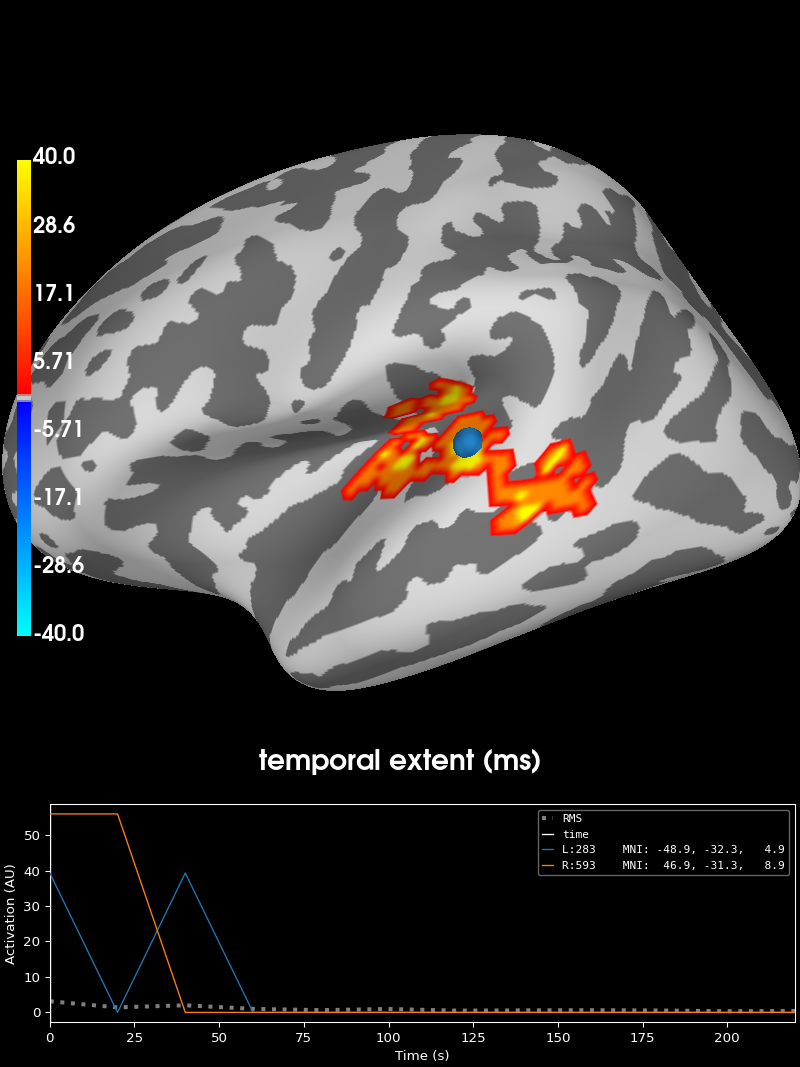
可视化聚类#
print("Visualizing clusters.")

# Now let's build a convenient representation of our results, where consecutive
# cluster spatial maps are stacked in the time dimension of a SourceEstimate
# object. This way by moving through the time dimension we will be able to see
# subsequent cluster maps.
stc_all_cluster_vis = summarize_clusters_stc(
    clu, tstep=tstep, vertices=fsave_vertices, subject="fsaverage"
)

# Let's actually plot the first "time point" in the SourceEstimate, which
# shows all the clusters, weighted by duration.

# blue blobs are for condition A < condition B, red for A > B
brain = stc_all_cluster_vis.plot(
    hemi="both",
    views="lateral",
    subjects_dir=subjects_dir,
    time_label="temporal extent (ms)",
    size=(800, 800),
    smoothing_steps=5,
    clim=dict(kind="value", pos_lims=[0, 1, 40]),
)

# We could save this via the following:
# brain.save_image('clusters.png')
Visualizing clusters.
脚本总运行时间:(0 分钟 4.437 秒)