
说明
转到末尾下载完整示例代码。
MNE-Python MEG/EEG 分析概览#
本教程涵盖事件相关分析的基本 EEG/MEG 流程:加载数据、分段、平均、绘图,以及从传感器数据估计皮层活动。教程介绍 MNE-Python 的核心数据结构 Raw、Epochs、Evoked 和 SourceEstimate,并快速覆盖大量内容(以牺牲深度为代价)。后续教程将更详细地讨论这些主题。
首先导入所需的 Python 模块:
# Authors: The MNE-Python contributors.
# License: BSD-3-Clause
# Copyright the MNE-Python contributors.
import numpy as np

import mne
加载数据#
MNE-Python 的数据结构以 Neuromag 的 FIF 文件格式为基础,但也提供了用于读取多种其他数据格式的读取函数。MNE-Python 还提供了对多种公开数据集的接口,可自动下载并管理这些数据集。
本教程首先加载一个示例数据集(称为“Sample”),其中包含一名受试者执行视听实验时采集的 EEG 和 MEG 数据,以及该受试者的结构性 MRI 扫描。若在预期位置未找到数据集,mne.datasets.sample.data_path 函数会自动下载数据集,然后返回数据集的目录路径(有关下载前检查的位置列表,请参阅 data_path 的文档)。另外请注意,为使本教程能在我们的服务器上顺利运行,这里使用的是经过滤波和降采样的数据版本(sample_audvis_filt-0-40_raw.fif),但示例数据集中也包含未滤波版本(sample_audvis_raw.fif),在本地运行教程时可替换使用。
sample_data_folder = mne.datasets.sample.data_path()
sample_data_raw_file = (
    sample_data_folder / "MEG" / "sample" / "sample_audvis_filt-0-40_raw.fif"
)
raw = mne.io.read_raw_fif(sample_data_raw_file)
Opening raw data file /home/circleci/mne_data/MNE-sample-data/MEG/sample/sample_audvis_filt-0-40_raw.fif...
    Read a total of 4 projection items:
        PCA-v1 (1 x 10²)  idle
        PCA-v2 (1 x 10²)  idle
        PCA-v3 (1 x 10²)  idle
        Average EEG reference (1 x 60)  idle
    Range : 6450 ... 48149 =     42.956 ...   320.665 secs
Ready.
默认情况下,read_raw_fif 会显示所加载文件的一些信息;例如,这里会告诉我们文件中有四个“投影项”(projection items)与记录数据并存;这些是用于去除 MEG 信号中环境噪声的 SSP 投影器,另有一个用于对 EEG 通道进行平均参考的投影器;相关内容在教程“投影器与投影的背景知识”中讨论。除了加载时显示的信息外,还可以通过打印 Raw 对象来了解其基本细节;打印其 info 属性(一个类似字典的对象,在 Raw、Epochs 和 Evoked 对象之间保持不变)可获得更多信息。info 数据结构会记录通道位置、已应用的滤波器、投影器等。请特别注意 chs 条目,它表明 MNE-Python 能检测不同的传感器类型并分别妥善处理。有关 Info 类的更多内容,请参阅“Info 数据结构”。
print(raw)
print(raw.info)
<Raw | sample_audvis_filt-0-40_raw.fif, 376 x 41700 (277.7 s), ~3.2 MiB, data not loaded>
<Info | 15 non-empty values
 bads: 2 items (MEG 2443, EEG 053)
 ch_names: MEG 0113, MEG 0112, MEG 0111, MEG 0122, MEG 0123, MEG 0121, MEG ...
 chs: 204 Gradiometers, 102 Magnetometers, 9 Stimulus, 60 EEG, 1 EOG
 custom_ref_applied: False
 dev_head_t: MEG device -> head transform
 dig: 146 items (3 Cardinal, 4 HPI, 61 EEG, 78 Extra)
 file_id: 4 items (dict)
 highpass: 0.1 Hz
 hpi_meas: 1 item (list)
 hpi_results: 1 item (list)
 lowpass: 40.0 Hz
 meas_date: 2002-12-03 19:01:10 UTC
 meas_id: 4 items (dict)
 nchan: 376
 projs: PCA-v1: off, PCA-v2: off, PCA-v3: off, Average EEG reference: off
 sfreq: 150.2 Hz
>
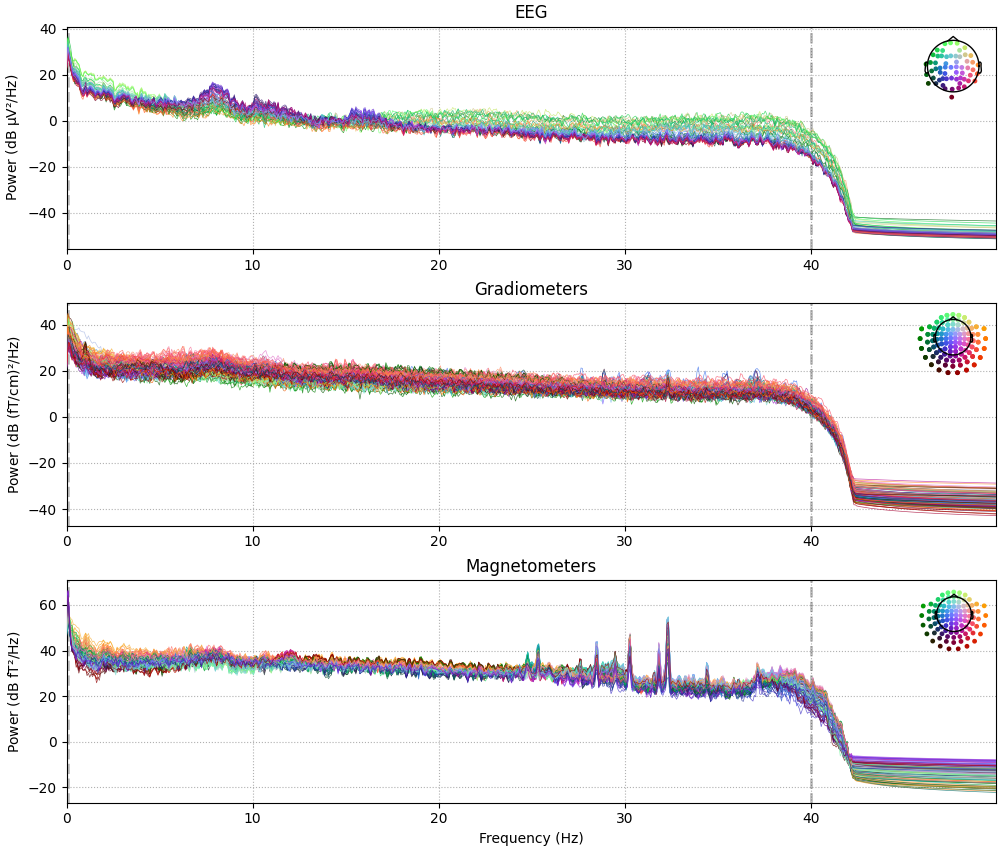
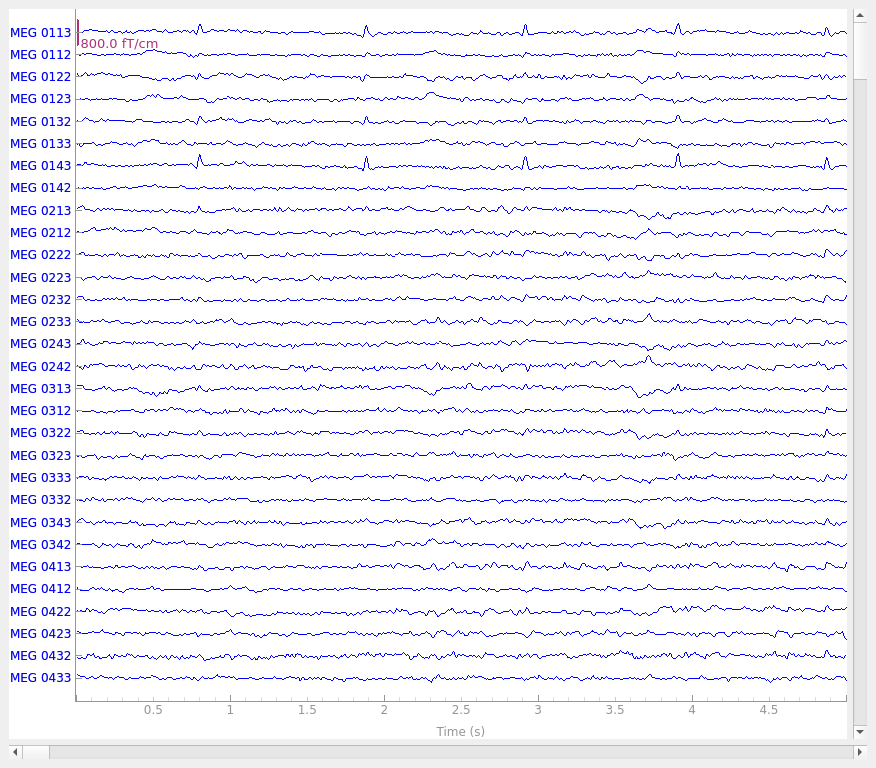
Raw 对象还内置了多种绘图方法;这里我们使用 compute_psd 显示每种传感器类型的功率谱密度(PSD),并使用 plot 绘制原始传感器信号轨迹。在 PSD 图中,我们只绘制 50 Hz 以下的频率(因为数据已在 40 Hz 处进行低通滤波)。在交互式 Python 会话中,plot 具有交互性,支持滚动、缩放、标记坏通道、添加注释、切换投影器等操作。
raw.compute_psd(fmax=50).plot(picks="data", exclude="bads", amplitude=False)
raw.plot(duration=5, n_channels=30)
Effective window size : 13.639 (s)
Plotting power spectral density (dB=True).
Using qt as 2D backend.
预处理#
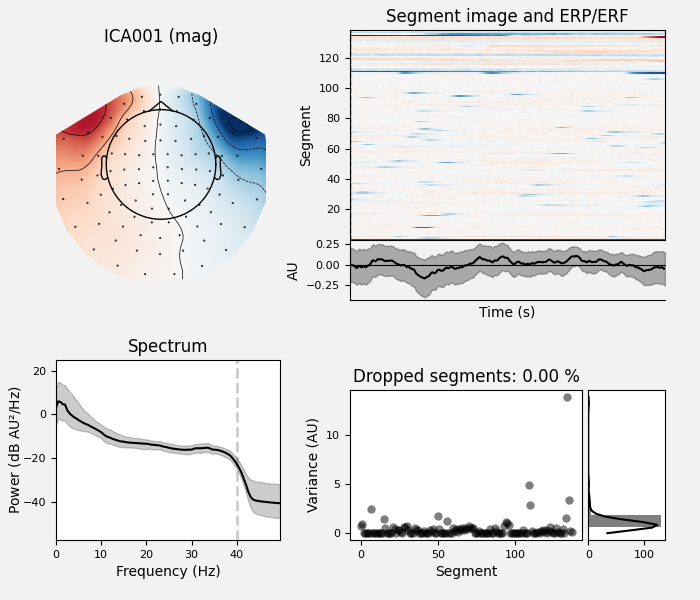
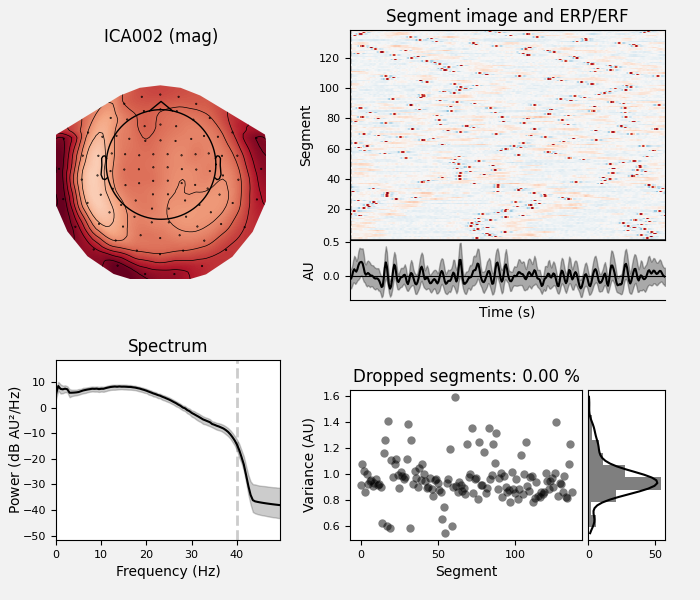
MNE-Python 支持多种预处理方法和技术(Maxwell 滤波、信号空间投影、独立成分分析、滤波、降采样等);完整的功能列表请参阅 mne.preprocessing 和 mne.filter 子模块。这里我们将通过执行独立成分分析(ICA)来清理数据;为简洁起见,将跳过用于确定哪些成分最能捕捉伪迹的步骤(该过程的详细讲解请参阅“使用 ICA 修复伪迹”)。
# set up and fit the ICA
ica = mne.preprocessing.ICA(n_components=20, rng=97, max_iter=800)
ica.fit(raw)
ica.exclude = [1, 2]  # details on how we picked these are omitted here
ica.plot_properties(raw, picks=ica.exclude)
Fitting ICA to data using 364 channels (please be patient, this may take a while)
Selecting by number: 20 components
Fitting ICA took 1.3s.
    Using multitaper spectrum estimation with 7 DPSS windows
Not setting metadata
138 matching events found
No baseline correction applied
0 projection items activated
Not setting metadata
138 matching events found
No baseline correction applied
0 projection items activated
确定要移除哪些成分后,将它们作为 exclude 参数传入,然后对原始信号应用 ICA。apply 方法要求原始数据已加载到内存中(默认情况下仅按需从磁盘读取),因此我们先使用 load_data。我们还会复制一份 Raw 对象,以便并排比较去除伪迹前后的信号:
orig_raw = raw.copy()
raw.load_data()
ica.apply(raw)

# show some frontal channels to clearly illustrate the artifact removal
chs = [
    "MEG 0111",
    "MEG 0121",
    "MEG 0131",
    "MEG 0211",
    "MEG 0221",
    "MEG 0231",
    "MEG 0311",
    "MEG 0321",
    "MEG 0331",
    "MEG 1511",
    "MEG 1521",
    "MEG 1531",
    "EEG 001",
    "EEG 002",
    "EEG 003",
    "EEG 004",
    "EEG 005",
    "EEG 006",
    "EEG 007",
    "EEG 008",
]
chan_idxs = [raw.ch_names.index(ch) for ch in chs]
orig_raw.plot(order=chan_idxs, start=12, duration=4)
raw.plot(order=chan_idxs, start=12, duration=4)
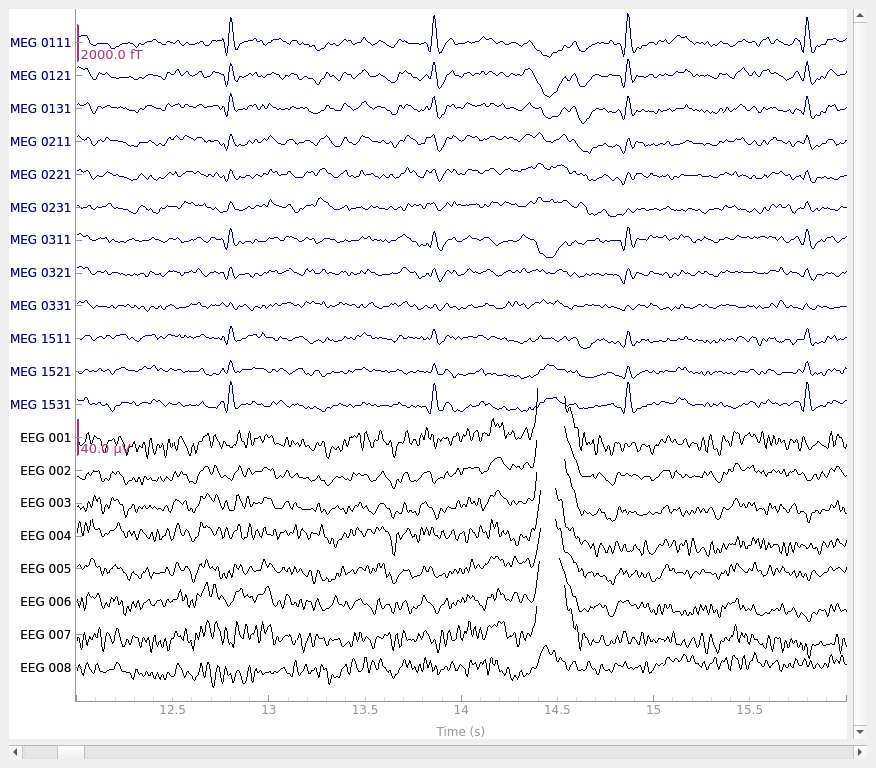
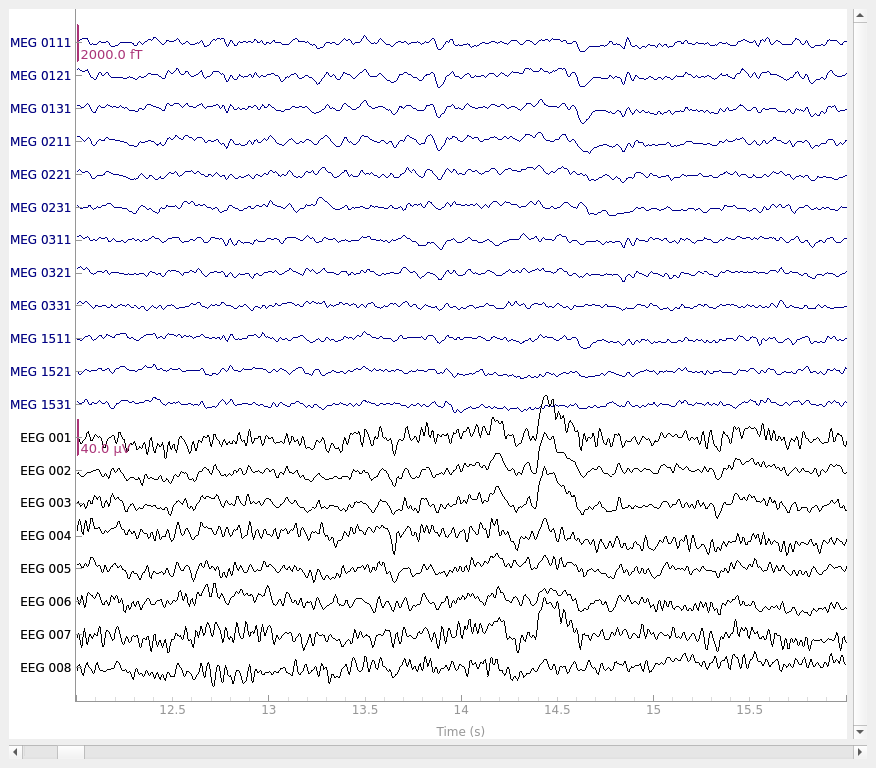
Reading 0 ... 41699  =      0.000 ...   277.709 secs...
Applying ICA to Raw instance
    Transforming to ICA space (20 components)
    Zeroing out 2 ICA components
    Projecting back using 364 PCA components
检测实验事件#
示例数据集包含多个“STIM”通道,用于记录刺激呈现计算机发送的电信号(表现为短暂的直流偏移/方波脉冲)。这些脉冲(通常称为“触发信号”或“trigger”)在该数据集中用于标记实验事件:刺激起始、刺激类型和受试者反应(按键)。各个 STIM 通道被合并到一个通道上,使得该通道上的电压水平能够被明确解码为特定的事件类型。在较旧的 Neuromag 系统上(例如用于记录示例数据的系统),该求和通道称为 STI 014,因此我们可以将该通道名传给 mne.find_events 函数,以恢复刺激事件的时间与身份。
events = mne.find_events(raw, stim_channel="STI 014")
print(events[:5])  # show the first 5
Finding events on: STI 014
319 events found on stim channel STI 014
Event IDs: [ 1  2  3  4  5 32]
[[6994    0    2]
 [7086    0    3]
 [7192    0    1]
 [7304    0    4]
 [7413    0    2]]
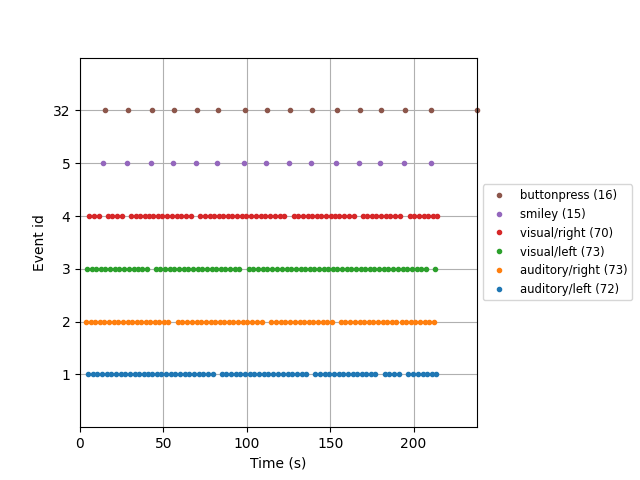
生成的 events 数组是一个普通的 3 列 NumPy 数组,第一列为采样点编号,最后一列为整数事件 ID;中间一列通常忽略。与其跟踪整数事件 ID,我们可以提供一个事件字典,将整数 ID 映射到实验条件或事件。在该数据集中,映射如下:
| 事件 ID | 条件 |
|---|---|
1 |
左耳的听觉刺激(音调) |
2 |
右耳的听觉刺激(音调) |
3 |
左侧视野的视觉刺激(棋盘格) |
4 |
右侧视野的视觉刺激(棋盘格) |
5 |
笑脸(catch trial) |
32 |
受试者按键 |
event_dict = {
    "auditory/left": 1,
    "auditory/right": 2,
    "visual/left": 3,
    "visual/right": 4,
    "smiley": 5,
    "buttonpress": 32,
}
从连续数据中提取分段时,会使用此类事件字典;字典键中的 / 字符允许通过请求部分条件描述符来跨条件合并(例如,请求 'auditory' 会选择事件 ID 为 1 和 2 的所有分段;请求 'left' 会选择事件 ID 为 1 和 3 的所有分段)。下一节将给出示例。此外还有便捷的 plot_events 函数,可用于可视化事件在整个记录时长内的分布(以确保事件检测按预期工作)。这里我们还会利用 Info 属性获取记录的采样频率(从而让 x 轴以秒而非采样点为单位)。
fig = mne.viz.plot_events(
    events, event_id=event_dict, sfreq=raw.info["sfreq"], first_samp=raw.first_samp
)
对于非事件相关范式(例如静息态数据分析),可以使用 mne.make_fixed_length_events 创建事件,提取等间隔(可能重叠)的数据片段,然后按下节所述进行分段。
将连续数据分段为 Epochs#
Raw 对象和 events 数组是创建 Epochs 对象所需的最基本要素,我们使用 Epochs 类构造函数来创建。这里还会指定一些数据质量约束:对于任一通道类型,若某个分段的峰峰值信号幅度超出合理范围,则将其剔除。这是通过剔除字典实现的;你可以为数据中出现的任意通道类型设置或省略阈值。此处给出的值对该数据集是合理的,但可能需针对不同硬件或记录条件进行调整。若希望采用更自动化的方法,可考虑使用 autoreject 包。
reject_criteria = dict(
    mag=4000e-15,  # 4000 fT
    grad=4000e-13,  # 4000 fT/cm
    eeg=150e-6,  # 150 µV
    eog=250e-6,
)  # 250 µV
我们还会将事件字典作为 event_id 参数传入(以便使用易于合并的事件标签,而不是整数事件 ID),并指定 tmin 和 tmax(相对于每个事件的分段起始和结束时间)。如上所述,默认情况下 Raw 和 Epochs 数据不会加载到内存中(仅在需要时从磁盘访问),但这里我们使用 preload=True 参数强制加载到内存,以便查看应用剔除标准后的结果:
epochs = mne.Epochs(
    raw,
    events,
    event_id=event_dict,
    tmin=-0.2,
    tmax=0.5,
    reject=reject_criteria,
    preload=True,
)
Not setting metadata
319 matching events found
Setting baseline interval to [-0.19979521315838786, 0.0] s
Applying baseline correction (mode: mean)
Created an SSP operator (subspace dimension = 4)
4 projection items activated
Using data from preloaded Raw for 319 events and 106 original time points ...
    Rejecting  epoch based on EOG : ['EOG 061']
    Rejecting  epoch based on EOG : ['EOG 061']
    Rejecting  epoch based on MAG : ['MEG 1711']
    Rejecting  epoch based on EOG : ['EOG 061']
    Rejecting  epoch based on EOG : ['EOG 061']
    Rejecting  epoch based on MAG : ['MEG 1711']
    Rejecting  epoch based on EEG : ['EEG 008']
    Rejecting  epoch based on EOG : ['EOG 061']
    Rejecting  epoch based on EOG : ['EOG 061']
    Rejecting  epoch based on EOG : ['EOG 061']
10 bad epochs dropped
接下来,我们将合并左/右刺激呈现,以便比较听觉与视觉响应。为避免信号偏向左侧或右侧,我们先使用 equalize_event_counts 从每个条件中随机抽取分段,使各条件的分段数与有效分段最少的条件一致。
conds_we_care_about = ["auditory/left", "auditory/right", "visual/left", "visual/right"]
epochs.equalize_event_counts(conds_we_care_about)  # this operates in-place
aud_epochs = epochs["auditory"]
vis_epochs = epochs["visual"]
del raw, epochs  # free up memory
Dropped 7 epochs: 121, 195, 258, 271, 273, 274, 275
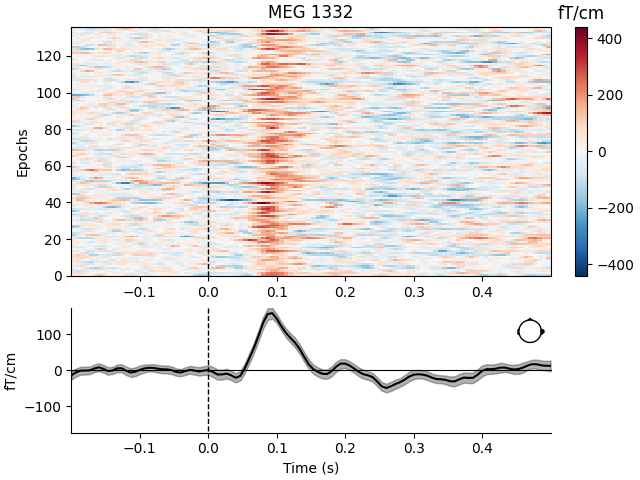
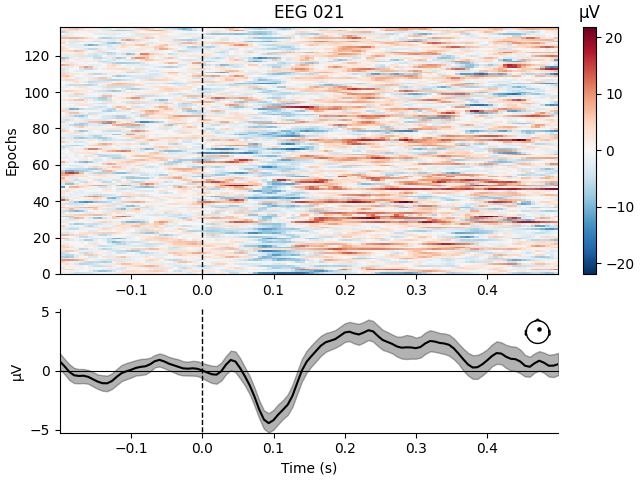
与 Raw 对象类似,Epochs 对象也内置了多种绘图方法。其中 plot_image 将每个分段显示为图像映射中的一行,颜色表示信号幅度;平均诱发响应和传感器位置显示在图像下方:
aud_epochs.plot_image(picks=["MEG 1332", "EEG 021"])
Not setting metadata
136 matching events found
No baseline correction applied
0 projection items activated
Not setting metadata
136 matching events found
No baseline correction applied
0 projection items activated
时频分析#
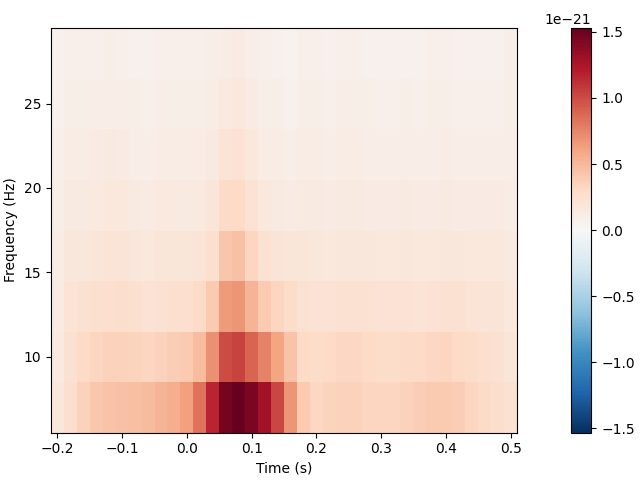
mne.time_frequency 子模块提供了多种算法的实现,用于计算时频表示、功率谱密度和互谱密度。例如,这里我们将使用 Morlet 小波计算听觉分段在不同频率和时间上的诱发功率。在该数据集上,结果信息量不大(仅显示出诱发性的“听觉 N100”响应);若需更丰富的示例,请参阅使用频率内容更丰富的数据集的扩展示例。
frequencies = np.arange(7, 30, 3)
power = aud_epochs.compute_tfr(
    "morlet", n_cycles=2, return_itc=False, freqs=frequencies, decim=3, average=True
)
power.plot(["MEG 1332"])
No baseline correction applied
估计诱发响应#
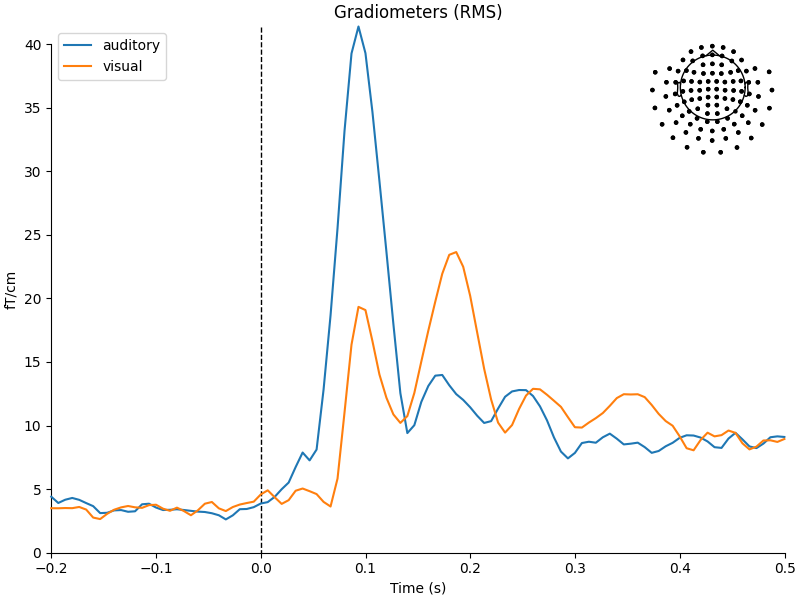
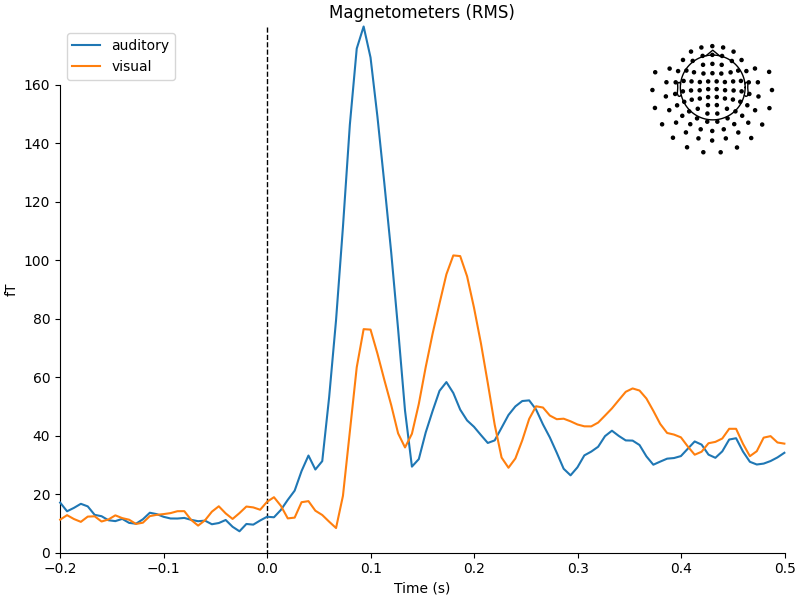
现在条件已分别保存在 aud_epochs 和 vis_epochs 中,我们可以通过对每个条件的分段进行平均,估计听觉与视觉刺激的诱发响应。只需在 Epochs 对象上调用 average 方法,然后使用 mne.viz 模块中的函数比较两个 Evoked 对象各传感器类型的全局场功率:
aud_evoked = aud_epochs.average()
vis_evoked = vis_epochs.average()

mne.viz.plot_compare_evokeds(
    dict(auditory=aud_evoked, visual=vis_evoked),
    legend="upper left",
    show_sensors="upper right",
)
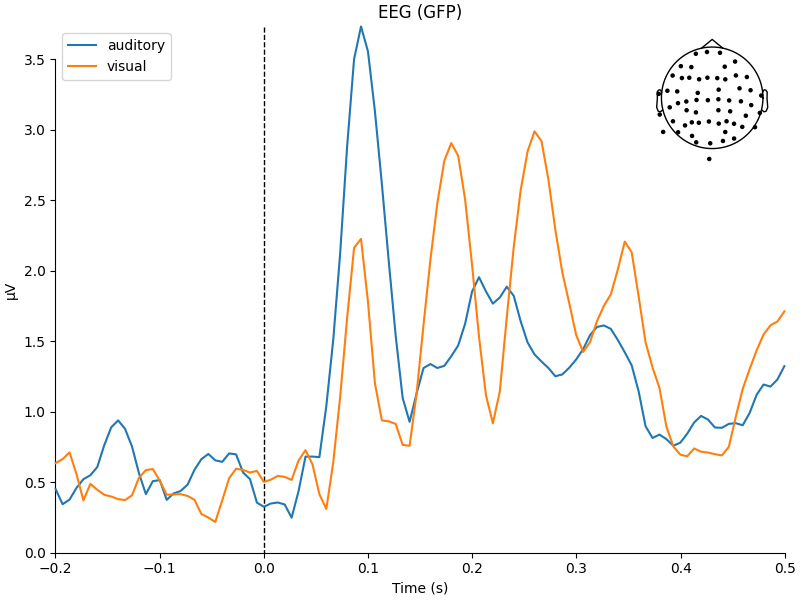
Multiple channel types selected, returning one figure per type.
combining channels using RMS (grad channels)
combining channels using RMS (grad channels)
combining channels using RMS (mag channels)
combining channels using RMS (mag channels)
combining channels using GFP (eeg channels)
combining channels using GFP (eeg channels)
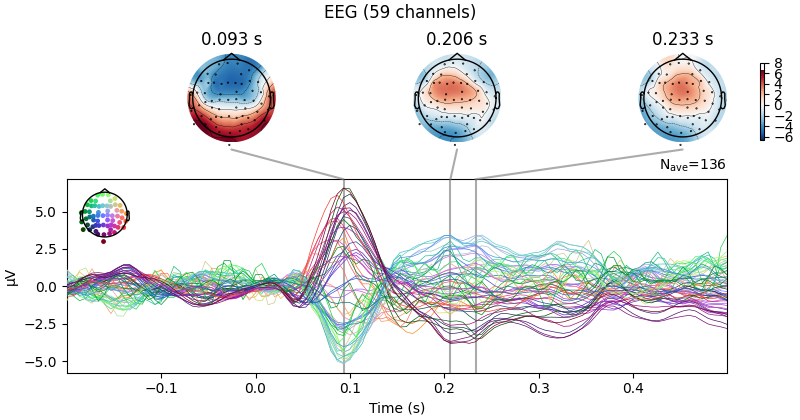
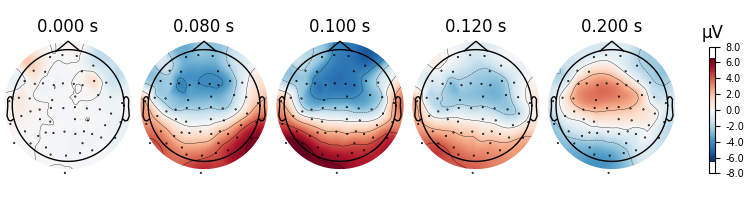
我们还可以使用 plot_joint 或 plot_topomap 等其他绘图方法更详细地查看每个 Evoked 对象。这里仅考察 EEG 通道,观察背侧额区电极上经典的听觉诱发 N100-P200 模式,然后在一些额外的任意时间点绘制头皮地形图:
aud_evoked.plot_joint(picks="eeg")
aud_evoked.plot_topomap(times=[0.0, 0.08, 0.1, 0.12, 0.2], ch_type="eeg")
Projections have already been applied. Setting proj attribute to True.
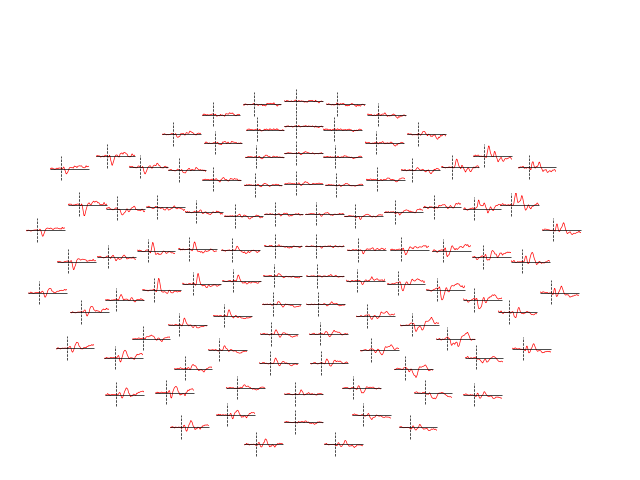
还可以使用 mne.combine_evoked 函数组合 Evoked 对象,以展示条件间的对比。传入 weights=[1, -1] 即可生成简单的差异波。随后我们使用 plot_topo 绘制每个传感器上的差异波:
evoked_diff = mne.combine_evoked([aud_evoked, vis_evoked], weights=[1, -1])
evoked_diff.pick(picks="mag").plot_topo(color="r", legend=False)
逆问题建模#
最后,我们可以将传感器数据投影到该受试者的源空间(由结构性 MRI 扫描估计得到的一组点,位于该受试者皮层表面或皮层体积内),从而估计诱发活动的来源。MNE-Python 支持多种方法(动态统计参数映射、偶极子拟合、波束形成器等);这里我们使用最小范数估计(MNE)生成约束在皮层表面上的连续激活图。MNE 使用线性逆算子将 EEG+MEG 传感器测量投影到源空间。逆算子由该受试者的正向解和传感器测量协方差的估计计算得到。本教程中我们将跳过这些计算步骤,直接从磁盘加载预先计算好的逆算子(它包含在示例数据中)。由于该“逆问题”是欠定的(解不唯一),这里我们通过提供一个正则化参数来进一步约束解,该参数以信噪比形式指定电流估计的相对平滑程度(此处的“噪声”类似于整个皮层范围内的基线活动水平)。
# load inverse operator
inverse_operator_file = (
    sample_data_folder / "MEG" / "sample" / "sample_audvis-meg-oct-6-meg-inv.fif"
)
inv_operator = mne.minimum_norm.read_inverse_operator(inverse_operator_file)
# set signal-to-noise ratio (SNR) to compute regularization parameter (λ²)
snr = 3.0
lambda2 = 1.0 / snr**2
# generate the source time course (STC)
stc = mne.minimum_norm.apply_inverse(
    vis_evoked, inv_operator, lambda2=lambda2, method="MNE"
)  # or dSPM, sLORETA, eLORETA
Reading inverse operator decomposition from /home/circleci/mne_data/MNE-sample-data/MEG/sample/sample_audvis-meg-oct-6-meg-inv.fif...
    Reading inverse operator info...
    [done]
    Reading inverse operator decomposition...
    [done]
    305 x 305 full covariance (kind = 1) found.
    Read a total of 4 projection items:
        PCA-v1 (1 x 10²) active
        PCA-v2 (1 x 10²) active
        PCA-v3 (1 x 10²) active
        Average EEG reference (1 x 60) active
    Noise covariance matrix read.
    22494 x 22494 diagonal covariance (kind = 2) found.
    Source covariance matrix read.
    22494 x 22494 diagonal covariance (kind = 6) found.
    Orientation priors read.
    22494 x 22494 diagonal covariance (kind = 5) found.
    Depth priors read.
    Did not find the desired covariance matrix (kind = 3)
    Reading a source space...
    Computing patch statistics...
    Patch information added...
    Distance information added...
    [done]
    Reading a source space...
    Computing patch statistics...
    Patch information added...
    Distance information added...
    [done]
    2 source spaces read
    Read a total of 4 projection items:
        PCA-v1 (1 x 10²) active
        PCA-v2 (1 x 10²) active
        PCA-v3 (1 x 10²) active
        Average EEG reference (1 x 60) active
    Source spaces transformed to the inverse solution coordinate frame
Preparing the inverse operator for use...
    Scaled noise and source covariance from nave = 1 to nave = 136
    Created the regularized inverter
    Created an SSP operator (subspace dimension = 3)
    Created the whitener using a noise covariance matrix with rank 302 (3 small eigenvalues omitted)
Applying inverse operator to "0.50 × visual/left + 0.50 × visual/right"...
    Picked 305 channels from the data
    Computing inverse...
    Eigenleads need to be weighted ...
    Computing residual...
    Explained  70.2% variance
    Combining the current components...
[done]
最后,为了在受试者的皮层表面上绘制源估计,我们还需要示例受试者结构性 MRI 文件的路径(subjects_dir):
# path to subjects' MRI files
subjects_dir = sample_data_folder / "subjects"
# plot the STC
stc.plot(
    initial_time=0.1, hemi="split", views=["lat", "med"], subjects_dir=subjects_dir
)
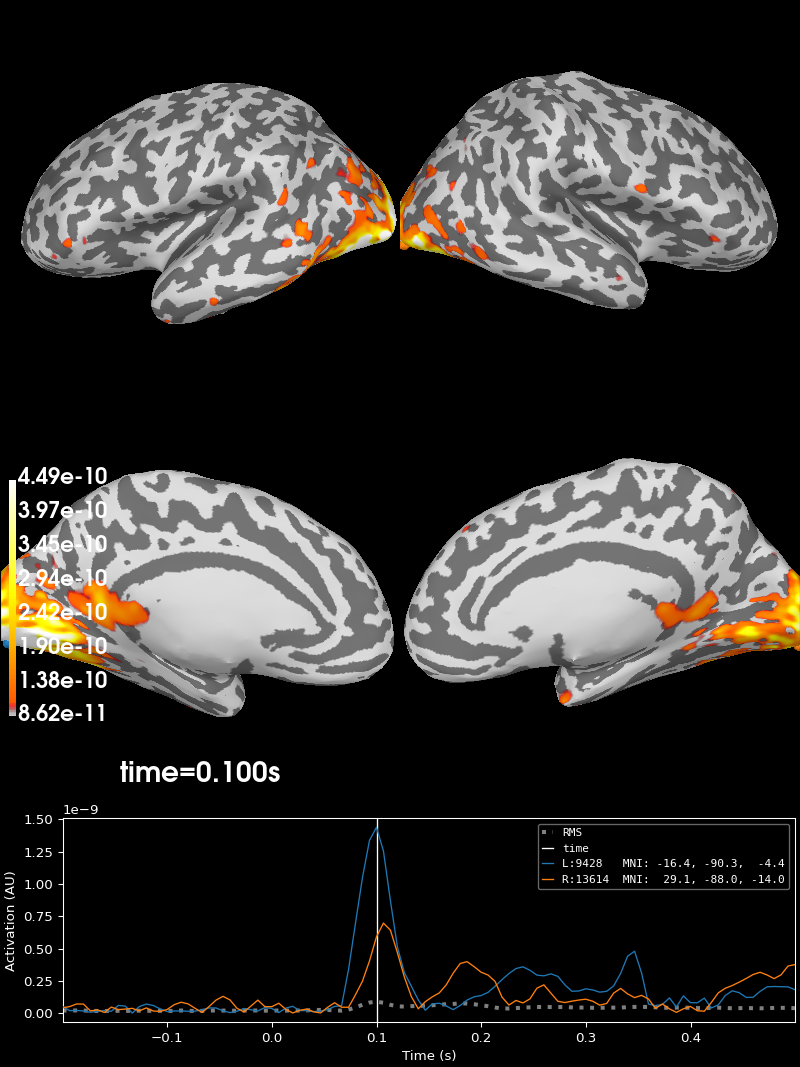
Using control points [8.61922423e-11 1.06837855e-10 4.49139511e-10]
我们还可以在同一大脑上显示多个条件。这里比较右半球上的听觉(红色)和视觉(蓝色)MNE 解。时间查看器中的“Overlay”下拉菜单可让你分别检查每一层:
stc_aud = mne.minimum_norm.apply_inverse(
    aud_evoked, inv_operator, lambda2=lambda2, method="dSPM"
)
stc_vis = mne.minimum_norm.apply_inverse(
    vis_evoked, inv_operator, lambda2=lambda2, method="dSPM"
)
brain = stc_aud.plot(
    initial_time=0.1,
    hemi="rh",
    views="lat",
    subjects_dir=subjects_dir,
    colormap="Reds",
    alpha=0.8,
    add_data_kwargs=dict(key="auditory"),
)
fmin_vis, fmid_vis, fmax_vis = np.percentile(stc_vis.rh_data, [50, 90, 99])
brain.add_data(
    stc_vis.rh_data,
    vertices=stc_vis.rh_vertno,
    hemi="rh",
    fmin=fmin_vis,
    fmid=fmid_vis,
    fmax=fmax_vis,
    colormap="Blues",
    transparent=True,
    alpha=0.8,
    time=stc_vis.times,
    initial_time=0.1,
    key="visual",
    remove_existing=False,
)
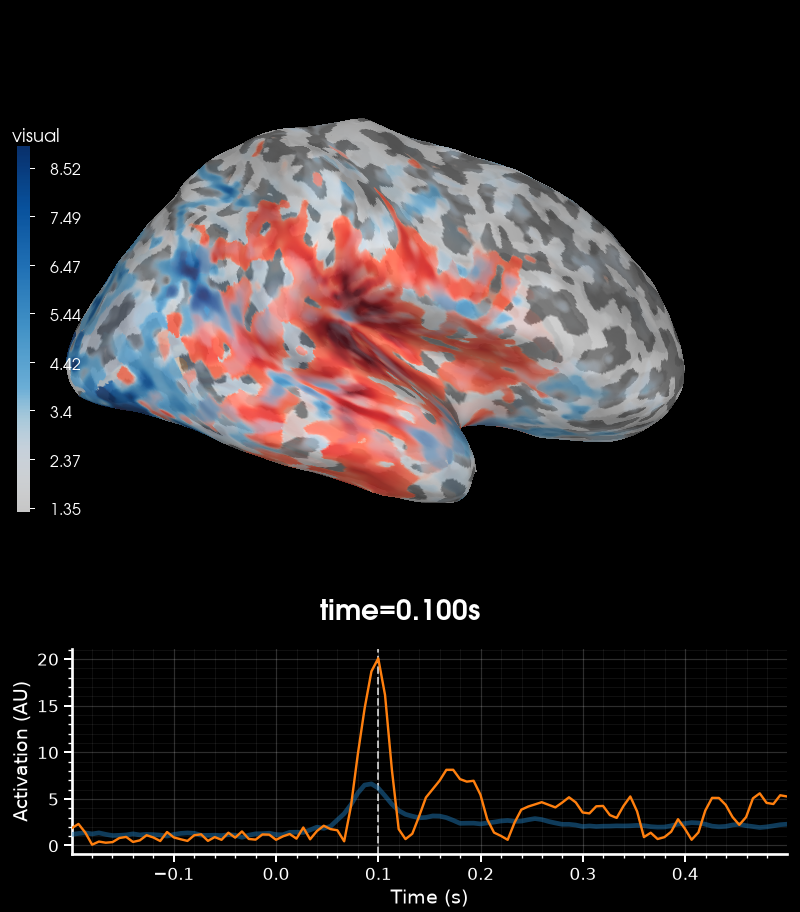
Preparing the inverse operator for use...
    Scaled noise and source covariance from nave = 1 to nave = 136
    Created the regularized inverter
    Created an SSP operator (subspace dimension = 3)
    Created the whitener using a noise covariance matrix with rank 302 (3 small eigenvalues omitted)
    Computing noise-normalization factors (dSPM)...
[done]
Applying inverse operator to "0.50 × auditory/left + 0.50 × auditory/right"...
    Picked 305 channels from the data
    Computing inverse...
    Eigenleads need to be weighted ...
    Computing residual...
    Explained  69.5% variance
    Combining the current components...
    dSPM...
[done]
Preparing the inverse operator for use...
    Scaled noise and source covariance from nave = 1 to nave = 136
    Created the regularized inverter
    Created an SSP operator (subspace dimension = 3)
    Created the whitener using a noise covariance matrix with rank 302 (3 small eigenvalues omitted)
    Computing noise-normalization factors (dSPM)...
[done]
Applying inverse operator to "0.50 × visual/left + 0.50 × visual/right"...
    Picked 305 channels from the data
    Computing inverse...
    Eigenleads need to be weighted ...
    Computing residual...
    Explained  70.2% variance
    Combining the current components...
    dSPM...
[done]
Using control points [ 4.90767314  5.83882245 25.64749582]
其余教程将对上述每个主题提供更详细的介绍(还包括此处未提及的 MNE-Python 许多其他功能:连接性分析、编码/解码模型、更多可视化选项等)。继续阅读以了解更多!
脚本总运行时间:(0 分 25.072 秒)