
说明
转到末尾下载完整示例代码。
滤波与重采样#
本教程介绍滤波与重采样,并举例说明如何利用滤波修复伪迹。
和往常一样,我们首先导入必要的 Python 模块并加载一些示例数据。为节省文档服务器的内存,我们还会将数据裁剪到 60 秒:
# Authors: The MNE-Python contributors.
# License: BSD-3-Clause
# Copyright the MNE-Python contributors.
import os

import matplotlib.pyplot as plt
import numpy as np

import mne

sample_data_folder = mne.datasets.sample.data_path()
sample_data_raw_file = os.path.join(
    sample_data_folder, "MEG", "sample", "sample_audvis_raw.fif"
)
raw = mne.io.read_raw_fif(sample_data_raw_file)
# use just 60 seconds of data and mag channels, to save memory
raw.crop(0, 60).pick(picks=["mag", "stim"]).load_data()
Opening raw data file /home/circleci/mne_data/MNE-sample-data/MEG/sample/sample_audvis_raw.fif...
    Read a total of 3 projection items:
        PCA-v1 (1 x 10²)  idle
        PCA-v2 (1 x 10²)  idle
        PCA-v3 (1 x 10²)  idle
    Range : 25800 ... 192599 =     42.956 ...   320.670 secs
Ready.
Reading 0 ... 36037  =      0.000 ...    60.000 secs...
滤波基础#
滤波器会去除或衰减信号中的部分成分。通常,滤波器作用于信号的特定频率范围——例如抑制某个截止值以上或以下的全部频率成分。设计数字滤波器的方法有很多;关于在 MNE-Python 中滤波生理信号的各种方法,更详细的讨论请参见滤波背景知识。
通过滤波修复伪迹#
局限于窄频率范围的伪迹有时可以通过对数据滤波来修复。慢漂移和工频噪声就是两种频率范围受限的伪迹。下面我们演示如何通过滤波分别修复这两种伪迹。
慢漂移#
原始数据中的低频漂移通常可以通过用 plot() 方法绘制较长时段的数据来发现,不过关闭逐通道的直流偏移校正有助于让慢漂移更容易显现。这里我们绘制 60 秒的数据,显示所有磁强计通道:
raw.plot(duration=60, proj=False, n_channels=len(raw.ch_names), remove_dc=False)
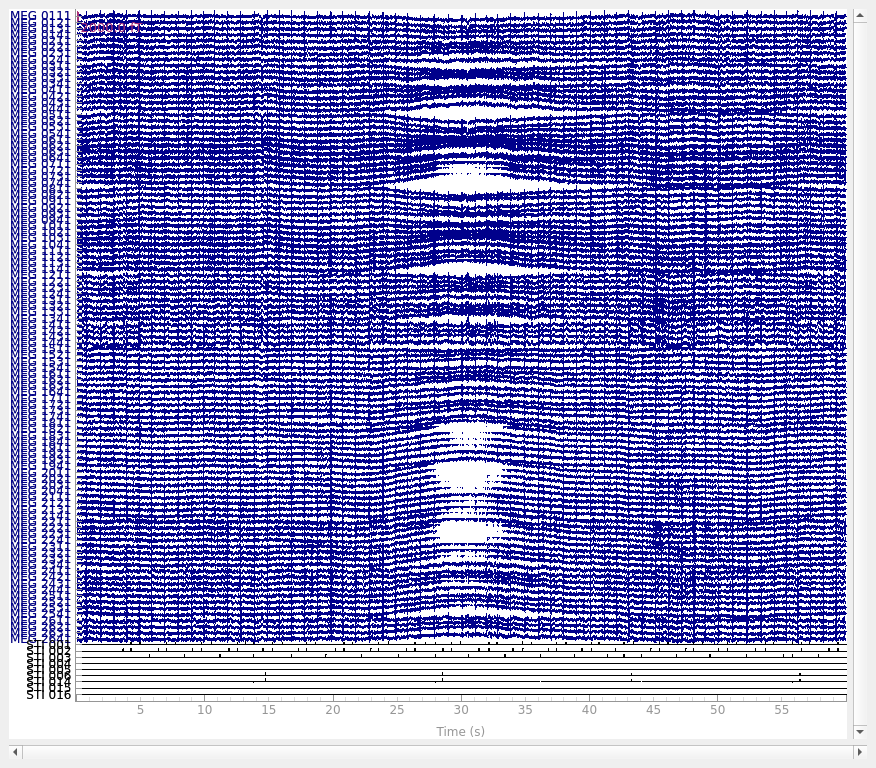
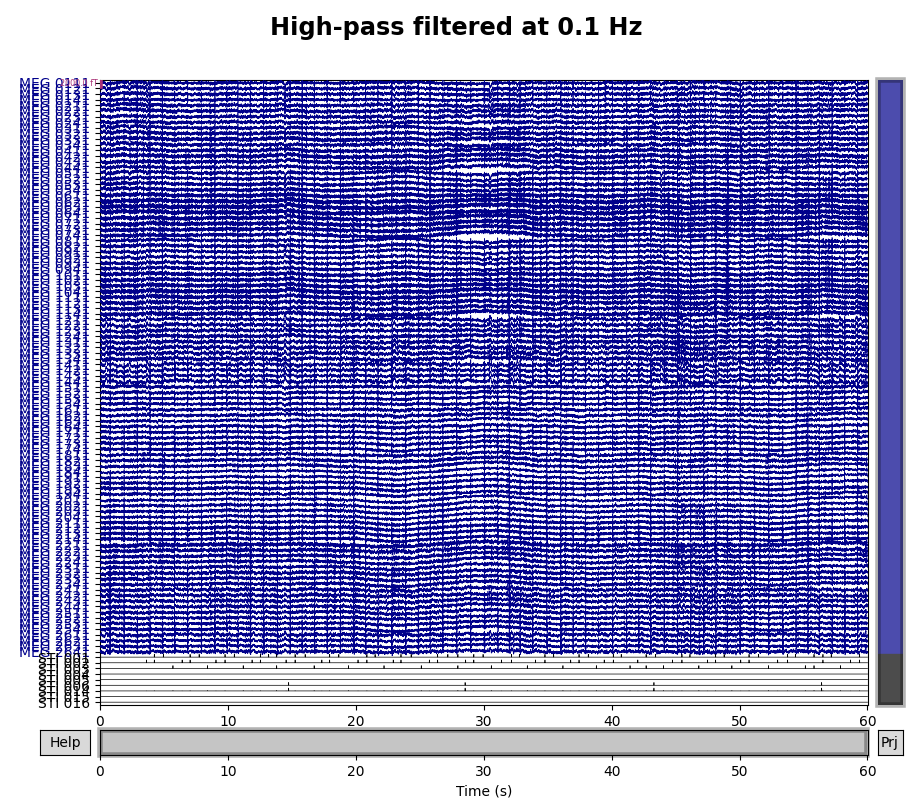
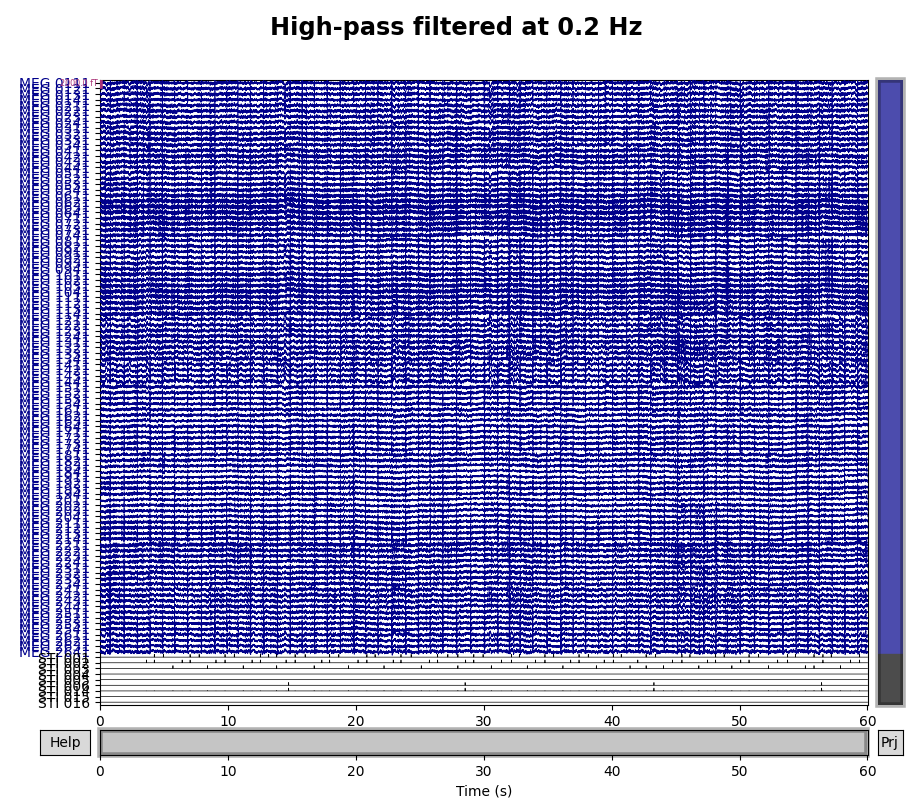
这一慢漂移的半个周期似乎持续约 10 秒,因此一个完整周期约为 20 秒,即 \(\frac{1}{20} \mathrm{Hz}\)。为确保排除这些成分,我们希望高通频率高于该值,因此尝试 \(\frac{1}{10} \mathrm{Hz}\) 和 \(\frac{1}{5} \mathrm{Hz}\) 的滤波器,看哪一个效果最好:
for cutoff in (0.1, 0.2):
    raw_highpass = raw.copy().filter(l_freq=cutoff, h_freq=None)
    with mne.viz.use_browser_backend("matplotlib"):
        fig = raw_highpass.plot(
            duration=60, proj=False, n_channels=len(raw.ch_names), remove_dc=False
        )
    fig.subplots_adjust(top=0.9)
    fig.suptitle(f"High-pass filtered at {cutoff} Hz", size="xx-large", weight="bold")
Filtering raw data in 1 contiguous segment
Setting up high-pass filter at 0.1 Hz

FIR filter parameters
---------------------
Designing a one-pass, zero-phase, non-causal highpass filter:
- Windowed time-domain design (firwin) method
- Hamming window with 0.0194 passband ripple and 53 dB stopband attenuation
- Lower passband edge: 0.10
- Lower transition bandwidth: 0.10 Hz (-6 dB cutoff frequency: 0.05 Hz)
- Filter length: 19821 samples (33.001 s)

Using matplotlib as 2D backend.
Using qt as 2D backend.
Filtering raw data in 1 contiguous segment
Setting up high-pass filter at 0.2 Hz

FIR filter parameters
---------------------
Designing a one-pass, zero-phase, non-causal highpass filter:
- Windowed time-domain design (firwin) method
- Hamming window with 0.0194 passband ripple and 53 dB stopband attenuation
- Lower passband edge: 0.20
- Lower transition bandwidth: 0.20 Hz (-6 dB cutoff frequency: 0.10 Hz)
- Filter length: 9911 samples (16.501 s)

Using matplotlib as 2D backend.
Using qt as 2D backend.
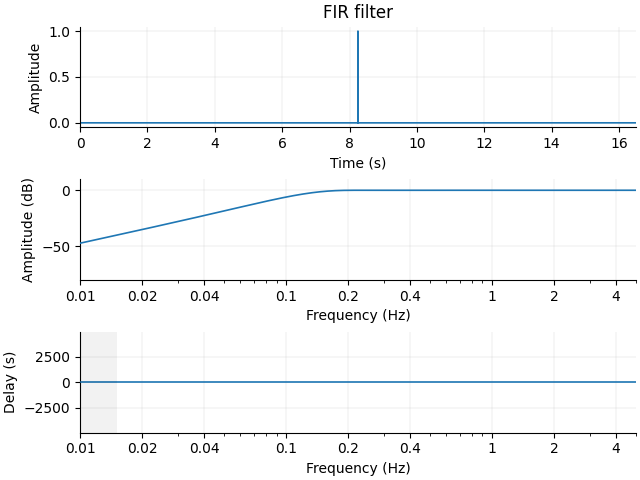
看起来 0.1 Hz 还不够高,未能完全去除慢漂移。请注意,文本输出概括了所创建滤波器的相关特性。如果想可视化滤波器,可以将上面调用 raw.filter() 时使用的相同参数传给 mne.filter.create_filter() 函数以获得滤波器参数,然后再将滤波器参数传给 mne.viz.plot_filter()。create_filter() 还需要参数 data(一个 NumPy array)和 sfreq(数据的采样频率),因此我们将从 Raw 对象中提取这些内容:
filter_params = mne.filter.create_filter(
    raw.get_data(), raw.info["sfreq"], l_freq=0.2, h_freq=None
)
Setting up high-pass filter at 0.2 Hz

FIR filter parameters
---------------------
Designing a one-pass, zero-phase, non-causal highpass filter:
- Windowed time-domain design (firwin) method
- Hamming window with 0.0194 passband ripple and 53 dB stopband attenuation
- Lower passband edge: 0.20
- Lower transition bandwidth: 0.20 Hz (-6 dB cutoff frequency: 0.10 Hz)
- Filter length: 9911 samples (16.501 s)
请注意,输出与使用 raw.filter() 将该滤波器应用于数据时相同。现在你可以将滤波器参数(以及采样频率)传给 plot_filter() 来绘制该滤波器:
mne.viz.plot_filter(filter_params, raw.info["sfreq"], flim=(0.01, 5))
工频噪声#
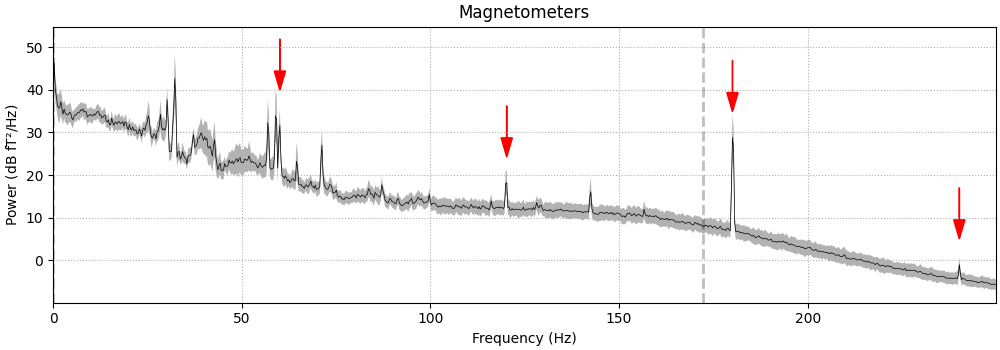
工频噪声是一种环境伪迹,表现为围绕交流电网频率的持续振荡。工频伪迹在频谱图上最容易观察,因此我们将使用 compute_psd() 获得 Spectrum 对象,并用其 plot() 方法进行展示。我们还会编写一个小函数,在频谱图上添加箭头以突出这些伪迹:
def add_arrows(axes):
    """Add some arrows at 60 Hz and its harmonics."""
    for ax in axes:
        freqs = ax.lines[-1].get_xdata()
        psds = ax.lines[-1].get_ydata()
        for freq in (60, 120, 180, 240):
            idx = np.searchsorted(freqs, freq)
            # get ymax of a small region around the freq. of interest
            y = psds[(idx - 4) : (idx + 5)].max()
            ax.arrow(
                x=freqs[idx],
                y=y + 18,
                dx=0,
                dy=-12,
                color="red",
                width=0.1,
                head_width=3,
                length_includes_head=True,
            )


fig = raw.compute_psd(fmax=250).plot(
    average=True, amplitude=False, picks="data", exclude="bads"
)
add_arrows(fig.axes[:2])
Effective window size : 3.410 (s)
Plotting power spectral density (dB=True).
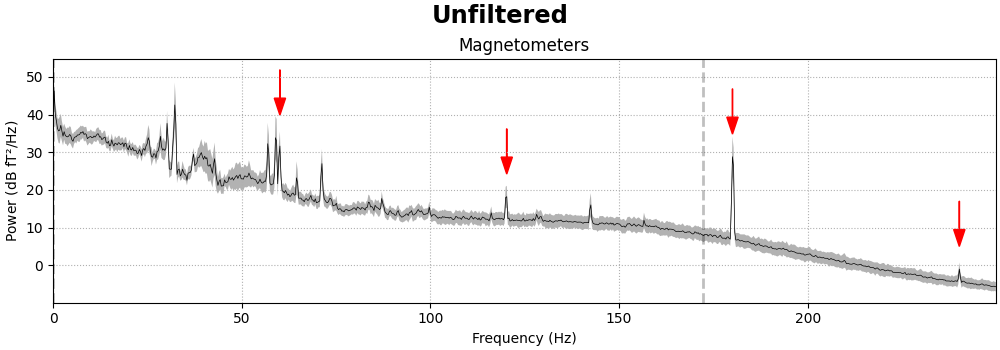
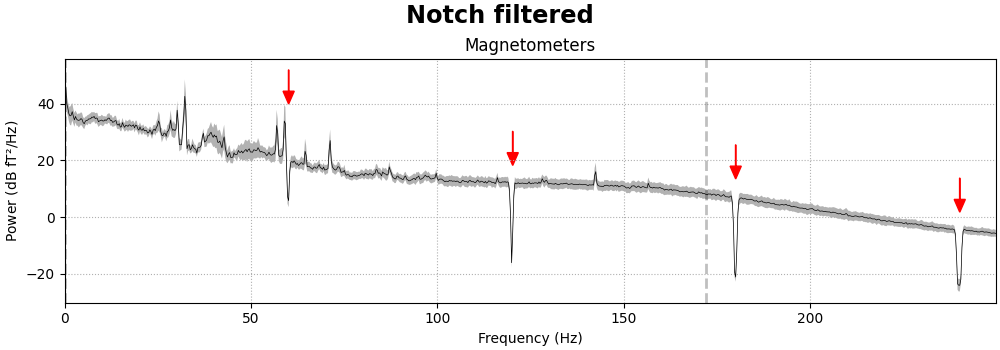
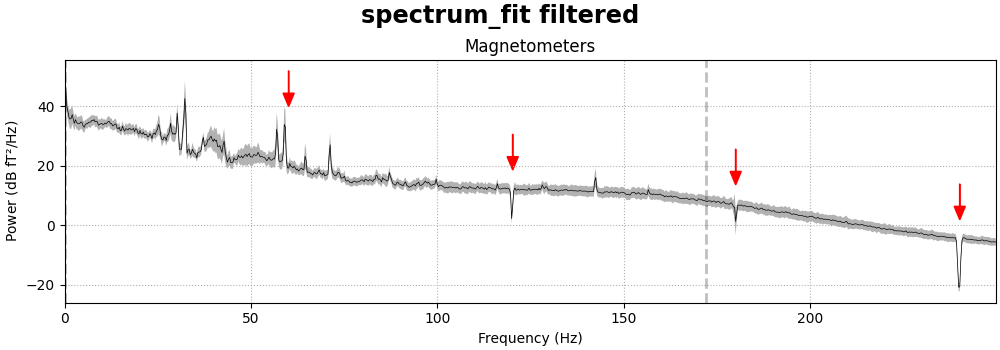
应当很明显,MEG 通道比在磁屏蔽室内记录的 EEG 更容易受到这类干扰。去除工频噪声可以用陷波滤波器完成,直接应用于 Raw 对象,并指定要衰减的频率数组。由于 EEG 通道相对不受工频噪声影响,我们还会指定 picks 参数,使只有磁强计和梯度计被滤波:
meg_picks = mne.pick_types(raw.info, meg=True)
freqs = (60, 120, 180, 240)
raw_notch = raw.copy().notch_filter(freqs=freqs, picks=meg_picks)
for title, data in zip(["Un", "Notch "], [raw, raw_notch]):
    fig = data.compute_psd(fmax=250).plot(
        average=True, amplitude=False, picks="data", exclude="bads"
    )
    fig.suptitle(f"{title}filtered", size="xx-large", weight="bold")
    add_arrows(fig.axes[:2])
Filtering raw data in 1 contiguous segment
Setting up band-stop filter

FIR filter parameters
---------------------
Designing a one-pass, zero-phase, non-causal bandstop filter:
- Windowed time-domain design (firwin) method
- Hamming window with 0.0194 passband ripple and 53 dB stopband attenuation
- Lower transition bandwidth: 0.50 Hz
- Upper transition bandwidth: 0.50 Hz
- Filter length: 3965 samples (6.602 s)

Effective window size : 3.410 (s)
Plotting power spectral density (dB=True).
Effective window size : 3.410 (s)
Plotting power spectral density (dB=True).
notch_filter() 还具有用于控制陷波宽度、过渡带宽以及滤波器其他方面的参数。详见其文档字符串。
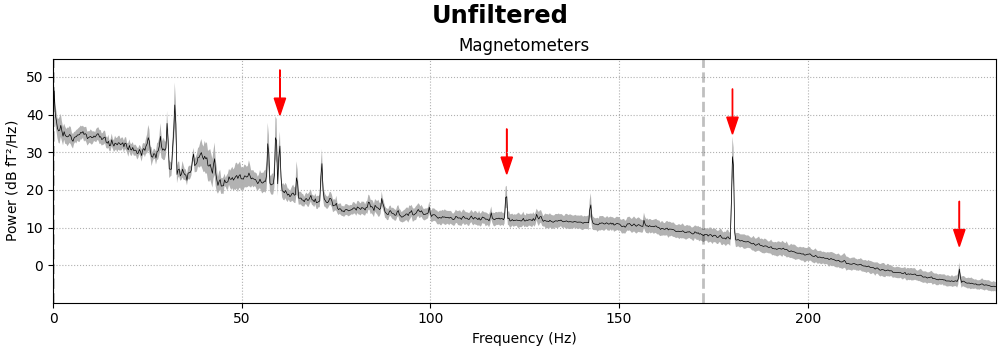
也可以尝试使用频谱拟合方法来执行陷波滤波。原则上它可以自动检测需要陷波的频率,但我们的实现通常无法可靠地做到这一点,因此我们改为指定要移除的频率,而它能很好地去除这些频率处的线路噪声。
raw_notch_fit = raw.copy().notch_filter(
    freqs=freqs, picks=meg_picks, method="spectrum_fit", filter_length="10s"
)
for title, data in zip(["Un", "spectrum_fit "], [raw, raw_notch_fit]):
    fig = data.compute_psd(fmax=250).plot(
        average=True, amplitude=False, picks="data", exclude="bads"
    )
    fig.suptitle(f"{title}filtered", size="xx-large", weight="bold")
    add_arrows(fig.axes[:2])
Filtering raw data in 1 contiguous segment
Removed notch frequencies (Hz):
     60.00 : 1122 windows
    120.00 : 1122 windows
    180.00 : 1122 windows
    239.00 : 1122 windows
    240.00 : 1122 windows
    241.00 : 1122 windows
Effective window size : 3.410 (s)
Plotting power spectral density (dB=True).
Effective window size : 3.410 (s)
Plotting power spectral density (dB=True).
重采样#
EEG 和 MEG 记录以其高时间精度著称,采样率通常在 1000 Hz 左右或更高。当事件的精确定时对实验设计或分析计划很重要时,这很有好处,但在处理数据时也会消耗更多内存和计算资源。如果信号的高频成分不重要,且不需要精确的定时(例如在长记录上计算 EOG 或 ECG 投影),那么对信号进行降采样可以有效地节省时间。
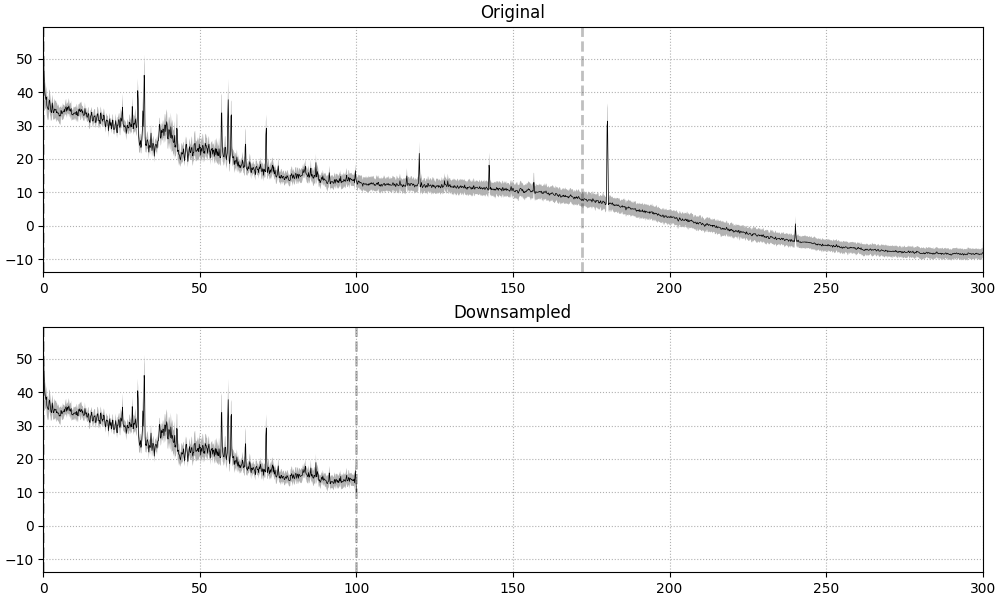
在 MNE-Python 中,重采样方法(raw.resample()、epochs.resample() 和 evoked.resample())会对信号施加低通滤波以避免混叠,因此你无需自己先显式滤波。使用 raw.resample()、epochs.resample() 或 evoked.resample() 时发生的这种内置滤波,是在所需新采样率的奈奎斯特频率处、于频域中应用的一种砖墙滤波器。这可以在 PSD 图中清楚地看到,图中虚线竖线表示滤波器截止频率;原始数据已有约 172 Hz 的低通(见 raw.info['lowpass']),而从约 600 Hz 重采样到 200 Hz 的数据会自动在 100 Hz(目标采样率 200 Hz 的奈奎斯特频率)处进行低通滤波:
raw_downsampled = raw.copy().resample(sfreq=200)
# choose n_fft for Welch PSD to make frequency axes similar resolution
n_ffts = [4096, int(round(4096 * 200 / raw.info["sfreq"]))]
fig, axes = plt.subplots(2, 1, sharey=True, layout="constrained", figsize=(10, 6))
for ax, data, title, n_fft in zip(
    axes, [raw, raw_downsampled], ["Original", "Downsampled"], n_ffts
):
    fig = data.compute_psd(n_fft=n_fft).plot(
        average=True, amplitude=False, picks="data", exclude="bads", axes=ax
    )
    ax.set(title=title, xlim=(0, 300))
Finding events on: STI 014
86 events found on stim channel STI 014
Event IDs: [ 1  2  3  4  5 32]
Finding events on: STI 014
86 events found on stim channel STI 014
Event IDs: [ 1  2  3  4  5 32]
Effective window size : 6.820 (s)
Plotting power spectral density (dB=True).
Effective window size : 6.820 (s)
Plotting power spectral density (dB=True).
默认情况下,MNE-Python 使用 method="fft" 进行重采样,即通过 scipy.signal.resample() 执行基于 FFT 的重采样。虽然这种方法高效且适用于大多数生物信号,但它有两个主要潜在缺点:
它假设信号具有周期性。我们尝试通过适当的信号填充来克服这一点,但仍可能发生一些信号泄漏。
它将整个信号视为一个单一数据块。这意味着一般情况下不保证效应在时间上局部化,尽管在实践中它们往往是局部化的。
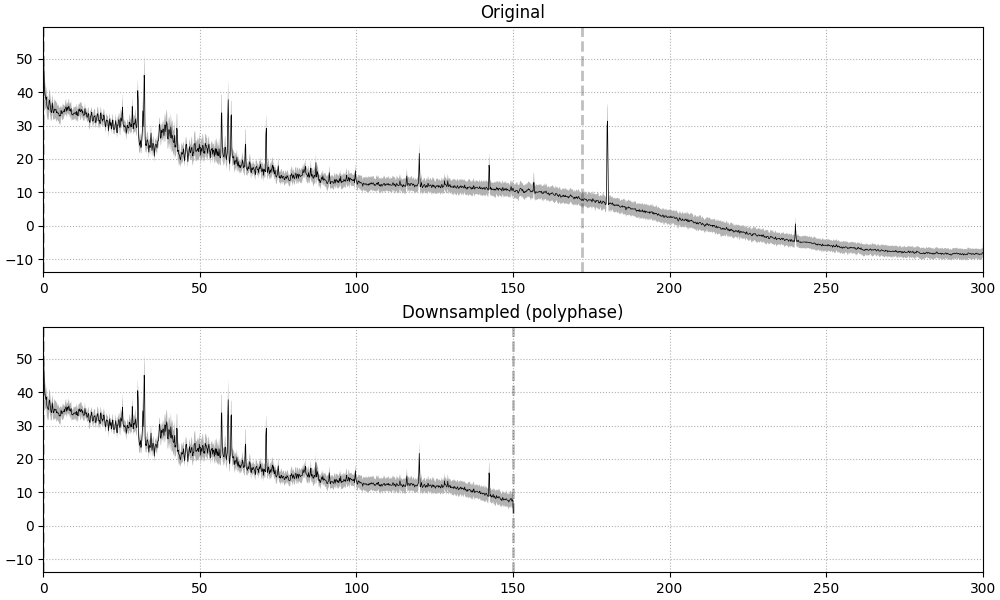
或者,也可以改用 method="polyphase" 进行重采样。其底层使用 scipy.signal.resample_poly(),后者又采用三步过程对信号进行重采样(详见 scipy.signal.upfirdn())。这一过程保证每个重采样输出值只受有限范围内输入值的影响。换句话说,输出值保证是某一组特定输入值的结果。
一般来说,当所需采样率与输入采样率相差整数倍时,使用 method="polyphase" 也可能比 method="fft" 更快。例如:
n_ffts = [4096, 2048]  # factor of 2 smaller n_fft
raw_downsampled_poly = raw.copy().resample(
    sfreq=raw.info["sfreq"] / 2.0,
    method="polyphase",
    verbose=True,
)
fig, axes = plt.subplots(2, 1, sharey=True, layout="constrained", figsize=(10, 6))
for ax, data, title, n_fft in zip(
    axes, [raw, raw_downsampled_poly], ["Original", "Downsampled (polyphase)"], n_ffts
):
    data.compute_psd(n_fft=n_fft).plot(
        average=True, amplitude=False, picks="data", exclude="bads", axes=ax
    )
    ax.set(title=title, xlim=(0, 300))
Finding events on: STI 014
86 events found on stim channel STI 014
Event IDs: [ 1  2  3  4  5 32]
Polyphase resampling neighborhood: ±2 input samples
Finding events on: STI 014
86 events found on stim channel STI 014
Event IDs: [ 1  2  3  4  5 32]
Effective window size : 6.820 (s)
Plotting power spectral density (dB=True).
Effective window size : 6.820 (s)
Plotting power spectral density (dB=True).
由于重采样涉及滤波,在分析流程的不同阶段进行重采样存在一些陷阱:
对
Raw数据(在分段之前)执行重采样会导致事件定时抖动,从而对 Events 数组的时间精度产生负面影响。这种时间精度的降低会传递到后续的分段操作。在分段之后执行重采样可能会在每个 epoch 上引入边缘伪迹,而对
Raw对象滤波只会在记录的起始和结束处引入伪迹(这通常距离第一个和最后一个 epoch 足够远,不会影响分析)。
下一节给出缓解这两个问题的最佳实践。
最佳实践#
为避免重采样 Raw 对象带来的事件时间精度下降,同时避免对 Epochs 或 Evoked 对象滤波产生的边缘伪迹,最佳实践是:
将
Raw数据低通滤波到所需采样率的 \(\frac{1}{3}\) 或更低,然后在分段之后对数据抽取(decimate),方法可以是在
Epochs构造函数中传入decim参数,或在创建Epochs之后使用decimate()方法。
警告
将低通拐点频率设为所需采样率的 \(\frac{1}{3}\) 这一建议,是基于 raw.filter() 的默认设置(与 raw.resample() 方法内部使用的滤波器设置不同)得出的相当安全的经验法则。如果你使用自定义低通滤波器(具体来说,如果过渡带宽大于低通截止频率的 0.5 倍),降采样到低通截止频率的 3 倍可能仍不足以避免混叠,而且 MNE-Python 不会对此发出警告(因为 raw.info 对象只跟踪低通截止频率,而不跟踪过渡带宽)。反之,如果你使用更陡峭的滤波器,该警告可能过于敏感。如果不确定,请在抽取之前绘制滤波后数据的 PSD,并确保在抽取后最终采样率的奈奎斯特频率以上的频率中没有内容。
请注意,这种手动滤波和抽取的方法只有在原始采样率是所需新采样率的整数倍时才精确。由于我们示例数据的采样率为 600.614990234375 Hz,因此无法得到像(比如)90 Hz 这样的特定采样率:
current_sfreq = raw.info["sfreq"]
desired_sfreq = 90  # Hz
decim = np.round(current_sfreq / desired_sfreq).astype(int)
obtained_sfreq = current_sfreq / decim
lowpass_freq = obtained_sfreq / 3.0

raw_filtered = raw.copy().filter(l_freq=None, h_freq=lowpass_freq)
events = mne.find_events(raw_filtered)
epochs = mne.Epochs(raw_filtered, events, decim=decim)

print(
    "desired sampling frequency was {} Hz; decim factor of {} yielded an "
    "actual sampling frequency of {} Hz.".format(
        desired_sfreq, decim, epochs.info["sfreq"]
    )
)
Filtering raw data in 1 contiguous segment
Setting up low-pass filter at 29 Hz

FIR filter parameters
---------------------
Designing a one-pass, zero-phase, non-causal lowpass filter:
- Windowed time-domain design (firwin) method
- Hamming window with 0.0194 passband ripple and 53 dB stopband attenuation
- Upper passband edge: 28.60 Hz
- Upper transition bandwidth: 7.15 Hz (-6 dB cutoff frequency: 32.18 Hz)
- Filter length: 279 samples (0.465 s)

Finding events on: STI 014
86 events found on stim channel STI 014
Event IDs: [ 1  2  3  4  5 32]
Not setting metadata
86 matching events found
Setting baseline interval to [-0.19813025304873463, 0.0] s
Applying baseline correction (mode: mean)
Created an SSP operator (subspace dimension = 3)
3 projection items activated
desired sampling frequency was 90 Hz; decim factor of 7 yielded an actual sampling frequency of 85.80214146205357 Hz.
如果由于某种原因无法遵循上述推荐的最佳实践,至少应该采用以下任一做法:
在分段之后对数据重采样,并使 epoch 足够长,以便滤波的边缘效应不会影响你希望分析/解释的 epoch 时间跨度;或者
同时对
Raw对象及其对应的 Events 数组执行重采样,使它们或多或少保持同步。这可以通过将 Events 数组作为events参数传给raw.resample()来实现。
脚本总运行时间:(0 分钟 11.946 秒)